在我的不同GoDaddy Conversations收件箱之间切换
如果您有多个企业连接到GoDaddy Conversations,则您可以轻松地在不同的Conversations统一收件箱之间切换,以阅读邮件。
Note: The GoDaddy mobile app is not available with free Conversations plans.
- Any time a customer sends a message through any of the channels you’ve connected to GoDaddy Conversations, you’ll receive a notification on your mobile phone. The notification will tell you which business it’s for and who it’s from.

- Tap the notification to be taken directly to the conversation thread in the GoDaddy mobile app, from where you can respond to the message.
- To switch to an inbox for a different venture, from your inbox, tap your business name at the top of the screen. A list of your businesses will show.
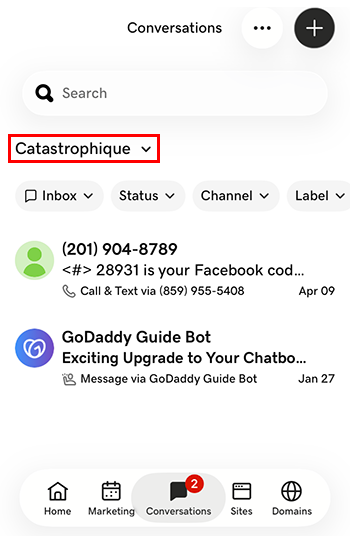
- 轻触您想要切换到的合资企业。您将被带到该企业的收件箱。
- 在网络浏览器中,转到GoDaddy产品页面。
如果您拥有Conversations的独立版本,请展开Conversations Unified Inbox(Conversations统一收件箱) 。在您的Conversations套餐右侧,选择Web Inbox(网络收件箱) 。
或
如果您拥有Websites + Marketing套餐,请滚动到Websites + Marketing ,然后选择网站旁边的Manage(管理) 。在左侧菜单中,展开Conversations 。
- 选择Inbox(收件箱) 。系统将显示您未存档的会话列表。
- 选择要直接带到对话主题的邮件,您可以在此处回复邮件。
- To switch to an inbox for a different venture, on the far left of your screen, select the venture you want to switch to. You’ll be taken to the dashboard for that venture.
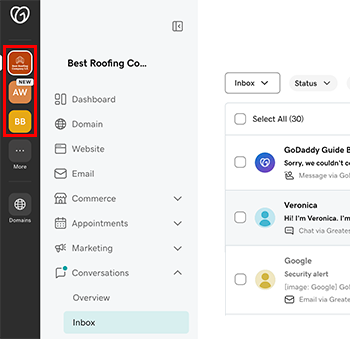
- 在左侧菜单中,展开Conversations ,然后选择收件箱将被带到该企业的收件箱中。