Disconnect my Websites + Marketing site from marketplaces
When you're connected to marketplaces, your Websites + Marketing online store stays in sync with your listings (Amazon, eBay, Etsy, Google Shopping, Facebook and Walmart), keeping your inventory, orders and product details aligned across all your connected channels.
But if you need to disconnect from a marketplace for any reason, such as if you're closing an account or changing your selling strategy, follow these steps:
- Go to your GoDaddy product page.
- Scroll down, expand Websites + Marketing and select Manage next to your site.
- In the left menu, expand Commerce, and then select Settings.
- Under Regional Info, select Why can't I change these?
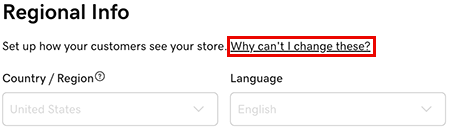
- On the popup that appears, select Disconnect from Marketplaces to edit.
- In the form that appears, type "DISCONNECT", and then select Disconnect.
Your Websites + Marketing online store will be disconnected from all connected marketplaces.