Remove a domain name from a Deluxe Automated SSL subscription
To change the domain name assigned to a Deluxe Automated SSL subscription, first follow these steps to remove the currently assigned domain name.
- Go to your Certificate Lifecycle Management page. You may be prompted to sign in.
- In the left menu, select Subscriptions.
- For the Deluxe Automated SSL subscription you want to change, select
 More options and then select Remove Domain.
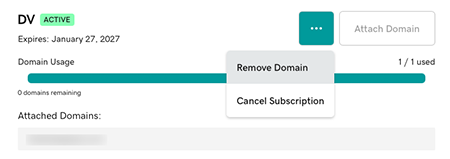
- In the confirming message, select Remove Domain. We'll remove the domain from the subscription and then show you another confirming message.
Related steps
To attach a new domain name and request a certificate for the subscription, continue with the steps in:
- Request a certificate for my DV Deluxe Automated SSL subscription (for a DV subscription)
- Request a certificate for my EV or OV Deluxe Automated SSL subscription (for an EV/OV subscription)