Mijn Domain Protection -abonnement toevoegen of upgraden
Voeg Domain Protection toe of voer een upgrade uit om de beveiliging van je domeinen te verbeteren. Domain Protection biedt verbeterde beveiliging tegen online bedreigingen door waarschuwingen te verzenden wanneer er wijzigingen worden aangebracht in uw domein en te voorkomen dat deze per ongeluk verlopen. Sommige domeinextensies komen niet in aanmerking voor bepaalde Domain Protection -functies.
- Meld je aan bij het Portfolio met domeinen van GoDaddy. (Hulp nodig bij het aanmelden? Zoek je gebruikersnaam of wachtwoord.)
- Selecteer de selectievakjes naast de domeinen die je gaat bijwerken. Of selecteer het selectievakje naast Domeinnaam en kies vervolgens Alles selecteren .
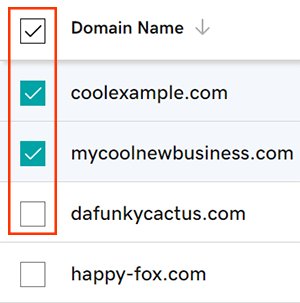
- Selecteer in het actiemenu Beschermingsplannen en selecteer vervolgens Beschermingsplannen upgraden .
- Afhankelijk van de grootte van je scherm, moet je mogelijk het menu Meer aanklikken en naar beneden scrollen om beschermde abonnementen te zien staan.
- Kies je favoriete Domain Protection -abonnement uit de beschikbare opties.
- Selecteer Afrekenen om je bestelling af te ronden.
Automatisch verlengen wordt automatisch ingeschakeld wanneer je Domain Protection toevoegt of bijwerkt.
Verwante stappen
- Wijzig de instelling Domain Privacy voor je domeinen.
- Bekijk of je contactgegevens voor je domein kloppen en actueel zijn.
Meer informatie
- Stel tweestapsverificatie in voor de beste beveiliging van je domeinen en account.