Renovar manualmente meus produtos ou serviços
Renove manualmente seus produtos quando quiser, mesmo se estiverem configurados para renovar automaticamente.
Observação: se você quiser renovar um domínio vencido, as etapas são diferentes.
- Acesse Renovações e cobrança e selecione a opção Gerenciar assinaturas.
- Na lista Assinaturas, selecione o produto e, em seguida, selecione Prorrogar prazo.
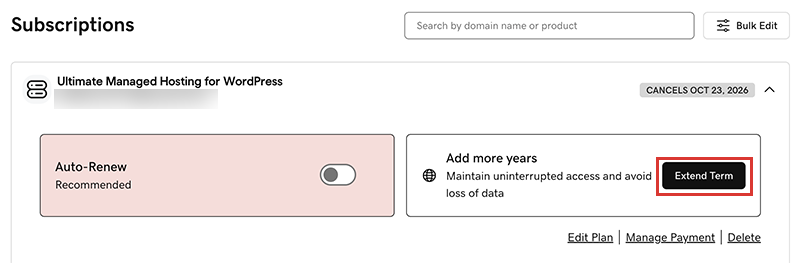
Vamos levá-lo ao carrinho de compras, onde você poderá ver o preço da renovação.Observação: se você vir Renovar agora em vez de Prorrogar o plano, selecione Renovar agora para confirmar a forma de pagamento a ser usada na renovação. - Siga as instruções para concluir a renovação.
Observação: os produtos são renovados automaticamente pelo mesmo período que a renovação manual mais recente, não pelo período do registro original. Também se aplica a domínios que são renovados manualmente (a partir de 16 de julho de 2020). Por exemplo, se um domínio for renovado manualmente após 16 de julho de 2020 por um prazo de três anos, ele será renovado automaticamente pelo mesmo prazo de três anos quando chegar a hora. Para saber mais, consulte nosso Acordo de registro de domínio.
Etapas relacionadas
- Confira como renovar um domínio expirado.
- Ative a renovação automática para renovar seus produtos automaticamente.
- Ou cancelar uma assinatura para desativar as renovações automáticas.
Saiba mais
- Atualize as informações do seu método de pagamento: Altere a data de vencimento ou endereço de cobrança do seu cartão de crédito.