Adicionar ou atualizar o meu plano Domain Protection
Adicione ou atualize o Domain Protection para aumentar a segurança dos seus domínios. O Domain Protection oferece maior segurança contra ameaças online, enviando alertas quando são feitas alterações ao seu domínio e evitando a expiração acidental. Algumas extensões de domínio não são elegíveis para determinados recursos do Domain Protection.
- Inicie sessão no seu Portefólio de Domínios GoDaddy (Precisa de ajuda para iniciar sessão? Encontre o seu nome de utilizador ou a respetiva palavra-passe.)
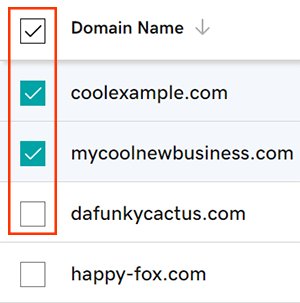
- Selecione as caixas de verificação junto aos domínios que pretende atualizar. Ou selecione a caixa de verificação junto a Nome de domínio e, em seguida, escolha Selecionar tudo .
- No menu de ações, selecione Planos de Proteção e, em seguida, selecione Atualizar Planos de Proteção .
- Dependendo do tamanho do ecrã, poderá ter de abrir o menu Mais e deslocar-se para baixo até Planos de proteção.
- Escolha o seu plano Domain Protection preferido a partir das opções disponíveis.
- Selecione Finalizar a compra para concluir o seu pedido.
A renovação automática será ativada automaticamente quando adicionar ou atualizar o Domain Protection.
Passos relacionados
- Altere a definição Domain Privacy dos seus domínios.
- Reveja as informações de contacto do domínio para garantir que os seus dados estão corretos e atualizados.
Mais informações
- Configure a verificação em 2 passos para obter a melhor segurança nos seus domínios e conta.