Connect my Facebook business page to GoDaddy Conversations
Connect GoDaddy Conversations to your Facebook business page to stay in touch with customers who contact you through Facebook Messenger or comment on your posts.
Note: The GoDaddy mobile app and the ability to connect your social media accounts aren't available with free Conversations plans.
- Sign in to your GoDaddy mobile app.
- At the bottom of the screen, tap Conversations to see a list of all your unarchived conversations.

- In the top-right corner, tap
 more, and then tap Settings.
 - Tap Facebook. You may be asked to sign in to your GoDaddy account.
- Expand Facebook, and then tap Connect.
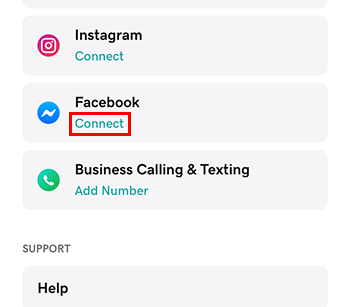 .
. - Sign in with the Facebook account associated with your Facebook business page. (You may be asked to sign in to your Facebook account first.)
Required: You must use a Facebook business page. GoDaddy Conversations will not work with personal Facebook pages. Read create a business page for more on creating a Facebook business page.
- Tap Continue.
- Select the Facebook business page you want connect.
- To complete the setup, tap Continue.
- Sign in to your GoDaddy mobile app.
- At the bottom of the screen, tap Conversations to see a list of all your unarchived conversations.
- In the top-right corner, tap
 settings.
 - Tap Facebook. You may be asked to sign in to your GoDaddy account.
- Expand Facebook, and then tap Connect.
. - Sign in with the Facebook account associated with your Facebook business page. (You may be asked to sign in to your Facebook account first.)
Required: You must use a Facebook business page. GoDaddy Conversations will not work with personal Facebook pages. Read create a business page for more on creating a Facebook business page.
- Tap Continue.
- Select the Facebook business page you want connect.
- To complete the setup, tap Continue.
- In a web browser, go to your GoDaddy product page.
-
If you have the standalone version of Conversations, expand Conversations Unified Inbox. To the right of your Conversations plan, select Web Inbox.
OR
If you have a Websites + Marketing plan, scroll to Websites + Marketing and select Manage next to your site. In the left menu, expand Conversations.
- Select Settings.
- Select Channels
- Next to Facebook, select Connect.
- Sign in with the Facebook account associated with your Facebook business page. (You may be asked to sign in to your Facebook account first.)
Required: You must use a Facebook business page. GoDaddy Conversations will not work with personal Facebook pages. Read create a business page for more on creating a Facebook business page.
- Select the Facebook business page you want connect.
- To complete the setup, tap Continue.