Mijn producten of services handmatig verlengen
Je kunt je producten op elk moment handmatig verlengen, zelfs als ze ingesteld staan op automatisch verlengen.
Opmerking: Als je een verlopen domein wilt vernieuwen, zijn de stappen anders.
- Ga naar de pagina Verlengingen en facturering en selecteer Abonnementen beheren.
- In de lijst Abonnementen kies je het product en selecteer je Abonnement verlengen
.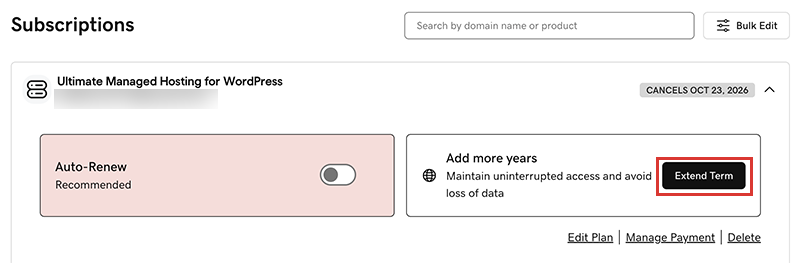
We sturen je naar de winkelwagen, waar je de verlengingsprijs kunt zien.Opmerking: Als je Nu verlengen ziet in plaats van Abonnement verlengen, selecteer dan Nu verlengen om de betaalmethode te bevestigen die je wilt gebruiken voor de verlenging. - Volg de aanwijzingen om te verlengen.
Opmerking: Producten worden automatisch verlengd voor dezelfde tijdsduur als de recentste handmatige verlenging, in plaats van tot hun oorspronkelijke registratieduur. Dit is ook van toepassing op domeinen die na 16 juli 2020 handmatig verlengd zijn. Als een domein bijvoorbeeld handmatig verlengd wordt na 16 juli 2020 voor een termijn van drie jaar, wordt deze te zijner tijd automatisch opnieuw voor drie jaar verlengd. Je vindt meer informatie in onze Overeenkomst domeinnaamregistratie.
Verwante stappen
- Zo kun je een verlopen domein verlengen.
- Zet automatisch verlengen aan zodat je je producten niet handmatig hoeft te verlengen.
- Of annuleer een abonnement om automatische verlengingen uit te schakelen.
Meer informatie
- Je betaalmethode bijwerken: Wijzig de vervaldatum van je creditcard of je factuuradres.