管理即時通訊+ Conversations的通知
When customers send a message through your Websites + Marketing site's chat widget, you'll also get an email notification. You can turn these notifications off or change the email address they're sent to.
Note: The GoDaddy mobile app is not available with free Conversations plans.
Required: You need a Websites + Marketing plan to use Chat + Conversations. If you're subscribed to Conversations standalone you won't have this feature.
- 登入您的GoDaddy行動應用程式。
- At the bottom of the screen, tap Conversations to see a list of all your unarchived conversations.

- In the top-right corner, tap
 more, and then tap Settings.
 - Next to Email Notifications, to receive chat messages through email, turn the toggle on (shows green). To stop receiving chat messages through email, turn the toggle off (shows white).
- 您會在與GoDaddy帳戶相關聯的主要電子郵件地址上收到電子郵件通知。若要進行變更,請依本文網頁標籤說明的步驟進行。
- To receive notifications in the GoDaddy mobile app whenever you get new messages, select Manage in Device Settings.
- 允許使用GoDaddy Conversations應用程式內通知。
- 登入您的GoDaddy行動應用程式。
- At the bottom of the screen, tap Conversations to see a list of all your unarchived conversations.
- In the top-right corner, tap
 settings.
 - Next to Email Notifications, to receive chat messages through email, turn the toggle on (shows green). To stop receiving chat messages through email, turn the toggle off (shows white).
- 您會在與GoDaddy帳戶相關聯的主要電子郵件地址上收到電子郵件通知。若要進行變更,請依本文網頁標籤說明的步驟進行。
- To receive notifications in the GoDaddy mobile app whenever you get new messages, select Manage in Device Settings.
- 允許使用GoDaddy Conversations應用程式內通知。
- 前往您的GoDaddy產品頁面。
- 向下捲動並展開Websites + Marketing ,然後點選網站旁邊的「管理」 。
- 在左側選單中,展開Conversations ,然後選取設定。
- 點選通知。
- 要以電子郵件接收交談訊息,請開啟
 開啟(顯示綠色)。如果您想停止透過電子郵件接收交談訊息,請關閉開關(顯示白色)。
 - 您會在與GoDaddy帳戶相關聯的主要電子郵件地址上收到電子郵件通知。若要變更,在方塊中輸入新的email地址。
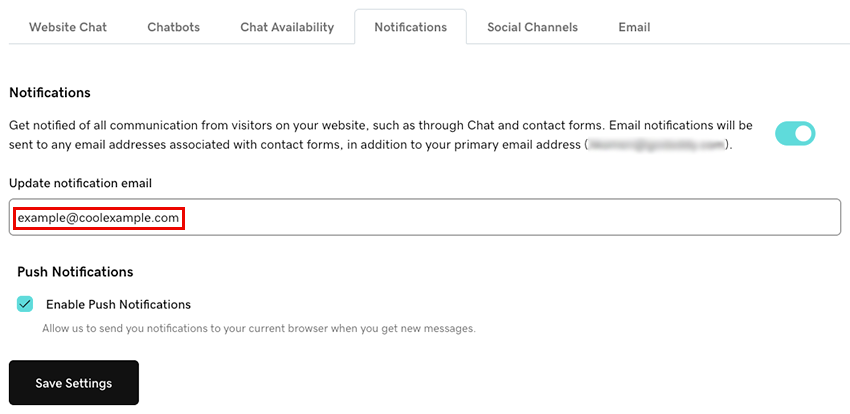
- 如果想在您透過Conversations收到新訊息時在瀏覽器中接收通知,請選取啟用推送通知核取方塊。這樣做會將通知傳送到您目前使用的瀏覽器。
- 點選「儲存設定」以儲存變更。
如果您無法順利設定通知,請嘗試使用我們的文章疑難排解Chat + Conversations通知。