Revoke a certificate in my Deluxe Automated SSL subscription
Revoking your SSL certificate cancels it and immediately removes HTTPS from the website. The process cannot be reversed.
Warning: Depending on your web host, revoking the SSL certificate might cause your website to display errors or become temporarily inaccessible. We recommend considering revocation only if the secured site is no longer operational or you requested the certificate for the wrong organization.
- Go to your Certificate Lifecycle Management page. You may be prompted to sign in.
- Select Certificate Inventory. The Domains Covered list shows all the domain names for which you've requested certificates.
- Select
 View for the domain.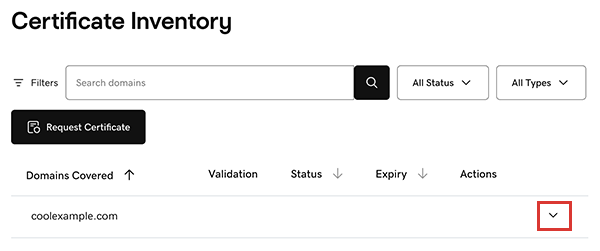
The certificate assigned to the domain appears in the list, including its Validation type, current Status, and Expiry date. - Select
 More options and then select Revoke.
 - In the confirming message, select Yes, Revoke. The certificate is revoked and its Status is updated in the list.