Conecte o Conversations ao meu Microsoft 365 do endereço de email GoDaddy
Link your Microsoft 365 email address to Conversations to get your emails directly in your Conversations unified inbox. If you’re a Websites + Marketing subscriber and you’re using a chat widget or web forms on your website, messages from those sources will also show in your Conversations box, through this email address.
- Faça login no aplicativo móvel da GoDaddy.
- At the bottom of the screen, tap Conversations to see a list of all your unarchived conversations.

- In the top-right corner, tap
 more, and then tap Settings.
 - Tap Email. You may be asked to sign in to your GoDaddy account.
- Expand Email, and then tap Connect.
- Tap Microsoft 365, and then tap Next.
- Se você já tiver um endereço de email Microsoft 365, ele aparecerá na tela. Caso contrário, você será solicitado a obter um antes de continuar com essas etapas.
Selecione o endereço de email que deseja conectar ao Conversations e toque em Continuar .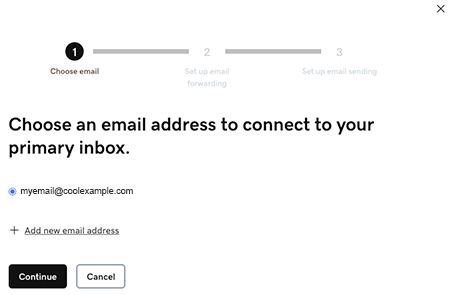
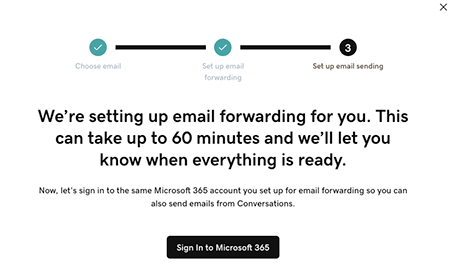
- Email forwarding will be set up for you. This could take up to 60 minutes, but you can continue setting up your email and we’ll let you know when forwarding is ready.
Sign in to the Microsoft 365 account you’re linking to Conversations. This must be the same account you used in Step 7.
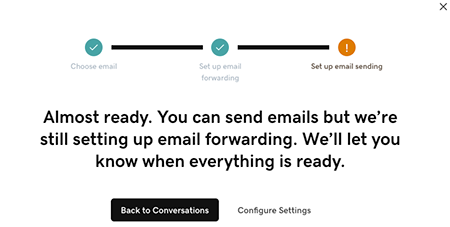
- Você verá uma tela explicando que seu email ainda está sendo configurado.
- Faça login no aplicativo móvel da GoDaddy.
- At the bottom of the screen, tap Conversations to see a list of all your unarchived conversations.
- In the top-right corner, tap
 settings.
 - Tap Email. You may be asked to sign in to your GoDaddy account.
- Expand Email, and then tap Connect.
- Tap Microsoft 365, and then tap Next.
- Se você já tiver um endereço de email Microsoft 365, ele aparecerá na tela. Caso contrário, você será solicitado a obter um antes de continuar com essas etapas.
Selecione o endereço de email que deseja conectar ao Conversations e toque em Continuar . - Email forwarding will be set up for you. This could take up to 60 minutes, but you can continue setting up your email and we’ll let you know when forwarding is ready.
Sign in to the Microsoft 365 account you’re linking to Conversations. This must be the same account you used in Step 7.
- Você verá uma tela explicando que seu email ainda está sendo configurado.
- Em um navegador da web, acesse sua da GoDaddy.
Se você tiver a versão autônoma do Conversations, expanda a Caixa de entrada unificada do Conversations . À direita do seu plano Conversations, selecione Caixa de entrada da web .
OU
Se você tiver um plano Websites + Marketing, role até Websites + Marketing e selecione Gerenciar ao lado do seu site. No menu à esquerda, expanda Conversations .
- Selecione Configurações.
- Select Channels.
- Expand Email, and then tap Connect.
- Select Microsoft 365, and then tap Next.
- Se você já tiver um endereço de email Microsoft 365, ele aparecerá na tela. Caso contrário, você será solicitado a obter um antes de continuar com essas etapas.
Selecione o endereço de email que deseja conectar ao Conversations e toque em Continuar . - Email forwarding will be set up for you. This could take up to 60 minutes, but you can continue setting up your email and we’ll let you know when forwarding is ready.
Sign in to the Microsoft 365 account you’re linking to Conversations. This must be the same account you used in Step 7.
- Você verá uma tela explicando que seu email ainda está sendo configurado.
Parabéns! Você vinculou seu endereço de email ao GoDaddy Conversations. Assim que o encaminhamento for finalizado, você começará a receber suas mensagens de email diretamente na sua caixa de entrada do Conversations.