Gia hạn thủ công sản phẩm hoặc dịch vụ
Bạn có thể gia hạn thủ công sản phẩm bất cứ lúc nào, kể cả khi đã đặt thành tự động gia hạn.
Lưu ý: Nếu muốn gia hạn miền đã hết hạn thì các bước thực hiện sẽ khác.
- Truy cập trang Gia hạn và Thanh toán của bạn và chọn Quản lý Đăng ký.
- Trong danh sách Gói đăng ký, chọn sản phẩm rồi chọn Gia hạn.
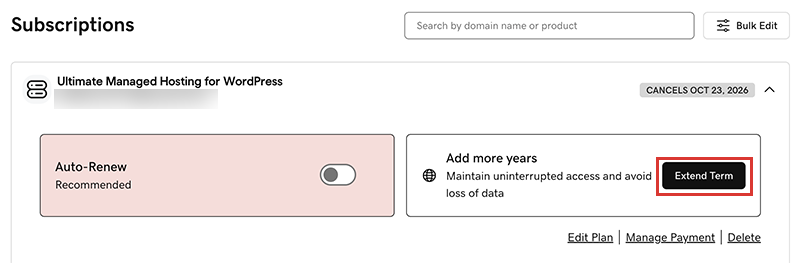
Chúng tôi sẽ đưa bạn đến Giỏ hàng để bạn có thể xem giá gia hạn.Lưu ý: Nếu bạn thấy nút Gia hạn ngay thay vì Gia hạn gói, hãy chọn Gia hạn ngay để xác nhận phương thức thanh toán sẽ dùng cho việc gia hạn. - Theo dõi các hướng dẫn để hoàn tất việc mua gia hạn của bạn.
Lưu ý: Sản phẩm sẽ tự động gia hạn theo đúng khoảng thời hạn ở lần gia hạn thủ công gần nhất, chứ không theo thời hạn đăng ký ban đầu. Quy tắc này cũng áp dụng cho các miền được gia hạn thủ công sau ngày 16 tháng 7 năm 2020. Ví dụ: Nếu một miền được gia hạn thủ công sau ngày 16 tháng 7 năm 2020 với thời hạn ba năm thì khi hết hạn, miền đó sẽ tự động gia hạn tiếp ba năm nữa. Để biết chi tiết đầy đủ, vui lòng xem Thỏa thuận đăng ký tên miền của chúng tôi.
Các bước liên quan
- Sau đây là cách gia hạn miền đã hết hạn.
- Bật tính năng tự động gia hạn để bạn không phải gia hạn sản phẩm theo cách thủ công.
- Hoặc hủy đăng ký để tắt tính năng tự động gia hạn.
Xem thêm thông tin
- Cập nhật thông tin về phương thức thanh toán của bạn: Thay đổi ngày hết hạn hoặc địa chỉ thanh toán cho thẻ tín dụng.