Activer le renouvellement automatique
Suivez ces étapes pour activer le renouvellement automatique de vos produits. Vos produits seront automatiquement renouvelés au moment de leur expiration.
Remarque : Pour les produits avec renouvellement automatique : si le mode de paiement sélectionné ne peut pas être débité au moment de la facturation, nous pouvons essayer un autre mode de paiement qui a déjà permis d’effectuer une transaction.
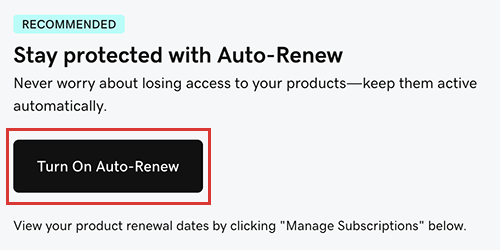
- Accédez à votre page Renouvellements et facturation, puis sélectionnez Gérer les abonnements.Remarque : Si vous voyez cette bannière sur votre page « Renouvellements et facturation » et que vous souhaitez activer le renouvellement automatique pour tous les produits de votre compte, sélectionnez Activer le renouvellement automatique. Sinon, passez à l’étape suivante.
- Sélectionnez le produit, puis sélectionnez la bascule Renouvellement automatique.
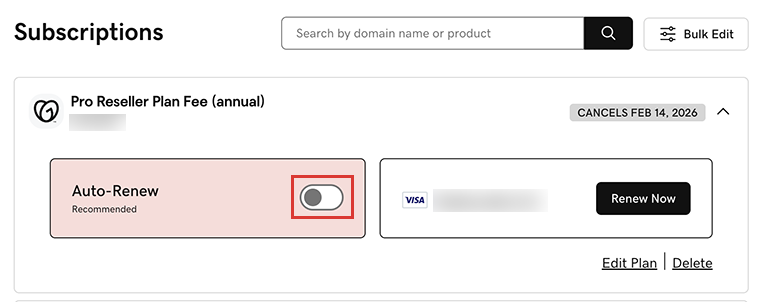
La liste des abonnements affiche maintenant la date du renouvellement automatique de votre produit.Remarque : Si le renouvellement automatique est déjà activé pour votre produit, la case ou la bascule Renouvellement automatique n'apparaîtra pas.
Modifier la durée du renouvellement et afficher le nouveau prix
Suivez ces étapes pour consulter le prix de votre produit avant d'activer le renouvellement automatique.
- Allez à votre page Renouvellements et facturation et sélectionnez Gérer les abonnements.
- Sélectionnez le produit, puis choisissez Modifier le plan. Nous vous présenterons votre plan actuel et son prix, ainsi que les autres plans disponibles.
Étapes connexes
- De nombreux produits se renouvellent automatiquement par défaut, mais vous pouvez désactiver le renouvellement automatique en résiliant votre abonnement au produit.
En savoir plus
- Supprimez les modes de paiement que vous n’utilisez pas pour vos produits.