Manually renew my products or services
Manually renew your products at any time, even if they're set to auto-renew.
Note: If you're looking to renew an expired domain, the steps are different.
- Go to your Renewals and Billing page and select Manage Subscriptions.
- In the Subscriptions list, select the product and then select Extend Term.
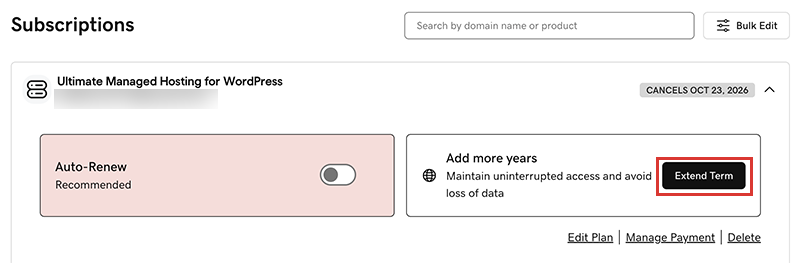
We'll take you to the Cart, where you can see the renewal price.Note: If you see Renew Now instead of Extend Plan, select Renew Now to confirm the payment method to use for the renewal. - Follow the prompts to complete your renewal purchase.
Note: Products auto-renew for the same length of time as their most recent manual renewal, instead of their original registration length. This also applies to domains that are manually renewed after July 16, 2020. For example, if a domain is manually renewed after July 16, 2020 for a three-year term, it will auto-renew for the same three-year term when the time comes. For full details, see our Domain Name Registration Agreement.
Related steps
- Here's how to renew an expired domain.
- Turn on auto-renew so you don't have to manually renew your products.
- Or, cancel a subscription to turn off auto-renewals.
More info
- Update your payment method information: Change your credit card expiration date or billing address.