

You don’t have to dig very far into the details of building a website before you stumble across something called web hosting. This technical service is essential for any working website.
Here’s everything I’ve learned so far.
What is web hosting?
Web hosting is a digital service that enables your website's online presence. At its core, web hosting is a service that stores your website’s files, including text, photos, videos, and other data, on a physical server in a data center so that it can be accessed by others via the internet at any time. It's a powerful computer that’s always connected to the internet. When someone types your website address into their browser, that server delivers the site to their screen. If you plan to launch a business website, online store, or blog, you'll need a web hosting service provider.
Yes, you could buy your own server, but they’re expensive. So most people rent space on a server owned by a web hosting company like GoDaddy.
Related: How to choose the best eCommerce hosting plan for your online store
How web hosting works?
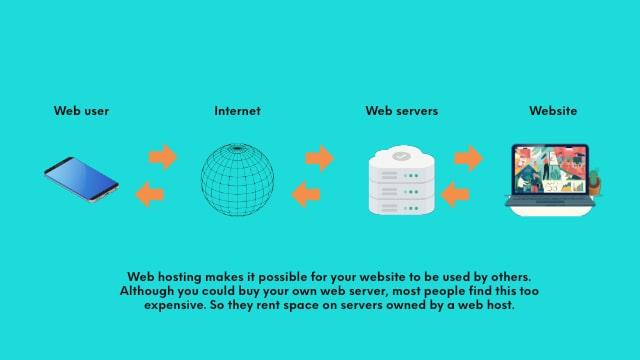
When a person wants to visit your website, they simply type your web address into the browser on their phone, desktop or tablet and click Return. This request is relayed over the internet to the web server that hosts your website. The server responds by presenting your web pages.
This graphic shows how web hosting works.
Alternatively, they might see an ad you’ve placed on social media or a link in an article and click on it to get to your website.
That request is then relayed over the internet to the web server that contains your website. The server responds to the request by presenting your website.
As I mentioned, you certainly can host a website yourself. But in addition to being pricey, this option requires advanced technical skills. You’ll have to:
- Set up and configure your web server from scratch
- Buy the equipment, infrastructure, hardware and software
- Handle all the ongoing maintenance
When you contract with a web hosting company, they take all the tech tasks off your shoulders — from software installation to troubleshooting.
Web hosts do all the heavy technical tasks for you.
Most data centres are staffed round the clock to make sure that all the sites they host are secure and available to global visitors 24/7 (or as close as possible to 24/7).
Key web hosting concepts explained
1. Servers and data centers
Servers are computers built for storing and delivering websites. They operate 24/7 in facilities called data centers. These centers often have backups, security systems, and climate-controlled environments to keep your site running smoothly.
2. Domain vs web hosting
Many beginners confuse a domain with hosting.
- The domain is your site’s address (like yourbrand.com)
- The hosting is where your site files live
You need both for a working website.
3. Bandwidth, storage & uptime
- Bandwidth: Data transferred when someone visits your site.
- Storage: Space on the server for files.
- Uptime: The time your site is online. Aim for at least 99.9%.
4. Security essentials
Secure your site with SSL certificates, regular backups, and firewalls. These are essential for business credibility and SEO.
Why do I need web hosting?
We’ve established that in order for your website to be always online and available, you need web hosting. While you could buy your own server, they're expensive and require technical skills to manage. Therefore, most website owners opt for hosting packages from a web hosting service provider like GoDaddy.
Website hosting is essential for any working website. It provides the necessary server resources to store your website content and make it accessible to users around the globe.

Hosting companies own and manage powerful servers located in data centers with:
- Expensive infrastructure
- Advanced security systems
- Powerful air conditioning (servers generate a lot of heat!)
- Highly trained staff
This ensures secure internet connections and reduces the likelihood of hardware or service failures.
When you start a business in the physical world, your company registration is your domain name, your hosting is your office space, and your website is the interior of your office.
Types of web hosting services
Web hosting plans vary, from free hosting to high-end dedicated hosting. Different types of websites require different types of hosting.
Different kinds of websites need different types of hosting.
The hosting plan that’s right for a freelance graphic designer is very different from what a large multinational corporation might need.
Check out the descriptions below to identify what type of hosting is most likely to work for you.
1. Shared hosting

Shared hosting is the least expensive option. Your website shares the same server and bandwidth with other websites. Shared hosting plans are popular for personal websites or blogs, small businesses, or anyone with a limited budget.
All the websites stored on your server will share a finite amount of resources such as disk space, CPU, and memory. Total costs are split between all the users, which keeps your costs low.
Pros
- Low cost
- Requires no tech skills
- Easy set-up
- Resources can be easily added or decreased
Cons
- Your site could be slow to load if traffic to other websites on your server have sudden surges in traffic
- Less control over your website’s performance
Popular for personal websites or blogs, small businesses or anyone with a limited budget.
Related: Paid or free hosting: Which one should you choose for your website
2. WordPress hosting
If you're using a content management system like WordPress to build your website, you'll need WordPress hosting. Although WordPress itself is free, you'll have to pay for hosting to make your website visible on the web. Hosting optimized for WordPress will often include automatic updates, backups, and security. This is great for blogs and business sites using WordPress.
WordPress is loved the world over because it’s endlessly customisable.
GoDaddy’s Managed WordPress hosting offers one-click WordPress installation, malware scanning and removal, a free SSL certificate, free domain name and daily backups with one-click site restore.
Planning to sell physical products, digital downloads, services or subscriptions from your website? Check out GoDaddy’s Managed WooCommerce Hosting.
Pros of Managed WordPress hosting
- Lower cost
- Designed to boost the performance of WordPress sites
- Often comes pre-installed with WordPress itself, as well as plugins and themes
- Regular updates, backups and security patches are done for you
Cons
- Your site could be slow to load if traffic to other sites on your server have sudden traffic spikes
- Less control over your website’s performance
Popular for anyone who wishes to create and launch a WordPress website, either for themselves or for clients.
Related: WordPress Ecommerce Hosting, powered by WooCommerce, all you need to know
3. Virtual private server: VPS hosting
Virtual Private Servers (VPS) store multiple websites on a single server but provide dedicated resources of RAM and disk space. VPS hosting is more powerful than shared hosting and offers better uptime guarantee.
In this case, you get your own environment with dedicated resources of RAM and disk space.
VPS hosting is more powerful than shared hosting because it has its own operating system and CPU cores.
Although more expensive, the risk of your website being affected by what’s happening on other sites is also reduced.
Photographers and videographers might want to consider VPS hosting.

Pros
- More powerful than shared hosting
- RAM and disk space can be increased or decreased as needed
- Gives you greater control over what happens on your site
- Can run custom configurations on your server, as you have root access
- Better uptime (the amount of time your website is up and running)
Cons
- The pricing is higher than shared hosting
- Requires technical skills for set up
Popular for businesses that can’t afford to have their websites go down, but don’t want to pay for a dedicated server of their own. Also great for websites that store many large media files like videos and images.
4. Dedicated server hosting
Dedicated server hosting gives you a server all your own. It's the most expensive hosting option but provides the highest security, fastest load times, and best uptimes.
This means your website will perform better, with increased uptime and better security.
Dedicated hosting is a great choice for resource-heavy websites like:
- Media streaming
- Online gaming
- Communications
Businesses that handle confidential financial or medical information — and are therefore prime targets of hackers — should consider dedicated hosting as well.
You will need to have some technical know-how, as well as a bigger budget since you’ll be configuring the server and paying for all the costs yourself.
Pros
- Complete control over your server
- Highest security
- Fastest load times and highest uptimes
Cons
- Most expensive
- Requires high-level technical skills to manage
Popular for large e-commerce businesses or media streaming websites that expect more than 100,000 monthly visits. Also recommended for any business that handles confidential financial or medical information.
5. Cloud hosting
Cloud hosting is a newer type of hosting where your website is stored on multiple servers in the cloud. This type of hosting is scalable and can handle high traffic levels.
Balancing cost and performance in web hosting
When selecting a web hosting service, it's important to understand how hosting costs correlate with the performance and resources provided.
While it might be tempting to choose the cheapest option, basing your decision solely on price can lead to insufficient performance and limited resources, which may hinder your website's success.
Understanding the factors affecting cost
The cost of web hosting is influenced by several key factors:
- Storage space — The amount of disk space allocated for your website's files, images, databases, and other content. Larger websites or those with high-resolution media may require more storage.
- CPU and RAM — These determine how efficiently your website can process requests and handle traffic. Websites with higher CPU and RAM can manage more simultaneous visitors and run resource-intensive applications smoothly.
- Shared vs. dedicated resources — In shared hosting environments, resources are shared among multiple websites, which can lead to slower performance during high-traffic periods. Dedicated hosting provides resources exclusively for your website, offering better performance and reliability.
- Level of control — Some hosting plans offer full root access, allowing you to customize server settings. This level of control is typically available with VPS hosting or dedicated hosting and can impact the cost.
- Additional features and services — Features such as automatic backups, security enhancements, SSL certificates, and managed services can increase the hosting cost but provide added convenience and protection.
Assessing cost versus performance
Investing in a hosting plan that aligns with your website's needs is crucial.
Here are some considerations:
- Website requirements — Identify the technical requirements of your website. A small blog may function well on a shared hosting plan, while an ecommerce site with high traffic may need a VPS or dedicated server.
- Scalability — Consider whether the hosting plan allows you to upgrade resources easily as your website grows.
- Reliability and uptime — Higher-priced plans often offer better uptime guarantees and faster load times, which are essential for user experience and SEO rankings.
- Support and management — Managed hosting services come at a higher cost but include professional support for server management tasks, freeing you to focus on your business.
Making an informed decision
While cost is an important factor, it should not be the sole determinant in choosing a web hosting service.
Evaluate the performance benefits and resources offered by different plans to ensure they meet your website's current and future needs.
Investing in a suitable hosting plan can enhance your site's speed, security, and reliability, ultimately contributing to its success.
How to choose the right web hosting service?
When choosing a web hosting service provider, consider factors like uptime guarantee, technical support, and the availability of a website builder. Check for good customer reviews and always-on customer support. Security is also crucial, so ensure your provider performs regular security scans.
Related: Hosting migration: How to transfer your website to a new web host?
1. An easy control panel
Look for an easy-to-use control panel, as you will likely spend a lot of time in it.
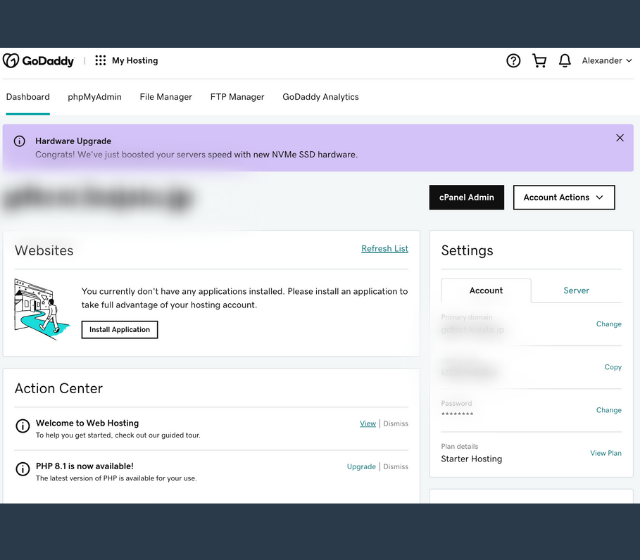
Here you can:
- Create email accounts
- Manage DNS records
- Add subdomains or parked domains
- Set up FTP accounts
- Manage daily backups
It’s a nice perk if your hosting plan comes with a one-click domain name setup, as GoDaddy does.
2. 99.9% uptime
Ensuring that your website is accessible all the time is extremely critical. Be it your online portfolio, your company's website, or your e-commerce site, no one wants to visit a website that does not load. You want to find the best web host that is reliable and ensures that your website will have as much uptime as possible.
Uptime is the way to measure how reliable your web host is. This is usually expressed as a percentage of time where your website is up and running.
This refers to the amount of time you can expect your website to be up and available on the Internet. The industry standard is a 99.9% uptime, which means your site may be down for a total of eight hours, 45 minutes, and 57 seconds over the course of a year.
Look for this guarantee from any web host you’re considering.
For example, GoDaddy's web hosting solutions guarantees 99.9% uptime for your website.
3. Speed
Besides keeping your site up and running smoothly, your site should be able to load quickly for your customers. A website is only as good as its loading time. In terms of Search Engine Optimisation (SEO), you would know Google generally ranks pages that loads faster more favorably. A page that loads fast is always a plus for user experience.
If your site takes too long to load, visitors may leave before it's finished loading. Worse still, they may not even visit your site at all.
While reasons for slow websites include database queries and poorly written code, the speed provided by your web host plays a critical role.
The difference between an active user and one who abandons your web page eventually is probably just a few seconds of loading time!
Therefore, always ensure that the web hosting service that you choose is offering good loading speeds for your website.
Did you know? Websites stored on a hard disk drive (HDD) often load slower than those that are stored on a solid-state drive (SSD). This is because the hard drive has to move its arm up and down repeatedly in order to read data. If you want your site to load faster, consider moving its files over to an SSD or a web hosting provider that already offers SSD as part of their service offering.
Good customer reviews
Before settling on a web host, it’s a good idea to read their customer reviews. This will give you an idea of how well they deliver on their promises.

Always-on customer support
No matter how technically skilled you are, and especially if you’re not, there will come a day when you need help.
Be sure to check if the web host you’re considering offers help via telephone, live chat and/or tickets.
Remember that hosting emergencies can take place day or night, so look for round-the-clock help. After all, every minute your website is down is a loss for you.
Security
With hackers seeming to come up with new attacks every week, cybersecurity is more important than ever. After all, the last thing you want is for a virus or data breach to undermine all your hard work.
Check whether your provider performs regular security scans to ensure the integrity of their platforms. GoDaddy offers offer 24/7 network security to keep all its hosted sites humming along.
A variety of web hosting plans
While you may start out with shared hosting, if your business is successful, it will likely need to graduate (more than once) to more powerful hosting. Make sure the web host you go with has a variety of plans to accommodate your needs as your business grows and your web hosting needs change.
Additional benefits
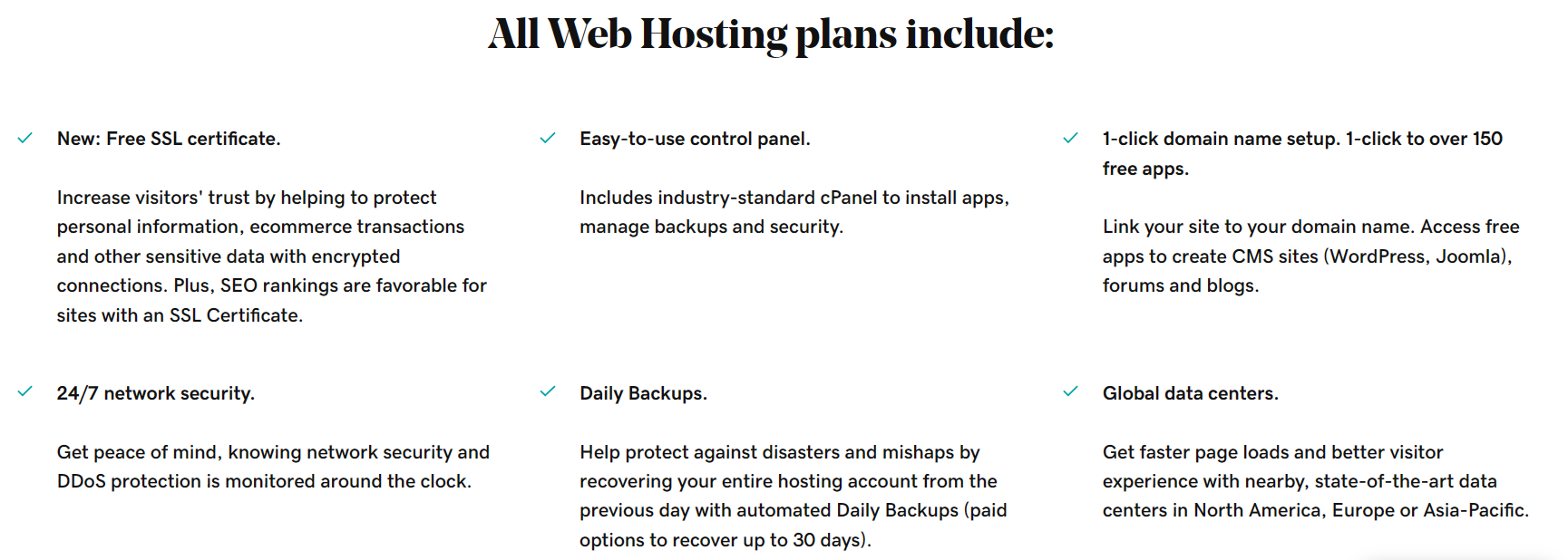
Many web hosting providers offer added benefits with their hosting plans. For example, you can see the free add-ons offered by GoDaddy below.
The difference between web hosting and a domain name
To recap, web hosting is the behind-the-scenes service that makes it possible for people anywhere in the world to find and use your website.
A domain name is a series of letters — like TimHortons.com, for example — that people type in to find that website. Without a domain name, people would have to memorize a different series of numbers for each website they wanted to visit.
Instead, we have domain names to give people an easy way to remember the sites they want to visit again and how to find them.
As an example, GoDaddy’s IP address is 208.109.192.70. Imagine how hard it would be to remember this series every time you wanted to open the GoDaddy website!
GoDaddy.com is much easier to remember.
Completing a domain name registration takes just a few minutes.
Web hosting makes your website accessible on the internet, while a domain name system (DNS) is the series of letters that people type in to find your website. Without a domain name, people would have to memorize a series of numbers for each website they wanted to visit.
Web hosting: what every website needs
By now, you know that every website needs hosting in order to be found and used by people around the world.
Hopefully, you also know that there are different kinds of hosting, from low-cost shared hosting all the way up to pricey dedicated hosting.
Once you’ve identified the type of hosting you need, you’ll want to research the various hosting providers using the tips above. Then let the adventure begin!
Sean Loiselle and Will Stevens contributed to this article.
Frequently Asked Questions (FAQ)
This section can answer common questions about web hosting, such as the meaning of terms like MySQL, reseller, SEO, downtime, and storage space.
1. What is web hosting and why do I need it?
Web hosting is the service that stores your website files on a server and makes them accessible on the internet. You need it so your site is visible online. It required by anyone wishing to have a working website or blog, whether for personal, business or any other use. In fact, every website you’ve ever opened is powered by web hosting.
2. What does a web host do?
Although you could host your website yourself, this is expensive and requires technical skills beyond what most people have. So instead, they rent space on a server owned by a web hosting company like GoDaddy.
It’s the web host’s job to make sure the websites stored on their servers load quickly, no matter how much web traffic they get. After all, a website is no good if customers can’t open it.
The web host is also responsible for safeguarding all website data, as stealing customer names and banking details is big business among hackers.
Finally, data centers require huge amounts of electricity and air conditioning, as servers generate a lot of heat. They also require backup power sources should the primary source of power be interrupted for any reason. And, of course, highly trained staff.
3. Is web hosting necessary for a website?
Yes — if you’d like other people to be able to find and use your website, you will need web hosting. Without it, you (and your web developer if you have one) are the only people who would ever see your website.
4. Does the location of a host’s servers make a difference to how quickly your website loads and SEO?
With how instantaneous the internet now is, it may seem funny to think that the distance between the server that stores your website and your customers might affect how quickly your website loads for them.
But the truth is, if your customers are primarily located in Canada and your web host only has data centres in Asia, it could slow the loading speed of your website.
The closer your customers are to one of your host’s data centres, the faster your site will likely load for them. And we all know that a delay of only three seconds will be enough to make you lose half your site visitors, which can in turn affect user experience and SEO.
You can get around this by knowing where the majority of your audience is and then picking a web host provider with servers in that part of the world.
By understanding web hosting, you can make informed decisions about your online presence and choose the best hosting account for your needs.
5. What is the best hosting for small business websites in the Middle East?
Shared hosting and managed WordPress hosting are great starting points due to affordability and ease of use.
Editor's Note: This article was first published on 20 July 2023 and updated on 26 December 2025. It includes content originally published on the GoDaddy blog by the following authors: Cate Barker, Sean Loiselle and Will Stevens.