Alternar entre as minhas diferentes caixas de entrada Conversations da GoDaddy
Se tiver mais do que um empreendimento ligado ao Conversations da GoDaddy, pode alternar facilmente entre as suas diferentes caixas de entrada unificadas do Conversations para ler mensagens para esse empreendimento.
Note: The GoDaddy mobile app is not available with free Conversations plans.
- Any time a customer sends a message through any of the channels you’ve connected to GoDaddy Conversations, you’ll receive a notification on your mobile phone. The notification will tell you which business it’s for and who it’s from.

- Tap the notification to be taken directly to the conversation thread in the GoDaddy mobile app, from where you can respond to the message.
- To switch to an inbox for a different venture, from your inbox, tap your business name at the top of the screen. A list of your businesses will show.
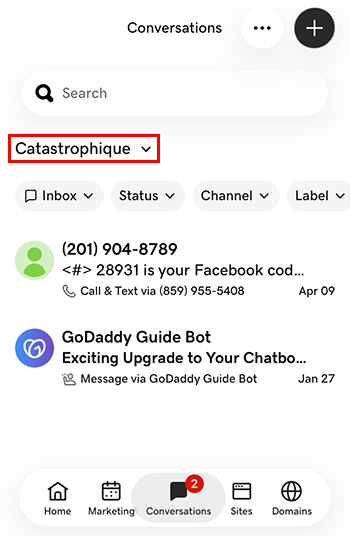
- Toque no empreendimento para o qual deseja mudar. Você será direcionado para a caixa de entrada desse empreendimento.
- Num navegador da internet, aceda à produto da GoDaddy.
Se tiver a versão autónoma do Conversations, expanda Conversations Unified Inbox . À direita do seu plano Conversations, selecione Caixa de entrada da internet .
OU
Se tiver um plano Websites + Marketing, desloque-se para Websites + Marketing e selecione Gerir junto ao seu site. No menu à esquerda, expanda Conversations .
- Selecione a caixa de entrada . Será apresentada uma lista das suas conversas não arquivadas.
- Selecione uma mensagem para ser direcionada diretamente para o tópico de conversação, a partir da qual poderá responder à mensagem.
- To switch to an inbox for a different venture, on the far left of your screen, select the venture you want to switch to. You’ll be taken to the dashboard for that venture.
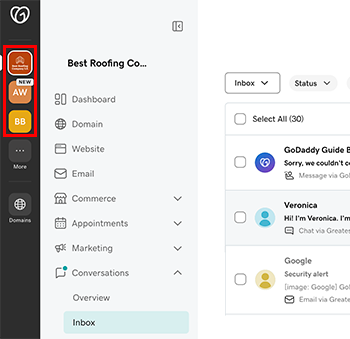
- No menu à esquerda, expanda Conversas e, em seguida, selecione Caixa de entrada para ser encaminhado para a caixa de entrada desse empreendimento.