Sign in to a Microsoft 365 inbox as a delegate
If you’ve been granted Read and manage (Full Access) delegate permissions to someone’s mailbox, you can sign in to it using Outlook on the web.
Required: Users with only Send as or Send on behalf permissions cannot access the owner’s mailbox. To read and access the owner’s mailbox, they need to grant you Read and manage (Full Access) permissions.
- Sign in to Outlook on the web. Use your Microsoft 365 email address and password (your GoDaddy username and password won't work here).
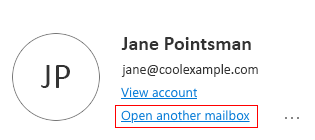
- In the upper-right corner, select your name, and then Open another mailbox.
- Enter the email address of the mailbox you want to access, and then select Open.
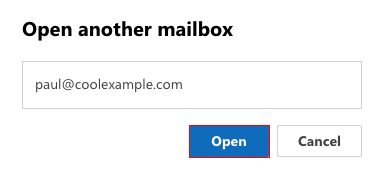
The delegated mailbox will open.
Related steps
- As a delegate user, you can also add the delegated inbox as a shared folder to Outlook on the web.
- Add a user as a delegate to your Microsoft 365 account.
More info
- Sign in to your Microsoft 365 account.
- To forward all incoming messages to a different email account, set up forwarding.
- Compare forwarding, aliases, distribution groups and shared mailboxes