

Key takeaways
- A therapist website gives you full ownership over your online presence and builds trust with potential clients in ways that directory listings alone cannot.
- Before building, prepare a detailed practice description, decide what pages your website needs, gather professional photos of yourself and your space, and register a domain name to speed up the process.
- The quality of your AI-generated website depends heavily on the quality of your prompts. Be specific about your specialties, modalities, target clients, and desired tone.
- Airo AI Builder can get a therapy website live quickly with no coding required, and supports integrations with booking and telehealth platforms.
For therapists, it can be tempting to skip the time and expense of creating a website and lean on directories and referrals instead. But while directories like Psychology Today can drive meaningful traffic to your practice, they can’t replace the role of your website.
Your website is a space that you own, independent of the whims of therapist directories. You maintain full control over what your website says and includes. Additionally, a website helps to build trust with potential clients by allowing you to signal your values, specialties, and background. Your potential clients want to understand the person that they’ll be working with, and directory sites don’t always convey that fully.
In this guide, we’ll cover how to build a therapist website, including how to add a booking engine to help onboard clients directly from that website.
GoDaddy Airo AI Builder
Describe your idea. We'll build your live website in minutes.
With a few prompts, Airo AI Builder generates your website, web app, pages, databases and logic in minutes — no coding required. Start for free with 50 AI credits a month. No credit card required.
Build for FreeDisclaimer: This content is provided for informational purposes only, and should not be construed as legal advice from GoDaddy on any subject matter.
What to prepare before building your website
Before jumping into the building process, it’s a good idea to gather some information to save time later.
Get organized
First, you’ll want to create a basic wireframe of what you’d like to include on your website. Having this information on hand will help speed up your website build considerably.
Write a description of your therapy practice
How you describe your practice will impact how your website will be structured, so be as specific as possible. Here’s what you should include in your description:
- Your specialties: Anxiety, depression, trauma/PTSD, grief, couples therapy, family therapy, addiction, OCD, etc.
- Your modalities: Cognitive behavioral therapy (CBT), dialectical behavior therapy (DBT), humanistic therapy, etc.
- Who you work with: Adults, kids, teenagers, couples, LGBTQ+, etc.
- Your credentials: Licensed Mental Health Counselor (LMHC), Licensed Professional Clinical Counselor (LPCC), Licensed Marriage and Family Therapist (LMFT), etc.
- Where you work: In-person, telehealth, or both.
- How your approach differs: Trauma-informed, culturally affirming, etc.
- What your website should feel like: Safe, approachable, calm, professional, etc.
| Not-so-great starter prompt | Good starter prompt |
|---|---|
| I’m a therapist and need a website. | Please build a website for a therapist with a Master's in Social Work (LCSW) specializing in OCD, addiction, and anxiety disorders. I use Exposure and Response Prevention (ERP) and DBT, and I work exclusively with adults. Sessions are in person in Denver, CO only. My philosophy is evidence-based and highly collaborative; I want clients to feel like active participants in their own healing. The website should strike a balance between professional and relatable, avoiding overly clinical or intimidating language. Include a FAQ page that addresses common myths about OCD treatment. |
Keep in mind that you don’t have to build your entire website through a single prompt, so that’s not what you should be aiming for here. However, having a thorough description of your practice and the website that you’re looking to build at the start can help you get to a working website faster.
Decide what pages you need
Many therapist websites share a common structure, and for good reason. The information that clients are seeking tends to be pretty similar from practice to practice, but the exact pages that you’ll need will depend on your specific area of expertise and how you work with clients.
Here are the more typical pages:
- Homepage
- Services/specialties
- About/bio
- Booking/consultation request
- Fees, insurance, and payment information
- Telehealth information
- FAQ
- Testimonials
- Blog/resources
- Contact
You don’t need to include all of these pages at first, since some will require more work than others (like a blog, for example). A good starting point for most would include a strong homepage, an about page, a services page, and a contact/booking page.
Gather photos of yourself and your space
Therapy is extremely personal, so clients will be interested to see both you and your space. You’ll want to grab a few images before starting your build, including:
- A picture of yourself: Your headshot should be professional and approachable, not stiff and corporate.
- Your therapy space or office: If you see your clients in person, include pictures of the waiting room, your full office space, etc.
- Candid/lifestyle photos: This is optional, but consider including additional lifestyle pictures of yourself for your about page to show warmth and approachability.
Stock photos can lend an inauthentic vibe to your website that may turn potential clients away, so use these sparingly or not at all. Your goal with images is to build trust, and that trust is essential for bringing in well-matched clients for your practice.
Find a domain name
A high-quality domain name is important for your therapy practice. It lends professionalism to your practice, builds trust, and makes it easier to share on both directory profiles and your business cards.
If you don’t already have a domain name, here are some tips on choosing a good one:
- Use your full name or your practice name
- Keep it short and easy to spell
- Avoid using hyphens or numbers
- Try to keep it close to your practice name for consistency, especially if you’re listed in a directory like Psychology Today.
Paid Airo AI Builder plans include a free domain name (for the first year)*, so you may not need to purchase yours separately. If you already own a domain name, Airo AI Builder will help connect the domain name to your website during the publishing process.
Want to see if the domain you want is available? Give it a try here:
Prompting tips to make your therapist website stand out
The quality of the site that you create is heavily dependent on the prompts that you put in. And, for therapist websites, your prompts should emphasize the tone that you want to set (warm and inviting versus clinical and impersonal). Don’t stress about making your prompt perfect; Airo AI Builder creates websites via natural language conversations. But, the more information that you include, the better your results will be.
Some tips to use while building your site with AI include:
- Lead with your specialties and modalities.
- Describe the feeling that you want to convey.
- Include who you work with specifically.
- Be clear about what you want visitors to accomplish.
- Examples include booking a free consult, filling out a contact form, place a call, etc.
- Include your brand colors, if you have colors already chosen.
- Mention where and how you practice (telehealth, in-person, both)
- Let clients know what payment or insurance you accept.
Here are a handful of sample prompts that accomplish this:
Create a professional website for a Licensed Marriage and Family Therapist (LMFT) whose specialties include couples therapy, family therapy, and communication issues. My primary modalities are Emotionally Focused Therapy (EFT) and the Gottman Method. I work with couples, families, and individuals of all ages, and I'm especially experienced with multicultural and LGBTQ+ families. I see clients in person in Chicago and via telehealth and accept UHC insurance. My approach is culturally affirming and attachment-focused. The tone of the site should feel professional but approachable, not clinical or cold.
Build me a therapy website for a Licensed Mental Health Counselor (LMHC) specializing in anxiety, trauma, and PTSD. I use CBT and somatic therapy and work with adults and teenagers. I offer both in-person sessions in Austin, TX, and telehealth across Texas, and accept all insurance types. My approach is trauma-informed and neurodiversity-affirming. The website should feel calm, grounded, and warm, like a safe exhale. Include an About page, Services page, and a Contact/booking section.
Design a therapy website for a Licensed Professional Counselor (LPC) who specializes in teen mental health, self-esteem, and anxiety. I use CBT, mindfulness-based approaches, and art therapy techniques. I work with kids ages 10–18 and young adults up to 25, and I have specific experience supporting LGBTQ+ youth. I offer both in-person sessions in Portland, OR, and telehealth, accepting both cash and OHP. My approach is affirming, playful, and trauma-informed. The website should feel bright, inclusive, and non-intimidating, welcoming to both teens and the parents reaching out on their behalf.
Therapist website checklist
Now that we’ve covered the details, let’s go over a quick checklist of what you’ll want to include before we move on to the building process.
Homepage with a warm, reassuring first impression
Your homepage sets the tone for your entire website. It should aim to ease anxiety that potential clients might have when searching for a new therapist. Lead with a clear message about who you help and how. Include a welcoming image, brief intro, and a prominent call to action.
Services and specialties with modalities
Potential clients should be able to quickly see if your practice is a good fit for their needs. Clearly list your specialties using plain-language explanations of your approach. Include a list of the modalities used, but be sure to explain them in an approachable manner. Try not to use clinical jargon.
About page with your credentials
The About page is likely going to be the page with the most traffic outside of your home page, as potential clients will want to learn more about you. Include your credentials here, as well as your licensing and your therapeutic approach. You should also include a headshot here to introduce yourself and make your website more personal and warm.
Online booking or consultation request
Your goal for this page should be to make it easy for clients to take the next step. Offer either direct online booking or a simple consultation form. Many therapists offer a free initial consultation, so your intake form or booking engine should offer this functionality.
Fees, insurance, payment options
Cost is one of the biggest barriers to starting therapy, so aim to be transparent here to reduce friction and build trust. This page should cover:
- Session rates
- If you accept insurance and which networks you’re in
- Accepted payment options
- Whether out-of-network reimbursement is an option
- Sliding scale therapy, if available
- Financing options (CareCredit, etc), if available
If you don’t want to list your exact rates online, that’s fine, but you should at least aim to include starting pricing or clearly state that potential clients should contact you for rates.
Telehealth/virtual session information
Many clients expect telehealth as an option, so it’s a good idea to clearly state whether you offer this service or not. If you do, make sure to include what states you’re licensed in, how your sessions work, and how to book a virtual session. Airo AI Builder can help you add a booking button that links to the telehealth platform that you already use (such as Doxy.me, Zoom for Healthcare, SimplePractice, etc.), which reduces friction for potential telehealth clients.
FAQ page
Your FAQ page should cover the most common questions that you receive, while also providing information that can help reduce anxiety that possible clients might feel before contacting you. Here are some common questions that you might include:
- What should I expect during our first session?
- How long are sessions and how frequent are they?
- Is therapy confidential? What are the limits?
- How do I know if you’re the right therapist for me?
- Are you able to prescribe medication?
- What is your cancellation policy?
A well-detailed FAQ page can help reduce the number of repetitive back-and-forth emails from visitors and can help clients feel informed before they contact you.
Client testimonials
While testimonials can help build trust with potential clients, it’s important to handle them carefully and in line with ethical guidelines. Depending on where you’re licensed, there may be rules against asking clients for a testimonial, so we recommend reviewing the guidelines in your own area(s) of practice. Clients should never feel coerced to provide a testimonial and, if they do agree to provide feedback, ensure that they’re fully informed and give voluntary consent to having a public testimonial on your website. Let them know that they can also remain anonymous.
Testimonials are a powerful way to build trust, but must be done ethically and in line with your licensing board’s rules.
Blog or mental health resources
A blog serves multiple purposes, including boosting your SEO, positioning you as an authority, and providing value to visitors that may not be ready to book yet. Topics can include what anxiety actually feels like, tips for avoiding burnout (and what burnout signs to watch out for), stress management strategies, what to expect in therapy, and/or mental health awareness information. Adding content regularly can help you rank for local searches, such as “therapist for anxiety in [city].”
Location, hours, and contact information
It’s important that potential clients know where you’re located and how they can contact you. As such, it’s a good idea to have your contact details (phone number and email) at the top of each page of your website. And, if you offer in-person therapy, list your hours clearly and ensure that your address is easy to find, along with an embedded map for clarity.
If your practice is telehealth only, make sure that you clearly state that as well.
Directory and social links
Directories like Psychology Today, Good Therapy, and TherapyDen can be good places for clients to find you. Many clients find therapists on directory sites, then visit the therapist’s website for more information, but it’s also a good idea to include links to the directories you’re listed on in case clients find your website first and want more information. Also, if you have active professional social media profiles, include those links as well.
Build a therapist website: step by step with Airo AI Builder
With your plan, photos, and domain ready, it’s time to start building your website. Airo AI Builder is the fastest way to get your therapy practice website online. Just describe what you need, and Airo AI Builder will take it from there. No coding or design skills required.
GoDaddy Airo AI Builder
Describe your idea. We'll build your live website in minutes.
With a few prompts, Airo AI Builder generates your website, web app, pages, databases and logic in minutes — no coding required. Start for free with 50 AI credits a month. No credit card required.
Build for FreeIf you’re ready to build a therapist website with Airo AI Builder, then let’s get started.
Step 1: Describe your therapy practice to Airo AI Builder
For our first step, we’ll add the prompt that we built earlier in this guide.

Here’s the prompt that Airo AI Builder will be starting this build with:
Create a therapy website for a Licensed Professional Counselor (LPC) named Jack Donaldson whose specialties include anxiety, perfectionism, burnout, and high-achieving professional stress. I use CBT, ACT, and mindfulness-based stress reduction (MBSR). My clients are primarily adults in demanding careers such as healthcare workers, attorneys, and executives. I offer both in-person sessions in Manhattan, NY, and telehealth across New York State. My approach is goal-oriented, evidence-based, and respectful of busy schedules. Regarding payment, I accept several major insurance plans, including Aetna, Cigna, and UnitedHealthcare, and also offer private pay options with a Good Faith Estimate provided upfront. The website should feel warm, professional, and calming — think a high-end but approachable aesthetic that resonates with professionals.
If you already have a website that you’d like to repurpose content from, feel free to include that in your conversation with Airo AI Builder. You’re also able to upload your logo or mention your brand colors if you have those.
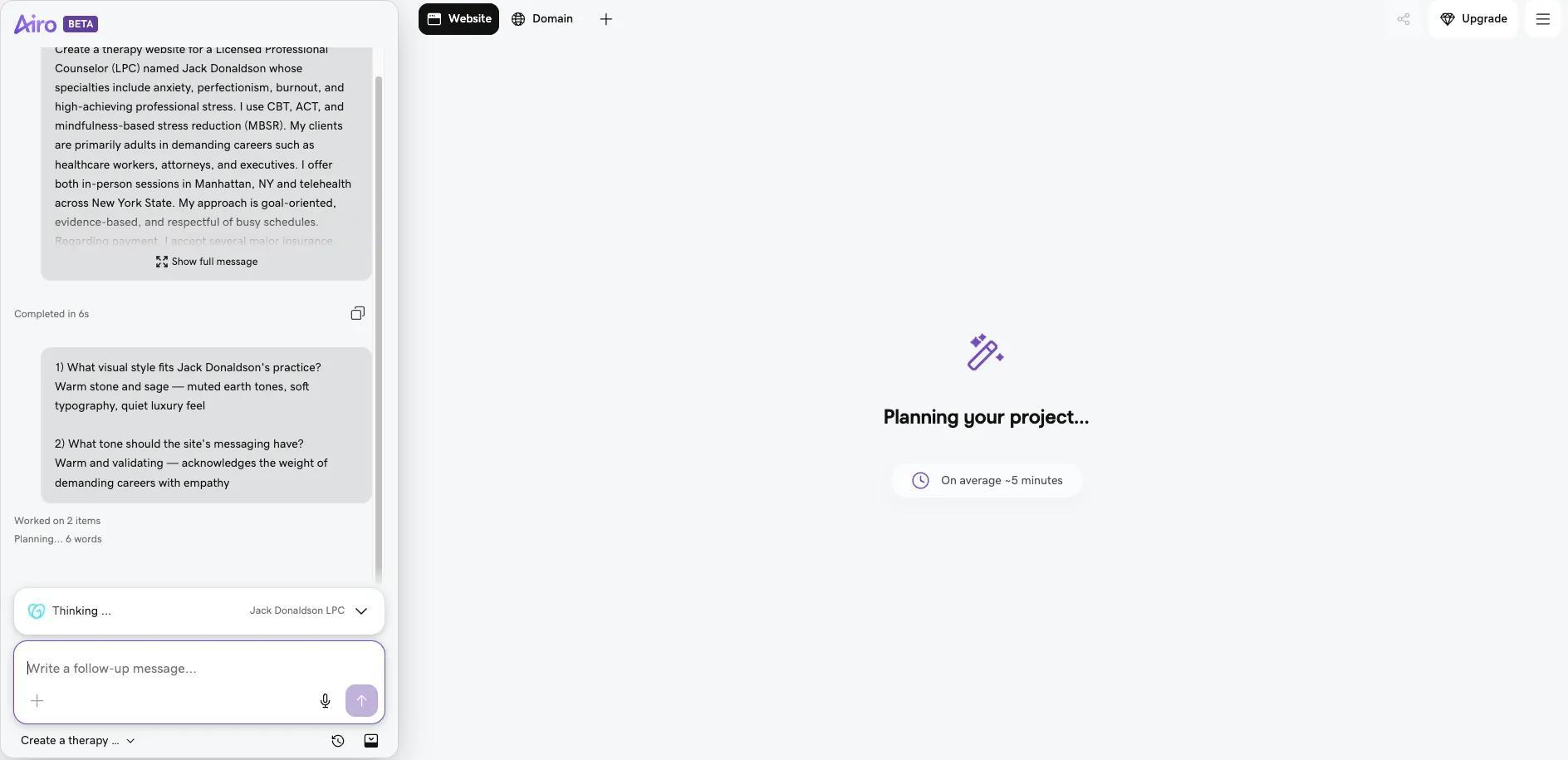
Step 2: Answer a few follow-up questions
After entering your initial prompt, Airo AI Builder will have a few clarifying questions to answer. These questions are quick and conversational, giving Airo AI Builder a firm direction in which to start drafting your website.
Step 3: Continue to edit your website
Airo AI Builder creates a wireframe of a website and invites you to continue building out your pages via conversation prompts.

You can select from the prompts that Airo AI Builder offers to work on other pages, or you can prompt Airo AI Builder in the chat field to make other changes. Here are some examples of what you might tell the AI builder:
- "Make the homepage feel warmer with soft earth tones, calming language"
- "Add a section explaining what EMDR is in plain language"
- "Create a fees page showing my rates, accepted insurance, and sliding scale info"
- "Add a FAQ section answering what to expect in a first session"
- "Add a consultation booking button to the top of every page"
You can keep editing your website until it’s exactly what you’re looking for. However, be aware that using AI prompts to edit your site (changes like adding new pages or changing the design) will consume AI credits. Basic edits, like changing text or swapping images, do not.
Step 4: Set up booking and connect your practice’s tools
Airo AI Builder can create an online booking portal for you, or it can connect your website to the platforms that you already use. Here are some examples of potential options for this functionality:
- Built-in booking: for therapists who want to accept appointment requests or free consultation bookings directly through the website, with deposits or prepayment if desired
- SimplePractice: link to the SimplePractice client portal for booking, intake, and secure messaging
- Jane: embed or link to Jane for scheduling and intake
- IntakeQ: embed HIPAA-compliant intake forms via iframe or popup for new patient paperwork
- Doxy.me/Zoom for Healthcare: add a "Join Virtual Session" or "Enter Waiting Room" button linking to the telehealth platform
- Payment processing: accept session payments, consultation fees, or package prepayments through GoDaddy Payments, Stripe, or Square (where available)
With Airo AI Builder, just describe what you’re already using and it can help set up the connection to each. You can also check out a full list of tools that Airo AI Builder offers to see if any fit your business needs.
If you don’t currently use any of these platforms, then Airo AI Builder can build a booking intake form for you. However, be aware that Airo AI Builder is not HIPAA-compliant, so you’ll need to ensure that the booking form is general and does not collect sensitive information.
Disclaimer: All known trademarks contained herein are the property of their respective owners and their inclusion does not represent any affiliation, endorsement, or sponsorship.
Step 5: Connect your domain name and publish
Once you’ve built out your pages and added your booking engine, it’s time to go live. Airo AI Builder handles the SEO basics and mobile responsiveness as you build, which makes it easy to get a robust, search-engine-friendly website online quickly.
If you haven’t upgraded to a paid plan yet, you will need to do so before you can publish your site. Click on the Upgrade button at the top right to choose and pay for your desired plan.
Then, once you’re ready, click the Publish button at the top right, add your domain name, then click Publish at the bottom of the publishing window.

Important note: If your domain is registered in the same GoDaddy account as Airo AI Builder, then your domain's DNS settings will be configured automatically when publishing. If your domain is registered in a different GoDaddy account, or at a different domain registrar, then additional steps will be required before your site can be live online. See our help guide on how to connect a domain to Airo AI Builder for the steps needed for each domain scenario.
What to expect from a therapist website built with Airo AI Builder
While Airo AI Builder is a robust site builder, it is not a practice management service or HIPAA-compliant clinical tool.
Here’s a full rundown of what you can expect from Airo AI Builder for a therapy website:
| What Airo AI Builder does | Services requiring dedicated clinical software |
|---|---|
| Practice website with all pages (services, about, fees, blog, contact) | HIPAA-compliant clinical intake forms collecting PHI |
| Online appointment booking and consultation requests | Electronic health records (EHR) and clinical notes |
| General contact and inquiry forms | Secure client messaging (HIPAA-compliant) |
| Payment processing for sessions, consultations, and packages (GoDaddy Payments, Stripe, Square, where available) | Insurance claims, billing codes, and superbill generation |
| Fees, insurance, and sliding scale information pages | Telehealth video sessions (Doxy.me, Zoom for Healthcare, SimplePractice Telehealth) |
| Telehealth landing page with "Join Session" link-out buttons | Prescription management |
| Blog and mental health resource pages | Treatment planning and progress tracking |
| Client review display (Google reviews) | Client portals with secure document sharing |
| SEO and local search optimization ("therapist near me") | Outcome measurement tools |
| Location mapping with Google Maps | |
| Email marketing and social media scheduling | |
| Mobile-responsive design | |
| SSL security and hosting |
Airo AI Builder's contact forms and email notifications are not HIPAA-compliant and should only be used for general inquiries, consultation requests, and non-clinical information. For any intake that collects Protected Health Information (PHI), such as health histories, diagnoses, insurance ID numbers, etc., connect to dedicated HIPAA-compliant platforms like SimplePractice, IntakeQ, or Jotform HIPAA via embed or link-out.
You can use Airo AI Builder alongside these clinical tools, as your website is your public-facing marketing and client-acquisition tool. Your practice management software should be used to handle the back-office, HIPAA-sensitive tasks.
Launch your therapy website today
With a bit of planning and a little conversational prompting, you can quickly create a therapist website with Airo AI Builder today. Also, your domain, website, booking forms, SEO are all in one place, making future website management easy.
Get started with Airo AI Builder and get online fast.
GoDaddy Airo AI Builder
Describe your idea. We'll build your live website in minutes.
With a few prompts, Airo AI Builder generates your website, web app, pages, databases and logic in minutes — no coding required. Start for free with 50 AI credits a month. No credit card required.
Build for FreeTherapist website FAQ
Does a therapist need a website?
Yes. Many potential clients search for a therapist online before making a decision on which therapist to choose. Without a website, your practice will be harder to find. A therapist website is also useful because it:
- Builds trust by letting potential clients get to know your style, values, and approach before reaching out.
- Answers common questions about your rates, insurance, specialties, and availability, which saves you and your potential clients time.
- Attracts the right clients by speaking directly to the people you most want to serve.
- Boosts your local Google presence beyond what a directory listing alone can do.
- Gives you a professional home base that you fully own and control, unlike social media or third-party profiles.
Is a website built with Airo AI Builder HIPAA-compliant?
Airo AI Builder builds the public-facing marketing, patient education, and general inquiry layer of your practice website. This includes your About page, service descriptions, therapist bio, and general contact pages, none of which involve collecting sensitive patient data.
For any workflows that might require sensitive clinical data, you’ll need to connect a dedicated HIPAA-compliant platform.
Can clients book therapy sessions directly from my website?
Yes, you can offer booking options in two ways:
- Built-in appointment scheduling: Airo AI Builder can create an online booking system for your website. This works well for general consultation requests where no sensitive patient information is required.
- Connect a third-party HIPAA-compliant booking platform: If you need a secure booking option, Airo AI Builder supports integrations with many of the platforms that therapists already use.
You can use both or either option on your website; it’s up to what you specifically need for your practice. Choose whichever option will work best for you and your clients.
How much does a therapist website cost?
The cost of a therapist website can vary depending on the tools and features you choose. Hiring a professional web designer can run anywhere from a few hundred to several thousand dollars, while DIY website builders offer a much more affordable alternative.
GoDaddy Airo AI Builder, for example, lets you start building for free with 50 AI credits. Paid plans add publishing, hosting, and more, which makes it a budget-friendly option for therapists. Eligible paid Airo AI Builder plans also include a free domain for the first year. After the first year, expect to pay around $10–20 per year.
Can I offer telehealth from my website?
Airo AI Builder doesn't host its own video platform, but it makes connecting to one effortless. You can have Airo AI Builder create a button to connect to the telehealth platform that you’re already using. Keep in mind:
- Airo AI Builder can handle the public-facing telehealth page and entry point only.
- The actual video session is hosted securely by your chosen telehealth platform.
- Make sure your telehealth provider has a Business Associate Agreement (BAA) in place to ensure HIPAA compliance.
*One free available domain with new purchase of an annual Airo AI Builder plan. Plus annual ICANN fee per domain. Domain name must be added to cart before purchase, and selected term must be equal to or less than term of selected plan to qualify for free domain. Additional years billed at current rates. Offer valid for 1st year only; renews at current prices. Invalid with other offers.