

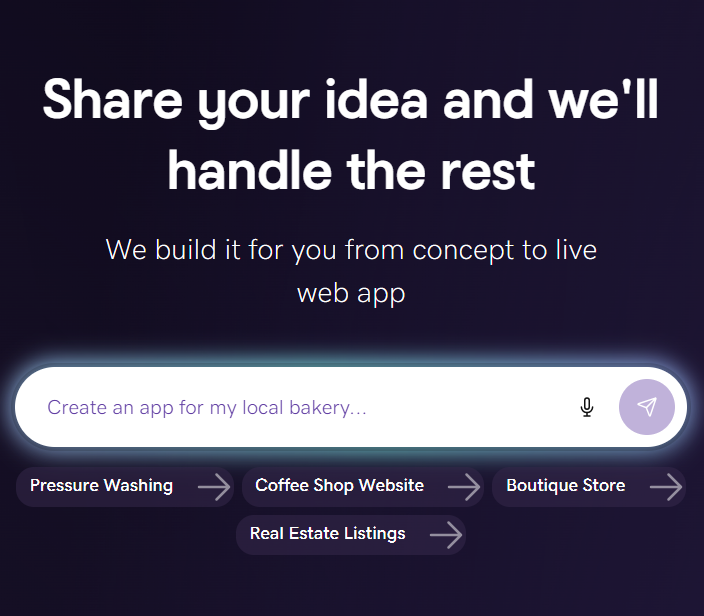
Your law firm’s website is where potential clients research your practice, get to know your attorneys, and decide whether to reach out. For someone searching “divorce lawyer near me” or “estate planning attorney in Denver,” that decision may be close at hand.
A professional website helps turn that interest into a conversation. Clear practice area pages, credible attorney profiles, and an easy-to-find consultation form show visitors whether you offer the help they need—and how to take the next step.
This guide walks you through planning, building, and launching a law firm website with Airo AI Builder. You’ll also learn what to include, how to describe your firm to Airo, and where dedicated legal tools should handle sensitive client information.
GoDaddy Airo AI Builder
Describe your idea. We'll build your live website in minutes.
With a few prompts, Airo AI Builder generates your website, web app, pages, databases and logic in minutes — no coding required. Start for free with 50 AI credits a month. No credit card required.
Build for FreeWhat you need before building a website
A little preparation makes your website faster to build and easier to get right. The more clearly you describe your practice areas, clients, and strengths, the more useful Airo AI Builder’s first draft will be.
Start with a firm description, a simple page plan, and a collection of approved photos and credentials.
Map out your site
You don’t need a detailed design brief before you begin. You do need a clear picture of what visitors should learn and what you want them to do next.
Get these three things ready first. For a more detailed planning process, see our guide on how to plan a website .
Write a description of your law firm (practice areas, who you serve, experience, what sets you apart)
Think of your firm description as the starting instructions you’ll give Airo AI Builder. Include:
- Practice areas: Family law, personal injury, criminal defense, estate planning, immigration, business law, real estate, or other areas you handle.
- Firm size: Whether you’re a solo practitioner, small firm, or multi-attorney practice.
- Clients: Individuals, families, small businesses, corporations, or a more specific audience.
- Geographic focus: The cities, counties, and states you serve, consistent with your attorneys’ admissions and applicable rules.
- Experience: Years in practice and approved examples of relevant work or results.
- Credentials: Bar admissions and accurately described certifications or specializations.
- Differentiators: Former prosecutor experience, bilingual services, an industry focus, or another meaningful strength.
- Style and goal: How the website should feel and the main action visitors should take.
Only provide verified information that you’re permitted to publish. Don’t include confidential client details in your prompt.
Vague description:
“We’re a law firm. Build us a professional website.”
More useful description:
“We’re a two-attorney family law firm in Austin, Texas. We handle divorce, child custody, and prenuptial agreements for individuals and families throughout Travis County. We want the website to feel professional but approachable—not intimidating. Our main goal is to encourage visitors to request a free 30-minute consultation.”
That gives Airo direction for the site’s structure, copy, design, and calls to action.
Decide what pages you need
Most law firm websites use a familiar structure:
- Homepage
- Practice area pages
- Attorney profiles
- Case results
- Testimonials
- Consultation request
- About
- Blog or legal resources
- Contact
You can start with the essentials: a homepage, dedicated practice area pages, attorney profiles, a consultation form, and contact information. Add other sections when you have approved content ready.
Give each practice area its own page.
Someone looking for help with child custody shouldn’t have to sort through a general services page covering everything from divorce to business formation. Dedicated pages also give search engines more specific information about your services.
Gather professional photos of your attorneys and office
Potential clients want to know who they’ll be working with. Gather current, professional headshots of every attorney and key client-facing team member.
Office photos can help visitors recognize your location and feel more comfortable before their first appointment. If you have multiple offices, include photos of each. A team photo also works well on your About page.
Favor authentic images over generic gavels and scales of justice. Your people and workspace tell visitors more about your firm than interchangeable stock photography.
Register a domain name
A custom domain gives your firm a recognizable online address and supports consistent branding across your website, email, and printed materials.
When choosing a domain:
- Use your firm’s name or a close variation.
- Keep it short and easy to say, spell, and type.
- Consider .com for familiarity.
- Explore a .law domain , subject to its eligibility requirements.
- Avoid hyphens and numbers where possible.
- If your firm’s name is long, consider an abbreviation clients already recognize.
You can search for and register a domain before building.
Eligible new annual Airo AI Builder plans include a custom domain for the first year, subject to offer terms, eligible extensions, and applicable fees. Check the offer before purchasing a domain separately. If you already own one, you can connect it when you’re ready to publish.
Prompting tips to make your law firm website stand out
When you talk to Airo AI Builder, specifics help. Instead of asking for a generic legal website, describe how your firm works and what prospective clients need.
- Lead with practice areas and location. Say “personal injury law firm in Phoenix” or “immigration attorney serving Dallas–Fort Worth,” rather than simply “law firm.”
- Describe the tone. Ask for authoritative and professional, approachable and warm, or modern and clean. Your website should sound like your firm.
- Explain the consultation flow. For example: “Add a consultation request button to the navigation and every practice area page.”
- Provide verified trust signals. Include accurate bar admissions, board certifications, and approved awards or ratings. Supply the correct names, dates, and any required disclosures.
- Name the areas you serve. Give Airo your actual cities, counties, and regions so it can draft relevant local copy without inventing office locations.
- Explain how to handle results. If you have approved case summaries, ask Airo to organize them into a results page. Explicitly tell it not to invent outcomes, testimonials, or credentials.
Here are three examples you can modify to make your own.
Solo personal injury attorney
“Create a website for a solo personal injury attorney in Phoenix serving people injured in car and motorcycle accidents. Use clear, reassuring language. Prioritize click-to-call and consultation requests. Include placeholders for my approved biography and case summaries, but don’t invent results or reviews.”
Multi-attorney family law firm
“Build a warm, professional website for a four-attorney family law firm in Raleigh. Create separate pages for divorce, custody, support, and mediation. Include individual attorney profiles and a consultation request button on each practice area page. Avoid combative language or promises about outcomes.”
Small business law practice
“Create a modern website for a business law practice serving small businesses in Denver. Feature business formation, contract review, and outside general counsel services. Explain the services in plain English and make scheduling an introductory call the main call to action.”
Law firm website checklist
Use this checklist to review your site before launching. Not every item applies to every practice — a solo attorney may need a simpler website than a firm with several offices.
Homepage with a clear call to action
Your homepage should immediately explain what you do, where you practice, and how visitors can contact you. Use a clear call to action, such as “Request a Consultation” or “Call Our Office,” and place verified trust signals near the top. Only advertise a free consultation if that’s what you actually offer.
Practice area pages (one per area of law)
Create a dedicated page for each practice area rather than relying on one long services list. Explain the issues you handle, how your firm helps, and what visitors can expect next. Use plain language and finish with a relevant consultation CTA.
Attorney profiles
Give each attorney a profile with a professional headshot, bar admissions, education, experience, and practice focus. Add approved results or credentials where appropriate, plus a short personal note about their approach to practicing law. Include a clear way to contact the firm about working with that attorney.
Free consultation or case evaluation form
Keep your initial form short: name, contact information, general issue category, and an optional, non-sensitive summary may be enough. Make it accessible from your homepage, navigation, and practice area pages. Clearly tell visitors not to submit confidential details or documents through a general inquiry form.
Case results
Approved settlements, verdicts, and other outcomes can help visitors understand your experience. Obtain appropriate client consent, protect confidentiality, and follow applicable advertising rules before publishing—even if some information is publicly available. Include required context and disclaimers, including that past results do not guarantee future outcomes; if you don’t have suitable results to share, leave this section out.
Client testimonials and reviews
Check your jurisdiction’s rules before displaying testimonials, and obtain appropriate permission before republishing client comments or identifying a reviewer. Feedback about responsiveness, clear explanations, and communication can help visitors understand the client experience. Don’t fabricate, materially alter, or selectively present reviews in a misleading way.
About page with your firm’s story
Explain why the firm was founded, what guides its work, and how it serves its community. Solo practitioners can focus on their motivation and approach without repeating their entire résumé. For a larger practice, include a team photo and introduce the people who support clients.
Blog or legal resources
Useful resources can answer common questions and help relevant readers discover your firm through search. Topics might include “How long does a divorce take in [state]?” or “What should I do after a car accident?” Have a qualified attorney review every legal claim — including AI-assisted drafts — and keep jurisdiction-specific information current.
Office locations, hours, and service areas
List each actual office’s address, phone number, hours, and service area, with an embedded map where appropriate. Make phone numbers tappable on mobile and explain whether visits require an appointment.
If you offer virtual consultations, say so without implying you can practice in jurisdictions where you’re not authorized.
Contact page
Bring your phone number, email, addresses, map, and short inquiry form together in one place. Explain what happens after someone submits a request, using a response timeframe your team can reliably meet.
Add a notice that the form is not monitored for emergencies or urgent legal deadlines if appropriate.
Social media and legal directory links
Link to current profiles that help visitors verify your background and learn more about your practice. Depending on your firm, these may include:
- Google Business Profile
- Avvo
- Martindale-Hubbell
- FindLaw
- Justia
- Super Lawyers
Only include listings that accurately represent your firm. Links support discovery and credibility, but don’t guarantee better search rankings.
Ethics disclaimers and privacy policy
Review the attorney advertising, solicitation, and website disclosure rules that apply to your practice. Common notices explain that website content is general information, not legal advice, and that viewing the site or submitting an inquiry does not by itself establish an attorney-client relationship.
Publish an accurate privacy policy reflecting your actual data practices and applicable law; footer notices alone may not satisfy every disclosure requirement.
Create a law firm website: step by step with Airo AI Builder
With your plan and approved materials ready, you can create a law firm website with Airo AI Builder through conversation. Describe your practice, review the draft, and ask for changes without starting from a blank page or writing the site’s code yourself.
Features, publishing options, and third-party connections depend on your plan and configuration.
GoDaddy Airo AI Builder
Describe your idea. We'll build your live website in minutes.
With a few prompts, Airo AI Builder generates your website, web app, pages, databases and logic in minutes — no coding required. Start for free with 50 AI credits a month. No credit card required.
Build for FreeStep 1: Describe your law firm to Airo AI Builder
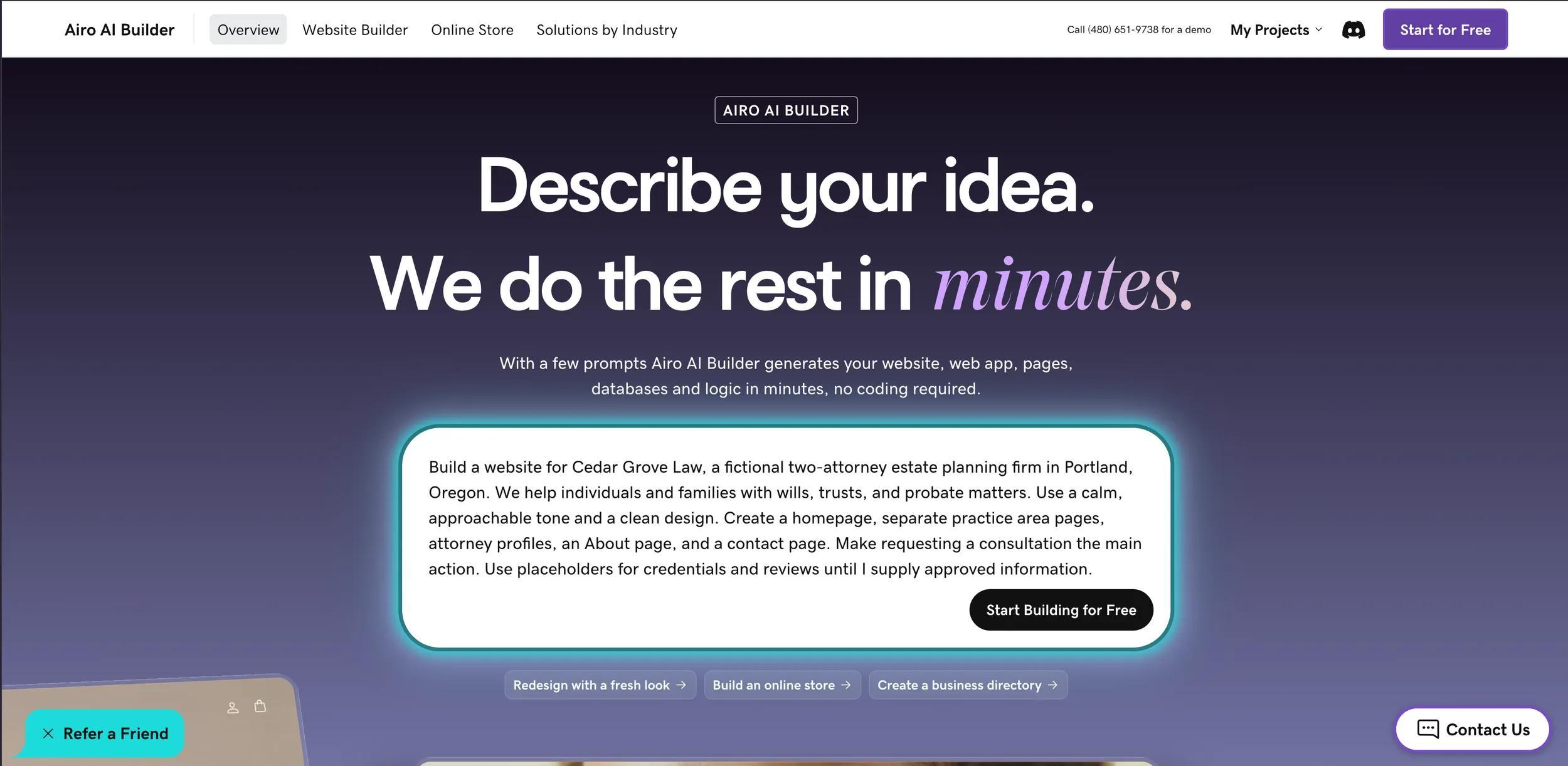
Start by giving Airo AI Builder the description you prepared. Include your practice areas, location, audience, preferred tone, and main conversion goal.
For example:
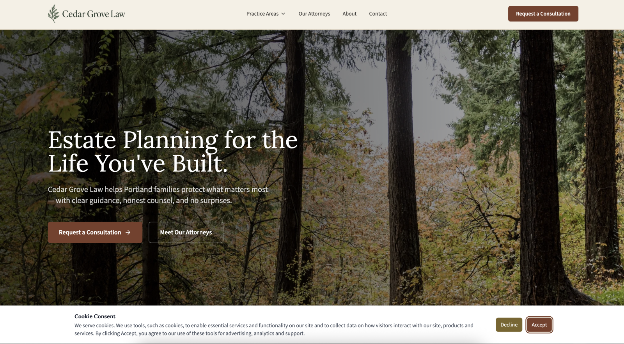
“Build a website for Cedar Grove Law, a fictional two-attorney estate planning firm in Portland, Oregon. We help individuals and families with wills, trusts, and probate matters. Use a calm, approachable tone and a clean design. Create a homepage, separate practice area pages, attorney profiles, an About page, and a contact page. Make requesting a consultation the main action. Use placeholders for credentials and reviews until I supply approved information.”
You can upload a logo or other approved images. You can also reference an existing website to explain a design preference, but don’t assume Airo will automatically migrate its content or functionality.
Step 2: Respond to a few follow-up questions
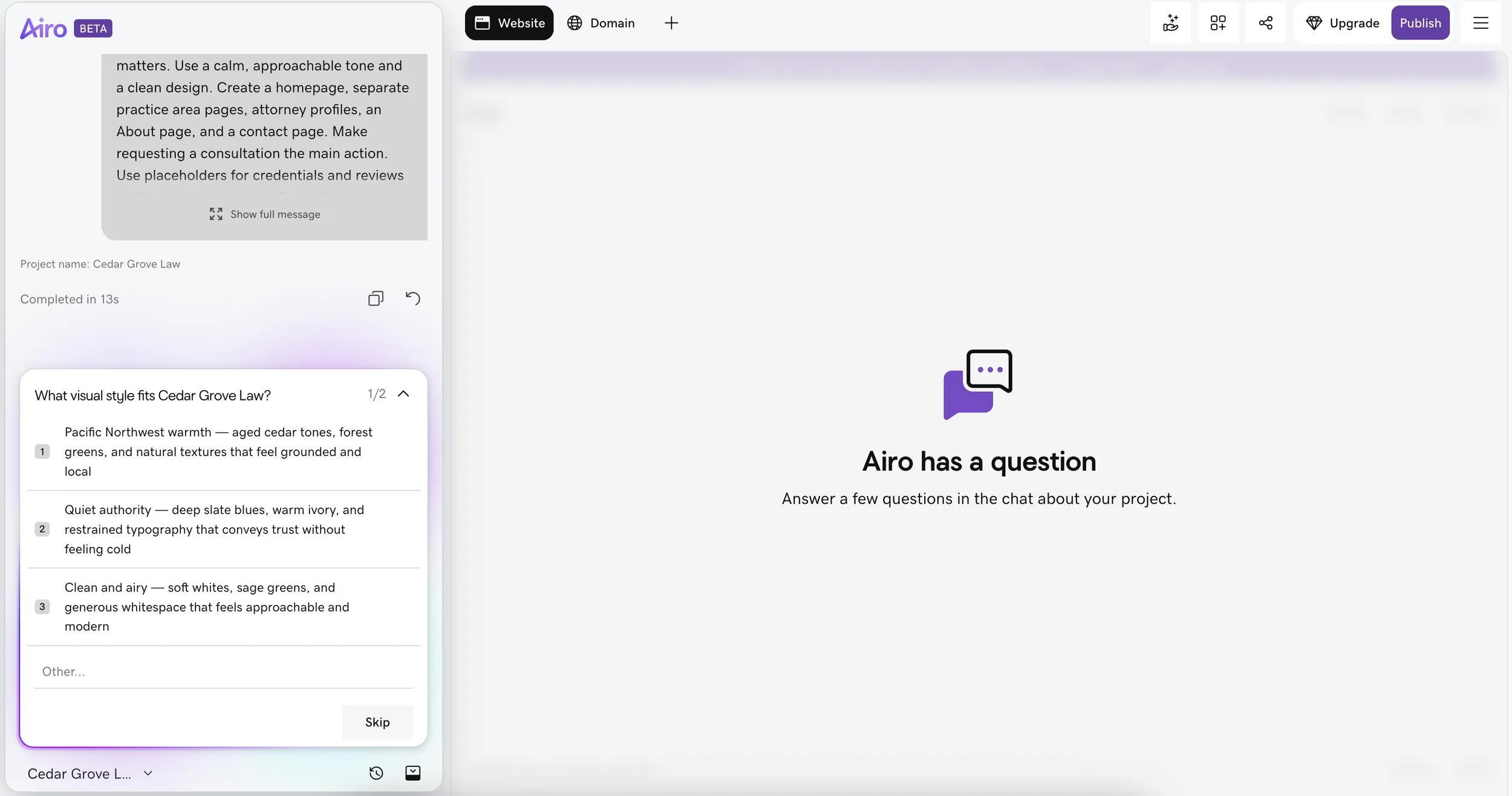
Airo AI Builder may ask follow-up questions about your priorities, pages, or design preferences. Use this conversation to clarify details such as which practice area to feature first or whether you’re ready to maintain a blog.
Be direct about what should stay out of the draft, too. If you don’t offer free consultations or don’t have approved testimonials, tell Airo not to include them.
Step 3: Edit your site through follow-up prompts
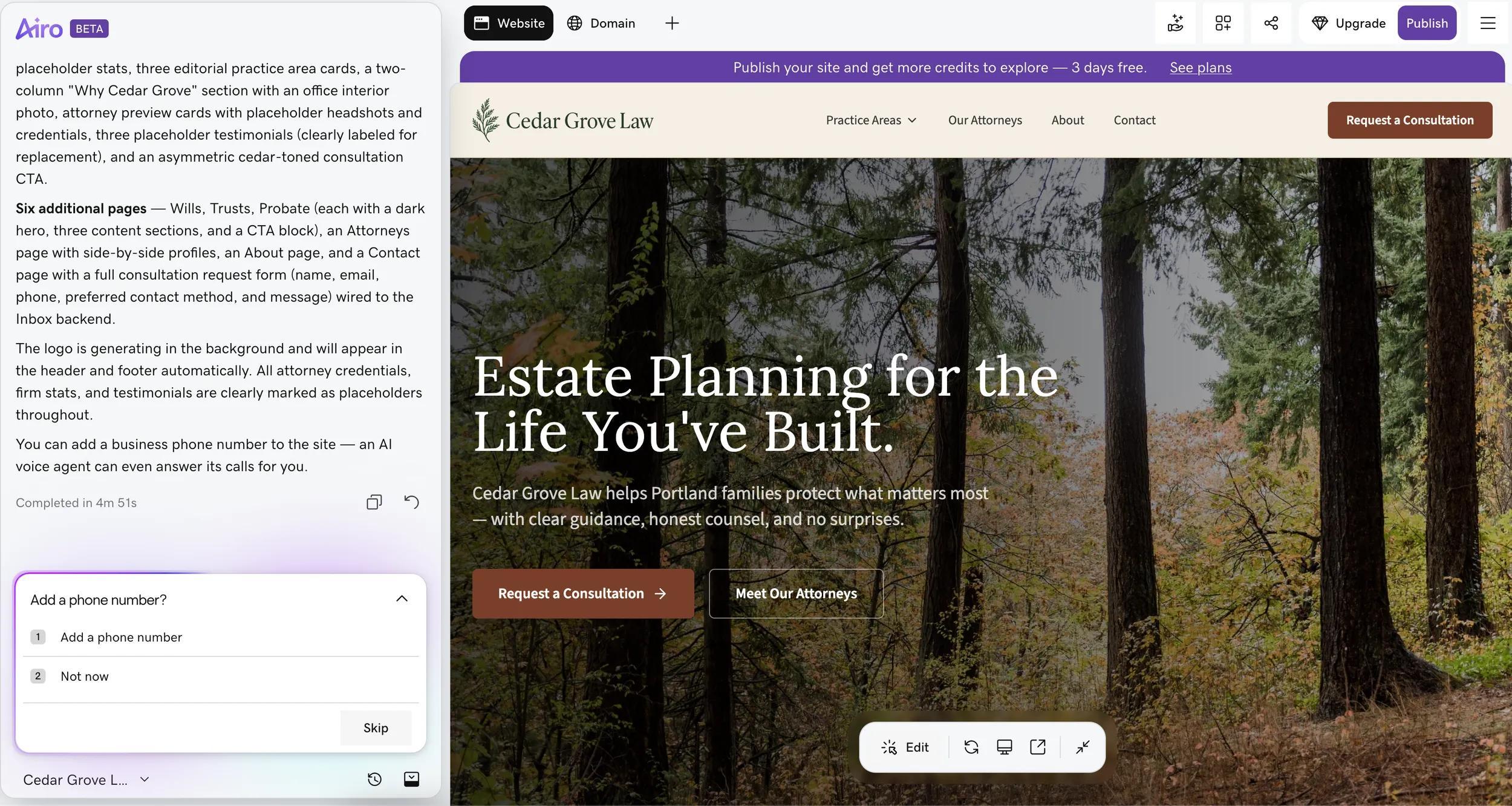
Once Airo AI Builder generates a draft, review it page by page. Continue the conversation to refine the content and layout.
Try prompts such as:
- “Create separate pages for divorce, child custody, and mediation.”
- “Add a consultation request CTA to every practice area page.”
- “Add attorney profiles with placeholders for headshots, bar admissions, and areas of focus.”
- “Create a case results page using only the approved summaries I provide, with space for our required disclaimer.”
- “Add our approved informational-use and attorney-client relationship disclaimers to the footer.”
- “Make the tone professional and confident, but not intimidating.”
- “Remove unsupported claims, invented awards, and promises about results.”
You can also make basic text and image edits directly in the editor. Airo offers 50 free AI credits to start. AI changes like new pages, design updates and new functionality use credits, while basic inline edits and image uploads don't.
Step 4: Set up consultation booking, intake forms, and connect your tools

Next, configure how a website inquiry becomes a scheduled conversation. Tell Airo AI Builder how you want the process to work, then test each part.
- Create a general consultation request form. Ask for contact information and the broad type of legal help needed—not a detailed case history.
- Add scheduling. Set availability, appointment lengths, buffers, and confirmation messages. Decide whether appointments need staff approval or an initial conflict screening.
- Route detailed intake to a suitable legal platform. Use an appropriately configured client portal or practice management system for sensitive case information.
- Configure payments if needed. If you charge for consultations, review the payment workflow, fee disclosures, and applicable professional obligations.
- Test on mobile. Complete a sample request and booking to confirm that notifications, calendar entries, and follow-up instructions work.
Explore the Airo AI Builder connectors directory for available connections, including:
- Clio: Case management and billing workflows.
- DocuSign: Document signature workflows.
- GoDaddy Payments, Stripe or Square: Supported payment workflows.
- Calendly or Google Calendar: Scheduling.
- Zoom or Google Meet: Virtual consultations.
- Dropbox or Google Drive: File-sharing workflows.
- Gmail or Outlook: Email.
- Google Business Profile: Local business visibility.
Some connections require manual API setup, your own third-party account, additional permissions, or a qualifying plan. A listed connector does not mean every workflow is available out of the box.
Before using any connected service for client information, assess its settings, access controls, contractual terms, and suitability for your firm’s obligations.
Step 5: Connect your domain and launch
Choose a paid publishing plan, then follow Airo AI Builder’s domain connection steps.
If your domain is registered with GoDaddy, Airo AI Builder will connect it and configure the DNS automatically, so no additional action is required. If your domain is with another registrar, follow the connection steps.
Airo provides mobile-friendly design and built-in SEO and AEO tools, but review the finished site yourself. Confirm page titles, meta descriptions, headings, contact details, and service locations rather than assuming every generated field is correct.
Before publishing, check:
- All attorney biographies, credentials, and legal statements.
- Required advertising disclosures and approved disclaimers.
- Forms, booking links, payments, and notifications.
- Mobile navigation, readable text, image descriptions, and form labels.
- Privacy notices and any analytics or cookie requirements.
- HTTPS and your domain connection.
If you need a domain, check if your plan includes free domain registration for the first year. If not, find your perfect domain name with GoDaddy.
What to expect from a law firm website built with Airo AI Builder
Airo AI Builder can help create your public-facing website and connect it to business tools. It isn’t a substitute for a legal practice management system, and a website form isn’t automatically suitable for confidential intake.
Here’s how to divide the work. Website features and connected workflows depend on your plan, setup, and third-party services.
| What Airo AI Builder does or can support | What requires dedicated legal software or additional controls |
|---|---|
| Firm website pages, including practice areas, attorney profiles, About, resources, and contact | Case management and matter tracking through tools such as Clio, MyCase, or PracticePanther |
| General consultation requests and configured booking workflows | Detailed intake involving sensitive case information |
| General contact and inquiry forms | Secure client portals and confidential document exchange |
| Payment connections for supported consultation or service payments | Legal billing, timekeeping, and compliant trust/IOLTA accounting |
| Pages explaining fees and payment policies | Conflict-of-interest checking |
| Location-focused practice area content, and SEO and AEO tools | Attorney review of jurisdictional claims and advertising compliance |
| Blog and legal resource pages | Legal research, accuracy checks, and ongoing content review |
| Approved testimonial or review displays | Consent, confidentiality, and advertising-rule review |
| Connected document workflows through services such as DocuSign, Dropbox, or Google Drive | Assessment and configuration for confidential documents, retention, and access |
| Email connections through Gmail or Outlook | Confidential communication policies and appropriate security controls |
| Links or configured connections to Clio | Full matter management and legal back-office workflows |
| Maps and office information | Verification of actual locations, service areas, and licensing limitations |
| Marketing-related pages and supported connected workflows | Required consent, confidentiality safeguards, and solicitation-rule review |
| Mobile-responsive design | Accessibility testing and remediation |
| Hosting and SSL support | Firm-wide cybersecurity, access management, and incident response |
| Links to external services | Court e-filing, electronic discovery, and legal document review |
Airo AI Builder’s native contact forms and email notifications should only be used for general inquiries and consultation requests — not for collecting sensitive case details or privileged information.
For detailed intake, connect an appropriately configured legal platform such as Clio where supported, or link to a suitable secure client portal. Don’t ask visitors to upload evidence, financial records, medical information, or detailed legal histories through a general website form.
The connectors directory also lists DocuSign, Dropbox, Google Drive, Gmail, and Outlook. Their availability does not, by itself, establish that a particular configuration meets your confidentiality obligations. SSL protects data in transit, but it does not guarantee confidentiality, regulatory compliance, or attorney-client privilege.
Think of the website as your firm’s public front door. It helps prospective clients discover your practice and request contact; your legal systems handle conflicts, sensitive intake, and the matter itself.
Get your law firm website live today
You don’t need to launch with every possible page. Start with accurate practice information, strong attorney profiles, clear contact options, and a consultation workflow your team can manage.
Airo AI Builder helps you turn that plan into a website through conversation. Add your approved content, connect the right tools, review the finished experience, and publish when the site is ready.
Ready to get started? Build a law firm website with Airo AI Builder .
GoDaddy Airo AI Builder
Describe your idea. We'll build your live website in minutes.
With a few prompts, Airo AI Builder generates your website, web app, pages, databases and logic in minutes — no coding required. Start for free with 50 AI credits a month. No credit card required.
Build for FreeLaw firm website FAQ
Does a law firm need a website?
A website gives prospective clients a central place to verify your firm, understand your services, and contact you. Directory listings and social profiles can support that presence, but your own website gives you greater control over your message and consultation process.
What should a law firm website include?
Start with a homepage, dedicated practice area pages, attorney profiles, contact information, and a simple consultation request process. Include appropriate disclosures and a privacy policy. Add approved results, testimonials, resources, and location pages as they become relevant to your practice.
How do I get clients from my law firm website?
Help the right visitors find relevant information and make the next step easy. Create useful practice area pages, maintain accurate local business listings, publish attorney-reviewed resources, and place clear consultation CTAs throughout the site.
Track inquiries and bookings to see what’s working, while respecting privacy and confidentiality obligations. A website can support client acquisition, but traffic, rankings, and signed engagements are not guaranteed.
How much does a law firm website cost?
The cost depends on your builder plan, domain, design needs, content, and connected services. Budget for recurring subscriptions, domain renewals, scheduling or legal software, transaction fees, and ongoing maintenance or compliance review where needed.
Airo AI Builder lets you begin building before choosing a paid publishing plan. Check current plans and pricing for publishing limits, AI credits, connector access, and eligible first-year domain offers.