
Your next fan, teammate, sponsor, or player needs somewhere to find you. Whether you run an esports team, stream on Twitch, develop indie games, manage a gaming community, or operate a LAN center, a website gives your brand a digital headquarters — a home base you control beyond YouTube feeds, Discord channels, and changing platform algorithms.
Building that home base doesn’t have to mean learning to code. With Airo AI Builder, you can describe your gaming business, generate a site, and refine it through conversation.
This guide covers five types of gaming businesses: esports teams, streamers and content creators, indie game studios, gaming communities, and LAN centers or gaming lounges. Not every feature applies to every business. Focus on the pages and tools that help your audience take the next step.
GoDaddy Airo AI Builder
Describe your idea. We'll build your live website in minutes.
With a few prompts, Airo AI Builder generates your website, web app, pages, databases and logic in minutes — no coding required. Start for free with 50 AI credits a month. No credit card required.
Build for FreeWhat you need before building a website
A little organization makes building your website faster. The more specific you are about your brand, audience, and goals, the more useful your first AI-generated draft will be.
You don’t need every detail finalized. Start with a clear description, a short page list, and the content that makes your brand recognizable.
Plan your site
Before opening Airo AI Builder, take a few minutes to decide what your website should accomplish. Are you trying to attract sponsors, get more stream viewers, grow your Discord, collect Steam wishlists, or fill gaming stations?
That goal should guide these three planning steps.
Write a description of your gaming business
Your description becomes the starting point for Airo AI Builder. Explain who you are, what you do, who your audience is, and what makes your brand different.
Include details that fit your business:
- Esports team: Game titles, competitive tier, roster size, league affiliations, region, and team personality.
- Streamer or content creator: What you stream or create, your niche, audience size, and the tone of your channel.
- Indie game studio: Games in development or already released, genres, studio size, and whether you’re pre-launch, in early access, or supporting a live game.
- Gaming community: The games or genres you focus on, community size, and what members can join — events, tournaments, social sessions, or coaching.
- LAN center or gaming lounge: Location, services such as PC gaming, VR, consoles, tournaments, and parties, plus your target customers.
Compare these two descriptions:
Before: “I have a gaming team.”
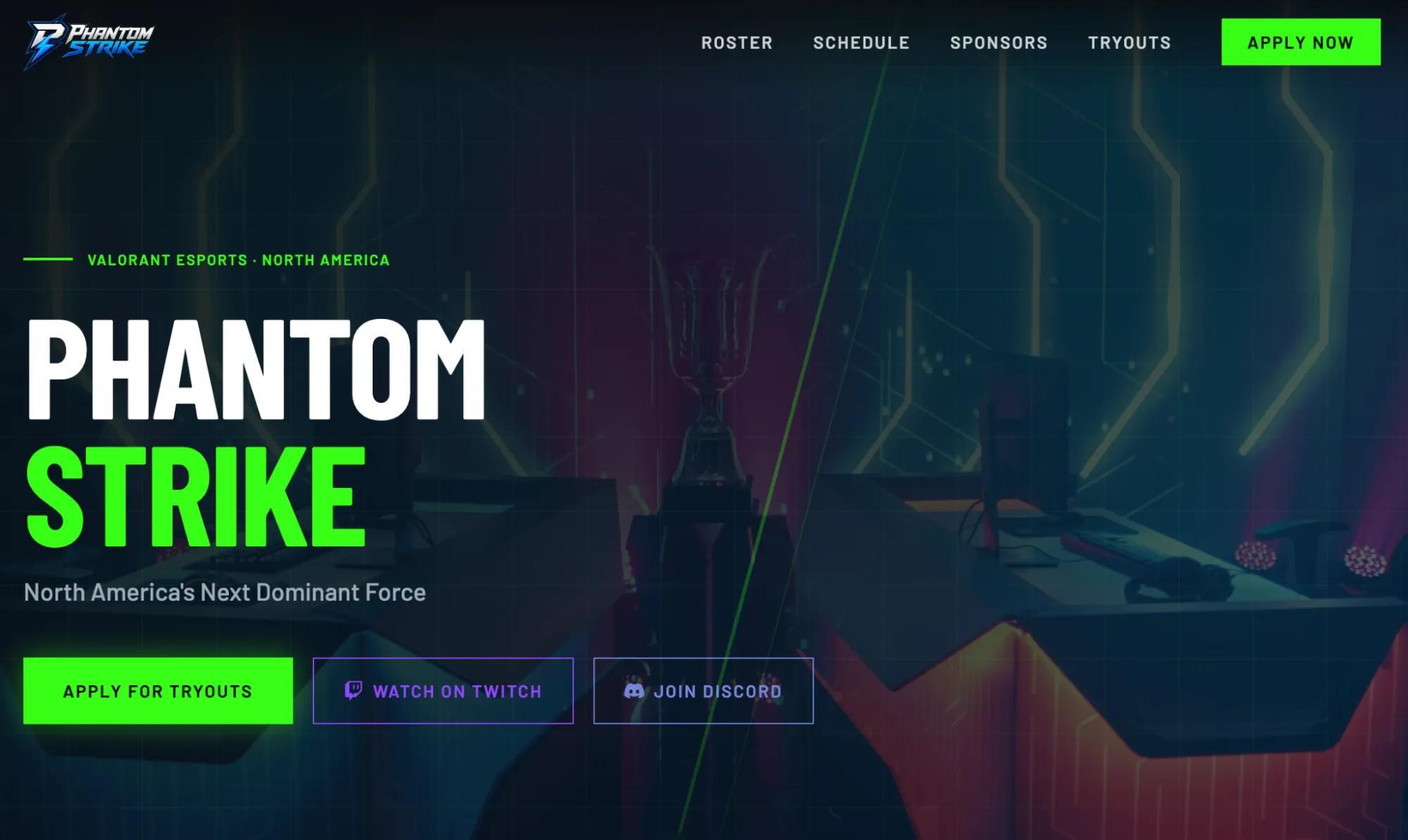
After: “We’re Phantom Strike, a North American competitive Valorant team with a five-player Diamond-and-above roster. We compete in weekly Challonge tournaments and want to attract sponsors and recruit players. Our brand is dark, bold, and clean, with electric-blue accents.”
The second description gives Airo a direction for the site’s design, content, and calls to action.
Decide what pages you need
Your website’s page list should match your business — not someone else’s checklist. Use these examples as a starting point:
- All types: Homepage, about page, and contact page.
- Esports teams: Roster, match schedule, recruitment, sponsors, and press kit.
- Streamers: Stream schedule, content hub for VODs and clips, merch store, and fan support page.
- Indie studios: Individual game pages, devlog or blog, press kit, and wishlist or download links.
- Communities: Discord links, events calendar, membership or recruitment information, and a forum link or content hub.
- LAN centers: Location and hours, booking, pricing, events calendar, and venue gallery.
Start with the essentials. A focused site with accurate information is more useful than a large site full of empty pages.
Gather your content
Gaming is visual, and your website should show what visitors can actually watch, play, or experience. Gather:
- Gameplay clips, highlights, and trailers.
- In-game screenshots, event photos, and venue photos.
- Team photos, player headshots, or creator portraits.
- Logos, banners, brand colors, and existing stream overlays.
- Written content, including bios, game descriptions, studio history, and community rules.
- Press coverage, approved sponsor logos, and partnership materials.
Use real content wherever possible. Generic stock imagery won’t tell visitors what your game looks like, who’s on your roster, or what makes your venue worth visiting.
Make sure you have permission to use the images, footage, music, and logos you upload.
Register a domain name
A custom domain gives your gaming brand a consistent address you can share everywhere. Your stream platform or social strategy may change, but your domain can remain your home base.
When choosing a domain:
- Use your team name, stream handle, studio name, or community name.
- Keep it short and easy to type in Twitch panels, Discord profiles, and social bios.
- Consider .com for familiarity or .gg for a gaming-focused identity. .game and .team are other options.
- Avoid hyphens and numbers unless they’re part of your established brand.
- Look for a name that matches — or closely resembles — your handles across platforms.
Before purchasing separately, check your Airo AI Builder offer. A qualifying new annual paid plan can include an eligible custom domain for the first year, subject to offer terms, availability, fees, and renewal pricing. If you already own a domain, you can connect it when you’re ready to publish.
Prompting tips to make your gaming website stand out

Think of prompting Airo AI Builder as briefing a designer who needs to understand your brand. “Make a gaming website” leaves a lot open to interpretation. A specific description gives Airo something useful to build around.
Here’s how to talk to Airo:
- Lead with your business type. Say “competitive Rocket League team,” “retro gaming YouTube channel,” or “VR arcade in downtown Austin,” rather than just “gaming.”
- Describe the personality and aesthetic. Dark and aggressive? Neon and playful? Clean and minimal? Include colors, typography preferences, and the mood you want.
- Name your platforms. Tell Airo whether you use Twitch, YouTube, Discord, Steam, or other services, and whether you want embeds or links.
- Choose a primary action. Make it clear whether visitors should join your Discord, watch a stream, apply for tryouts, wishlist a game, book a session, or buy merch.
- Reference existing branding. Mention your logo, color palette, stream overlays, and other assets so the site feels connected to your existing presence.
- Request important features upfront. Include roster pages, brackets, press kits, stores, booking, or tip jars in your initial description.
Try adapting one of these prompts:
Esports team: “Build a website for Orbit Five, a competitive Rocket League team in Europe. Use a dark navy background, bright orange accents, and a clean layout. Include our roster, upcoming matches, sponsor section, and tryout form. Make ‘Apply for tryouts’ the main call to action.”
Streamer: “Create a website for PixelAfterHours, a cozy gaming streamer focused on farming sims and indie discoveries. Use warm purple and cream colors. Feature my Twitch channel, weekly schedule, YouTube highlights, and Discord link. Prioritize helping visitors find my next stream.”
Indie studio: “Build a website for Mosslight Games, a three-person studio making a hand-drawn puzzle adventure. Create a game page with screenshots, a trailer, a devlog, and a press kit. Use our forest-green palette and make the Steam wishlist button prominent.”
Gaming website checklist
This checklist covers what a gaming website can include — not what every website needs. An esports team probably doesn’t need game download pages, and an indie studio probably doesn’t need player tryouts.
Use the items that fit your business while building, then review them before going live.
Homepage with a strong hook
Show visitors what your brand is within seconds. Pair a bold headline with a gameplay trailer, stream highlight, hype reel, or strong image, then add a clear action such as “Join,” “Watch,” “Wishlist,” or “Book.” Keep large videos from slowing down the page, especially on mobile.
About page with your story and background
Tell visitors how your team, channel, studio, community, or venue started — and where you’re headed. Include the people behind it and what drives them. Specific, authentic details are more memorable than broad claims about being “passionate about gaming.”
Content hub (stream archives, videos, clips, devlogs, blog)
Give visitors something to explore between streams, matches, or releases. Streamers can organize VODs and highlights; studios can publish devlogs and patch notes; communities can share event recaps and member spotlights. Useful, regularly updated content also creates more opportunities for people to discover your site through search.
Team roster or player profiles
For esports teams and competitive clans, player profiles help fans, sponsors, and tournament organizers understand the roster. Include each player’s in-game name, role, game titles, competitive rank where relevant, photo or avatar, and social links. Update the page whenever the lineup changes.
Tournament brackets and match schedule
List upcoming matches with dates, times, time zones, opponents, and viewing links. Airo AI Builder can embed Challonge tournament brackets via iframe widgets, while Battlefy and Start.gg tournament pages can be linked directly. You can also request countdown timers for upcoming matches; live bracket updates depend on the tournament platform supplying the embed.
Game pages (screenshots, trailers, wishlist and download links)
Give each indie game its own page with screenshots, a gameplay trailer, and a clear description of its genre, mechanics, and story. Add supported platforms, system requirements where relevant, and release or early-access information. Make Steam, Epic Games Store, or Itch.io wishlist and download buttons easy to find.
Recruitment or tryout forms
A structured application is easier to manage than scattered direct messages. Airo AI Builder can generate multi-step forms with conditional questions for different roles, covering details such as game title, rank, Discord handle, availability, and experience. Explain what happens after submission, and collect only the information you need.
Merch or digital product store
A store can turn your branding into apparel, stickers, mousepads, or other products fans want to own. You can also promote digital products such as overlays, guides, or wallpapers. Airo AI Builder supports ecommerce, but confirm payment availability and any digital-delivery requirements before promising instant downloads.
Stream schedule
Show your streaming days, start times, time zone, and planned games or formats. Put the schedule on the homepage or give it a clearly labeled page. Update it when plans change so fans don’t show up for a stream that isn’t happening.
Fan support (tips, donations, memberships)
Make support easy to find without overwhelming the rest of your site. Options include:
- A built-in tip jar with preset amounts.
- A Ko-fi button, supported embed, or direct link for one-time tips.
- A Patreon link for membership tiers.
- A Streamlabs link for stream tips.
Airo AI Builder can also support direct payments through GoDaddy Payments, Stripe, Square, or other supported providers, depending on your region and setup. Explain what supporters receive, and remember that payment processing fees may apply.
Press kit or media kit
Help journalists, sponsors, and collaborators find what they need without waiting for a reply. Include downloadable high-resolution logos, approved photos, a concise brand overview, current audience statistics, and relevant partnership examples or packages. Indie studios should also provide game descriptions, trailers, screenshots, and a press contact.
Community links (Discord, forums)
Give visitors a prominent “Join our Discord” button. Where supported and enabled, an official Discord widget can show online members and a server invitation. Larger communities can also link to forums, subreddits, and other gathering places, alongside clear community rules.
Social media and platform links (Twitch, YouTube, TikTok)
Link to the profiles you actively maintain, including Twitch, YouTube, TikTok, X, Instagram, and game-specific accounts. Keep your most important channels easy to reach across the site rather than hiding them among unrelated footer links. A live Twitch player or recent YouTube video can also give visitors an immediate reason to stay.
Sponsors and partnerships
Display approved sponsor logos, link to their sites, and explain the relationships where appropriate. A sponsor section or carousel can help you recognize current partners, but make sure it’s readable and usable on mobile. If you’re seeking sponsors, create a “Partner with us” page with your media kit and contact details.
Location, hours, and booking (for LAN centers and gaming lounges)
For physical gaming venues, include your address, map, opening hours, session pricing, equipment, and party or event packages. Give customers a clear way to reserve stations or rooms. Airo AI Builder offers booking, payments, and deposit capabilities on applicable paid plans; configure and test them for your venue’s capacity and policies.
Contact page
Make it easy for sponsors, media, tournament organizers, potential recruits, and fans to reach you. Include a contact form and business email address, plus a phone number for physical venues where appropriate. Label inquiry types so messages reach the right person.
Create a gaming website: step by step with Airo AI Builder
With your plan, assets, and domain choice ready, you can move from preparation to building. Airo AI Builder generates a custom website through conversation, so you can start from a description instead of code.
Here’s how to make a gaming website with Airo AI Builder.
GoDaddy Airo AI Builder
Describe your idea. We'll build your live website in minutes.
With a few prompts, Airo AI Builder generates your website, web app, pages, databases and logic in minutes — no coding required. Start for free with 50 AI credits a month. No credit card required.
Build for FreeStep 1: Describe your gaming concept to Airo AI Builder

Start by telling Airo AI Builder what you’re building. Use the description you prepared earlier, including your business type, audience, brand personality, platforms, and primary visitor action.
For example:
“We’re Phantom Strike, a North American Valorant team seeking sponsors and new players. Build a dark, clean website with electric-blue accents, a roster page, match schedule, sponsor information, and a recruitment form. Feature our Twitch and Discord links, and prioritize tryout applications.”
For a streamer, emphasize your content niche, schedule, and viewing platforms. For an indie studio, describe the game, development stage, and wishlist or download goal.
You can provide files such as logos and branding assets, or point Airo toward an existing website or social profile for reference. Check the generated result rather than assuming it has imported every detail correctly.
Step 2: Answer a few questions

Airo AI Builder may ask follow-up questions about your pages, style preferences, or features. You might clarify whether you want a merch store, what colors to use, or which call to action belongs on the homepage.
Keep your answers specific. “Prioritize our Steam wishlist link over newsletter signup” is more useful than “Make it engaging.”
Step 3: Shape your site with follow-up prompts

Once Airo AI Builder generates a draft, review it and continue the conversation. You can request changes without manually rearranging every section or editing code. You can also make quick changes directly within the editor.
Try prompts such as:
- “Add a roster page with each player’s name, role, rank, and social links.”
- “Embed my Twitch stream on the homepage using this channel URL.”
- “Create a press kit page with downloadable logos and these audience statistics.”
- “Make the site dark with neon-green accents, but keep body text easy to read.”
- “Add a recruitment form that asks for game title, rank, and Discord handle.”
- “Create a page for our upcoming game with a prominent Steam wishlist button.”
Refine the site until its content and layout match your goals. Replace placeholder copy, verify factual claims, and check that every button does what its label promises.
Step 4: Connect your platforms and tools (Twitch, Discord, YouTube, Challonge, Ko-fi, Steam, etc.)

Tell Airo AI Builder which platforms you want to feature and provide the relevant URLs, embed codes, IDs, or credentials when requested. The setup varies: some services use embeds or links, while others require an authenticated connection.
Common options include:
- Streaming and video: Embed Twitch streams, YouTube videos, and Vimeo gameplay trailers.
- Community: Add an official Discord widget or a prominent server invitation.
- Tournaments: Embed Challonge brackets via iframe widgets, or link to Battlefy and Start.gg tournament pages.
- Fan support: Add a supported Ko-fi embed or button, Patreon membership link, Streamlabs tip-page link, or built-in tip jar. Accept payments through GoDaddy Payments (US and Canada), Stripe, Square or other supported providers, depending on your region and setup.
- Game distribution: Create wishlist and download buttons linking to Steam, Epic Games Store, and Itch.io.
- Merch and payments: Configure an online store and supported payment processor. Native GoDaddy Payments store setup is available in the United States and Canada, subject to eligibility and onboarding.
Explore the Airo AI Builder connectors directory for current third-party connection options.
Before publishing, test each integration. A working link is a useful fallback when an external platform’s embed settings prevent content from displaying.
Step 5: Connect your domain and publish your website
Connect your chosen domain to your Airo AI Builder project and follow the publishing instructions. If the domain uses GoDaddy nameservers, GoDaddy can update the required DNS records automatically. If it uses another provider’s nameservers, you may need to add the supplied records there.
A qualifying new annual paid plan can include an eligible domain for the first year. Check the offer terms and renewal costs before checkout.
Airo AI Builder includes mobile-responsive design and SEO features, but give the finished site a final review:
- Check layouts, text, buttons, and embeds on a phone.
- Review page titles, descriptions, and public-facing copy.
- Test forms, store checkout, booking, and support links.
- Confirm dates, schedules, prices, and contact details.
- Add appropriate privacy information and policies for the data or payments you collect.
Publish the project, allow time for any domain changes to take effect, and open the live address to confirm everything works.
What to expect from an Airo AI Builder gaming website
Airo AI Builder can create websites and web apps for gaming brands, but it isn’t a replacement for a game engine. Use it for your public-facing home base, content, commerce, and fan engagement — and use dedicated development tools for more demanding gameplay systems.
| What Airo AI Builder does | What requires dedicated gaming tools |
|---|---|
| Creates custom websites for teams, streamers, studios, communities, and LAN centers | Full 3D game development with engines such as Unity, Godot, or Unreal Engine |
| Embeds Twitch streams, YouTube videos, and Vimeo trailers | Advanced WebGL or Three.js 3D rendering |
| Adds official Discord widgets and server links | Real-time multiplayer lobbies and WebSocket-based gameplay |
| Embeds Challonge tournament brackets via iframe widgets | Persistent cross-game leaderboard systems |
| Links to Battlefy and Start.gg tournament hubs | Real-time multiplayer server infrastructure |
| Generates multi-step recruitment forms with conditional questions | — |
| Builds sponsor sections or carousels and presents partnership tiers | — |
| Creates downloadable press and media kit pages | — |
| Adds tip jars and supported donation flows | — |
| Adds supported Ko-fi embeds and Patreon or Streamlabs links | — |
| Builds merch stores with supported payment processing | — |
| Adds Steam, Epic Games Store, and Itch.io wishlist or download buttons | — |
| Creates devlogs, roadmap displays, and patch changelogs | — |
| Builds simple playable 2D browser games, such as puzzles, trivia, card games, and branching stories | — |
| Generates mobile-responsive layouts | — |
| Provides SEO and answer engine optimization features | — |
| Updates roster, schedule, and content displays through conversational requests | — |
Commerce, payment, booking, and integration features depend on the applicable plan, region, external service, and configuration. Search optimization can help make your content discoverable, but it doesn’t guarantee rankings or inclusion in AI-generated answers.
For an indie studio, the division is straightforward: build the game in Unity, Godot, or Unreal Engine, then use Airo AI Builder for the game website, wishlist landing page, press kit, and devlogs. Your game engine handles the gameplay; your website helps people discover it.
Launch your gaming website today

You don’t need every feature in this guide to launch. Start with a clear identity, useful content, and one obvious next step for visitors.
Plan your pages, describe your brand to Airo AI Builder, refine the draft, and connect the platforms your audience already uses. Then publish a digital headquarters you can grow alongside your team, channel, studio, community, or venue.
With website creation, domain connection, content, and supported commerce tools in one workflow, you can spend less time assembling a site and more time building your gaming brand.
Ready to get started? Create a gaming website with Airo AI Builder.
GoDaddy Airo AI Builder
Describe your idea. We'll build your live website in minutes.
With a few prompts, Airo AI Builder generates your website, web app, pages, databases and logic in minutes — no coding required. Start for free with 50 AI credits a month. No credit card required.
Build for FreeGaming website FAQ
Do gamers need a website?
Not every casual player needs one. But a website is useful if you’re building a gaming brand, running a business, organizing a community, or looking for sponsors. It gives people one reliable place to find your content, schedule, contact information, and platform links.
What should a gaming or esports website include?
Start with a homepage, an about page, a contact page, and links to your active platforms. Esports teams should usually add a roster, match schedule, recruitment information, and sponsor details. Streamers, studios, communities, and venues should prioritize features that support their goals, such as stream schedules, game pages, events, or booking.
Can I embed live Twitch streams and Discord on my website?
Yes. Airo AI Builder supports Twitch embeds and official Discord widgets. You’ll need to provide the relevant channel or server information and enable any required platform settings. Twitch embeds require a secure (HTTPS) domain, so check the live player on your published site, not just the preview. Discord widgets are not a full replacement for the Discord app; what they display depends on Discord’s widget functionality.
Can I display live tournament brackets on my site?
Yes. You can embed Challonge brackets via iframe widgets, so visitors can view tournament progress on your website. Updates come from Challonge, so keep the tournament information current there. Challonge supports embeds for user-hosted tournaments; brackets hosted by organizations may need to be linked instead.For Battlefy and Start.gg, you can link visitors to the relevant tournament pages.
Can I sell merch and accept donations from my gaming website?
Yes, with the appropriate setup. Airo AI Builder supports online stores and payment options, along with tip jars and links or supported embeds for services such as Ko-fi, Patreon, and Streamlabs. Payment availability varies by region and provider, and processing fees may apply. Confirm separate requirements for recurring memberships or digital-download delivery.
How much does a gaming website cost?
The cost depends on your plan, domain, and features. Airo AI Builder offers a free option for building and previewing, while publishing requires a paid plan. Check the current Airo AI Builder plans for pricing, billing terms, and included features.
Also budget for domain renewal*, payment processing, and any paid third-party tools. Qualifying new annual plans may include an eligible domain for the first year, but that doesn’t mean the domain stays free at renewal.
*One free available domain with new purchase of an annual Airo AI Builder plan. Plus annual ICANN fee per domain. Domain name must be added to cart before purchase, and selected term must be equal to or less than term of selected plan to qualify for free domain. Additional years billed at current rates. Offer valid for 1st year only; renews at current prices. Invalid with other offers.