
Key takeaways
- GoDaddy Auctions helps buyers discover, evaluate, bid on, and purchase expired domains.
- The redesigned Domain Details page helps buyers assess expired domains with a cleaner layout and clearer access to key signals.
- Buyers can use Majestic and Semrush data to examine backlinks, referring domains, authority, indexed pages, and search demand before bidding.
- Comparable domain sales and estimated value provide useful pricing context, but buyers should also consider the domain’s history, intended use, and budget.
- More than 55,000 domains are added to GoDaddy Auctions each day, giving buyers a large and frequently changing inventory to evaluate.
Finding an interesting expired domain is only the first step. The next question is usually harder: Is this domain worth pursuing?
With more than 55,000 domains added to GoDaddy Auctions every day, buyers have plenty of opportunities to consider. Before placing a bid or buying a Closeout domain, they need to understand the name, its price, its history, and the signals that might make it a good fit.
We’ve redesigned the GoDaddy Auctions Domain Details page to make that evaluation easier. The new experience brings auction information and domain data together in a cleaner layout, helping buyers spend less time navigating and more time deciding.

Earlier this year, we added new domain signals from EstiBot and Semrush. This update builds on that work, making the available information easier to review at the point where buyers decide whether to bid, buy, or keep looking.
How to evaluate an expired domain
The redesigned page groups information into focused sections, so you can move from the auction basics to deeper domain research without losing sight of the decision at hand. Here’s a closer look at each section.
1. Check the auction type, price, and time remaining
Start with the essentials: the current bid, time remaining, listing type, estimated value, and expected delivery time. When you’re ready to participate, enter your minimum or proxy bid and select Place Bid.

2. Review the bidding activity
Open the Bid History tab to see the number of bidders and bids, along with the amount and timing of each bid. This gives you a clearer view of the auction’s activity before you decide how to proceed.

3. Get a quick introduction to the domain
The About section provides a short, plain-language overview of the domain and the types of websites or organizations it could suit. Use it as a starting point for considering how the name might align with your plans.

4. Explore the domain’s website history
The Website history timeline shows when previous website activity was detected. Follow the history link to investigate how the domain was used in the past and gather more context before bidding or buying.

Review key domain details

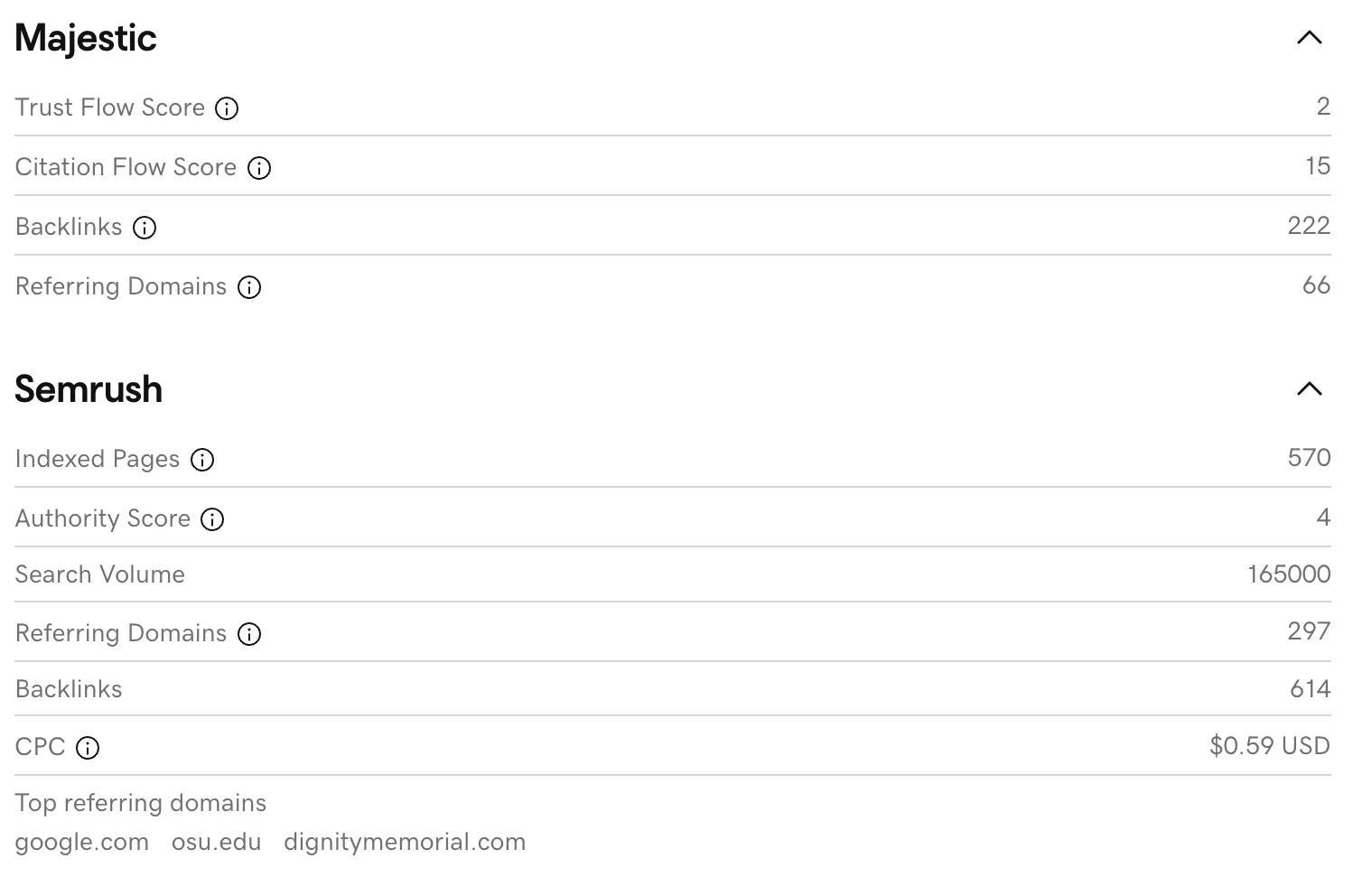
5. Review SEO and backlink signals
The Majestic and Semrush sections provide available backlink, authority, referring-domain, search-volume, and related search data. Expand each section to explore its metrics, and select the information icons for more context.
You don’t need to give every signal equal weight. Focus on the data most relevant to your buying strategy, then investigate further when an opportunity warrants it.
6. Compare previous domain sales
The Comparable Domains Sold section shows reported sale prices for similar names. Use these sales alongside the estimated value to help put the current price in context. These figures are useful reference points, but the domain’s fit with your goals and budget should still guide your decision.

Together, these sections help experienced investors scan opportunities more efficiently while giving newer buyers a clearer, more approachable way to evaluate an expired domain and help them to decide whether it’s worth buying, or not.
What we learned from testing
We tested the redesigned experience before rolling it out. Our hypothesis was straightforward: a clearer, more informative Domain Details page would help buyers evaluate opportunities and take the next step.
The redesign delivered an improved experience for our buyers that we saw through direct feedback, as well as our data, including:
- Total bid and cart actions, measuring engagement across the buying experience.
- Bid and cart actions on Domain Details, showing increased activity at the evaluation stage.
- Expired GoDaddy domains purchased, extending the improvement through to completed purchases.
The lesson is that adding useful data is only part of improving evaluation. How buyers find and review that information matters too. Bringing the signals into a clearer layout can make the page more useful at a critical point in the buying journey.
More activity is encouraging, but the purpose of the page remains helping buyers make informed decisions. Sometimes that means placing a bid. Sometimes it means recognizing that a domain doesn’t fit and moving on.
With thousands of new names arriving daily, both decisions matter. Buyers need to direct their time and budget toward the opportunities that make sense for them.
Part of a better buying experience
The Domain Details revamp connects with our broader work across GoDaddy Auctions. The Acquisition Agent helps buyers discover relevant domains. New domain signals add depth to evaluation. The redesigned page makes those signals easier to review before taking action. In fact, we received so much positive feedback about the new experience that the team decided to bring it to the Auctions domain list view as well via the Flyout, a quick-look card that appears when you click on a listing from GoDaddy Auctions.

The Flyout upgrade increased the number of bids submitted directly from the page while reducing the overall time required to place a bid.
For more programmatic control
For customers who want the same domain details and more programmatic control, the GoDaddy Auctions APIs bring listing information and domain signals into their own tools and workflows.
What’s next
The redesigned Domain Details page is now available. Next, we’ll apply the same design principles to more of the Auctions experience, including mobile and other places where buyers evaluate domains.
Browse GoDaddy Auctions, try the Acquisition Agent, and open a Domain Details page to explore the new experience. Your next domain may already be among the names available. Now, it’s easier to take a closer look.
Frequently asked questions
What is GoDaddy Auctions?
GoDaddy Auctions is a marketplace where buyers can discover, research, bid on, and purchase eligible domain names, including expired domains.
What is an expired domain?
An expired domain is a domain name that was previously registered but was not renewed by its registrant. Depending on its status, it may become available through an expired-domain auction, Closeout purchase, or another acquisition process.
What should I check before bidding on an expired domain?
Review the auction type, current price, time remaining, bid history, domain age, previous website activity, backlinks, referring domains, search data, estimated value, and comparable domain sales. Also investigate whether the domain fits your intended use and budget.
What does the estimated domain value mean?
An estimated value is a reference point for evaluating a domain. It should be considered alongside comparable sales, domain history, brand fit, extension, demand, and other relevant information.
Can I use GoDaddy Auctions programmatically?
Yes, GoDaddy Auctions offers API capabilities available to all Auctions members that enable programmatic workflows, including:
- Exact Match Search via API: Check availability of up to 50 specific domains in a single request
- Instant Purchase via API: Buy eligible Closeout/Buy Now domains automatically
- Expired Auctions Bidding via API: Place single or bulk bids on expired auction listings
These tools are designed for domain investors, developers, power buyers, and AI-assisted workflows. Visit the GoDaddy Developer Platform to review documentation and get started.