

Key takeaways
- One tool with smart routing eliminates model misrouting errors by consolidating single and bulk checks into a single interface.
- Strict separation between data and presentation lets the same structured JSON response render as interactive widgets in ChatGPT or plain text in Claude.
- Every failure point has a defined fallback, so users always get a usable result even when the LLM layer or upstream APIs are unavailable.
Introduction
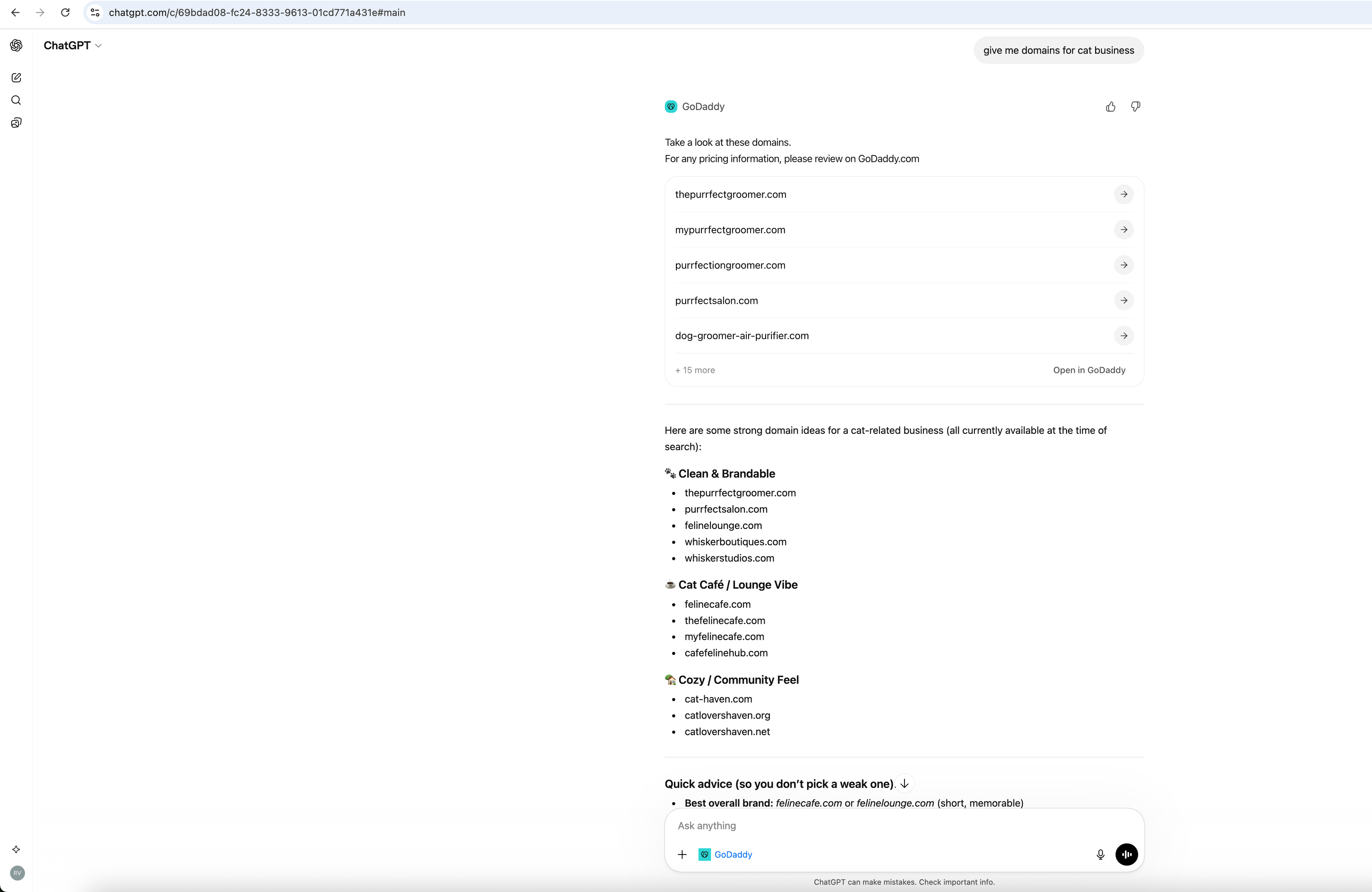
AI assistants like ChatGPT and Claude can now search for domain names and check availability without leaving the conversation. In AI clients, such as ChatGPT, results render as widgets with interactive domain cards, and registration links. That capability comes from the GoDaddy Domains MCP Server - a public integration we built on the Model Context Protocol (MCP), an open standard for connecting AI applications to external tools and data.
In this post, we'll walk through the problem we solved, the architecture we chose, how we implemented it - including the widget layer that brings rich UI into AI chat - and how it connects to OpenAI and Anthropic's ecosystem. Engineers building MCP servers, widgets, or integrating AI with external APIs can use this as a practical reference.
Bringing domain search into AI conversations
Domain discovery usually means switching contexts: open a registrar site, run keyword searches, check availability, and manually compare options. That breaks the flow for users who are brainstorming names or validating ideas inside an AI assistant.
Our goal was let users ask or request things like "Is mycoolstartup.com available?" or "Find domains for a sustainable fashion brand" directly in the chat, and get structured, actionable responses instead of having to constally switch contexts. We had to expose GoDaddy's domain search and availability APIs in a way that MCP clients (like Claude or ChatGPT or Cursor) could call as tools, with no auth for read-only usage and no friction for developers.
Why MCP?
MCP is a shared protocol for exposing tools, data, and prompts to AI applications. It’s supported by Claude, Cursor, and other AI clients, so building an MCP server gives broad reach from a single implementation.
We chose MCP over custom APIs for the following reasons:
- Standard tool model – Tools are modeled as callable functions with clear inputs/outputs. Under the hood, MCP uses JSON-RPC 2.0 over the chosen transport, and clients invoke tools via the
tools/callmethod with JSON-serializable arguments. - Multiple transports – STDIO, HTTP, and SSE let us support local dev, web clients, and cloud deployments.
- Growing ecosystem – Anthropic, OpenAI, and others are investing in MCP; building here aligns us with that direction.
We built on FastMCP, a Python MCP framework that handles protocol details so we can focus on domain logic and integration.
Architecture overview
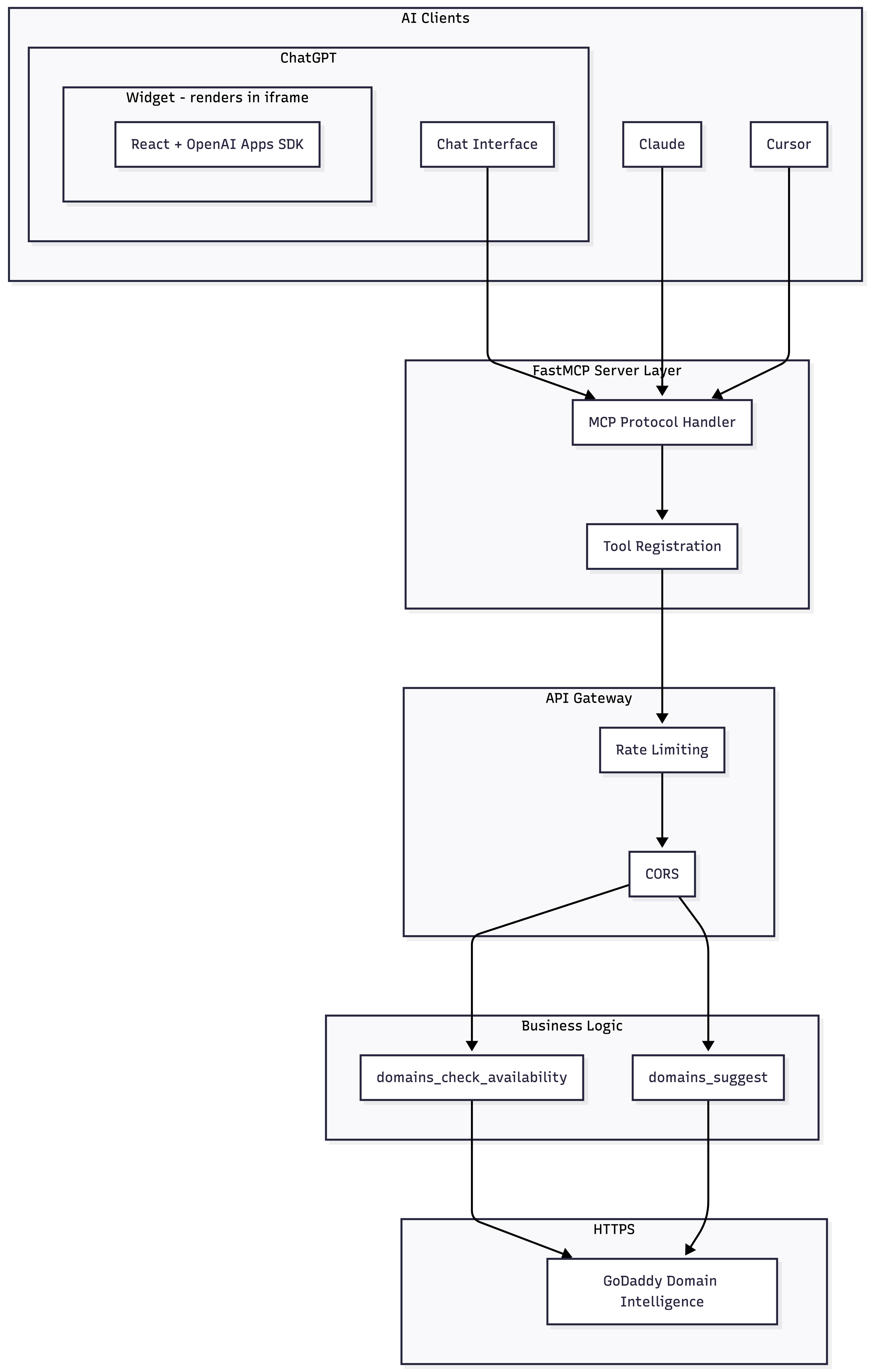
The server follows a layered design: an MCP layer that speaks the protocol, a gateway for routing and rate limiting, a business logic layer with domain tools, and an integration layer to GoDaddy’s public APIs. For widget-capable clients like ChatGPT, tool responses additionally include widget HTML and structured domain data that the widget, which we discus in more detail later, renders inline.
The server is built on Python’s asyncio and FastAPI. Tool handlers are async; when we fan out to multiple upstream calls (e.g., parallel suggest requests), we use asyncio.gather to avoid blocking. Connection pooling and configurable timeouts keep requests from hanging. For production, we run behind a reverse proxy with TLS termination; health check endpoints (/health, /ready) support container orchestration and load balancers.
The following diagram illustrates how a request flows from an AI client through each layer of the server down to GoDaddy’s public APIs and back.
Two core tools that power domain search
We expose two main MCP tools:
1. domains_check_availability
This tool checks whether domains are available. It routes automatically:
- Single domain → exact search API (detailed result, pricing if available)
- Multiple domains → bulk search API (batch, efficient)
Input is a comma-separated string, e.g. "example.com" or "site1.com, site2.com, site3.com". Output includes availability status, pricing if available, and registration links.
2. domains_suggest
This tool generates domain suggestions from keywords or business descriptions. For longer, more descriptive queries, we run an LLM preprocessing step to expand the intent into multiple search angles, then fan out to GoDaddy’s suggest API in parallel. That yields more diverse suggestions while staying within our usage policies.
We define each tool with a strict input schema: Pydantic models with field validation, length limits, and descriptions. Those descriptions matter—they help the AI client decide when to call a tool and how to populate parameters. We also use MCP’s readOnlyHint and destructiveHint annotations so clients know these tools don’t mutate state.
Both tools are read-only and use GoDaddy’s public APIs, so no API keys are required from end users. We use distributed quota tracking to prevent abuse without requiring authentication. Both tools also return structured data including widget metadata, so clients that support rich UI, like ChatGPT, can render results as interactive components instead of plain text.
Transport and deployment choices
We support multiple transports for different use cases:
| Transport | Use case | Production fit |
|---|---|---|
| STDIO | MCP Inspector, local dev | Local only |
| Streamable HTTP | Claude, Cursor, web clients | Primary |
| SSE | Streaming clients | Supported |
For production, we use streamable HTTP. The client sends a POST with a JSON-RPC body and receives a response over the same connection or via chunked transfer. We expose a single /mcp endpoint that accepts Content-Type: application/json and Accept: application/json, text/event-stream for SSE-style streaming where supported. It works with web-based AI clients and fits containerized deployment (e.g. ECS). The transport layer handles connection lifecycle; our business logic stays transport-agnostic. CORS is enabled for claude.ai and cursor.sh.
Our public endpoint is https://api.godaddy.com/v1/domains/mcp, so developers and AI clients can connect without running their own server.
MCP Server implementation highlights
The following sections discuss the key technical decisions that shaped the server's behavior. We'll cover how we simplified tool routing to how we handled failure gracefully and brought richer visuals into AI chat interfaces.
Unified availability routing
Early on, we had two separate tools: one for checking a single domain and another for bulk lookups. That worked, but it created a problem for AI clients. The model had to decide which tool to call based on the user's input, and it often guessed wrong, calling the single-domain tool when the user listed five domains in one sentence, or calling the bulk tool for a quick "is example.com available?" check.
We consolidated into a single domains_check_availability tool that accepts one or more domains as a comma-separated string. Internally, the server parses the input, counts domains, and routes accordingly: single domains go to an exact-search API that returns richer metadata (pricing tiers, premium status, alternative TLDs), while multiple domains go to a bulk API optimized for throughput. The AI client doesn't need to know which path runs - it just calls one tool and gets a consistent response shape either way.
This pattern of "one tool, smart routing" is worth considering for any MCP server where the underlying service has multiple endpoints that serve variations of the same use case. It reduces the cognitive load on the model and eliminates a class of misrouting errors.
AI-enhanced domain suggestions
The GoDaddy suggest API works well with short keyword queries like "coffee shop" or "tech startup." But when a user describes their business in a full sentence, "AI-powered customer service chatbot for e-commerce retailers", the API returns generic results because it wasn't designed for natural language input.
We solved this by adding an LLM preprocessing layer. When the server detects a longer, descriptive query, it sends the text to an internal LLM, which distills it into multiple focused keyword sets, each approaching the concept from a different angle (core product, target audience, key benefit, industry vertical). We then fire off parallel requests to the suggest API with each keyword set and merge the results, deduplicating by domain name.
The key design choice here was making this layer optional and invisible. If the LLM is unavailable or the client has exhausted their optimization quota, the server falls back to the original query. The user still gets suggestions, just less diverse ones. We wanted the happy path to be better without making the unhappy path worse.
Error handling and graceful degradation
We designed the error strategy around a principle: never let an internal failure become a user-facing dead end. The server has multiple points where things can go wrong - LLM timeouts, upstream API errors, quota exhaustion, malformed input and each one needs a sensible fallback.
For the LLM layer, failure means the server skips optimization and uses the raw query. For upstream API errors, we use retries with exponential backoff and a circuit breaker that short-circuits calls to a failing endpoint rather than stacking up timeouts. All errors are returned in MCP-compliant JSON-RPC format with structured error codes, so AI clients can distinguish between "try again later" and "fix your input." That matters because the model uses those signals to decide whether to retry, rephrase, or tell the user what happened.
Bringing rich UI into AI chat
Text-only tool responses work, but they're not the best experience for domain results. Users comparing availability, and alternatives benefit from structured visuals—cards, status indicators, and action buttons. That's what our widget layer provides: a UI that renders directly inside AI clients like ChatGPT, turning raw domain data into an interactive experience without leaving the conversation.
Default text-based rendering
Not every MCP client supports widgets. Clients like Cursor and Claude Desktop render tool results as text. For these text-only clients, we format responses in Markdown with clear structure: headings, bullet lists, and tables, making it easy for the model to parse and summarize. We also include direct registration links so the model can surface them in its reply.
To handle both cases, every tool response includes both a text field (Markdown-formatted results for text-only clients) and a structured_content field (JSON data for widget-capable clients). The server builds both in a single StructuredToolResponse, so the right format is served transparently based on what the client supports. Consistency in output shape — whether text or structured — helps both models and widgets reliably extract availability status, pricing if available, and suggestions.
Data-only server, presentation-only widget
The key architectural decision here is a clean separation between data and presentation. The MCP server never generates UI markup. Instead, it sends a structured JSON payload with domain objects, availability status, alongside widget metadata that tells the MCP client which widget to render.
The widget owns everything visual: layout, messaging, internationalization, and user interaction. Here’s what happens end to end when a user asks ChatGPT a domain question:
- The user asks something like ”Find domains for a pizza shop”.
- ChatGPT understands user intent and calls the MCP server’s
domains_suggesttool. - The server returns a tool response with text, structured domain data, and widget metadata (including the widget HTML).
- ChatGPT renders the widget HTML in an iframe.
- ChatGPT passes the structured domain data to the widget iframe.
- The widget picks up the data, renders domain cards, and the user sees results inline.
The widget itself is a React application built with OpenAI's Apps SDK. Each domain card shows the name, TLD, and availability status. An "Open in GoDaddy" button links users to the registration page on https://www.godaddy.com/domainsearch/find. For details on how widgets receive data and render inside ChatGPT, see Build your ChatGPT UI.
The widget supports three display modes based on the data it receives:
- Available – A single domain was checked and is available. The widget shows a confirmation message alongside alternative suggestions.
- Unavailable – The domain is taken. The widget shows an unavailability message alongside alternative suggestions.
- Suggestions – The widget presents a curated list of options based on the user's keywords.
For bulk availability checks (multiple domains at once), the widget renders grouped sections — one per queried domain — each with its own availability status and alternatives.
The widget also handles edge cases: a skeleton loading state while waiting for data, dark mode support, and internationalization for locale-aware messaging.
Connect Claude Code and ChatGPT to GoDaddy
Now that you understand what we’ve built, let’s get into the how you can use it. Integrating with Anthropic’s connectors directory and OpenAI’s MCP connector system makes it easy for users on either platform to access domain capabilities. After the MCP server is live and exposed over HTTP, connecting it to Claude or ChatGPT is mostly configuration.
The following limitations exist with the GoDaddy app and Connector:
- Read-only – Searches and availability checks only; no purchases or DNS changes
- Public data only – No account-specific actions
- Rate limited – Usage quotas apply to ensure fair access
- Registration elsewhere – Users complete purchases on godaddy.com
- Widgets in ChatGPT only – Interactive domain cards currently render in ChatGPT; other clients (Claude, Cursor) receive text-based results
For Claude Desktop users
The following procedure describes how to connect to the GoDaddy MCP with Claude Desktop.
- Open Claude Desktop.
- Go to Settings → Connectors.
- Click Browse connectors.
- In the Search field, type GoDaddy.
- Select the GoDaddy tile.
- Click Connect.
After that, users can ask Claude domain questions and get results directly in chat. GoDaddy is listed in Anthropic’s Connectors Directory as a verified integration.
For developers (direct integration)
Developers can point at our public endpoint via mcpServers:
{
  "mcpServers": {
    "godaddy": {
      "url": "https://api.godaddy.com/v1/domains/mcp",
      "transport": "streamable-http"
    }
  }
}
For more on wiring MCP servers to Claude, go to Anthropic’s Connect Claude Code to tools via MCP and the MCP architecture overview.
Connecting ChatGPT Desktop users to GoDaddy
The following procedure describes how to connect to the GoDaddy MCP with ChatGPT Desktop.
- Open ChatGPT.
- Go to Apps.
- In the Search apps field, type GoDaddy.
- Select the GoDaddy Connector.
- Click Connect.```
After connecting, users can ask domain questions directly in chat. GoDaddy is listed in ChatGPT's Apps Directory as a verified integration.
Conclusion
The GoDaddy Domains MCP Server demonstrates how to expose existing APIs to AI assistants via MCP. A layered architecture, two core tools, multiple transports, a widget layer, and quota management let us provide domain search and suggestions inside AI chat without authentication. In ChatGPT, results render as interactive domain cards with pricing, if available, and registration links; in Claude and Cursor, they appear as structured text. Integrating with Anthropic’s Connectors Directory and OpenAI’s MCP connector system makes it easy for users on either platform to access domain capabilities.
We’re open to feedback and contributions. If you’re building MCP servers, widgets, or integrating domain services with AI, we’d like to hear from you. Contact us at mcp@godaddy.com.