Key takeaways
- Traditional localization pipelines create bottlenecks for fast-moving teams. When content changes happen weekly across 23 locales, a multi-day turnaround slows down experimentation and iteration.
- LLM-powered translation can complement existing workflows. By handling routine copy translations instantly and in-place, teams can reserve professional linguists for high-stakes, nuanced content.
- The hardest parts of translation aren't the words — they're the structure. Rich text parsing, dynamic token placement, and context-aware translation require careful engineering beyond simple string substitution.
If you've ever worked on a global product, you already know the rule:
The feature might take two days to build. The translation will take two weeks.
That's not a dig at translators. Localization is difficult. Languages have grammar rules, cultural nuances, dialect differences, and plenty of opportunities for things to go hilariously wrong. But there's one part of the process where content delivery and copy changes tend to struggle with: speed and resources. Modern translation management systems exist to manage multilingual content and automate workflows across translators, reviewers, and stakeholders. They help coordinate translation pipelines, versioning, and approvals across large organizations.
They are powerful and have thousands of iterations on translations.
They follow a structured pipeline for accuracy.
They are also... slower than we'd like.
At GoDaddy's translation workflow, localization looks something like this:
- Marketing Ops, design, and copy writers work together to create content in English.
- Teams export strings into a translation platform queue, awaiting acceptance.
- Translators review and translate; up to 23 different individual linguists may be needed, one per locale.
- QA checks everything, raises concerns and addresses them through PMs on either side.
- Results come back days (or weeks) later.
- This cycle repeats if any errors occur (additional Slack DMs and Jira tickets can extend the process even longer).
The following image illustrates our current bottleneck pipeline with items still processing for weeks:
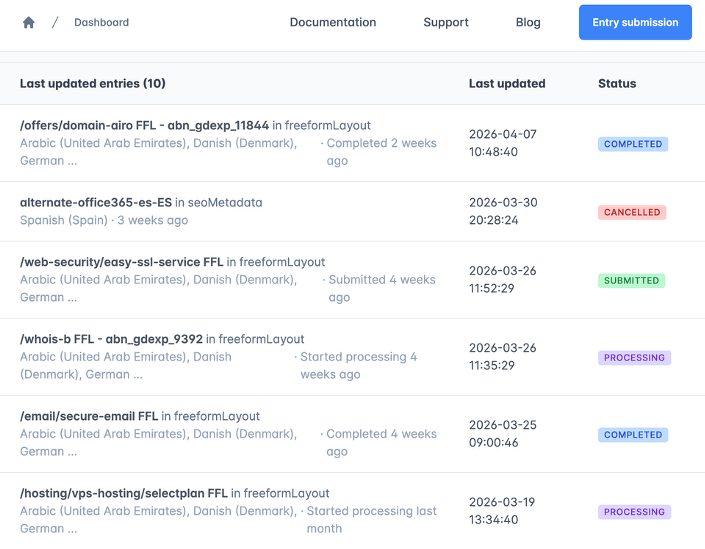
If everything runs smoothly and cycles don't get repeated, it works well for large launches. But when you're trying to iterate quickly and run different experiments or A/B tests, the waiting becomes the bottleneck. And that's where our story begins.
The "Let's Just Build a Tool" moment every engineering team eventually reaches a point where someone says:
"We could just build something ourselves."
Enter the GoCaaS LLM Localizer
Every engineering project has an origin story. Ours began with a simple question:
"Why does translating a single sentence sometimes take a week?"
That idea eventually became the GoCaaS LLM Localizer. The Localizer is essentially a translation workspace designed for speed and visibility. Instead of sending content into a traditional translation pipeline and waiting for the results to come back, the Localizer allows editors to:
- Translate content instantly and iterate on the translations in real time
- See which strings are in use (for SEO and proper nouns at GoDaddy)
- Test localization directly inside the Contentful space without leaving the UI
The initial design came together fast, but we had to keep iterating on what was a simple string translation feature into a well-oiled, automated, custom solution that we have today.
How the Localizer works (secret sauce NOT included)
Without diving too far into internal implementation details (keeping our GoCaaS Patty Formula locked away), the Localizer builds on a few simple ideas that make fast iteration possible.
At a high level, the system works like this:
1. The system scans and extracts content directly from CMS nodes
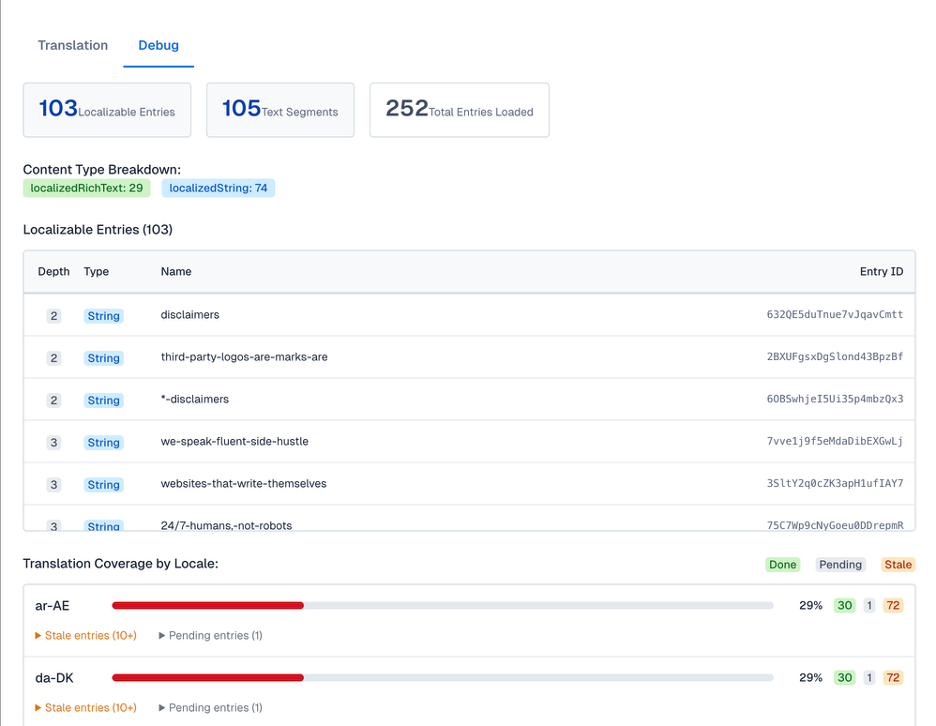
Instead of waiting for export pipelines, the Localizer reads content structures directly so we can immediately identify what needs translation. This means the CMS manager doesn't even need to leave the pages to translate; they work as is, in place. Talk about an easy button.
The following image shows us the additional parsing information that occurs within each model:
2. The system analyzes strings for tokens, wrappers, and placeholders (dynamically).
Before translation happens, the system detects dynamic values such as placeholders, variables, or tokens that must remain intact during translation, especially HTML blocks.
3. An LLM layer generates the translations
After we parse and structure the content, it passes through an LLM-based translation step that produces translations almost instantly, secured by GoCode (our internal backend framework) authentication.
4. Metadata tracks translation state
The system records whether content is new, changed, or already translated, helping avoid unnecessary retranslations and keeping iteration visible so we aren't guessing on previous translation work.
5. Results appear directly in the UI
Engineers and content teams can immediately see what changed, what the team translated, and what might still need attention.
The following image shows the ease of mutability with tokenized content for different translations:
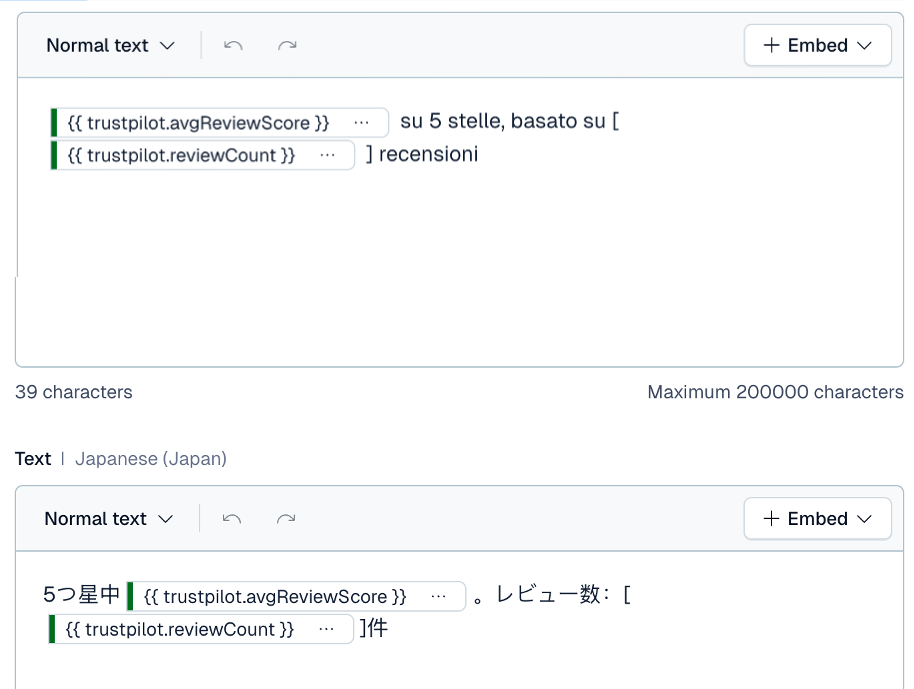
6. Translation history gradually becomes translation memory
As more content flows through the system, stored outputs start forming a reusable knowledge base that improves consistency over time. By utilizing Contentful as our database for now, we have access to the history of translations for each individual string!
Originally, we built the Localizer to solve a practical problem: speed. But the more we worked with it, the more it started to feel like something else.
Traditional localization systems treat translation as a pipeline that sits outside of development. The Localizer flips that model by making translation part of the copy workflow itself that engineers can be hands-off, allowing our marketing department to fully control their copy translations.
You could think of this tool as v0 of a different kind of translation infrastructure, one that is LLM-native, faster to iterate on, and more tightly integrated with how modern applications can quickly ship content.
It may not replace existing translation platforms overnight, but in a way, it might represent the early stages of that shift.
Things we learned the hard way about translating with LLMs
When we started building the Localizer, we assumed translation would be a straightforward string-in, string-out process. Languages have other plans and the following sections describe a few lessons we learned along the way.
Languages do not respect your string templates
Engineers love placeholders.
Hello { userName }, welcome back!
Simple, predictable, clean. But languages have no obligation to keep that structure intact. We needed to be a bit... dynamic about how we spliced our paragraphs.
This is how we evolved our language processing:
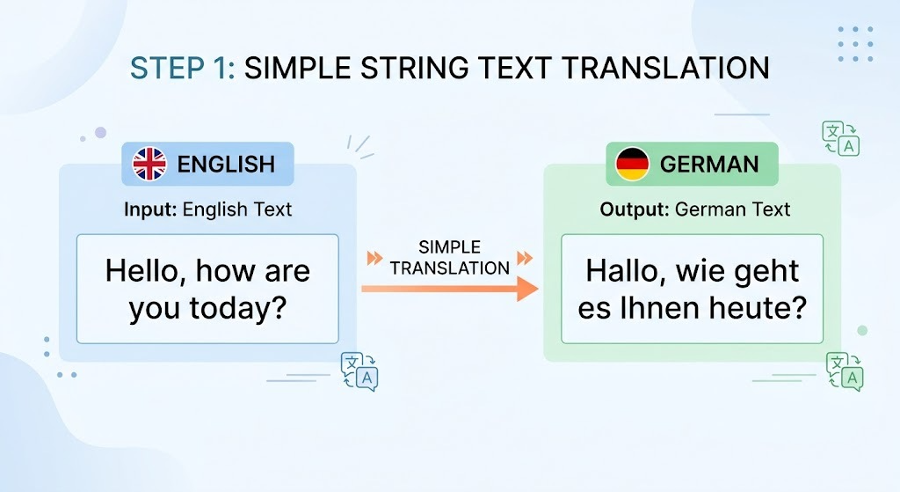
1. We first initialized the simplest scope; could we translate a simple string? (the answer was yes.)
The following image shows simple string translations with prompts:
2. Now, how could we handle more difficult items like rich text and parsing context with random marks?
The following image shows rich text marks with the respective matching items highlighted:
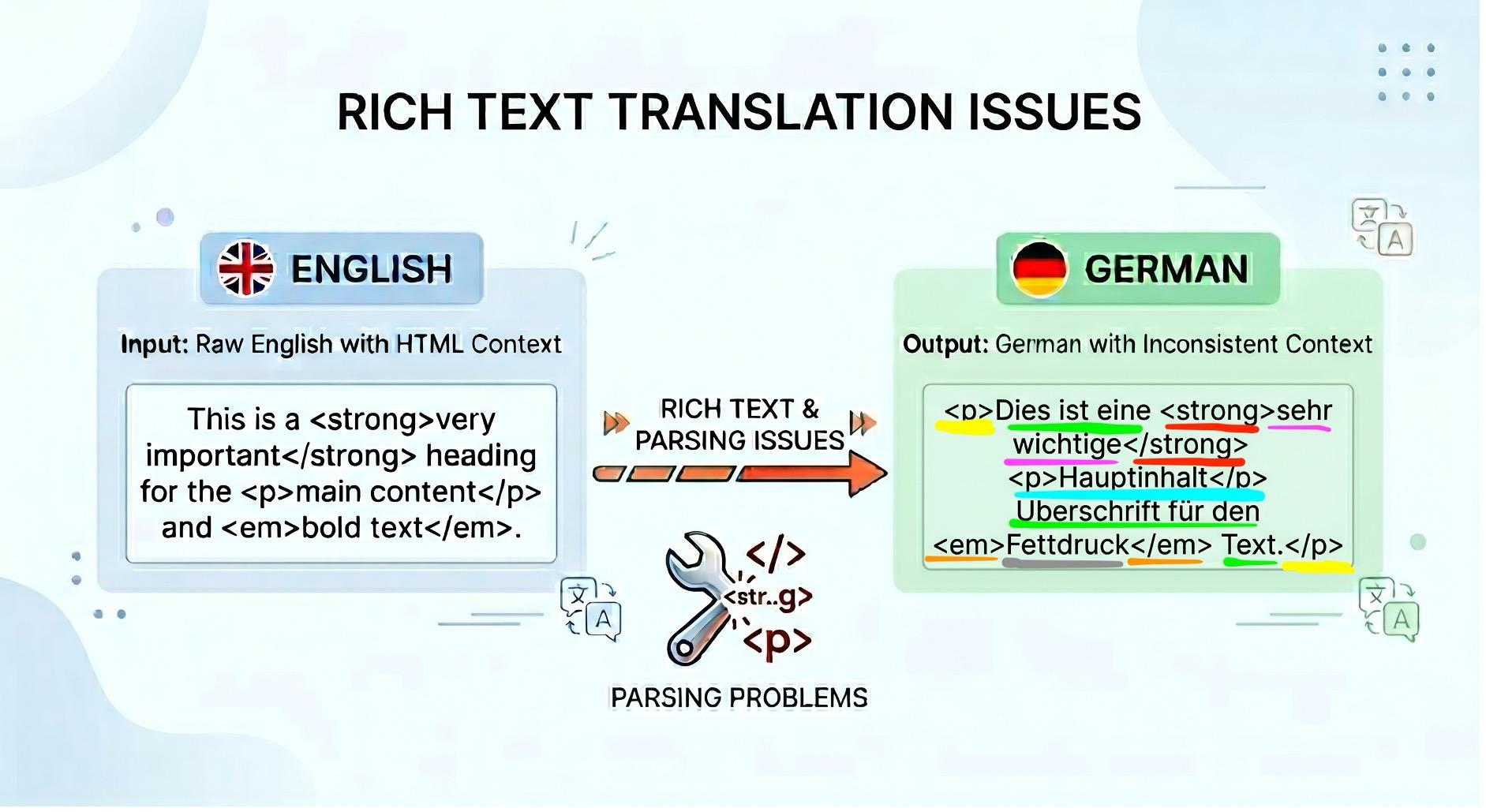
Notice the number of segments that we have to ensure connect properly and stay congruent with translation flow. We handle the mapping and keep the AI agnostic to rich text. It receives simple sentences to translate, and we Frankenstein the sentences via our pre-computation mapping afterwards!
An analogy would be our client-side application is the Head Chef in a kitchen that takes apart all the decorations on a completed dish. We send it to one of the cooks (LLM models) to revamp the dish (translate) preserving the core ingredients. Afterwards, we would put back the decorations and garnishes back to where they belong (HTML secured)!
3. Now the last part was handling all that, while including tokens that we use.
The following image shows a high-level diagram of dynamic token parsing in conjunction with grammar:
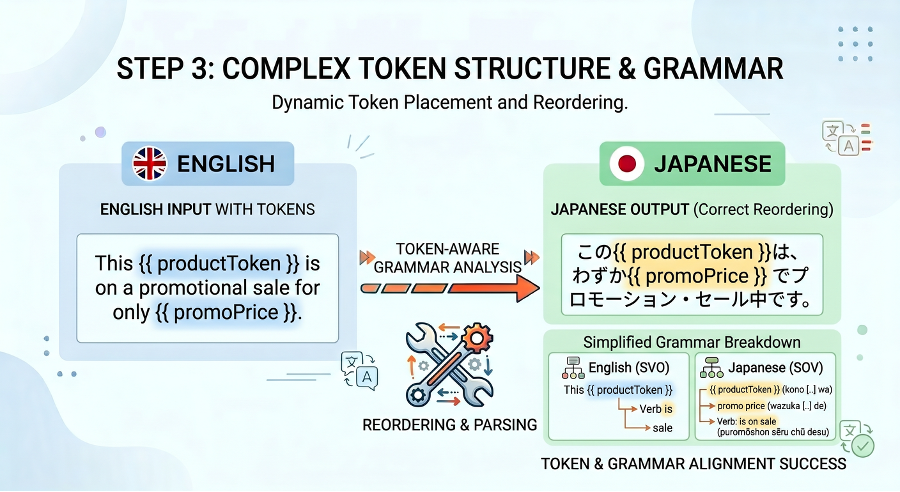
In English, we have Subject-Verb-Object:
The Company (subject) sells (verb) the product (object).
Whereas in languages such as Japanese it's Subject-Object-Verb:
The Company (subject) owns the product (object) to sell (verb).
We use dynamic token placeholder values and tell our LLM that these are content blocks that must be contextually placed in the proper spots in tandem with the translation. Again, we use smart stitching of where tokens would live, send it to an LLM to decide the best use-case of the grammar and we get back beautiful dynamic token placements for our translations.
Some Languages Are... Verbose
One of the first UI tests we ran revealed a classic localization problem: copy length.
The English string fit perfectly inside a banner while the German translation did not. Not even close. Designing localized UI means accepting a simple reality: some languages need much more space to say the same thing. A button that comfortably holds "Save Changes" in English might need 30–40% more room in another language.
This is not a translation bug. It's just how language works; sometimes we just need more copy to say the same thing. It might mean running the translator with other models or different contexts.
Context is everything, and transliteration has a non-deterministic solution
Take the word "save". In English, it can mean:
- rescue something
- preserve progress
- store money
Humans use context to interpret which meaning is correct.
Translation systems need that context explicitly. Without it, you can easily end up translating a UI button using the wrong sense of the word entirely.
Our solution to avoid drowning in Jira tickets on inaccuracies or copies?
We realized that sometimes we need to lean in with some specific use cases, and so we've developed a built-in prompt-enhancement injector that our editors can use for more granularity for their intended scope. They can decide what rules to imply for the LLM, the tone that they want to create, and which words to specifically use or avoid!
The following image shows a clever, self-service solution for editors that resolves length and contextual issues:
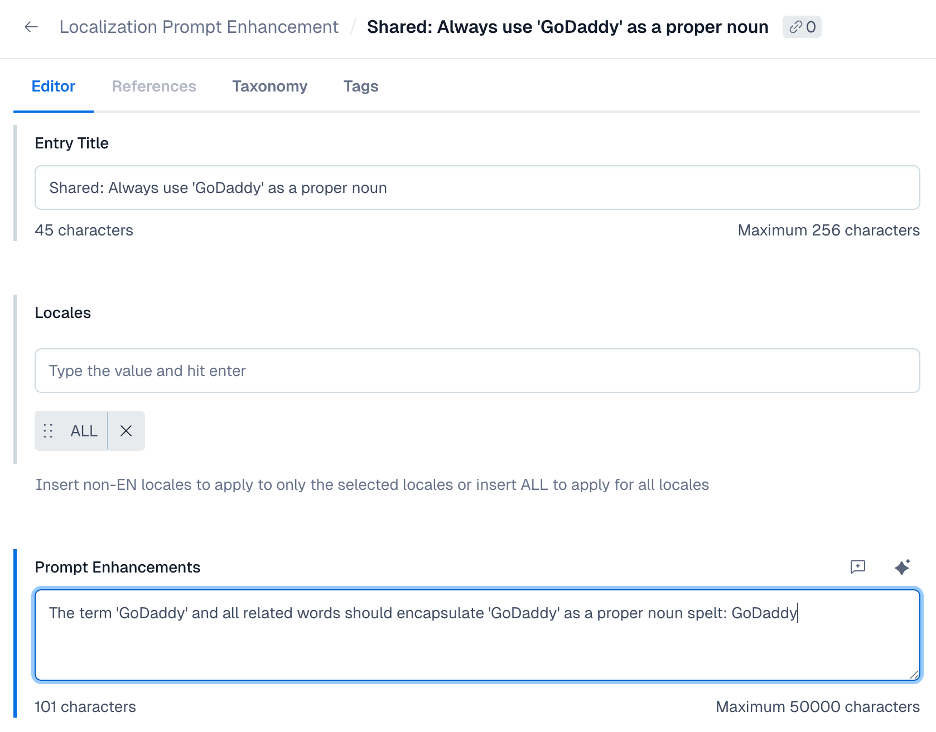
This reduces our edge cases and builds upon our registry of prompts that we can adjust and adapt for different tones and output.
Expanding into that registry, as we get more data and eventually build our own translation memory storage, this can become the starting base to overcome the contextual accuracy hurdle.
Will this replace translation platform services? Maybe.
Just like all things, we at GoDaddy are leveraging tools to fulfill our needs, and when some ideas make sense to try out, our team asks: Why not? And sometimes the smallest tools end up unlocking the biggest productivity gains.
The LLM Localizer started as a scrappy experiment to cut down translation wait times, and it's grown into a tool that our marketing and content teams rely on daily. It doesn't replace the rigor of professional linguists for high-stakes launches, but for the dozens of copy changes that happen every week, it gives teams the speed and control they need to keep moving.
Also, if you ever find yourself waiting two weeks for a translation of a button that says "Save", you might just end up building your own localizer too.