
In the shadow of ChatGPT, everyone's being told to build their network.
AI has depersonalized communication. Autonomous bots make it harder to know who’s real and who can be trusted. Networking experts are calling this the age of the "relationship economy,” where relationships are more important than ever but harder to establish.
LinkedIn is the natural place to invest in your professional network, but entrepreneurs can feel out of touch with the platform. Forget applying for jobs: the power of LinkedIn is far greater than a virtual resume.
Once you understand the etiquette and opportunity of LinkedIn, it morphs from an awkward and stuffy platform to one of the most lively, engaged, and effective corners of the internet for entrepreneurs. This guide will teach you how to network on LinkedIn with confidence in 2026.
Is LinkedIn worth it for entrepreneurs?
Building a personal LinkedIn profile (not a company page) is valuable for entrepreneurs in three major ways:
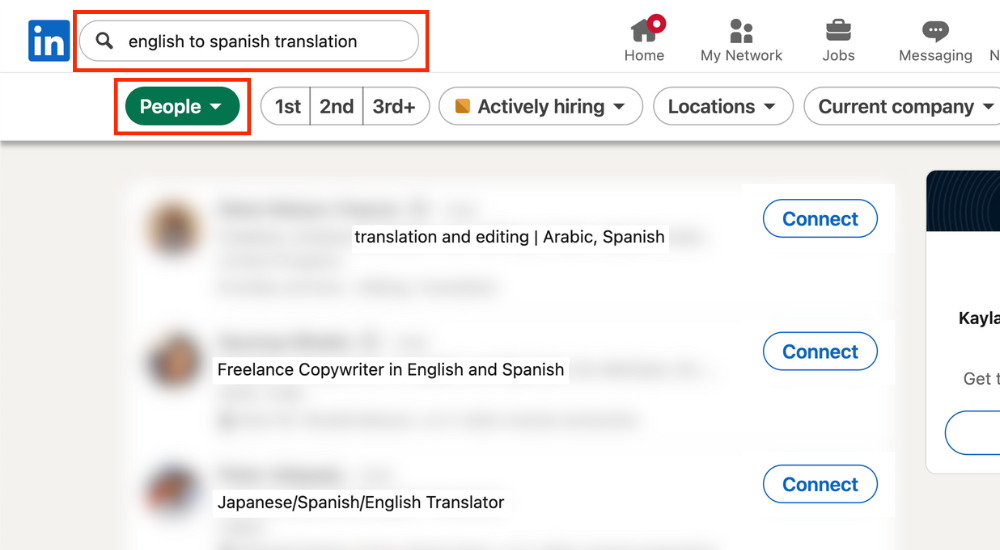
- Generating leads. One of LinkedIn’s many functions is as a search engine. If your profile is optimized for search, it can funnel users directly to your profile.
- Nurturing through your profile. Beyond search placement, your LinkedIn profile acts as an independent landing page for your business.
- Building community. Relationships are built through comments, direct messages, and video chats. This can lead to friendship, collaborations, referrals, media features, and new clients.
Tip: Even if you’re not ready to spend time on LinkedIn, set up your profile now so that it can funnel search traffic to your offers.
The relationship economy
Relationships have always been important for entrepreneurs, but AI has officially ushered in the era of the relationship economy.
Entire fake websites, LinkedIn profiles, and video testimonials can be easily (and convincingly) generated with AI.
Mindset: Building trust with strangers on LinkedIn starts with treating it as a form of relationship marketing instead of content marketing. Entrepreneurs who jump straight to selling will never maximize their LinkedIn ROI.
What LinkedIn isn’t
Understanding what LinkedIn isn’t might help you wrap your head around the platform even faster. LinkedIn is not:
- Just a job-searching platform. While many self-employed people will find work opportunities (I have), the greatest value comes in building your network before you need something.
- Stuffy and professional. Personal content, selfies, and casual conversation are normal. Just as colleagues like to converse about diverse topics at the work watercooler, LinkedIn users enjoy varied conversations instead of always talking shop.
- A place for AI engagement. AI cannot build relationships for you. Bot engagement is a huge complaint that immediately gives you a bad reputation (and often a block) on LinkedIn.
A good first impression starts with a coherent profile. Pull up your profile and let’s walk through updating your account together.
How to set up your LinkedIn profile
This isn’t a definitive list of every single LinkedIn profile setting. Settings change constantly, get moved behind the Premium paywall, and are rolled out to geographic areas at different times. Instead, this is an overview of the big focus areas with lots of examples to learn from.
Verifications
Profile verifications exist to build trust between users on LinkedIn. Users can verify their identity via a work email, education email, or government-issued ID. If successfully verified, your profile gets a clear checkmark badge.
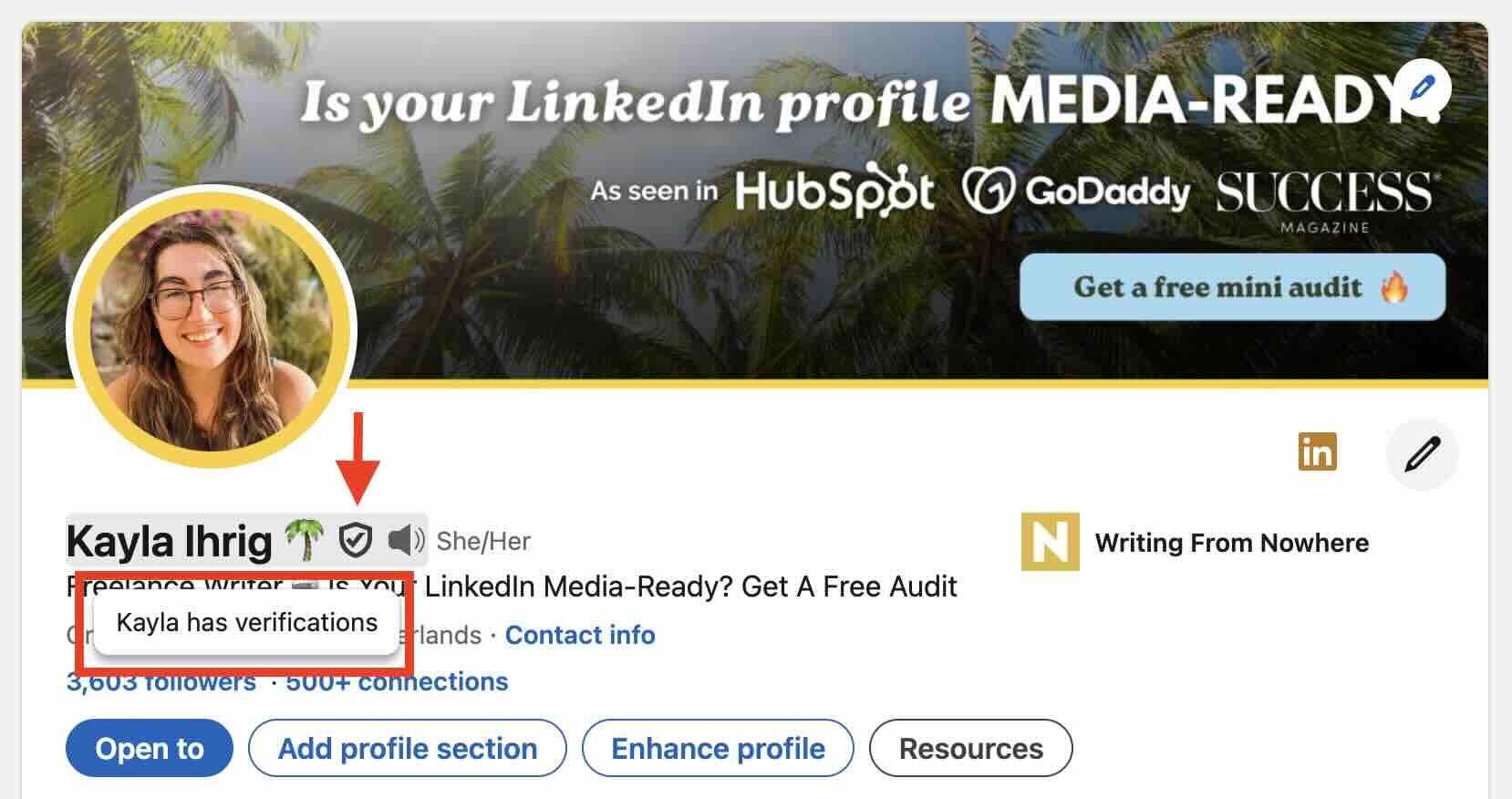
LinkedIn claims that verified profiles get 60% more profile visits, but this process isn’t perfect. For example, some people struggle to get verified because they use a different name than what’s listed on their government identification. There are also geographic limitations.
See your verification options here and complete the process if you’re able.
Basic info
When was the last time you updated your basic information on LinkedIn? Do a quick once-over and check for these details.
Name: The “name” section of your LinkedIn profile is for your name alone. You will see some variations to this, like people adding emojis or keywords, but variations can get your account automatically suspended by mistake. Confession: I added an emoji to my name years ago before I knew about the suspension risk. Save that extra flair for your headline.
Pronunciation: On the mobile app, you can add name pronunciation. Click on the speaker icon to record your voice.
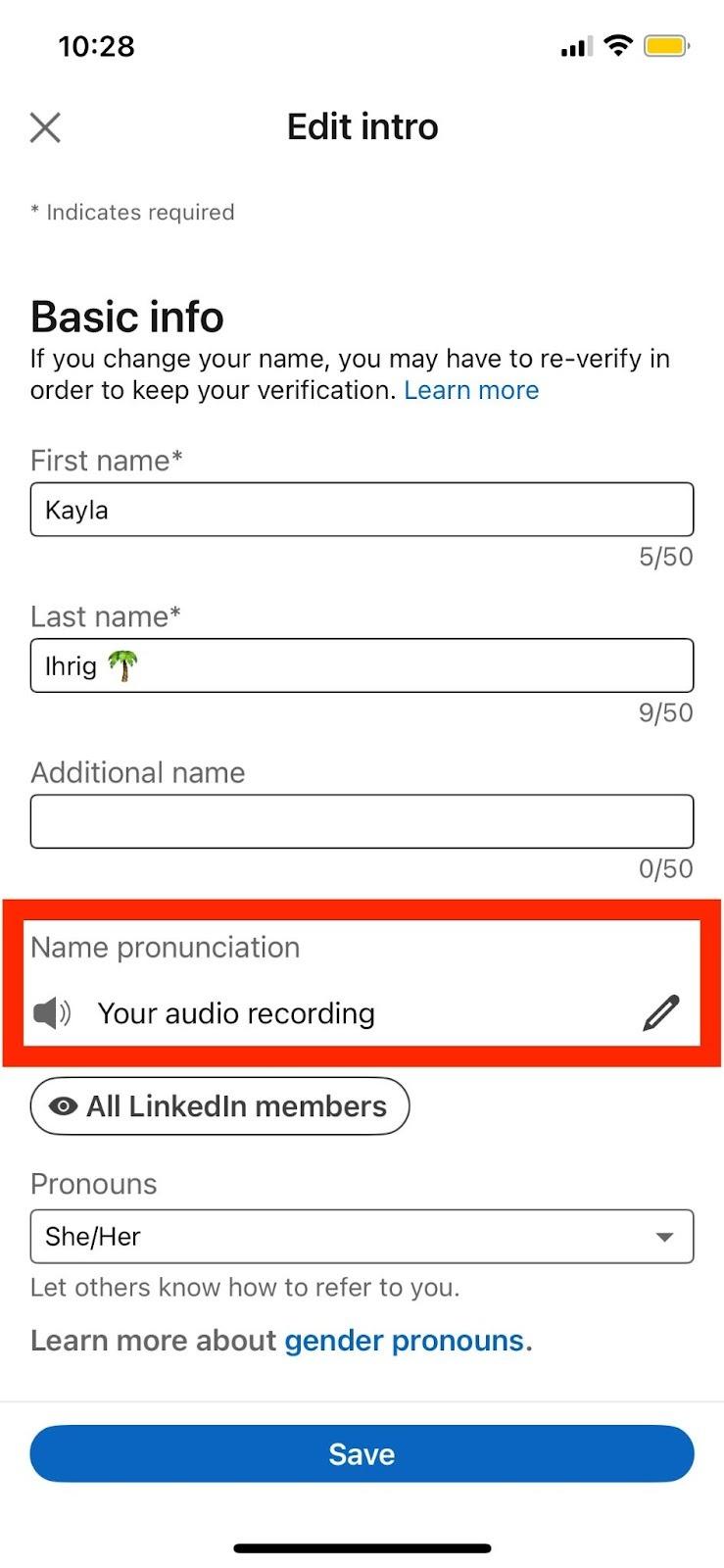
Pronouns: LinkedIn allows users to provide pronouns on their profile. Users can select she/her, he/him, they/them, or provide custom pronouns.
Contact information: LinkedIn limits the number of messages users can send to new connections for free each month. This means that a potential client, collaborator, or media inquiry might find you through LinkedIn but be unable to message you on the platform. Including an off-platform form of communication opens you up to more opportunities.
Headline
Your headline gets as much exposure as your name and profile picture, except it has more real estate (220 characters). It’s displayed with every comment you share on LinkedIn.
In this section, consider including what you do (with keywords), an email freebie, or a current offer. You can also demonstrate your industry authority here. This can be changed often, so don’t be afraid to test different versions based on your current focus.
Tip: Keywords help viewers understand your offers and get your profile indexed in search results.
Cover image
Your cover image is the most visually compelling part of your entire LinkedIn profile. A good account cover image is:
- Informative: It should inform viewers about what you offer.
- On brand: Colors, fonts, and imagery should feel consistent across all of your content.
- Formatted correctly: Check it on both desktop and mobile to make sure your profile picture doesn’t overlap and the text is legible.
Featured section
The featured section on LinkedIn is the equivalent of the “pinned” section on other social media platforms, except that you can add anything to this section (not just posts). It’s a piece of prime real estate.
Focus on the highest-value viewer actions in your featured section: booking introductory calls, reading case studies, signing up for email freebies, etc. You can include a single featured item, or allow viewers to scroll through multiple offers.
About section
There’s no single right way to structure your about section. Some people will share their background, while others will focus exclusively on their offers.
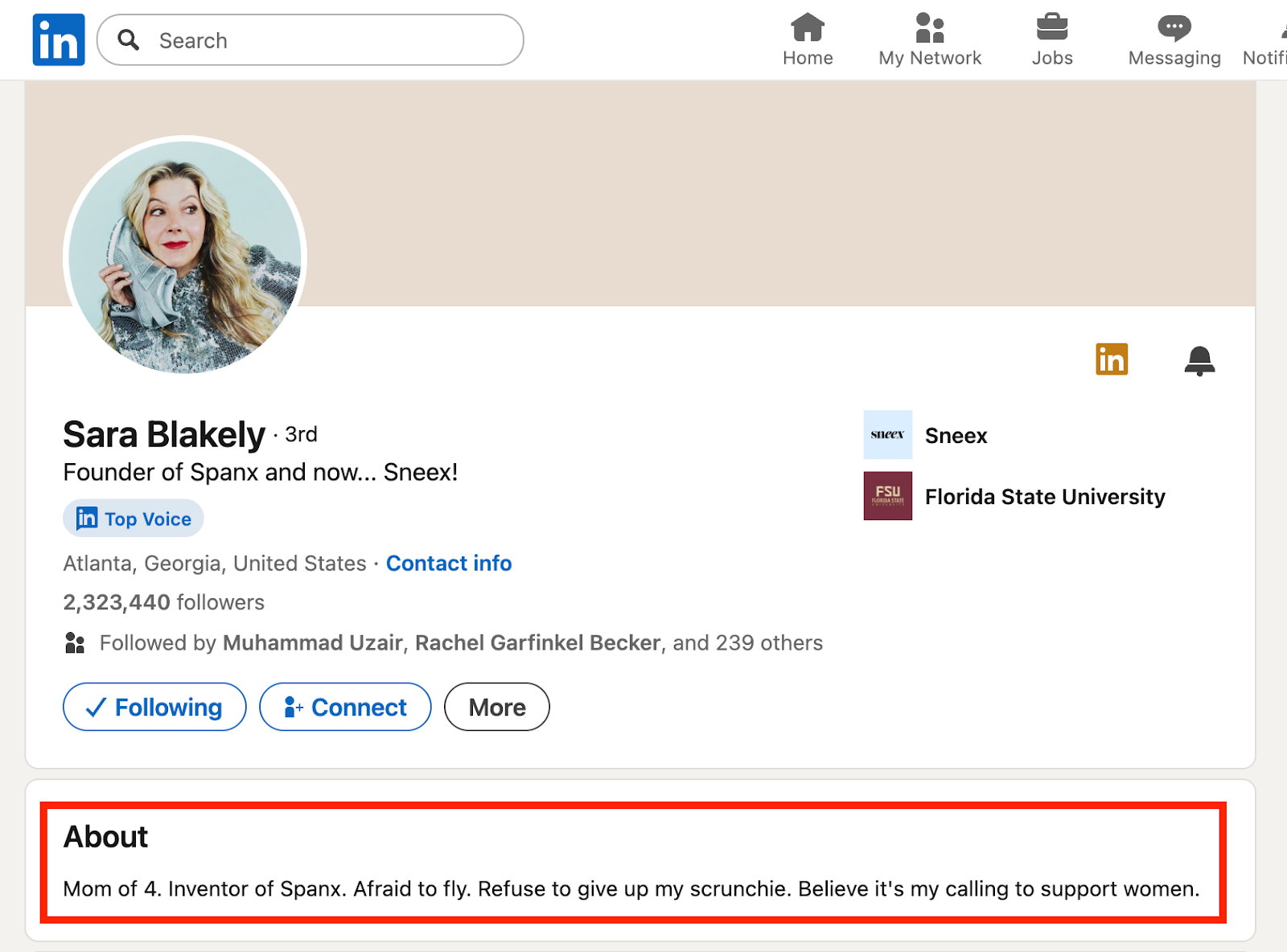
Spanx founder Sara Blakely has a lighthearted “About” section that shares her personality and passion with viewers:
Focus is your friend. As with anything online, most people will skim instead of reading every word.
Services
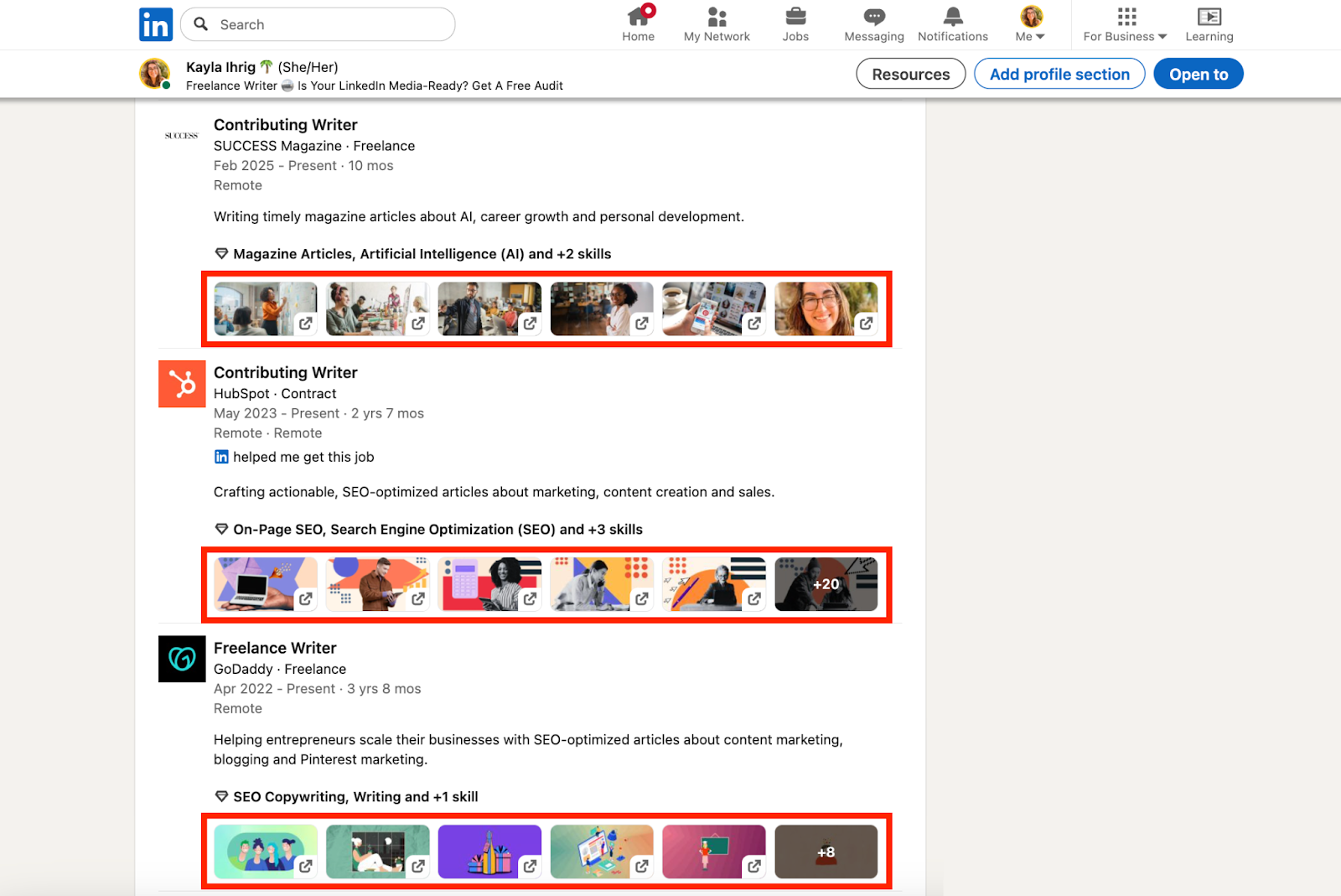
LinkedIn has removed the need for an independent website by offering service listings directly within the platform. Services are displayed directly under the about section and can include text, links, skills, and recommendations from clients (though these are sadly not linked to the recommendations section on your profile).
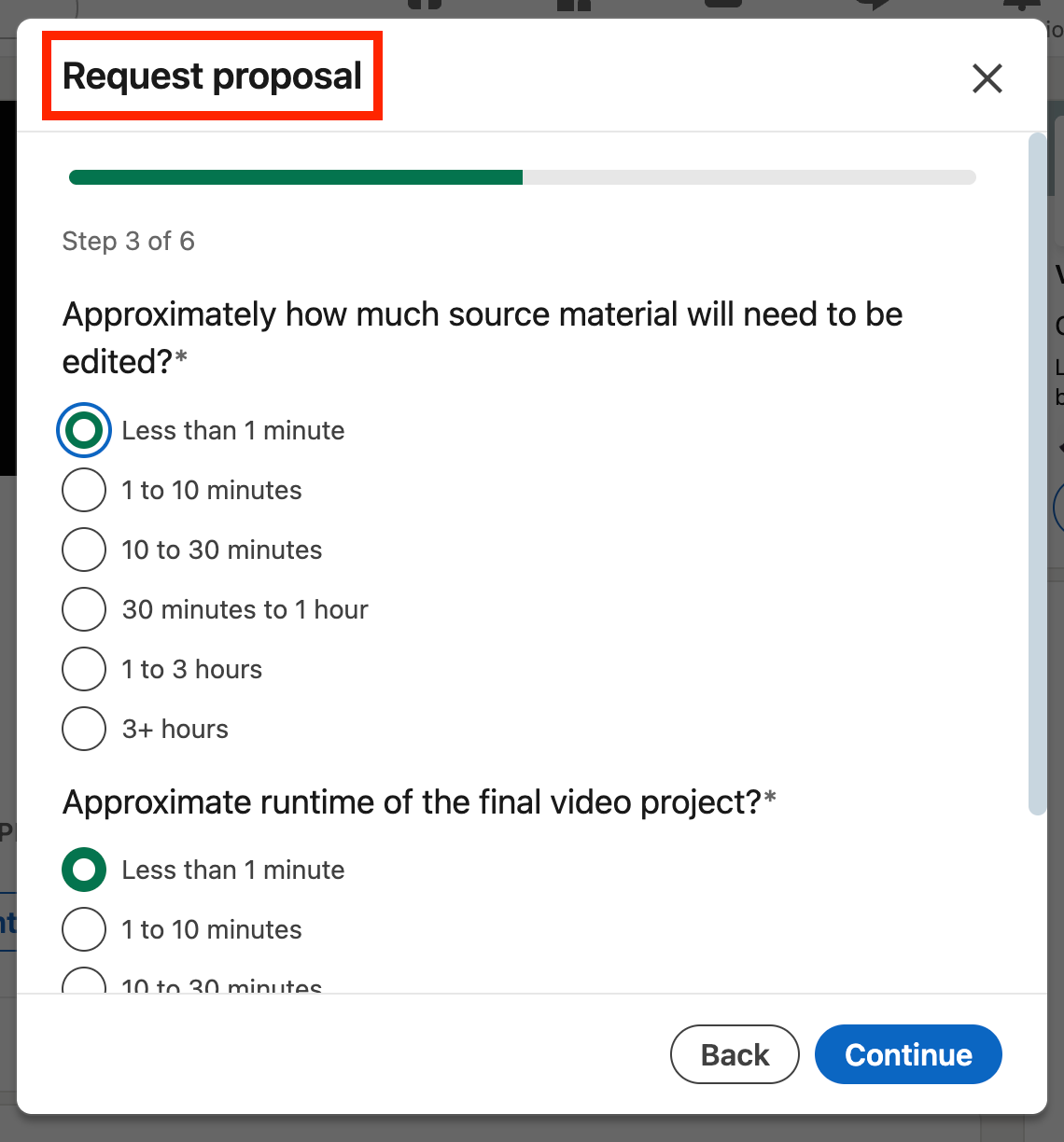
When viewers click “request services,” they’re guided through a set of custom questions about the deliverables and timeline:
Experience
Most LinkedIn users treat the experience section like a virtual resume. Entrepreneurs can use this section to illustrate their lived professional experience.
Naturally use keywords. Add skills. Talk about your current offers. And include links.
Most people skip this last step, but it’s worth taking the time. Adding links is an easy way to make your profile more skimmable, engaging, and believable. This helps establish trust.
For example, I recently vetted a writer who claimed to have written dozens of articles. As I looked at his profile, I couldn’t find a single link to his work.
We’ve all heard that effective writing should “show, not tell.” Show your experience here if you can.
Recommendations
LinkedIn recommendations are probably the most trustworthy form of testimonial an entrepreneur can receive online. While anyone can make up fake recommendations on their website, LinkedIn endorsements are all attached to an individual. The date is also prominently displayed, making it easy to showcase years of experience.
You can request recommendations directly within the platform. Go to the recommendations section at the bottom of your profile, click the “+” icon, and select “ask for a recommendation.” You’ll be guided through a set of questions before the recommendation is sent.
Extras to build authority
There are many other “extras” that you can add to display your authority, expertise, and passions on your LinkedIn profile. A few examples include:
- Patents
- Career breaks
- Causes
- Publications
- Volunteering
- Honors and awards
- Languages
- Projects
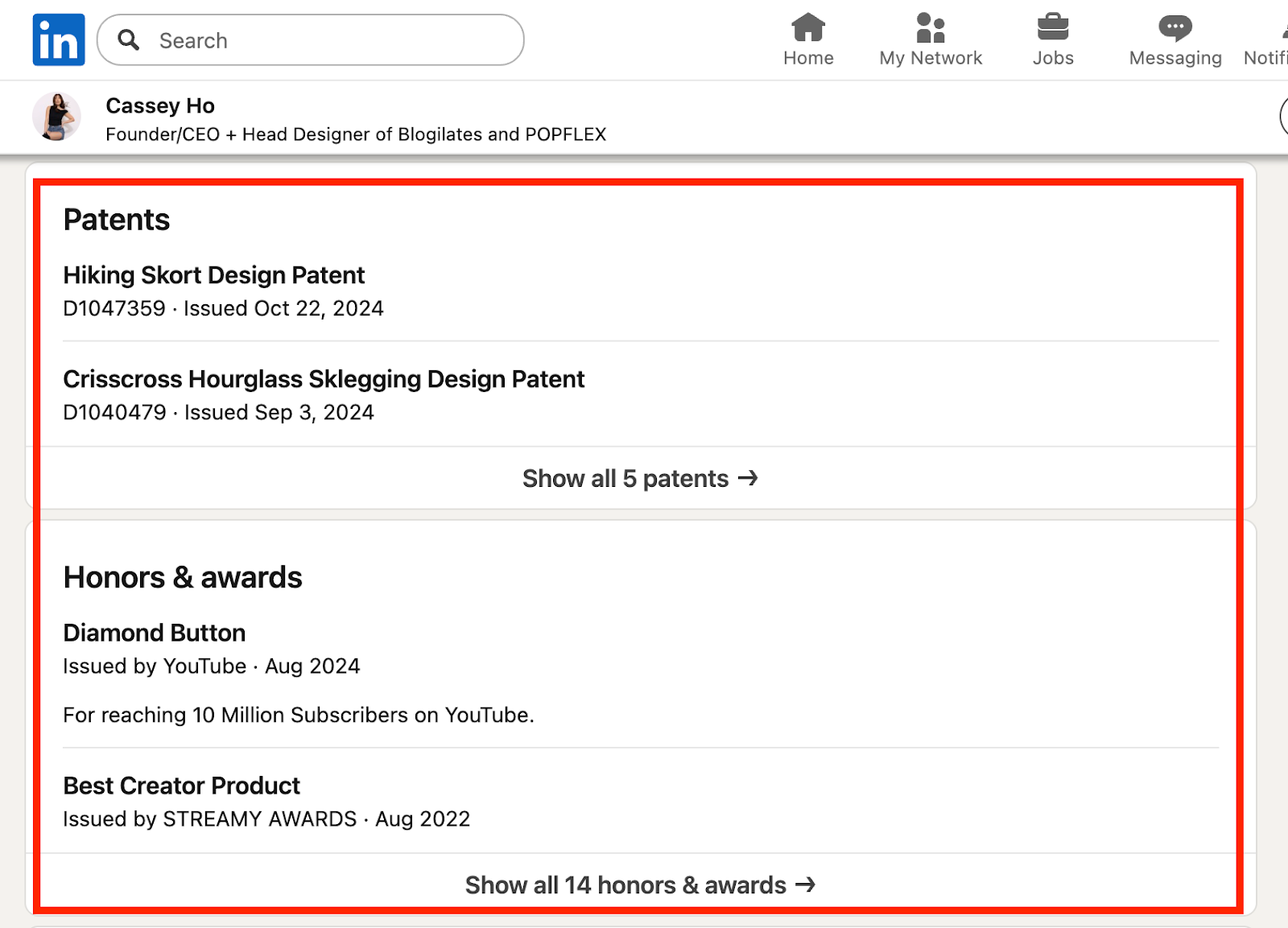
Here on fashion designer Cassey Ho’s profile, you can see patents and awards added:
As a writer, I focus on the publications and recommendations section of my profile. Take the time to add all relevant extras to your profile.
Once your account is structurally sound, it’s time to move on to engagement.
How to engage on LinkedIn
A well-established profile introduces viewers to you, your business, and your offers. But how do they find your LinkedIn profile in the first place? Either through search queries, your posts, or engagement on other people’s posts. Start with the comments.
Comments
If you only take one thing away from this guide, it should be this: comments are the best way to grow on LinkedIn.
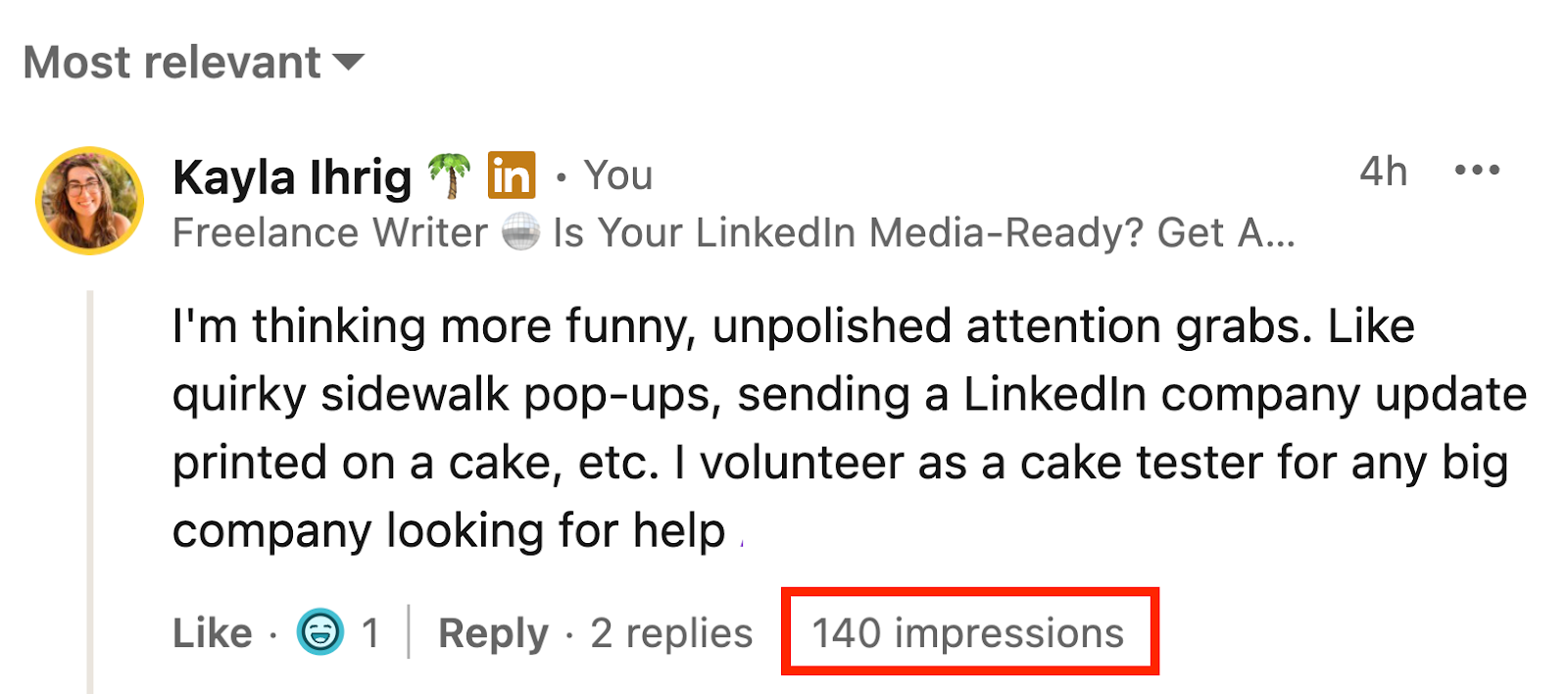
This is a great thing: comments take less time to write than original posts. They reach new people. And they’re so important to the platform that LinkedIn even shows you how many impressions each comment gets.
By actively commenting, you give the kind of engagement that you hope to receive on LinkedIn. It’s a value-first model.
Here are a few quick tips:
- Comment as quickly as possible. Maximum visibility is given to people who comment when a post is still fresh and hasn’t racked up dozens of other comments.
- Always tag the author. The point of commenting is to engage in a conversation. Tagging helps you get noticed.
- Reply to other comments. Start a conversation within the conversation by replying to comments that are already posted by others.
Cold connection requests
Sending a connection request to a person you don’t know can feel awkward. Spammy. Maybe even against the unspoken rules of LinkedIn?
On the contrary, new introductions are what the platform is all about (as long as you actually introduce yourself). Connection requests to new people need context: AKA adding a message.
There’s no official “right” way to handle cold requests, but this works well for me: saying hi using a person’s first name. Sharing why their account caught my eye. Mentioning what I do, and telling them that I would love for us to learn from each other.
There’s unfortunately now a limit on how many messages you can send for free to new connections. You may be eligible for a free trial of LinkedIn Premium, where you can send unlimited messages with your connection requests. Follow these steps to find out if you qualify.
Thought leaders
Established thought leaders are like watering coolers on LinkedIn, where people gather to discuss a specific topic. The people who read, react, and comment are people who have a shared interest in the topic that the author is posting about.
Peers
Collaborations, referrals, trust, visibility, and fun all stem from peer-to-peer connections on LinkedIn. Plus, many peers have the potential to turn into clients or customers once trust is established.
Potential clients or customers
Potential clients are an important group on LinkedIn. In your content, you can speak to their struggles, show them that you understand their challenges, and position yourself as their solution. Posting this type of content attracts attention and builds retention.
Coffee chats
For those who have the time, a great outcome of LinkedIn networking is to leave the platform and speak in real-time on video calls. This is where conversations flourish, and connections move from just another face on the platform to a specific, memorable person.
On LinkedIn, these calls are often called “coffee chats.” They’re 15-30 minute conversations where two people get to know each other. No structure or agenda. No pitching.
I schedule my coffee chats on Fridays, which I call “Friendly Friday.” I have a dedicated Google Calendar booking link that I share freely on LinkedIn. I try to do a couple of friendly Friday calls a month. These conversations have naturally led to many friendships and opportunities.
Creating content on LinkedIn
There’s a huge opportunity for entrepreneurs to become known for what they do on LinkedIn, without needing to go viral or attract hundreds of thousands of followers. That’s because LinkedIn is popular, but comparatively, it’s not crowded.
The platform has more than 1 billion users, but most of them don’t post content regularly. The algorithm compensates for this in different ways, like sometimes:
- Showing viewers the same posts several times on their feed.
- Pushing old content again that got good engagement.
- Emphasizing the comments section of posts.
Posting builds visibility, authority, and trust, which lead to conversions. After you’re already investing regularly in engaging with other content (commenting), experiment with these content types.
Types of content
YouTube is more than videos. Instagram is more than photos. X is more than short-form text. And likewise, LinkedIn is a collection of content types:
- Text: just text
- Photos: selfie, desk photo, etc.
- Graphics: screenshots, quotes, statistics, etc.
- Videos: pre-recorded horizontal or vertical videos
- Live videos: solo or group livestreams
- Carousels: swipeable PDFs
- Polls: viewers weigh in
- Newsletters: longer form written content
What type of content performs best? Your unique answer can only be found by experimenting with content creation on LinkedIn.
Before and after you post
Before and after posting any piece of new content, you should spend time engaging with others on the platform.
Commenting before you post “warms up” the algorithm. Commenting afterwards helps bring people to your profile and improves content distribution in the feed. I haven’t posted “cold” in years, and I personally wouldn’t even bother.
Post ideas for entrepreneurs
Ready to start posting? Here are nine post ideas to consider today.
1. Highlight industry events
Every industry event is an opportunity to recap for others who didn’t attend. Share a takeaway, a quote, or a photo with fellow attendees.
2. Educate with a video
No one can deny the power that video has for making you feel connected to a creator. Most entrepreneurs are oozing energy and passion for their area of expertise. An educational video is a fantastic channel displaying this.
3. Show expertise with an infographic
Infographics are popular on LinkedIn for offering quick, intense education while putting your expertise fully on display. When they’re designed well, they’re works of art.
4. Display your values
All the best entrepreneurs I know are values-driven. When was the last time you talked about your values? A value that’s obvious to you might be invisible to others.
5. Share a lived experience
Educational, first-person experiences beat hollow, generic thought leadership content. Share something you experienced lately and frame it in a way that’s helpful for others.
6. Thoughts on industry shifts
What changes are impacting your industry, and what are your thoughts? As an SEO writer, I’ve had “the Reddit” discussion with every writer I know.
7. Day-to-day life
Selfies, desk photos, pet pics, personal life updates: they’re all welcome on LinkedIn. No one likes to be sold to constantly. Connect across cultures and industries by sharing some day-to-day content. It keeps the platform human.
8. Step-by-step tutorials
Well-structured tutorials educate, nurture, and share a glimpse of your working style. They’re time-consuming to create, but can be re-shared multiple times.
9. Celebrate others
None of us works alone. Acknowledge and celebrate the people who are doing great things around you. Encourage others to do the same in the comments (good karma plus engagement).
Start growing
If you’re still reading, then I’m convinced that LinkedIn has something important waiting for you in 2026.
Can I offer one final tip? Tune your feed. Follow people who make you excited to open the app. If your feed is full of ex-coworkers, you’ll never see LinkedIn’s full potential for entrepreneurs.
I think the secret to growing on LinkedIn is to treat it like a delightful ongoing conversation that you get to be a part of. Go find out what opportunities await you there.
Disclaimer: All known trademarks contained herein are the property of their respective owners and their inclusion does not represent any affiliation, endorsement, or sponsorship.