

Key takeaways
- Newsletters are strategic email marketing tools to engage customers with relevant content, build authority, and generate sales.
- Success depends on editorial planning, responsive design, and valuable content that prioritizes scannability and the mobile experience.
- Essential metrics to track include open, clic,k and conversion rates — supported by A/B testing for continuous optimization.
- Build permission-based lists in a compliant way, following the CCPA (California Consumer Privacy Act), using transparent opt-in forms and lead magnets.
- Platforms like GoDaddy offer end-to-end solutions to create, send and automate newsletters integrated with other digital marketing tools.

Did you know that for every $1 spent on email marketing, the average return is $41? That’s a stat confirmed by the DMA (Data and Marketing Association) that shows the extraordinary power of this channel. So, learning how to create a newsletter is essential for anyone who wants results like that.
But getting to that level of return takes more than just sending emails. You need a full strategy that starts with planning, moves through content production, and continues with data analysis and ongoing optimization.
This guide brings together everything you need to know — from the fundamentals to practical steps and real examples — so you don’t just understand the theory, you put it into action and turn your newsletter into a powerful growth lever.
Get ready to build a loyal subscriber base, craft content that engages, and measure the results that actually matter. Let’s get started.
What is a newsletter?
It’s a digital publication sent at a regular cadence to people who opted in to receive it. Unlike a promotional email, its main goal is to strengthen relationships with a specific audience by delivering relevant, valuable content. A strong newsletter informs, educates, entertains, or updates readers on topics they care about.
They’re widely used by companies, brands, content creators, and media outlets to:
- Build authority and trust in a niche.
- Maintain audience engagement.
- Share news, products, or services in context.
- Drive traffic to a website or blog.
In essence, it’s a strategic marketing and communication tool that, when well executed, becomes a valuable, anticipated channel for your audience.
Why invest in creating newsletters?
Because it’s a direct, owned, high-engagement channel. Unlike social networks, where reach is controlled by algorithms, email lands straight in the inbox of people who already showed interest in your content, enabling more personal, one-to-one contact.
From a business perspective, newsletters are powerful tools to:
- Build relationships and authority: Regular contact with valuable content turns your brand into a reference, building trust and loyalty.
- Generate qualified traffic: Strategic links send subscribers to your site or blog, ideal for boosting conversions.
- Nurture leads: Newsletters guide prospects along the entire buying journey, from awareness to decision.
- Monetize: A loyal audience can be monetized directly through ads, your own products, or premium subscriptions.
In short, a newsletter is a valuable digital asset. It puts you in control of audience communication, creates steady business opportunities and delivers exceptional ROI when done well.
How to send a newsletter: A complete step-by-step
To ensure your send is professional, effective, and compliant with data protection laws, follow these steps:
- Plan your content.
- Choose a platform and template.
- Conduct pre-send checks.
- Send and analyze.
Here’s what to do at each step.
1. Plan your content
- Define the goal: Decide what you want to achieve (e.g., drive traffic, educate leads, promote sales).
- Know your audience: Understand your readers’ interests and pain points to create relevant content.
- Create the content: Produce valuable, compelling material with a strong subject line, well-written copy, quality images, and a clear call to action (CTA).
- Set the cadence: Choose a consistent frequency (weekly, biweekly) to keep readers engaged.
2. Choose a platform and template
- Choose an email marketing platform: Use a professional service; these platforms support deliverability, templates, and legal compliance.
- Use a template: Pick or create a responsive layout (mobile-friendly) to ensure a great reading experience.
- Run an A/B test: Test different subject lines on a small segment to find the one with the best open rate.
3. Conduct pre-send checks
- Review content: Carefully verify grammar, links, images, and CTA functionality.
- Send yourself a test: Preview the email in different clients (Gmail, Outlook) and devices (mobile, desktop).
- Configure sender details: Add a recognizable From Name and a clear, persuasive Subject.
4. Send and analyze
- Choose the target list: Select the subscriber segment that should receive that specific email.
- Launch the campaign: Click Send or Schedule for the time that best fits your audience.
- Monitor results: After sending, analyze key metrics — open rate, click-through rate (CTR), and bounce rates. Use the data to improve future sends.
Now that you know what a newsletter is and how to send one, let’s dig into more specifics.
What should newsletter design and structure look like?
Your design and structure should prioritize clarity and scannability — most people skim. The layout must be responsive and adapt perfectly to mobile devices, where most emails are opened.
The ideal structure:
- Header: Logo and simple menu.
- Main content: Clear hierarchy with an engaging headline, lightweight images, and short text blocks.
- Call to action (CTA): Visible buttons with action-oriented copy.
- Footer: Contact info and an unsubscribe link.
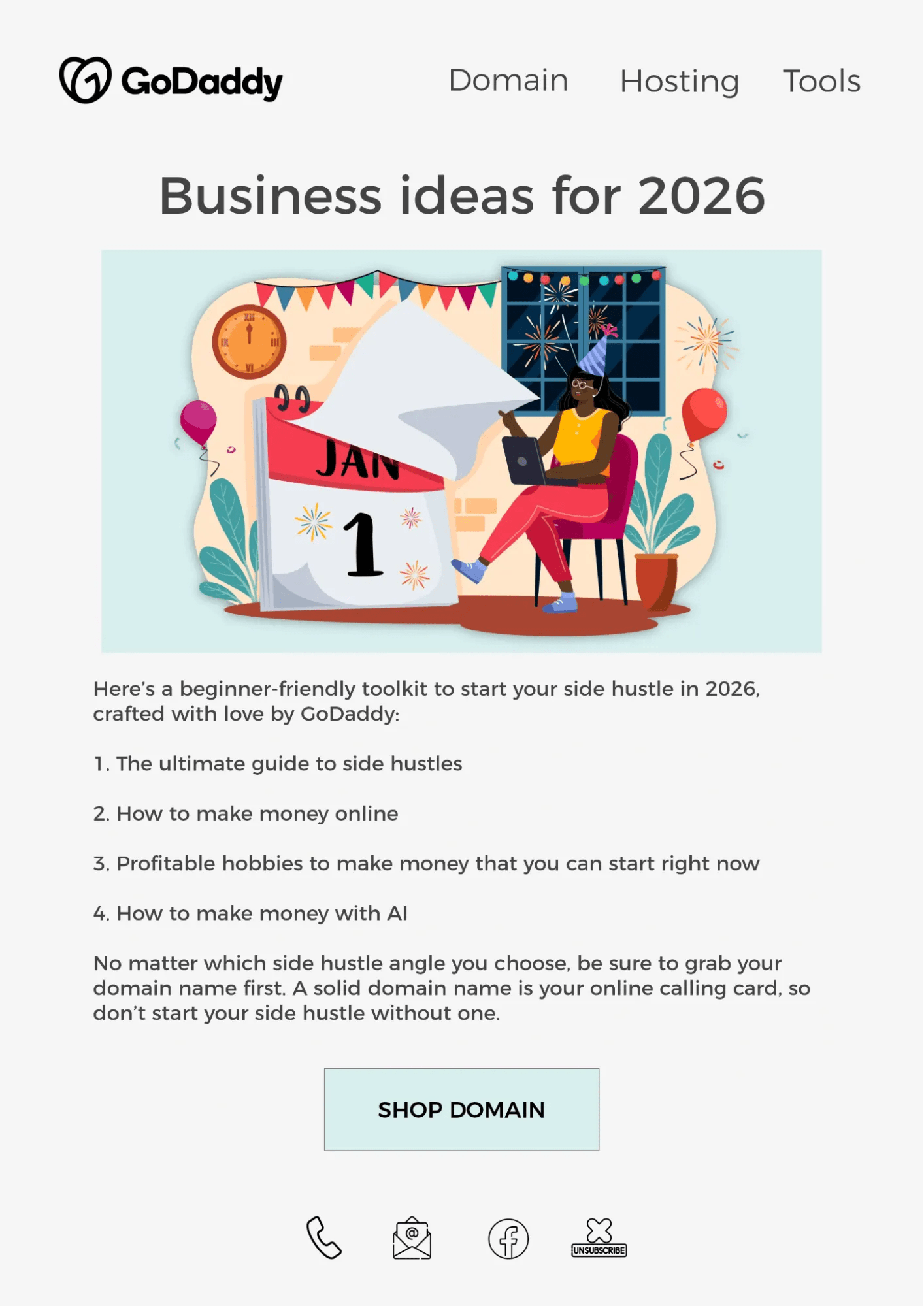
Sizing and scannability:
- Width: Between 600 and 700 pixels to display well in most email clients.
- Text: Use short sentences and paragraphs, bullet lists, subheads, and bold for keywords — these help readers grasp the core message at a glance.
- Images: Keep them lightweight for fast loading and complementary to the text — never replace essential information with images.
A clean design with white space and a mobile-first focus is key for guiding the reader’s eye and prompting the action you want — whether that’s a click or a deeper read.
Newsletter examples: How to create content that engages
Engaging content takes several steps, but the essentials are an attractive design, direct copy, and clear value for the reader. In other words, there’s no point “padding” your email — think about what you can genuinely offer and use that to stand out.
Here are three ideas and examples focused on delivering specific value for each type of business.
Example 1: Fashion retail (ecommerce)
Idea: “Style Guide of the Week.” Instead of just showing new products, the newsletter teaches subscribers how to elevate their outfits. The focus is on solving a style problem using items from the catalog.
Practical example
Subject: “3 denim jacket looks to turn heads in the cold weather”
Content:
- Look 1 (casual): Photo of the denim jacket with a basic tee and twill pants, with short copy: “the perfect combo for a day of shopping.”
- Look 2 (work): The same jacket over a sleek dress, with a tip: “go from office to happy hour without breaking a sweat.”
- Look 3 (night): Jacket with a black shirt and skinny jeans, plus accessory suggestion.
Engagement: each “look” has a CTA button (“View Product” or “Build This Look”) linking straight to product pages. The newsletter becomes a personal style guide, not a promo flyer.
Example 2: Consulting or B2B services
Idea: “Market Insights for [Industry Name].” The goal is to position your company as an authority — sharing knowledge, not selling directly. Purely educational and actionable.
Practical example
Subject: “How [Trend X] is impacting the logistics industry”
Content:
- Summary analysis: One paragraph explaining the trend and its implications.
- Actionable tip: “3 steps your company can take to adapt to this change.”
- Success story (brief): “How Company Y implemented this and increased efficiency by 15%.”
- Exclusive resource: Link to a free webinar or a deeper ebook.
Engagement: delivers real value for professionals by helping them do their jobs. The CTA points to richer content to nurture the lead.
Example 3: GoDaddy Substack newsletter
Idea: A “permission to pause” newsletter that reassures readers that rest is productive while gently introducing side-hustle ideas as inspiration for the year ahead.
Practical example
Subject: “Refresh, reset, and ready-set-go”
Content:
- It gives readers permission to reset during the holidays, instead of pushing them to stay productive.
- Meets the readers where they are — tired and reflective — introduces side hustle ideas without pressure.
- Question for the audience: “What do you actually want next after you’ve rested?” It invites pause and reflection on their own readiness and less about what they should do more; what feels right for them once they’re no longer exhausted.
Read the full newsletter here to explore the holiday reset and side-hustle inspiration in more detail. Subscribe to the Substack newsletter to receive future issues in your inbox.
How do you define success and measure results?
Start with clear goals aligned to your business and audience. For newsletters, common goals include:
- Nurturing leads
- Building loyalty
- Driving traffic
- Selling
Each goal requires different KPIs (key performance indicators).
To nurture leads, focus on engagement: open and click-through rates (CTR). For sales, look at conversions and revenue. For loyalty, subscriber retention is crucial.
So measuring results goes beyond isolated numbers. Analyze whether your newsletter KPIs are moving toward the original goal — always considering your audience’s behavior and interests.
How to build an editorial plan for a newsletter
Follow these steps:
- Define formats
- Set frequency
- Create a calendar
- Adapt as needed
Start by defining content formats aligned to your goal, such as: link curation, quick tips, interviews, or original articles.
Then set a realistic frequency (weekly, biweekly, or monthly) that you can maintain with consistent quality. Consistency matters more than frequency.
Finally, map everything in an editorial calendar. Include send dates, themes for each edition, CTAs, and the personas each piece serves. This removes the “what should I write?” question and ensures a steady, strategic flow of content for your audience.
How to build a permission-based newsletter list
Building a permission-based list is rooted in transparency and value, which are essential for compliance with the Federal Trade Commission (FTC). Collection should always be opt-in, meaning the user subscribes and consents to receive emails.
This process is crucial because, by offering a clear incentive (like an ebook, discount or exclusive content) in exchange for an email, you set expectations about what subscribers will receive and how often.
Best practices to avoid issues:
- Use double opt-in forms (to validate the email).
- Keep a record of consent.
- Provide an easy unsubscribe link in every email.
- Never buy third-party lists.
A qualified, aware list — even if smaller — is far more valuable than a large, purchased list that never asked to hear from you.
What platforms and tools can you use to create and send newsletters?
Email marketing platforms are essential for creating, sending, and managing newsletters professionally. These tools generally fall into categories:
- A full-service platform like GoDaddy, is ideal for small businesses and creators, offering drag-and-drop templates, automation, and basic reporting.
- Advanced automation with integrated CRM (like ActiveCampaign and HubSpot).
- Design tools (like Canva).
- A/B testing tools to optimize subject lines.
- Domain warm-up tools (like Instantly) to improve deliverability.
Choose based on your send volume, automation needs, and budget.
What is continuous newsletter optimization?
It’s the process of continually improving your newsletter performance using data and tests. It rests on three pillars:
- A/B testing: Experiment with elements like subject line, sender name, and calls to action (CTAs) to learn what engages your audience and lifts opens and clicks.
- Segmentation: Divide your list by behavior (like clicks and purchases) or demographics to send highly relevant content with a greater chance of conversion.
- Deliverability: Handle the technical side so your emails hit the inbox. This includes monitoring bounces and spam complaints, keeping your list clean and setting up authentications like SPF and DKIM.
How to create and send your first newsletter
Here’s a step-by-step to create and send your first newsletter:
- Define the goal and audience: Choose a specific theme for the edition and be clear about who will receive it.
- Write the content: Craft an appealing subject line and direct copy with clear value for the reader. Use quality images that complement the message.
- Choose a platform: Sign up for an email marketing service that offers ready-made templates and solid deliverability.
- Build the layout: Use the platform’s editor to organize text and image blocks in a clean, responsive template.
- Include a call to action (CTA): Add a button or link with a clear action, like “Read more on the blog” or “Grab the discount.”
- Review and test: Check links, spelling, and previews across devices. Send a test to your own inbox.
- Schedule the send: Select your contact list (always with consent) and choose the best time based on your audience’s behavior.
Set up your email marketing platform and start today
Now that you know how to create an effective newsletter, put it into practice with the right tools. With GoDaddy’s Digital Marketing Suite, you don’t have to be an expert to create professional campaigns that engage and convert.
Imagine creating and sending impactful newsletters right from one integrated dashboard — with 750,000 monthly sends on the Ultimate plan — while scheduling social posts and optimizing your site for Google. All in one place, with expert support and ready-to-customize templates.
Real results are waiting. Start free for 30 days and watch your emails take off.
Let our experts handle your digital marketing campaigns.
Still have questions about how to create a newsletter? Here are quick answers to get you up to speed.
FAQ: Frequently asked questions about creating a newsletter
How do I send a newsletter in a few steps?
- Create your content in an email marketing platform.
- Choose a responsive template and build the layout.
- Review links and copy.
- Select your contact list.
- Schedule or send.
How often should I send and how do I avoid spam?
Maintain a consistent cadence (weekly or biweekly). To avoid spam, use permission-based (opt-in) lists only, include an easy unsubscribe link, authenticate your domain (SPF/DKIM), and avoid overusing words like “free” or “offer” in the subject line.
Which KPIs should I track to gauge performance?
Track open rate (engagement), click-through rate (CTR) (interest), and conversions (bottom-line results). Delivery metrics — like bounces, unsubscribe,s and spam complaints — are also essential to spot issues with list quality or content relevance.