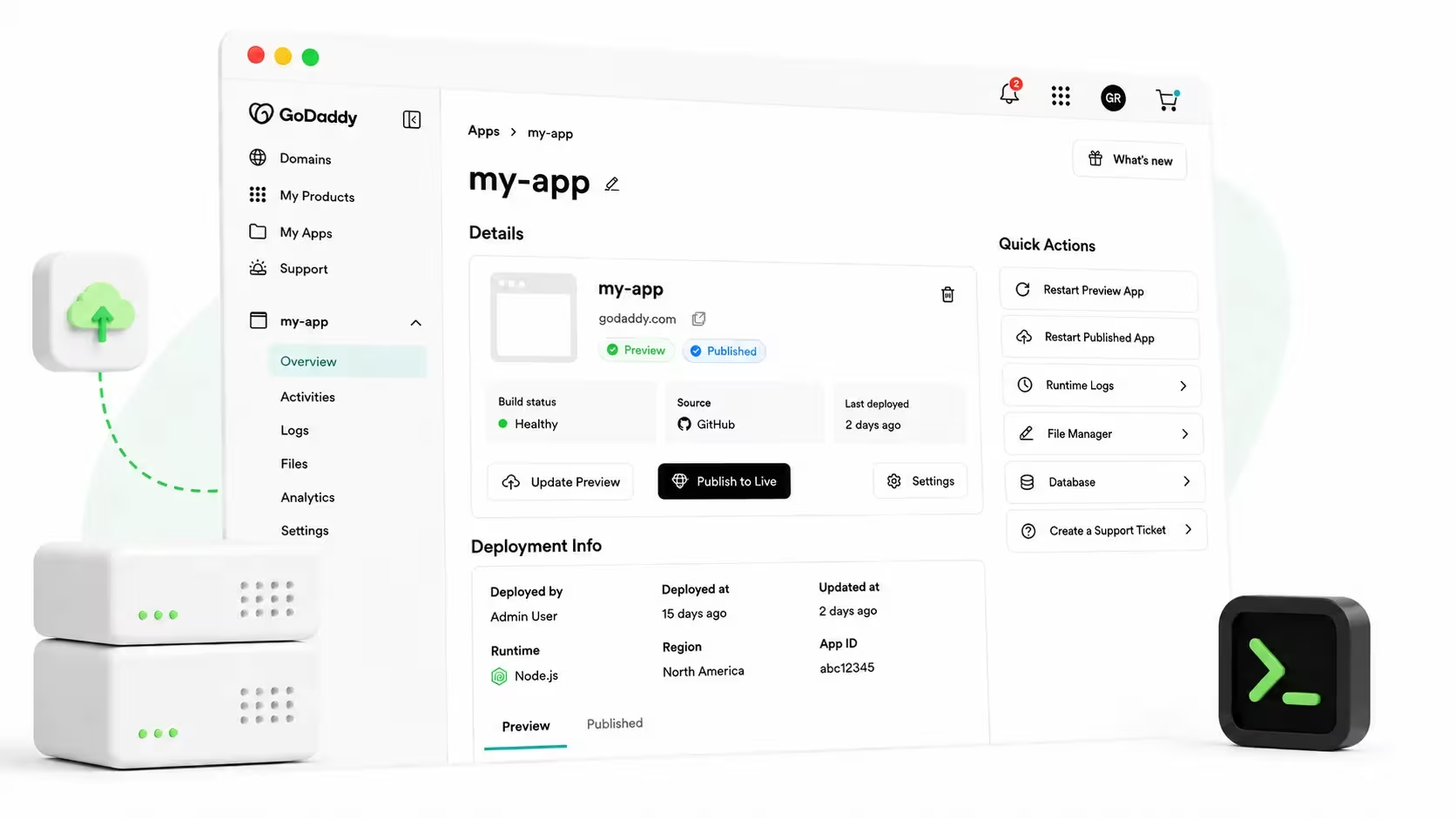
If you've built a Node.js app — with your own hands, an AI coding agent, or a freelancer you hired — the only thing standing between you and real users is getting it live. As of today, that step takes minutes: GoDaddy Node.js Hosting puts your app on the internet, on your own domain, with SSL already turned on.
Node.js Hosting went generally available on August 12, 2026. Bring your app in as a zip file or via a GitHub repo — two ways in. Once it's live, it runs as a real, persistent Node.js 22 process, not a serverless function that resets between requests.
Pricing is flat — no per-request, per-gigabyte, or per-build-minute charge, so your bill doesn't change based on how much traffic your app gets. And if something breaks, GoDaddy's support team is a phone call or chat away, 24/7.
Building an app has never been easier. The hard part is everything that comes next — hosting it, publishing it, ensuring it is secure and reliable, and connecting it to payments, commerce, and the systems a real business depends on. Node.js Hosting bridges that gap, helping turn something built with AI, by a freelancer, or by a small business owner into something that actually works and is available to the world.- Bhala Dalvi, VP of Engineering, GoDaddy
Whether you wrote the code, used an AI builder to create it, deployed it for a client, or hired someone to build it for your business, this guide is for you. It covers what Node.js Hosting is, how the three-step deploy works, what it costs, and how to start for free today.
What is GoDaddy Node.js Hosting?
Node.js Hosting is a place to run a Node.js app — a website, an API, or a full web application — without configuring a server, buying a certificate, or managing infrastructure yourself. It's included at no additional cost with every GoDaddy Web Hosting plan: Economy, Deluxe, and Ultimate. It isn't a separate product you buy on top of Web Hosting; if you purchase a Web Hosting plan from GoDaddy, you have it.
You don't need a Web Hosting plan to try it, either. GoDaddy's free preview tier gives you up to two preview apps with no credit card and no plan required, and those previews don't expire. That's the philosophy behind the whole product, in six words: you build the app, GoDaddy runs it live. GoDaddy handles the framework detection, the dependency installation, and the deployment — the parts that have nothing to do with whether your app is any good.
For a builder who just wants to see their work in front of real people, that makes Node.js Hosting one of the best ways to turn a finished app into a live website without learning a new set of skills.
Start a free Node.js Hosting preview today.
No plan, no credit card required.
Whether you built it, deployed it for a client, or had it built for you — this is for you
Node.js Hosting serves three kinds of readers, and each one gets something slightly different out of it. Find yourself below.
If you're a developer or freelancer
You built something that works on your laptop, and you don't want deployment to undo that. Node.js Hosting runs your app as a real, persistent Node.js process on Node.js 22 — not a serverless function — so npm start behaves the same way in production as it does locally. If you built a Fastify API that tracks session state in memory or runs a background job on a timer, that logic behaves exactly as written, because the process doesn't reset between requests.
Connect your GitHub repo and every push to your chosen branch can then be pulled to your GoDaddy Node.js Hosting. Pricing is flat — no per-request, per-gigabyte, or per-build-minute charge — so your bill doesn't move when your app gets popular.
If you're building it for a client
You need a hosting target you can hand off and walk away from — one that doesn't turn into a support ticket six months later. Say you're launching a Next.js site for a client's rebrand: connect their GoDaddy domain and DNS configures itself automatically, or add the exact records GoDaddy gives you if their domain lives elsewhere. Every published app runs behind automatic HTTPS, a CDN (powered by Cloudflare), and a web application firewall by default, so there's nothing left for you to configure after launch.
Pricing is flat and included in the Web Hosting plan your client purchases, which makes it easy to put in a client budget without guessing at usage-based fees. And when a build fails, GoDaddy AI reads the logs and explains the problem in plain language — often before your client even notices something went wrong.
If someone built this for your business
Maybe a freelancer built you a Node.js booking app for your salon, or you used an AI tool like GoDaddy Airo AI Builder, Lovable, Base44, or Replit yourself — either way, you shouldn't need to become a developer to trust that it'll stay live. Your app runs the same way live as it did when it was built: it stays on and remembers things instead of resetting, the way a website should.
Once your app deploy is published, your site or app runs behind automatic HTTPS, a CDN, and a firewall — configured by default, so there's nothing extra for you to set up. GoDaddy Node.js Hosting also comes from the same company that likely already holds your domain, your business email, and takes your payments. If something breaks, you can call the same 24/7 support line by phone or chat you already know, not a chat window with a stranger.
Start a free Node.js Hosting preview today.
No plan, no credit card required, whichever one of the three above sounds like you.
Real Node.js, not serverless
Here's a distinction most Node.js Hosting comparisons skip, and it matters more than it sounds: not every "Node.js Hosting" runs your app the same way. Some providers — Netlify runs Express apps through Netlify Functions, for example — spin your code up per request as a serverless function that starts fresh each time and disappears when it's done.
Node.js Hosting doesn't work that way. Your app runs as a real, persistent process on Node.js 22, the same way it runs when you type npm start on your own computer. That difference shows up the moment your app does something a serverless function isn't built for: hold a value in memory between requests, run a background job on a timer, or keep a WebSocket connection open. In a persistent process, all of that behaves exactly as written. In a serverless function, it often breaks, resets, or has to be redesigned around the platform's limits.
For a non-technical reader, the plain-language version is simpler: your app runs the same way live as it did when it was being built. Nothing about how it behaves changes just because it's now public — the person or tool that built it doesn't have to account for a different environment in production than the one they tested in.
How to get your app live — in 3 steps
Here's exactly what publishing looks like, from a finished app to a live URL.
Step 1: Upload a zip or connect your GitHub repo
Two ways to bring your app to GoDaddy. Upload a zip file up to 100 MB (leave out node_modules — GoDaddy installs your dependencies for you), or connect your GitHub repository so every push to your chosen branch redeploys automatically. Use the zip upload for a one-time or occasional deploy; use GitHub Connect if you're actively iterating on the app.
GoDaddy detects your framework automatically — React, Vue, Next.js, Nuxt, Remix, Express, Fastify, Nest, or any app that runs with a single npm start — and installs whatever it needs. No config files, no Docker, no YAML.
Step 2: Preview it for free before it goes live
Before anything is public, GoDaddy builds your app and gives you a private preview link that requires a login to view. Preview apps are free, don't expire, and you can have up to two at a time — no Web Hosting plan or credit card required.
If a build fails, GoDaddy AI reads the build logs and explains the error in plain language instead of leaving you with raw output. You can apply the suggested fix yourself, download a corrected zip, or open a pull request against your repository — in some cases, Airo adapts the app automatically so the build succeeds without you changing anything.
From code to a live preview link, there's no server to configure and no separate build pipeline to babysit — just a link you can share the moment the build finishes.
Step 3: Publish on your domain with automatic SSL
When the preview looks right, publish it. Connect a GoDaddy domain in one click and DNS configures itself automatically; on an external domain, GoDaddy gives you the exact A and CNAME records to add. Either way, your published app goes live behind automatic HTTPS, a global CDN, and a web application firewall — already configured, with no command line required.
Need a database? A managed MySQL database comes with every published app, with a table browser and SQL editor built in, plus encrypted environment variables for anything your app needs to keep private. Nothing to provision separately. Before your first deploy, you'll also pick a region — North America or Europe — for where your app runs.
Start a free Node.js Hosting preview today.
No plan, no credit card required — you just read the whole process; now try it with your own app.
How much does Node.js Hosting cost?
Node.js Hosting isn't something you buy on its own — it's included with GoDaddy Web Hosting, at a flat rate that doesn't change based on how much traffic your app gets. There's no per-request, per-gigabyte, per-build-minute, or per-invocation charge — your bill stays the same whether your app gets ten visitors or ten thousand.
| Plan | Node.js Hosting | Preview apps | Published apps included | Best for |
|---|---|---|---|---|
| No plan (free) | Preview only | 2 | 0 | Trying Node.js Hosting before committing to a plan |
| Web Hosting Economy | Included | 2 | 1 | A single app, personal project, or first client site |
| Web Hosting Deluxe | Included | 2 | 10 | Freelancers and agencies publishing multiple apps |
| Web Hosting Ultimate | Included | 2 | 25 | Agencies managing a full portfolio of client apps |
Plans and allowances accurate for GoDaddy Node.js Hosting at the time of writing, August 18, 2026.
Preview apps stay free and private no matter which plan you're on; published apps count against your plan's allowance, and moving an app to a different plan is possible any time there's a free slot on the destination plan. Your bill won't spike because your app got popular — that's how flat-rate pricing works, not a caveat buried in the fine print.
Start your Node.js app for free today
The only thing left is trying it with your own app.
Start for free. Upload a zip or connect your GitHub repo, and see your app live on a private preview link in minutes. No plan, no credit card required. And if you already have a GoDaddy Web Hosting plan, publishing on your own domain is one step further, not a new purchase.
Start for free at godaddy.com/hosting/nodejs.
Node.js Hosting FAQs
Is Node.js Hosting included with my GoDaddy Web Hosting plan, or do I have to buy it separately?
Node.js Hosting is included with every new GoDaddy Web Hosting plan purchase — Economy, Deluxe, and Ultimate — at no additional cost. It isn't sold as a separate product.
Can I try Node.js Hosting for free before I commit to a plan?
Yes. GoDaddy's free preview tier lets you deploy and preview up to two apps with no Web Hosting plan and no credit card required. Preview apps are private, require a login to view, and don't expire — you can try Node.js Hosting for as long as you want before deciding whether to publish.
I'm not a developer — can I still have a Node.js app hosted for my business?
Yes. If a freelancer, agency, or AI tool built the app, you can still be the one who manages where it's hosted. Upload the app as a zip file or connect a GitHub repository, and Node.js Hosting handles the framework detection, and setup automatically — no coding or DevOps knowledge required.
What's the difference between Node.js Hosting and serverless hosting?
Node.js Hosting runs your app as a real, persistent process on Node.js 22 — the same way npm start behaves on your own computer. Serverless hosting, like Netlify's approach for Express apps, spins your code up per request and shuts it down afterward. That difference matters for in-memory state, background jobs, and long-lived connections, which behave as written on a persistent process and often break under serverless.
What security measures come with Node.js Hosting?
Once your app is published, it runs behind automatic HTTPS with an auto-renewed certificate, a global content delivery network, and a web application firewall — all configured by default, with nothing extra for you to set up.
What happens if my app goes down — who do I call?
GoDaddy's support team is available 24/7 by phone and chat, and you can create a support ticket for a specific app directly inside the product. Support can access your application's logs, so you don't have to diagnose the problem yourself before asking for help.
What happens to my published app if I cancel my Web Hosting plan?
Your app doesn't disappear immediately. If your plan is suspended, published apps stop serving but nothing is deleted, and reactivating the plan restores everything. If your plan is fully canceled, apps are frozen for 30 days before your apps, secrets, databases, and storage are permanently deleted — giving you time to move the app or reactivate.