Domain hijacking is a serious issue that can affect something you’ve worked hard to make your own, whether that's a website, a portfolio, or a personal project. It happens when someone gains unauthorized access to your domain and takes control of it.
When a domain is compromised, it can redirect your website, disrupt your email, and affect how your customers find and trust your business. In this guide, you’ll learn what domain hijacking is, how it happens, and the practical steps you can take to keep your domain secure.
What is domain hijacking?
Domain hijacking happens when someone takes control of a domain name without the owner’s permission. In most cases, this means the scammer or attacker gets access to the account connected to the domain, changes important settings, or moves the domain to another account. Once that happens, the real owner can lose control of the website, email, or both.
People hijack domains for different reasons. Some want to redirect traffic, impersonate a business, intercept communications, or resell the domain for money. Others may use it to harm a brand or send visitors to unsafe content. Even though the term sounds technical, domain hijacking often begins with something simple, like a compromised email account, a weak password, or a support scam.
Domain hijacking vs. DNS hijacking vs. domain spoofing
These terms may sound similar, but domain hijacking, DNS hijacking, and domain spoofing each refer to distinct threats that affect a website or its visitors in different ways.
Domain hijacking
This happens when someone takes control of the domain name without the owner’s permission. They may gain access to the account connected to the domain, change important settings, or transfer the domain name to another account. In this case, the attacker takes over the domain itself.
DNS hijacking
This happens when someone changes the settings that connect the domain to a website or email service. The owner may still technically own the domain, but visitors or messages can be sent to the wrong place without the owner realizing it. The attacker is not taking the domain itself. They are changing where it connects.
Domain spoofing
This happens when someone creates a fake version of a domain to make emails, websites, or messages look trustworthy. The real domain is not taken over, and the attacker does not need to own it. Instead, they imitate it to mislead people.
Related: What is domain squatting
How does domain hijacking work?
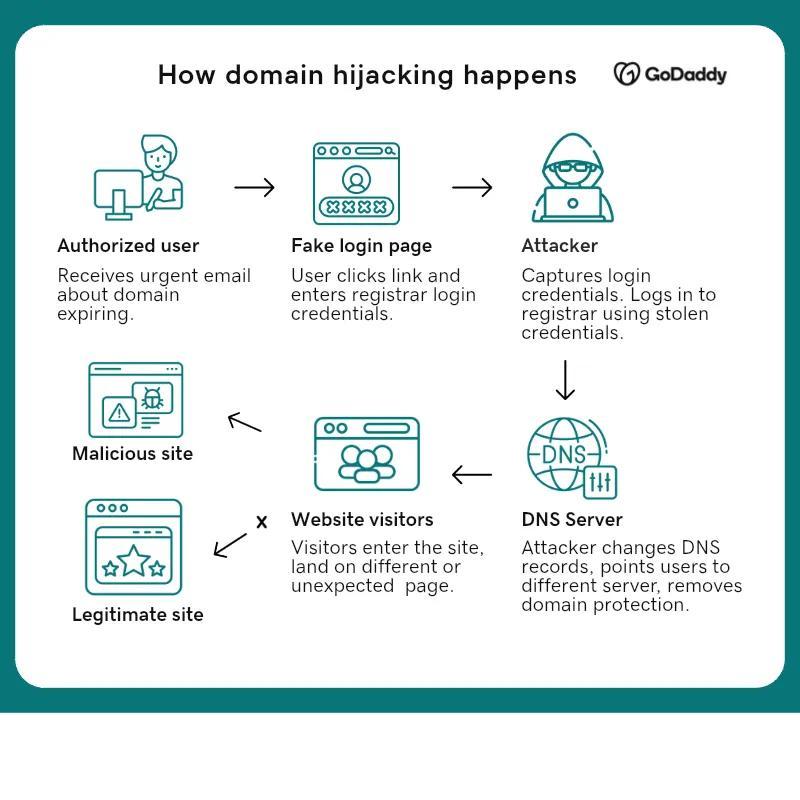
Domain hijacking usually starts with access. An attacker finds a way into the account, email, or settings tied to a domain, then uses that access to take control.
1. A weak spot is exposed
This often begins with something simple, such as a weak password, reused login, a phishing message, or a domain that was not renewed on time. In some cases, the email account connected to the domain becomes the entry point.
2. An unauthorized user gains access to the connected account
Once access is gained, this can include logging in to the registrar account, resetting passwords, or using the connected email to approve requests.
3. Key settings are then changed
This can include updating the account details, unlocking the domain, changing DNS settings, or starting a domain registrar.
4. Control is taken away from the owner
The website may stop loading properly, email may be disrupted, or the domain may be moved to another account.
The longer this goes unnoticed, the harder it can be to reverse, which is why early detection and basic security make a difference.
What is the impact of domain hijacking?
Imagine visiting a familiar website to check your account or make a payment, only to find the page looks different or does not load at all. Emails you expect to receive never arrive, or messages start coming from an address that seems slightly off. Situations like this can happen when a domain is hijacked, affecting how people access services, communicate, and trust what they see online.
- Website access breaks or changes: Visitors may land on the wrong page, see unexpected content, or be unable to access the site altogether.
- Emails stop or fall into the wrong hands: Messages may not arrive, bounce back, or be routed somewhere they should not go.
- Trust is disrupted quickly: Even small inconsistencies can make people hesitate to continue, especially when personal or payment details are involved.
- Brand identity is misused: A hijacked domain can be used to send messages or display content that appears legitimate, but is not.
- Revenue and opportunities can be lost: Missed transactions, interrupted services, or customer drop-off can have a direct financial effect.
- Access to core tools is interrupted: The domain often connects to multiple services, so losing control can affect more than just the website.
- Recovery takes time and coordination: Restoring access may involve support teams, verification steps, and monitoring to ensure everything is secure again.
Disclaimer: All known trademarks contained herein are the property of their respective owners and their inclusion does not represent any affiliation, endorsement, or sponsorship.
Real-world cases of domain hijacking
1. Perl.com (2021)

The domain for a well-known developer resource was taken over after unauthorized changes were made to its registrar account. The website was redirected to unrelated content, which disrupted access to its regular audience. Control was eventually restored, but the accident showed how quickly a trusted domain can be affected.
2. MyEtherWallet DNS incident (2018)

In this case, the domain itself was not transferred, but its DNS settings were changed. Visitors were briefly redirected to a malicious version of the site, designed to collect sensitive information. The issue was identified and resolved, highlighting how behind-the-scenes changes can impact users without obvious warning.
3. Lenovo (2015)
Lenovo’s website was disrupted after its domain records were changed, causing visitors to be redirected to an unexpected page. Users trying to access the official site were unable to reach normal content, which interrupted access and created confusion. The issue was later resolved, but it showed how changes at the domain level can affect how people reach a website, even without access to the company’s internal systems.
How to prevent domain hijacking
Preventing domain hijacking comes down to securing access and keeping control over key settings. The steps below focus on practical actions you can take to reduce the risk and protect your domain.
- Enable strong authentication
- Update and strengthen your passwords
- Keep your domain active and monitored
- Limit and review account access
- Educate anyone with access to your domain
- Choose a registrar with strong security controls
- Enable domain transfer lock
- Protect your domain’s contact information
1. Enable strong authentication
Turn on two-factor authentication (2FA) for your domain registrar and email accounts. This adds a second verification step during login, making it harder for unauthorized access even if passwords are exposed. Most providers allow setup through an authenticator app in account security settings.
2. Update and strengthen your passwords
Use unique, complex passwords for all accounts connected to your domain and avoid reusing them across services. Updating passwords periodically helps reduce long-term risk, especially if credentials are exposed without your knowledge. A password manager can help generate and store secure passwords.
3. Keep your domain active and monitored
Enable auto-renewal and regularly check your domain’s expiration date. Domains that expire can be quickly claimed by others, which can lead to loss of access. Most registrars provide renewal settings and notifications within the account dashboard.
4. Limit and review account access
Only give access to trusted users who need it, and remove permissions when they are no longer required. Fewer access points reduce the risk of accidental or unauthorized changes. Review user access settings periodically in your account.
5. Educate anyone with access to your domain
Make sure team members can recognize phishing attempts and suspicious requests, especially those asking for login details or urgent changes. Even basic awareness can prevent common social engineering attacks. Encourage accessing accounts directly instead of clicking email links.
6. Choose a registrar with strong security controls
Work with a provider that offers account protection, activity alerts, and change monitoring. These tools help detect unusual activity and provide additional safeguards against unauthorized changes. Security features are typically found in account or domain settings.
7. Enable domain transfer lock
Turn on domain lock (or transfer lock) to prevent unauthorized transfers. This ensures additional verification is required before a domain can be moved to another account or provider. It is usually enabled by default, but should be verified.
8. Protect your domain’s contact information
Use privacy protection to keep personal contact details from being publicly visible in domain records. This reduces exposure and helps prevent targeted attempts to access your account. Domains bought from GoDaddy get free Privacy Protection.
What to do if your domain gets hijacked
If your domain suddenly isn’t behaving the way you expect, it can feel confusing at first. The most important thing is to pause, confirm what’s happening, and take a few focused steps to regain control. The process may take some coordination, but starting early can make it much easier to resolve.
If you suspect your domain has been hijacked, start securing your email account and any related logins, then contact your domain registrar as soon as possible.
Confirm what changed
Start by identifying what is no longer working as expected. Check if the website is redirecting, if email services are affected, or if access to your domain account is no longer available. This helps determine whether the issue is related to account access, DNS settings, or a domain transfer.
Secure connected accounts immediately
Update passwords for your domain registrar and email accounts, and enable two-factor authentication (2FA) if it is not already in place. This helps prevent additional unauthorized access while you work through the recovery. Focus on accounts directly connected to your domain first.
Contact your domain registrar right away
Reach out to your registrar’s support team and report the issue clearly. Ask them to review recent account activity and check if the domain is still in your account or has been transferred.
If the domain is still in your account, ask them to secure it and review recent changes. If it has been transferred out, request guidance on the recovery and dispute process.
Gather proof of ownership
Collect any records that show you own the domain, such as purchase confirmations, renewal receipts, account details, or past communications. Having this ready can help speed up the process when working with support teams.
Document what you’re seeing
Take screenshots of any unusual behavior, including redirects, error messages, or changes in your account access. Keep a record of emails or messages related to the incident. This information can help support teams review what happened and move your case forward if additional investigation is needed.
Escalate if needed
If the issue is not resolved through standard support, ask about formal dispute or escalation options. Some cases may require additional review depending on how the domain was accessed or changed. Staying persistent and organized can help move the process forward.
Secure domain after recovery
Once access is restored, review all domain settings carefully. Reset your passwords again, confirm DNS records are correct, enable domain lock, and turn on privacy protection if it's not yet already active.
How to choose a secure domain registrar
Choosing a domain registrar is not just about availability or price. It also affects how your domain is protected and how easily you can manage it over time. Looking for the right security features and support can help you avoid issues and keep your domain under control.
Look for strong account security options
A secure registrar should support features like two-factor authentication (2FA) and account alerts. These add an extra layer of protection and help reduce the risk of unauthorized access.
Check for domain protection tools
Features such as domain transfer lock and protection against unauthorized changes are important. These controls help prevent domains from being moved or modified without proper verification.
Confirm WHOIS privacy availability
A trustworthy domain registrant should have access to WHOIS privacy protection to keep personal contact details from being publicly visible. This helps reduce unwanted contact and limits exposure to potential misuse.
Review renewal and expiration management
Look for options like auto-renewal and expiration reminders. These help keep your domain active and reduce the risk of losing ownership due to missed renewals. Still, it’s important to review renewal settings regularly.
Evaluate reputation and support quality
Using best domain registrars often means choosing providers with strong reputation, or clear channels, and responsive customer service. Reliable support can make a difference if you need help quickly.
Check for transparency and control
A good registrar should make it easy to view and manage your domain settings in one place.You should be able to quickly check DNS records, see recent changes, and control who has access to your account. Clear controls help you stay informed and make updates without confusion.
FAQ about domain hijacking
Is domain hijacking illegal in the U.S.?
Yes, domain hijacking is considered illegal in the U.S. because it involves gaining control of a domain without permission. Depending on how it happens, it may fall under laws related to unauthorized access, fraud, or identity misuse. In some cases, recovery may involve working with the registrar and, if needed, formal dispute or legal processes.
How common is domain hijacking?
Domain hijacking is not an everyday occurrence, but it is not rare either. It can affect individuals, small businesses, and larger organizations, often due to weak account security, phishing attempts, or missed renewals. While many domains remain secure, the impact of a single incident can be significant.
How can I tell if my domain has been hijacked?
Some signs can appear quickly, while others are less obvious. You may notice that your website is redirecting to a different page, your domain is no longer loading, or your email stops working as expected. You might also lose access to your registrar account or see unexpected changes in your DNS settings. Any sudden or unexplained change is worth checking right away.
What happens when a domain is hijacked?
When a domain is hijacked, control is taken without the owner’s approval. This can lead to website downtime, redirects to unfamiliar pages, or changes that affect email delivery. In some cases, visitors may be sent to misleading or unsafe content, which can impact trust and disrupt normal activity.
Can a hijacked domain be recovered?
In many cases, a hijacked domain can be recovered, especially when action is taken early. The process usually involves contacting the registrar, confirming ownership, and reviewing recent changes to the account or domain settings. Recovery steps can vary, but responding quickly can help improve the outcome.