
A successful website incorporates more than great design and compelling copy. It also relies on strong SEO foundations to help webpages rank in search results. Make sure your website is built for search success with this expert SEO checklist to attract search engines and boost your visibility in rankings.
We've got all of the details that you need to be successful, so read on for the full details below.
Before launching your website
SEO, or search engine optimization, refers to tactics that help websites appear in search engine results. Effective SEO starts even before website design and copywriting. Truly strong SEO foundations are built during the website planning phase.
If you need a more detailed overview of SEO and how it impacts your website, use our guide on how to do SEO for beginners.
Let's go over the steps you should take for SEO planning ahead of your website launch.
1. Outline your site structure
Critical
Intermediate
Site structure refers to the pages on a website and how they are organized, grouped, and assigned hierarchy. It indicates which pages are important and how pages are connected to each other. Site structure is important because it helps both readers and search engines easily navigate a website and find the information they need.
So, to be sure that you're covering your bases, you'll want to ensure that you've completed these steps:
- Make a list of the pages needed on your website.
- Determine your top pages, which include your homepage and main pillar or cornerstone pages.
- Choose supporting content pages. Group related pages within categories and subcategories.
- Assign internal links that show how pages are interconnected.
For a deeper dive into this process, check out this guide and learn more about how to plan a website.
2. Map keywords to specific pages
Critical
Intermediate
Once you have a list of pages for your website, assign target keywords to each page. Target keywords are the search terms you want people to use to find your webpage. Each individual page on your website should include one primary keyword and multiple secondary, related keywords.
Here are some tips on finding keywords that work for your website:
- Conduct keyword research for core topics.
- Assign one primary keyword to each page based on user intent and page purpose.
- Assign a few secondary, related keywords to each page.
- Do not assign the same keywords to multiple pages.
Need help? Learn how to do keyword research and find the best search terms for your pages.
3. Write original, valuable content for every page
High
Intermediate
A website needs high-quality content to increase engagement, build authority, and improve its chances of ranking. A basic SEO checklist must include creating content that provides information to readers and context to search engines.
To accomplish this, here are a few helpful ideas to get you started:
- Know your audience.
- Provide useful, valuable content that matches search intent.
- Answer key questions clearly and thoroughly.
- Review competitors to identify content gaps.
- Incorporate keywords naturally.
- Get support from AI, but write original content.
- Do not copy content from other sources.
Need help? Use content writing prompts to get inspiration for creating valuable content.
4. Use SEO-friendly URLs
Critical
Beginner
Each page on a website has a unique URL. A URL includes a domain name (example: website.com) as well as a path, the characters that come after the domain name (example: website.com/path). URLs send SEO signals and should be optimized for the target keyword assigned to the page.
Here's how to make the best possible URLs for SEO:
- Start with an SEO friendly domain name.
- Use short, descriptive URL paths.
- Include the primary keyword.
- Remove filler words (and, the, to, etc.).
- Use hyphens instead of underscores.
- Keep all lowercase for consistency.
- Avoid long strings of numbers or symbols.
5. Design clear, intuitive navigation menus
Critical
Beginner
Navigation menus are guides that help users and search engines understand and move through a website. Menus outline primary pages and also group pages by topic and category.
A few pointers on how to design your menu include:
- Present a main navigation with your most important pages.
- Add dropdowns or footer menus for secondary pages.
- Keep labels short, clear, and descriptive.
- Confirm that navigation works well on both desktop and mobile.
6. Ensure that you have a good internal linking strategy
High
Intermediate
In addition to menus, internal links help website visitors and search engines move through your website. Internal links are active hyperlinks, often presented as buttons or linked text, that lead to other pages on your website. Internal links help search engines and users understand which pages are related to each other.
To establish a solid interlinking strategy, here are some tips to help:
- Link relevant pages to each other.
- Add more links to high-priority pages than to low-priority pages.
- Use anchor text that is relevant to the topic and keyword of the linked page.
- Keep anchor text to five or fewer words.
- Keep pages within two to three clicks from your homepage.
- Set internal links as do-follow.
7. Write unique, descriptive title tags
High
Beginner
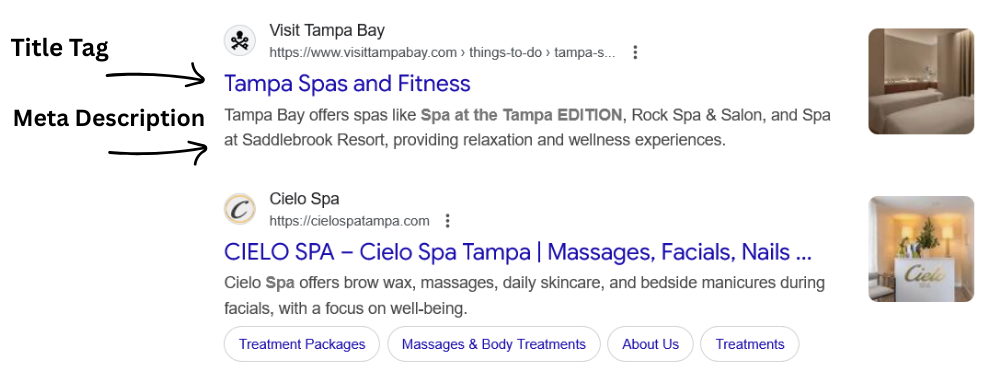
A title tag, or meta title, is code added to the backend of a webpage to tell search engines what the page is about. Title tags can be different from page titles. Title tags appear as your page's headline in Google, so they should be clear, keyword-focused, and compelling.
Here are the steps you'll need for making helpful title tags:
- Create a unique title tag for every page.
- Include the primary keyword near the beginning.
- Keep titles under 60 characters.
- Include content that is relevant to the page topic and enticing to readers.
8. Write clear, compelling meta descriptions
Medium
Beginner
Just as you use title tags as part of an on-page SEO checklist, add meta descriptions to each page. Meta descriptions are lines of code that provide a summary of the page. They appear on search engine results pages as blurbs under title tags and entice users to click on search results.
To ensure that you're creating solid meta descriptions, use these tips:
- Create a unique meta description for every page.
- Include the primary keyword near the beginning.
- Write roughly 155 to 160 characters.
- Summarize the page, highlight its value, and align with search intent.
9. Use proper heading structure (H1, H2, H3)
Critical
Beginner
Great website content is broken up into sections and blocks that are easy to read and scan. Headings are used to define each section of text. Headings use lines of code to create page hierarchy and structure. H1 is used for the main title of the page. H2 is used for subheadings. H3 fits within H2 subheadings, and so on.
Here are some guidelines for proper heading use:
- Include only one H1 per page (the main title).
- Use H2s for major sections and H3s for subsections.
- Follow a logical, nested structure.
- Include the target keyword in H1 and at least one H2 heading.
- Include other keywords naturally within headings.
10. Add descriptive, keyword-rich alt text to all images
Medium
Beginner
Website images can include alt text, a line of code that describes what the image is. Alt text serves a variety of purposes. It helps people understand an image if it doesn't load. It provides context to search engines, and it supports website accessibility.
To ensure that you've got useful alt text for your website, use this checklist:
- Describe the image.
- Use roughly 150-200 characters.
- Incorporate keywords when relevant.
- Don't say "picture of" or "image of."
- Use it on graphics as well as photos.
- Write in full sentences.
11. Compress images for quick loading
High
Intermediate
Large image files can slow down site performance, increase bounce rates, and make it harder for search engines to crawl your site efficiently. Compress and optimize images to help your website load faster, improve user experience, and boost search rankings.
Steps to follow to ensure optimized images include:
- Keep image file sizes under 100 KB (ideally under 70 KB).
- Use efficient formats like JPG, PNG, or WebP.
- Compress files with tools like TinyPNG or Squoosh.
- Test page speed after optimization.
12. Ensure your website is mobile-friendly and responsive
Critical
Advanced
Mobile-friendly websites use responsive design, which rearranges content to best fit the screen size. A mobile response website looks different on a phone, tablet, and desktop screen. It's essential to use a mobile-responsive design as Google no longer indexes websites that aren't mobile-friendly.
For a responsive website experience, you'll need to:
- Test pages on phones, tablets, and desktops.
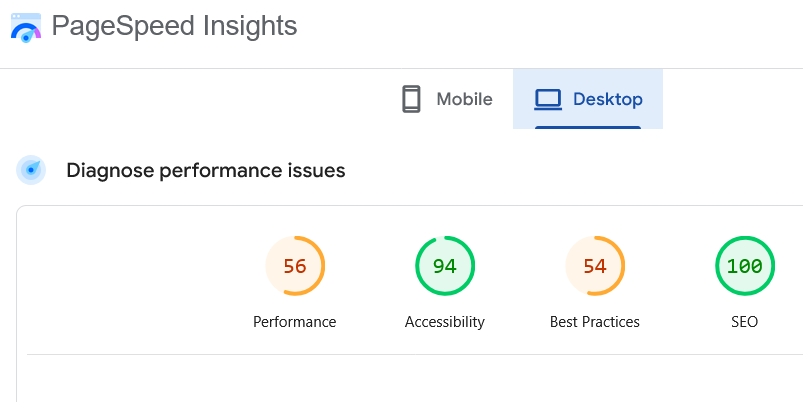
- Use Google's PageSpeed Insights to identify mobile errors.
- Adjust breakpoints for smooth layout changes.
- Check menus, forms, and buttons for usability.
- Fix any text, spacing, or alignment issues.
13. Create a custom 404 page
High
Advanced
If a user enters a bad or missing URL for a website, they will land on a 404 page. A 404 page lets audiences know they entered a URL that does not lead to a live webpage. It helps keep users on a website by explaining what went wrong and directing them to more useful pages.
For an effective 404 page, use these steps:
- Create content that lets the reader know they entered a missing URL.
- Include a link to your homepage.
- Add links to key pages (blog, shop, contact).
- Match your site's branding so users know they are still on your website.
14. Set canonical tags on each page
Critical
Beginner
Canonical tags tell search engines which version of a page is the primary page when similar or duplicate content exists. Using canonical tags prevents indexing issues, consolidates ranking signals, and ensures the right page appears in search results.
Canonical tags are especially important for ecommerce sites. Product variants or similar landing pages can create unintentional duplicate content, so be sure to include this step in your ecommerce SEO checklist.
Here's how to use canonical tags for your site:
- Identify duplicate or near-duplicate pages.
- Choose the preferred (primary) version.
- Add a rel="canonical" tag to all non-primary versions.
- Ensure the primary page self-references its canonical URL.
- Test canonical tags in Google Search Console (see step 17).
15. Check your indexable and non-indexable pages
High
Intermediate
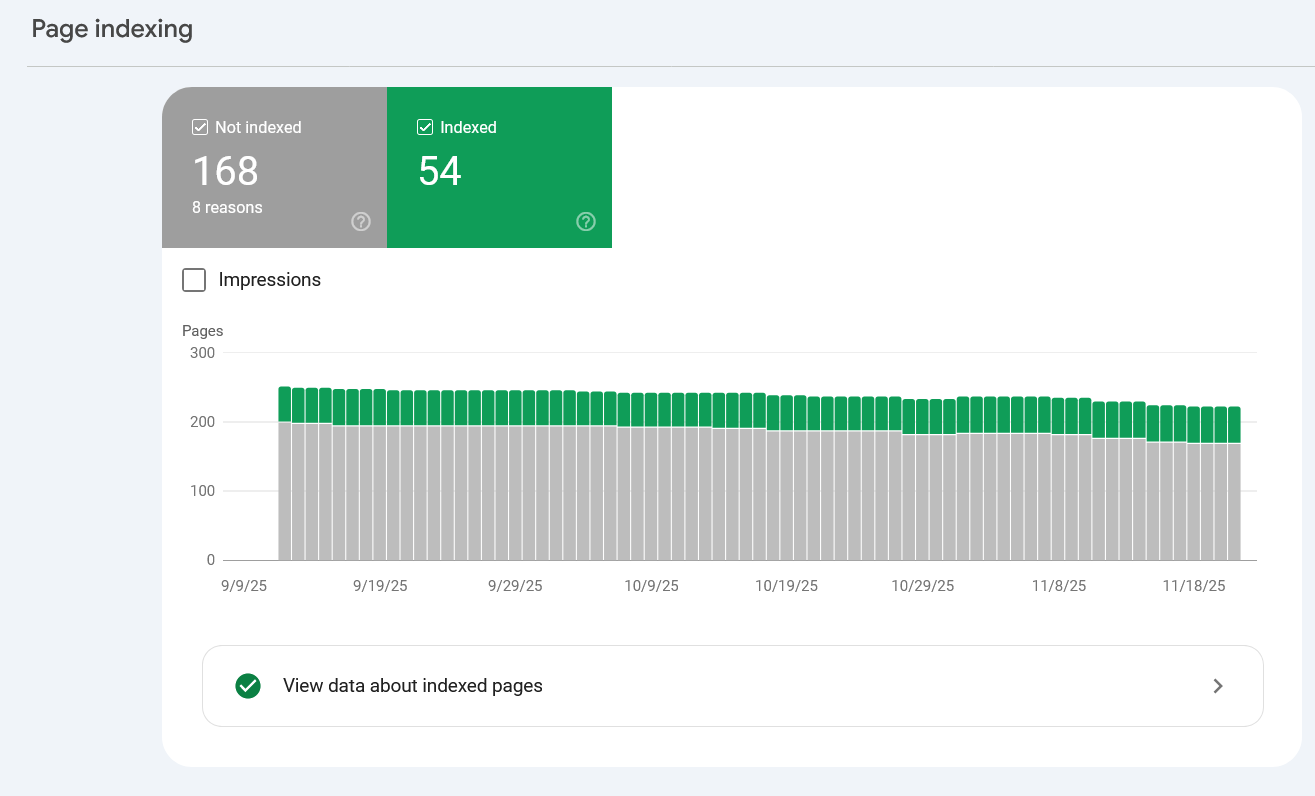
Page indexing helps search engines recognize which pages on your site should appear in search rankings. Indexable pages are crawlable and show in search, while non-indexable pages are not crawlable and will not show in search.
Pages like staging sites, thank-you pages, and duplicates should be blocked, while important content should remain indexable.
To make sure you have the right mix of pages indexed, follow these steps:
- Identify which pages should be indexed or noindexed.
- Verify index status in Google Search Console.
- Set staging and private pages to noindex.
- Remove accidental noindex tags from important pages.
- Re-test after making changes.
16. Enable HTTPS with a valid SSL certificate
Critical
Advanced
HTTPS is a secure version of HTTP, the protocol that allows web browsers and servers to communicate. To secure this connection, websites use an SSL certificate, which encrypts data and protects user information. Enabling HTTPS is essential not only for security but also for SEO. A site without HTTPS may appear untrustworthy to users and can lose visibility in search results.
Here's how to apply an SSL certificate to your website:
- Purchase or activate an SSL certificate through your host.
- Install the SSL certificate on your server.
- Update your site to use HTTPS throughout.
- Fix mixed-content warnings.
- Verify HTTPS is working in your browser and Google Search Console.
After Launching Your Website
Once you launch your website, there is still plenty of SEO work to do. Use this SEO optimization checklist after your site has gone live to boost visibility even more.
17. Set up Google Analytics and Google Search Console
Critical
Beginner
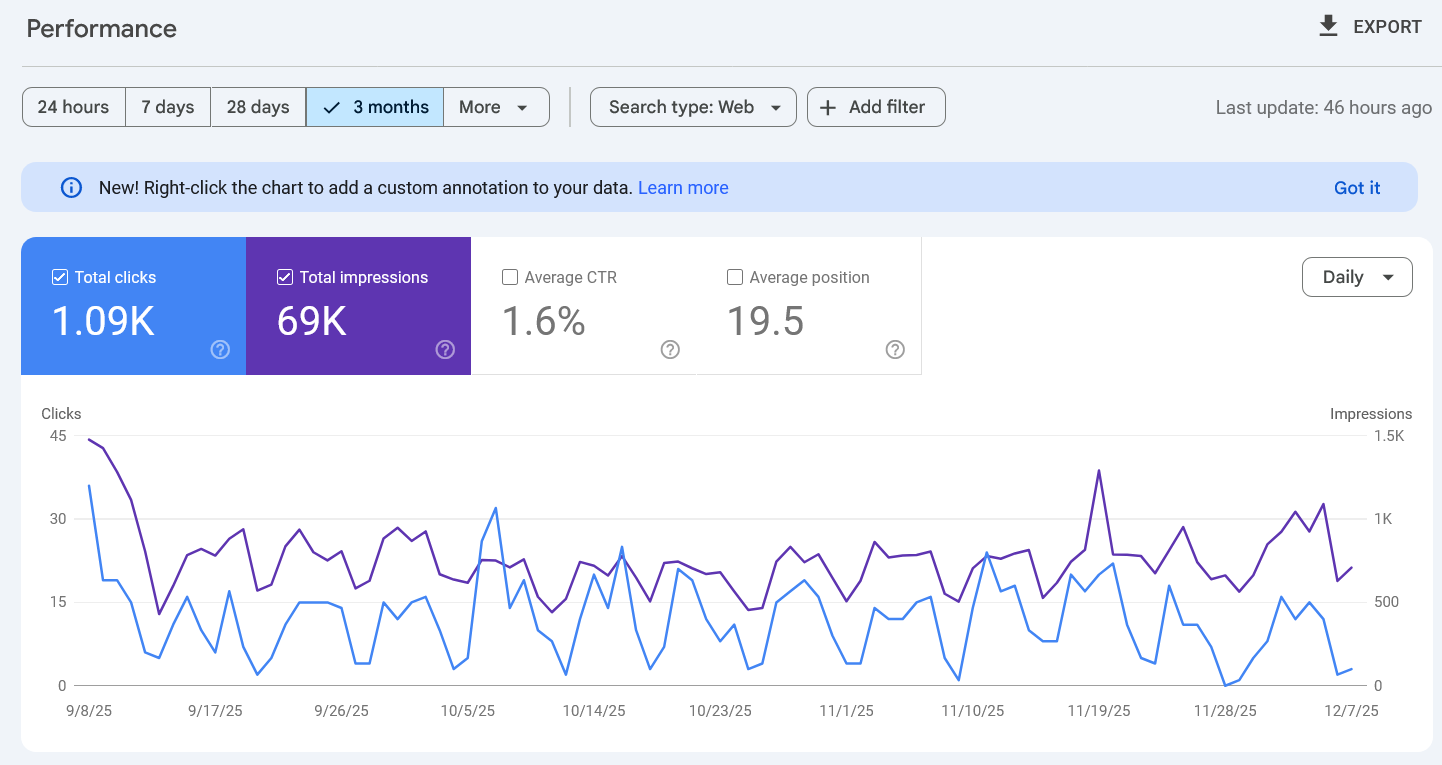
Google Analytics and Google Search Console provide essential insights into how users find and interact with your website. Google Analytics tracks traffic and behavior, while Search Console monitors your site's presence in search, identifies indexing issues, and helps you understand keyword performance. Use both to measure success and guide your SEO strategy.
Here's how you should use these tools for the best results:
- Create accounts for both tools.
- Install the Google Analytics tracking tag.
- Verify your website in Google Search Console.
- Regularly review traffic, indexing, and performance reports.
18. Create and submit an XML sitemap
Critical
Intermediate
An XML sitemap uses Extensible Markup Language (XML) to create a file listing all of the pages on your website. The sitemap provides a roadmap for search engines to crawl. Submitting a sitemap helps Google discover new pages, understand your site structure, and index your content accurately.
The steps to submit your sitemap are as follows:
- Generate a sitemap (often found at /sitemap.xml).
- Include key indexable pages only.
- Upload or verify it on your site.
- Submit the URL in Google Search Console under Sitemaps.
- Update and resubmit after major site changes.
19. Configure a robots.txt file
High
Advanced
A robots.txt file also helps search engines crawl your website. The file tells search engines which pages to crawl and which pages to ignore. Properly configuring this file helps ensure search engines focus on your important, indexable pages while ignoring duplicate, sensitive, or irrelevant content.
An effective robots.txt file will:
- Identify pages to allow or block from crawling.
- Add Disallow rules for private or duplicate pages.
- Confirm important pages are not blocked.
- Include your XML sitemap link.
- Test the file in Google Search.
20. Test your site for broken links
Medium
Intermediate
Broken links can create a poor user experience, disrupt search bot crawling, and hurt your SEO performance. Test your site for broken links to ensure users and search engines can navigate your website without hitting dead ends. Maintaining a regular testing cadence will help maintain a healthy, well-structured site.
Here's some tips on how to stay on top of your site links:
- Scan your site using Google Search Console.
- Use tools like Screaming Frog, Ahrefs, or Dead Link Checker.
- Identify 404 errors and outdated URLs.
- Update internal links or create redirects.
- Re-test to confirm all links work properly.
21. Preview your site on mobile and desktop
Critical
Beginner
Preview your site on mobile and desktop to confirm design, layout, and functionality work smoothly across devices. Once your site is live, make sure all pages render correctly and interact as expected.
Use these steps to test your website:
- Test pages on phones, tablets, and desktops.
- Check menus, buttons, and forms for functionality.
- Look for layout shifts or cut-off text.
- Use browser dev tools to test breakpoints.
- Scan your site using Google's PageSpeed Insights.
- Fix any issues impacting readability or navigation.
Advanced SEO checklist
Give your site even more opportunities to show up in search by taking your site SEO to the next level. Use this technical SEO checklist to further boost your visibility in search rankings.
Need help? Our SEO services conduct these technical SEO tasks so you don't have to. Learn more about our web design services that take care of everything.
22. Add structured data/schema markup
Medium
Advanced
Structured data and schema markup are lines of code added to webpages to help search engines better understand content. The code uses a standardized semantic vocabulary that makes it easy for search engines to quickly identify and analyze content types. Schema markup and structured data are important parts of an SEO technical checklist, as they also help your content show up in generative AI tools and chatbots.
Here's how to add this feature to your site:
- Identify schema types relevant to each page (FAQ, product, event, article, etc.).
- Add JSON-LD schema in the <head> or via plugins.
- Ensure details match on-page content exactly.
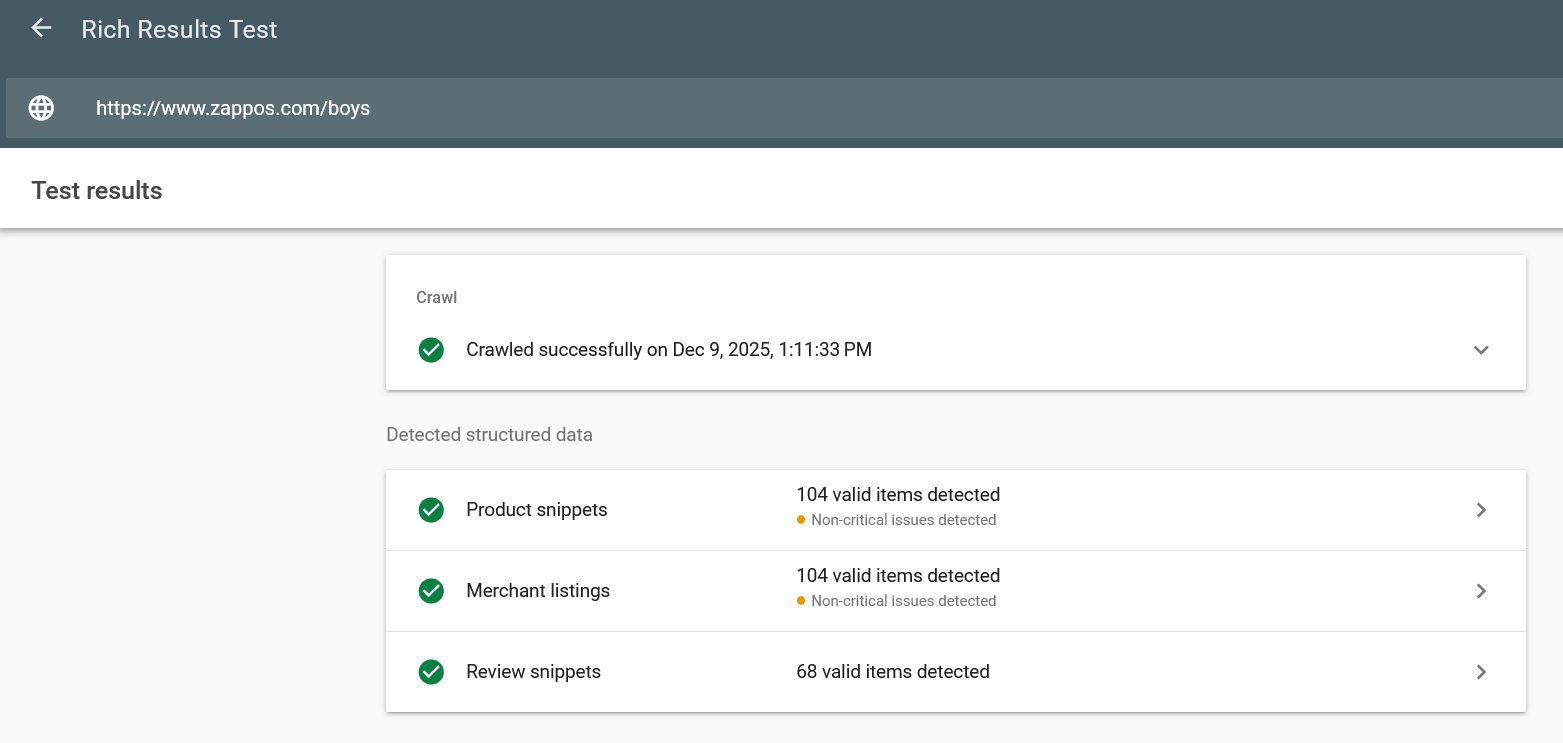
- Validate using Google's Rich Results Test.
- Monitor Search Console for schema errors.
23. Create topic clusters for content depth
Critical
Intermediate
Fresh, original content helps search engines better understand your website and see it as an authority in specific topics and categories. To build authority, publish regular content around topic clusters related to your business, expertise, and industry.
Use this checklist to create deep, meaningful content:
- Identify key pillar topics for your business.
- Create a comprehensive pillar page for each topic.
- Write supporting posts that cover related subtopics.
- Internally link supporting posts to pillar pages.
- Update clusters regularly to maintain depth and relevance.
24. Add hreflang tags for multilingual/multi-country sites
High
Advanced
Hreflang tags help search engines serve the correct language or regional version of your pages to users. They prevent duplicate-content issues and make sure visitors land on the most relevant version of your site.
If you expect to have users from other countries use your website, add these steps to your SEO list:
- Identify all language and regional versions of each page.
- Add hreflang annotations in the <head> or XML sitemap.
- Include a self-referencing hreflang tag.
- Use correct ISO language + region codes (e.g., en-us, en-gb).
- Validate tags with Google's hreflang testing tools.
25. Set up Open Graph and social sharing tags
Medium
Advanced
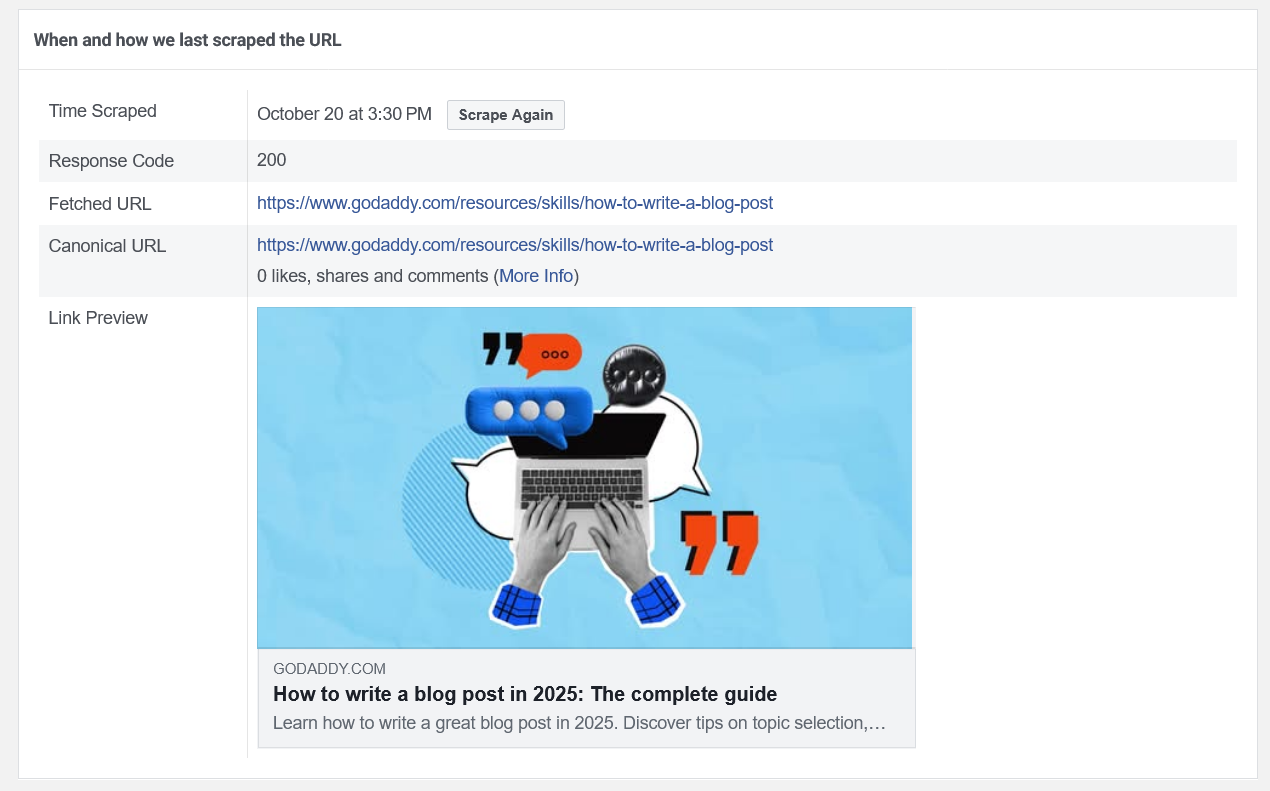
Open Graph and social sharing tags help your webpages display correctly when shared on social platforms like Facebook, LinkedIn, and X. These tags control how your title, description, and image appear in social previews. Add and customize these tags on every important page to optimize your site's shareability.
Here's how to implement these tags:
- Define an Open Graph title, description, image, URL, and type.
- Use a high-quality featured image.
- Match Open Graph content to your page topic and metadata.
- Test using Facebook Sharing Debugger and LinkedIn Post Inspector.
26. Plan for content updates and evergreen strategies
High
Intermediate
Search engines reward sites that regularly refresh content and maintain pages. Plan to update your website content so it stays relevant, accurate, and competitive in search results over time.
To keep your content fresh, we recommend that you:
- Refresh top posts annually with new data and links.
- Publish evergreen topics that provide long-term value.
- Regularly revisit landing pages to update information.
- Remove or redirect outdated pages.
- Track performance to identify update opportunities.
27. Optimize page load speeds
High
Advanced
Both audiences and search engines prefer websites that load quickly. Fast-loading pages improve user experience, reduce bounce rates, and boost search visibility, as loading is a known ranking factor.
Optimize your pages so they load quickly for users and meet search engine performance standards:
- Compress images and videos.
- Minimize scripts, plugins, and heavy code.
- Enable caching on your site.
- Use a fast, reliable hosting provider.
- Test speed using Google PageSpeed Insights.
- Fix issues flagged in performance reports.
Long-term SEO checks
Search engine optimization is not a one-time task. Your initial SEO work will help your website start to rank. Then, you need to continue to execute ongoing website SEO checklist tasks to keep your pages showing up in search.
28. Set up basic reporting dashboards
High
Intermediate
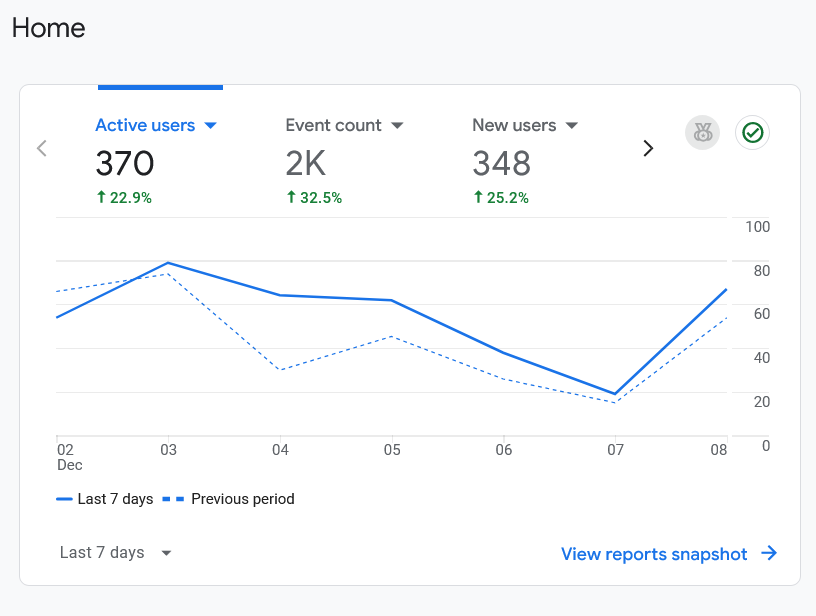
Reporting dashboards help you track your website's SEO performance and understand how users interact with your content. Set up dashboards that consolidate key metrics into an easy-to-read view so you can monitor progress, spot issues early, and make informed optimization decisions.
- Use tools like Google Analytics, Google Search Console, and Looker Studio to build clear, actionable reports.
- Identify key metrics (traffic, rankings, conversions, etc.).
- Schedule automatic email reports.
- Review dashboards weekly or monthly.
29. Schedule regular audits
Medium
Intermediate
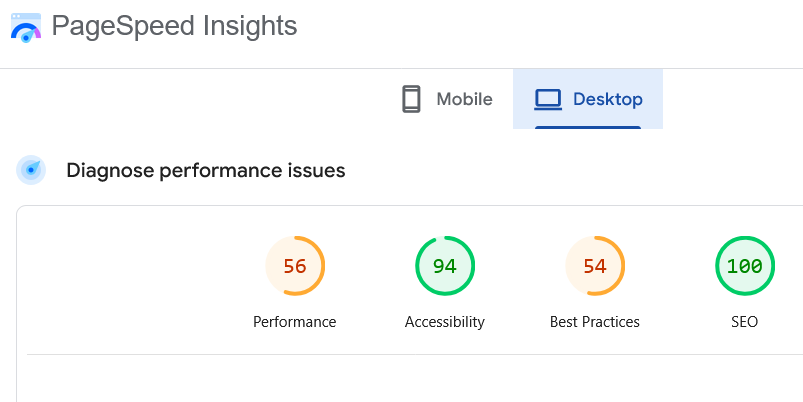
Regular SEO audits help you identify technical issues, content gaps, and performance problems before they impact your rankings. By reviewing your site on a consistent schedule, you can catch errors early, confirm that pages remain optimized, and maintain long-term search visibility.
Set up audits that cover technical SEO, on-page optimization, content quality, and user experience:
- Audit your site every three to six months.
- Review technical SEO (speed, indexing, broken links).
- Check metadata, headings, and keyword targeting.
- Update or improve outdated content.
- Fix errors found in Google Search Console.
30. Learn from common SEO mistakes
Critical
Intermediate
Learning from common SEO mistakes helps you avoid issues that can harm rankings, slow growth, or create technical problems on your website. Understanding what typically goes wrong helps you to proactively fix problems and apply best practices that improve long-term search visibility.
- Avoid keyword stuffing and unnatural optimization.
- Fix duplicate or thin content.
- Confirm that pages load quickly and work on mobile.
- Use strong internal linking.
- Keep metadata unique and descriptive.
- Monitor Search Console for ongoing issues.
31. Keep up with major SEO trends and algorithm changes
Medium
Intermediate
Search engines frequently update how they evaluate content, user experience, and authority. Be sure to keep up with SEO trends and algorithm changes to ensure your website continues to meet search engine standards and maintains strong long-term visibility.
- Follow trusted SEO sources, like GoDaddy.
- Monitor Google algorithm update announcements.
- Review SEO blogs and newsletters monthly.
- Adjust strategies based on emerging best practices.
- Experiment and track performance to learn what works.
Put your SEO checklist to work
You put a lot of effort into building a website. Make sure people can find it. Incorporate each step of this SEO checklist to help your website earn and maintain search visibility now and in the future.
If you're not confident in getting it done yourself, we can help.