
For all the tech advancements and security improvements that have been made over the past few decades, email phishing continues to be a pervasive threat online.
According to the FBI's Internet Crime Complaint Center (IC3), phishing was the most reported cybercrime in 2025, with over 191,000 complaints filed.
Because email remains an important tool both personally and professionally, it's important to understand what email phishing is and how you can protect both yourself and your business today.
We'll briefly cover what email phishing is, what it looks like, and how you can stay safe online.
What is a phishing email?
Email phishing is a cyberattack where fraudulent emails impersonate trusted senders to steal personal information such as passwords, usernames, or financial data. These emails often appear to come from trusted entities, including banks, well-known companies, or even colleagues.
While email phishing isn't a new type of scam, attackers are now able to use detailed personal information that they're able to easily gather from social media (or even data breaches) to create highly personalized emails. All of this data makes these emails even more difficult to recognize as a scam.
Not sure of what a phishing email might include? Here's an older example:
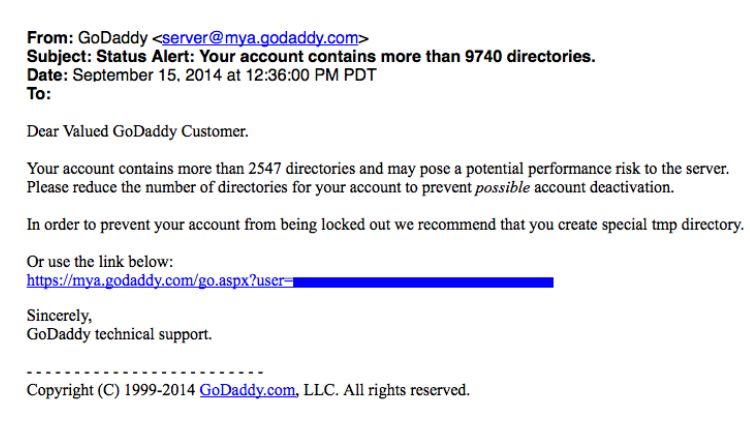
For this particular phishing attack, the goal was to get the recipient to click the account link included. Once a person clicks this link, it directs them to what looks like a GoDaddy login page. However, if you were to hover over the link in that original email, you'd notice it wouldn't take you to GoDaddy.com, but a fake GoDaddy website instead.
If you clicked the link and attempted to log into the fake GoDaddy.com landing page, your information would be sent to the scammer, and your GoDaddy account would've been compromised. Not great.
If you ever receive a phishing email that appears to be from GoDaddy, you can report it to our security team here.
Types of email phishing attacks
Email phishing attacks can generally be sorted into five different categories:
| Type | Type Definition | Common indicators |
|---|---|---|
| Type | Definition | Common indicators |
| Email phishing | The most common type of phishing; these emails include links to counterfeit websites or attachments that deliver malware or attempt to capture sensitive information. | Generic greetings, suspicious links, urgent requests |
| Spear phishing | A targeted approach focusing on specific individuals or organizations using personalized data about the person or company. | Personalized details, references to colleagues or projects |
| Whaling | Targets high-profile individuals such as executives or business leaders to steal privileged information or authorize fraudulent transactions. | Executive-level requests, financial transaction demands |
| Clone phishing | Involves duplicating a legitimate email and altering it to include malicious content. | Familiar email format, slight variations in links or attachments |
| Spoofing | Forges the sender's address to make an email appear as if it comes from someone else. Newer DNS requirements have made this less common. | Mismatched sender name and email address |
With the majority of phishing scams originating from attachments, it’s important to be vigilant with incoming emails. If you’d like to stay ahead of current phishing scams, GoDaddy’s Advanced Email Security helps prevent malicious emails from ever reaching your inbox.
Anatomy of a phishing email
Here are five common red flags to watch for in phishing emails:
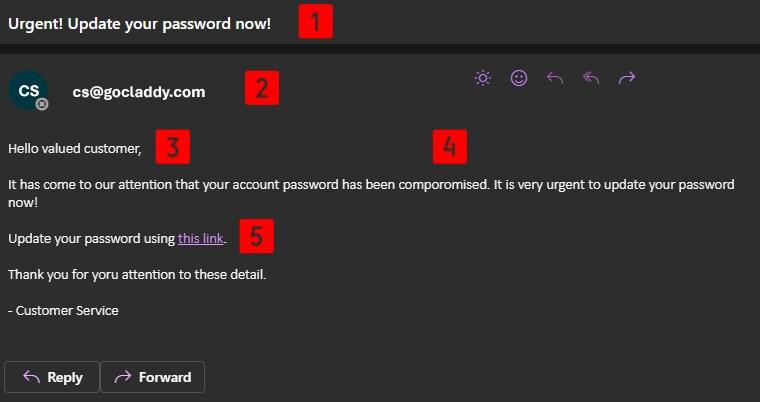
- Urgent/threatening language: The goal is to make you panic and act immediately.
- Suspicious sender address: Carefully review the email address to ensure it’s legit.
- Generic greetings: Scammers tend to be as non-specific as possible.
- Poor spelling or grammar: No one is perfect, but companies tend to carefully spellcheck their email messages.
- Malicious links: Always hover over links and review the pop-up preview before clicking.
What to do if you receive a phishing email
If you receive a phishing email, follow these steps to protect yourself:
- Do not click any links or download attachments.
- Contact your IT department if the email was sent to your work email address. They may ask for a copy of the email for their own records.
- Mark the email as spam once you've verified that the email message is phishing-related (some providers will allow you to report the email message as phishing).
- Report the email to the impersonated company's security team when applicable.
How to protect yourself from phishing attacks
While not all phishing attacks can be fully prevented, you can take these steps to avoid becoming a victim in the future:
- Keep software up-to-date: Ensure your email applications and computer operating systems are fully current. Security patches are regularly pushed out by software providers.
- Enable two-factor authentication: Add two-factor authentication to as many of your accounts as possible.
- Conduct regular security training: If you have employees, make sure to conduct security training regularly to keep them aware of email phishing trends and how to avoid falling for scams.
- Maintain email backups: If the worst ends up happening, having email backups available can help give extra peace of mind.
Staying vigilant is key to staying safe online. And keeping these tips in mind can help you to maintain that vigilance even as email scammers continue to evolve their techniques.