

Your website is coming along nicely. You have a lot of the basics down: a home page, an about page, and a contact page. But there’s one other often-overlooked page that plays a key role in your visitor’s transition from casual browser to customer — or even brand advocate. That’s your FAQ page, also known as frequently asked questions, help, or support.
What is an FAQ page?
An FAQ page is a dedicated webpage that provides organized, honest answers to the most common questions customers and partners ask about your products, services, and business operations.
While your About page focuses on stories about your brand and company — such as how you got started and what you stand for — your FAQ page focuses specifically on questions about your products and operations, from product contents to shipping timelines to return or refund policies.
GoDaddy Airo AI Builder
Describe your idea. We'll build your live website in minutes.
With a few prompts, Airo AI Builder generates your website, web app, pages, databases and logic in minutes — no coding required. Start for free with 50 AI credits a month. No credit card required.
Build for FreeFAQ pages vs. help centers: what’s the difference?
You may be confused about whether they need an FAQ page, a help center, or both.
This clarification helps you make the right decision for your business needs and prevents you from building the wrong solution.
FAQ pages
FAQ pages are designed for high-frequency, straightforward questions that are answerable in a few sentences. Examples include shipping costs, return windows, and order status. Use an FAQ page when customers need quick answers to common questions.
Help centers
Help centers are broader knowledge bases that include detailed articles, tutorials, video guides, and community forums. They’re better for complex topics that require step-by-step explanations.
Build a full help center when your products or services require detailed guidance, technical documentation, or multi-step tutorials.
Do you need both?
Most ecommerce brands benefit from both: an FAQ page for speed and a help center for depth.
Why do I need an FAQ page?
Many businesses decide to build an FAQ page when they, or their customer service team, get tired of answering the same question over and over and over. But there are many more reasons to create an amazing FAQ page for your website, even before the questions become frequently asked.
When casual browsers visit your FAQ page, it signals that they are actually sales prospects.
By checking out the FAQs, they’re clearly indicating that they’re interested in learning more about your products or services.
How you can use your FAQ page

Now that we’ve explored what an FAQ page is and why having one is important, let’s dig in to putting yours to work.
Key benefits of an FAQ page:
- Builds trust by proactively providing transparent information
- Reduces purchase barriers by enabling customer self-service research
- Improves SEO through additional keyword targeting and featured snippet opportunities
- Decreases customer service workload by answering repetitive questions automatically
- Strengthens brand voice through consistent tone and messaging
- Addresses sales objections that your main copy may not cover
Earn trust with your customers
Proactively providing information on an FAQ page easily helps you build trust with your customers. If you’re positive and transparent in your FAQ answers, your customers get a good sense of how you’re going to behave in the rest of your business.
By publishing these answers where anyone can see them — yes, even your competitors — you demonstrate that you have nothing to hide.
Beyond the trust factor, you also establish your brand as an authority in your industry.
Reduce barriers to purchase
Many consumers today want to do their own research, not wait for a salesperson or customer service rep to get back to them.
A well-crafted FAQ page can provide many clarifications and help move clients from the interest stage to the decision (or even buying) phase of the sales funnel.
If you sell online, FAQ pages and help pages keep visitors on your site for answers, instead of heading back to a search engine. That increases the likelihood that they convert from browser to buyer.
Alleviate concerns that your sales copy may not address
You write your sales copy to be as compelling and motivating as possible, but your ideal customers may still have concerns or objections you can’t address easily.
Your FAQ page can provide visitors the reassurance they need that this buying decision is the right one.
You can even address questions they hadn’t thought to ask. That shows them that you’ve really thought through every aspect of your product.
Improve SEO
Your FAQ page gives you the opportunity to target additional keywords and use alternate phrases to describe your products and services, both of which improve your SEO.
This extra content is full of valuable information for your customers and search engines. It’s often picked up for AI Overview answers or the People Also Ask section on search engine result pages.
Build your brand voice
Your FAQ page is a great place to practice using your brand voice.
Whether you’re friendly and approachable or buttoned up and professional, using the same tone throughout your FAQs helps you establish and extend your brand personality.
The key to doing this successfully is to be consistent throughout your website and marketing materials.
Reduce stress for your customer service department
The last, but certainly not least important, reason to have an FAQ page is to reduce stress and workload for your customer service department.
Rather than filling phone queues and inboxes with repetitive questions, allow your customer service department to shine by helping customers with more unusual requests.
Your customers will also thank you for empowering them to do more on their own without waiting for a response from a busy customer service representative.
How to write an FAQ page in 4 steps
Now that you know the benefits of having an FAQ page, it’s time to start creating your own.
To do that, there are four important steps:
- Identify your frequently asked questions.
- Write answers to each question.
- Organize the questions and answers on the FAQ page.
- Publish and make your FAQ page accessible.
Step 1: Identify your frequently asked questions
One of the first things you’ll need to do is identify your actual most commonly asked questions. The best places to find these are your customer service inbox, customer support tickets, and call logs.
After you’ve collected those questions, consider the follow-up questions that someone may have after you’ve answered the initial question. For example, if one of your common questions is about shipping, you can follow up with questions and answers about upgraded shipping options and gift packaging. Ask (and answer) the questions they haven’t even thought about asking yet.
You also can strategically create additional questions that educate and drive demand for your products or services.
For example, a business coach might post the question “How many clients do you work with at a time?” In the answer, she can state that she only works with five one-on-one clients at a time, so each client can get adequate attention to their business.
The exclusivity built into this Q&A helps drive demand and gives the potential client insight into the level of personalized attention they’ll receive.
Finally, you can turn common sales objections into questions.
If you’re providing an exclusive or high-quality product, such as handmade candles infused with essential oils, you may often get objections based on price.
Your FAQ page can explain why your candles are worth the higher price than what customers may find at their local home decor shop, based on the slower burn time and essential oil enhancements.
Overall, your FAQs should focus on questions that are highly relevant and drive engagement and conversation with your customers.
Cover multiple search intents to serve more users
An effective FAQ page should cover a broad range of search intent types to serve users at different stages of their journey.
Include transactional questions (buying-related queries like payment methods or shipping options), informational questions (learning-related queries about how products work or what features they have), and locational questions (location-based queries about store hours or service areas).
Step 2: Write answers to each question

Once you’ve picked out the questions you want to address, make sure to structure the questions appropriately.
Write your questions from your customer’s point of view with openings such as “How do I …?” Then answer them as the business owner using language like “We provide” or “You should …”
Once you have all of your questions written, it’s time to start answering. Be sure you answer your questions in a positive way.
For example, one of the questions may be about how you compare to a competitor. Rather than pointing out flaws in the competitor’s product or service, focus on the advantages and benefits of your product.
When you start writing, you might find yourself with answers flowing quickly.
You may have to temper your enthusiasm and focus on providing only the answers customers really need. Otherwise, your potential customer could get overwhelmed and move on to another choice. It’s better to be clear and concise than overly precise.
Of course, your FAQs don’t have to be only written content. Some of the best FAQ pages include images and videos to help answer user questions.
Step 3: Organize the questions and answers on your FAQ page
FAQ pages usually have a lot of information, so it’s important to make it easy for readers to find what they’re looking for. One way to do this is to organize the page into sections, such as “shipping timelines” or “about the product.”
Mobile responsiveness is non-negotiable since many customers will access your FAQ from phones while shopping or awaiting deliveries. Test your FAQ on mobile devices before publishing. Ensure buttons are large enough to tap accurately, text is readable without zooming, and the page loads quickly.
Fast load times and responsive design ensure customers can find answers without frustration, especially when they’re on the go.
Use an accordion layout for long FAQ pages
The accordion pattern uses expandable sections to reduce visual clutter while keeping all content accessible.
Users see question headlines at a glance and can expand specific answers without scrolling past irrelevant information.
This pattern works particularly well for FAQ pages with more than 10 questions.
Users can scan question headlines without opening every answer, then expand only the sections they need, which reduces scroll length and gives customers control over their experience.
Step 4: Publish and make your FAQ page accessible
Once your FAQ page is complete, make sure customers can easily find it.
Customers typically look for FAQ pages in the navigation first, so prominent placement increases usage and can reduce support inquiries.
- Add to website navigation: Place your FAQ page link in the main navigation menu where customers expect to find it.
- Feature on home page: Include an FAQ section on your home page with a link to the comprehensive FAQ page.
- Include in footer: Add a link to your FAQ page in the website footer as an alternative access point.
Technical optimization considerations
Beyond content and organization, pay attention to technical optimization areas that maximize your FAQ page’s visibility and performance:
- Implement FAQ schema markup: This structured data helps search engines understand your FAQ content and increases the chances of appearing in featured snippets.
- Ensure fast page speed: Users expect instant access to answers, so optimize images, minimize code, and use caching.
- Optimize for mobile-friendliness: Most FAQ searches happen on mobile devices, so ensure your page is responsive and easy to navigate on smaller devices.
These technical elements are crucial for helping your FAQ content appear in featured snippets and voice search results.
Maintaining and evolving your FAQ page
Your FAQ page should be an ever-evolving resource that grows with your business and audience needs.
Test and improve monthly
Review your FAQ page performance every month and iteratively improve elements from headings and clickable elements to calls to action.
Use data to identify new questions
Monitor Google Search Console data and on-site search behavior to discover what questions users are asking.
Research competitor FAQ pages
Look at what questions your competitors are answering to identify gaps in your own coverage.
Use research tools for broader question discovery
Leverage free tools like Answer the Public and Google Trends to discover broader question trends in your industry.
Prioritize based on demand
Use this data to continuously add new content and refine existing answers based on what your audience actually needs.
FAQ page best practices
Follow these guidelines to create an effective FAQ page:
- Write from your customer's perspective: Use "How do I...?" and "Can I...?" phrasing for questions
- Keep answers concise: Provide the information customers need without overwhelming them
- Organize by category: Group related questions together for easy navigation
- Include contact options: Provide email, phone, or chat for questions not covered
- Use your brand voice: Maintain consistent tone throughout all answers
- Add visuals when helpful: Include images or videos to clarify complex answers
- Update regularly: Review and refresh your FAQ as your business evolves
- Link to detailed resources: Connect to full articles or pages for complex topics
Common FAQ page mistakes to avoid
- Adding fake questions that no real customer would ask
- Writing overly long answers that overwhelm readers
- Using jargon or technical language customers won't understand
- Neglecting to update outdated information as policies change
- Hiding the FAQ page in hard-to-find locations on your site
- Forgetting contact options for questions not covered
- Being defensive or negative when addressing competitor comparisons
Get inspired by great FAQ pages
Looking for a little inspiration on how to write an FAQ page?
Here are examples of FAQ pages from well-known brands that can help you move in the right direction.
Owala
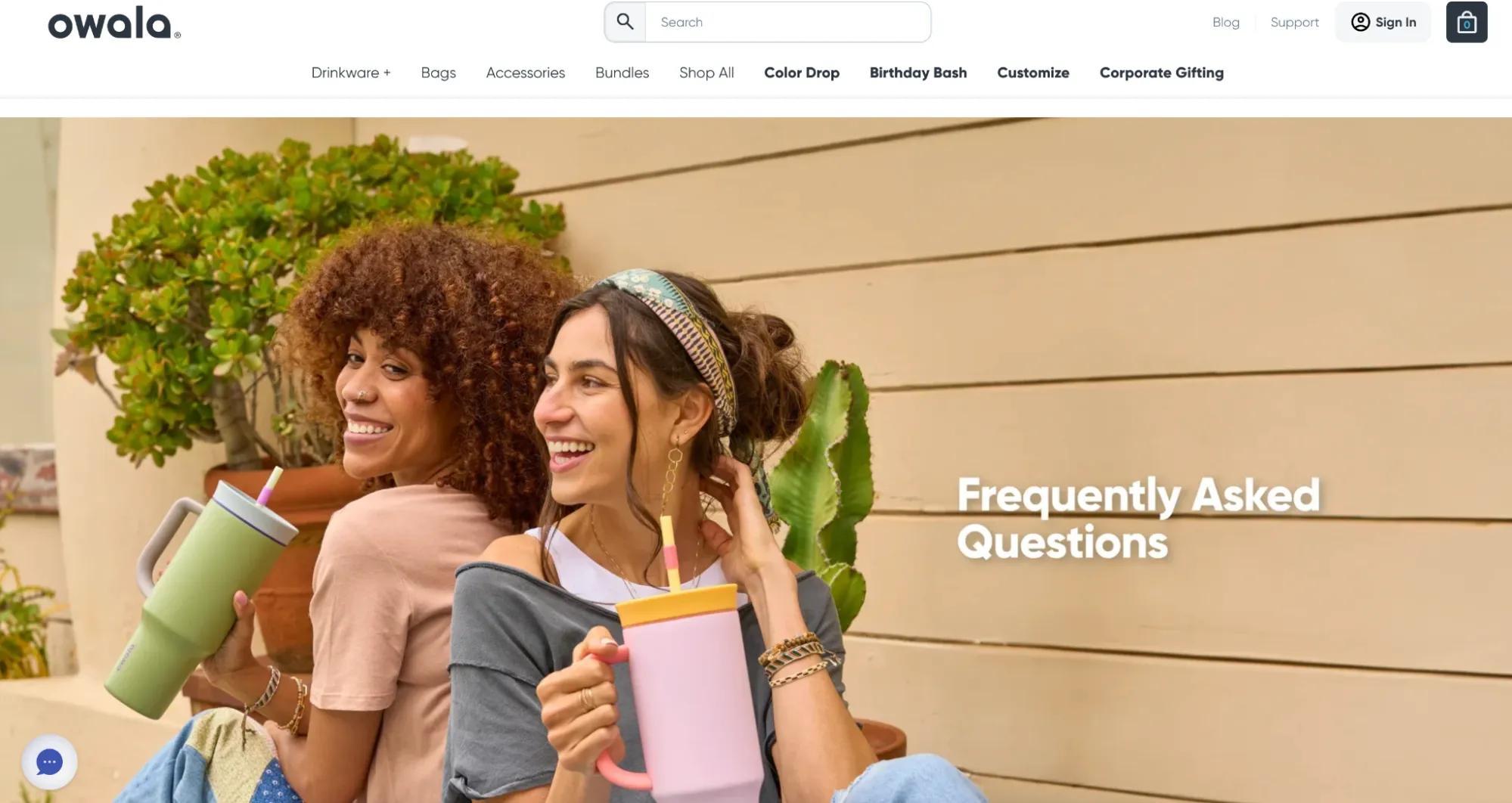
A welcoming hero image signals to visitors that it’s OK if they have questions. The FAQs are well researched, with answers provided in friendly, non-salesy language. The presentation is well organized, and accordion layouts avoid overcrowding the page.
Scrub Daddy
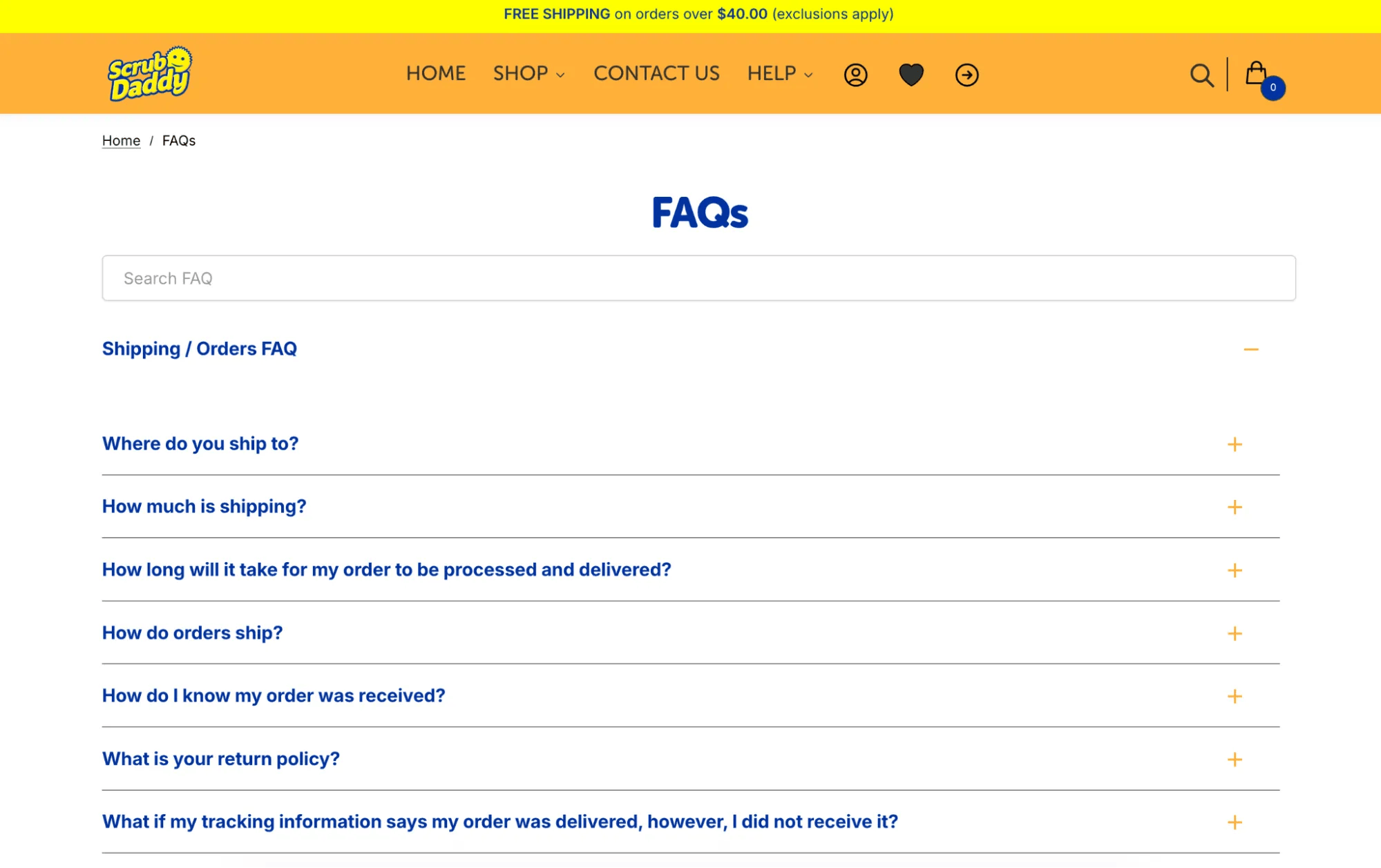
The page layout is very clean — FAQs are presented immediately with no scrolling required. Questions are very relevant, and answers are direct with no sales language. An accordion layout further streamlines the page.
Magic Spoon
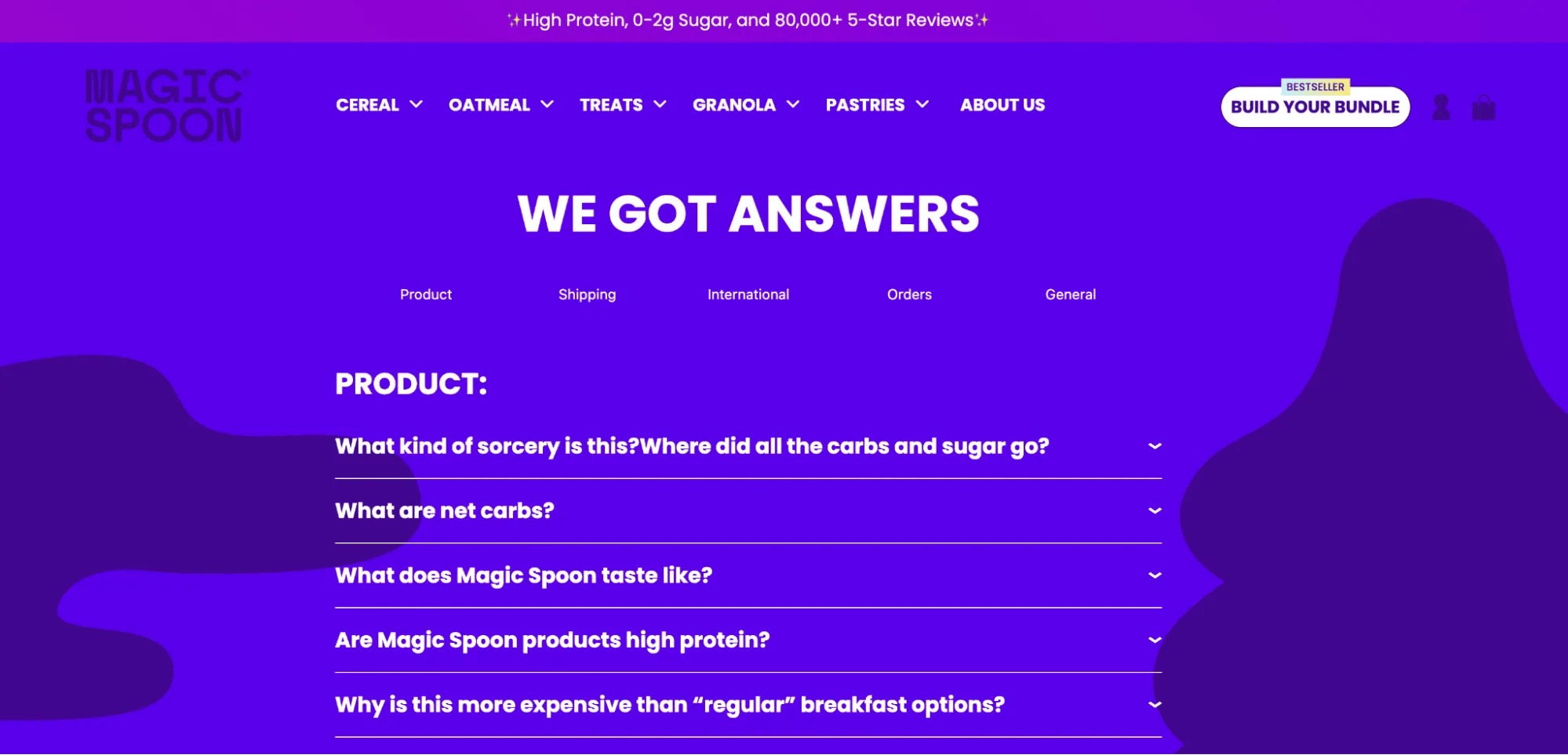
Catchy language and vibrant colors reinforce the brand identity and create a fun vibe that clears up any anxiety. FAQs are relevant and address real concerns, such as price. An accordion layout further supports the brand by avoiding clutter and keeping the focus on fonts and colors, rather than a “wall of text.”
How to build your FAQ page fast with GoDaddy Airo AI Builder
Once you've gathered your questions and drafted answers using the steps above, you don't have to build the page by hand. GoDaddy's Airo AI Builder lets you generate a fully functional FAQ page — accordion layout, categories, mobile-responsive design and all — just by describing what you want. Here’s how it works:
1. Describe your FAQ page
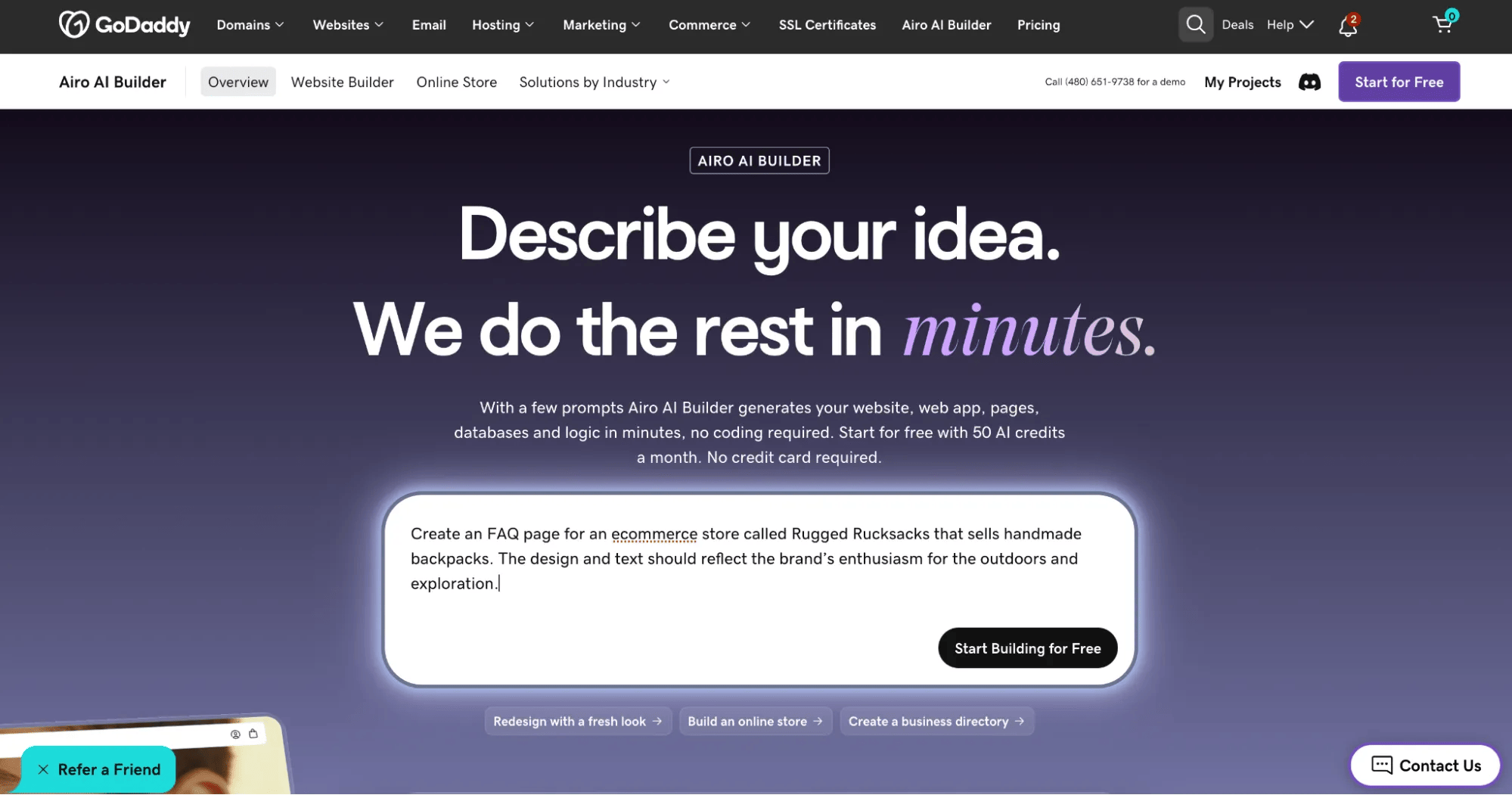
Tell Airo something like, "Create an FAQ page for an ecommerce store called Rugged Rucksacks that sells handmade backpacks. The design and text should reflect the brand’s enthusiasm for the outdoors and exploration." Airo lays out the structure, starter copy, and design in minutes.
2. Refine conversationally
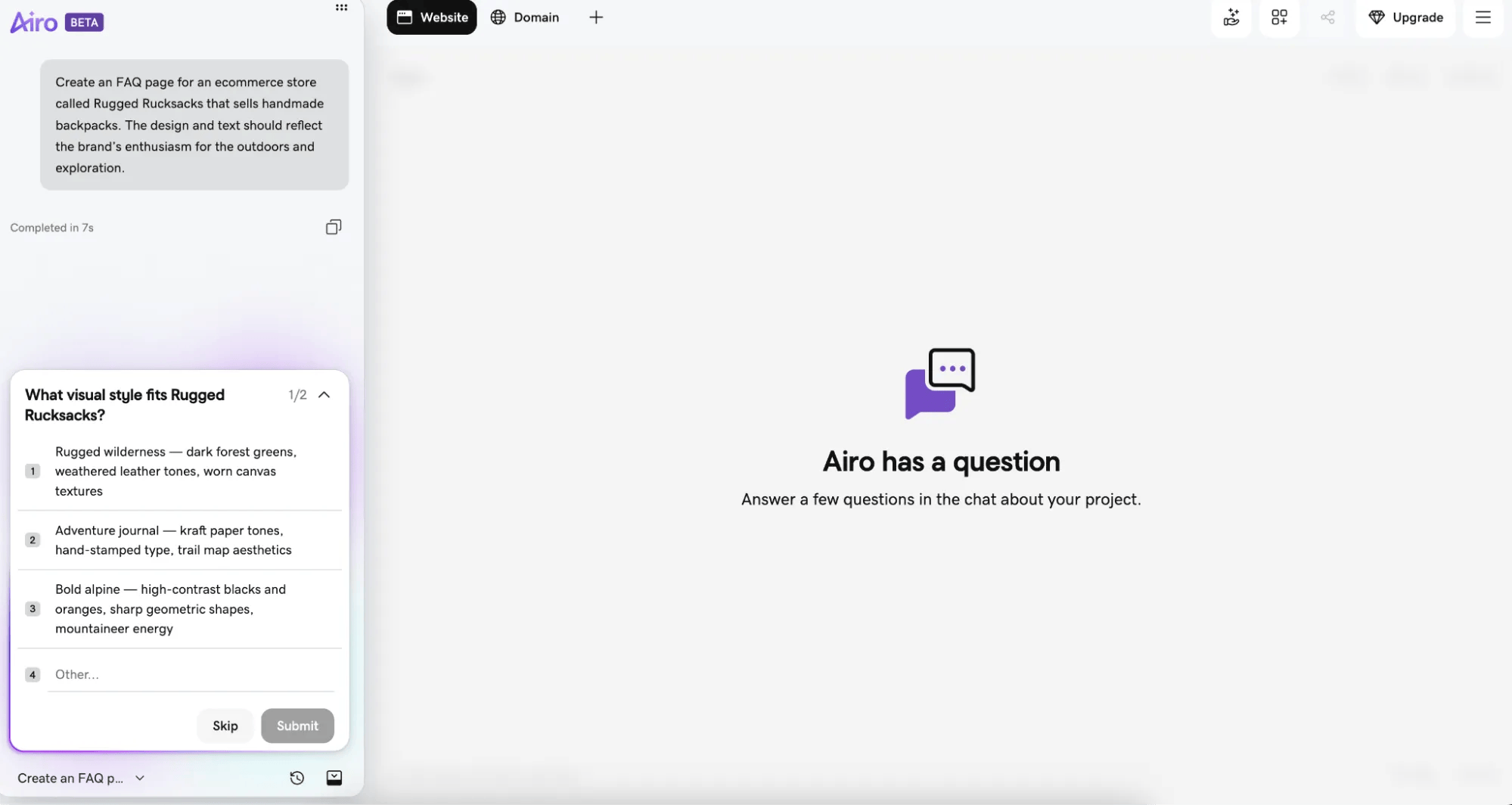
Use natural-language prompts to adjust tone, reorder sections, or add new categories as your list of questions grows — no coding required.
3. Publish instantly
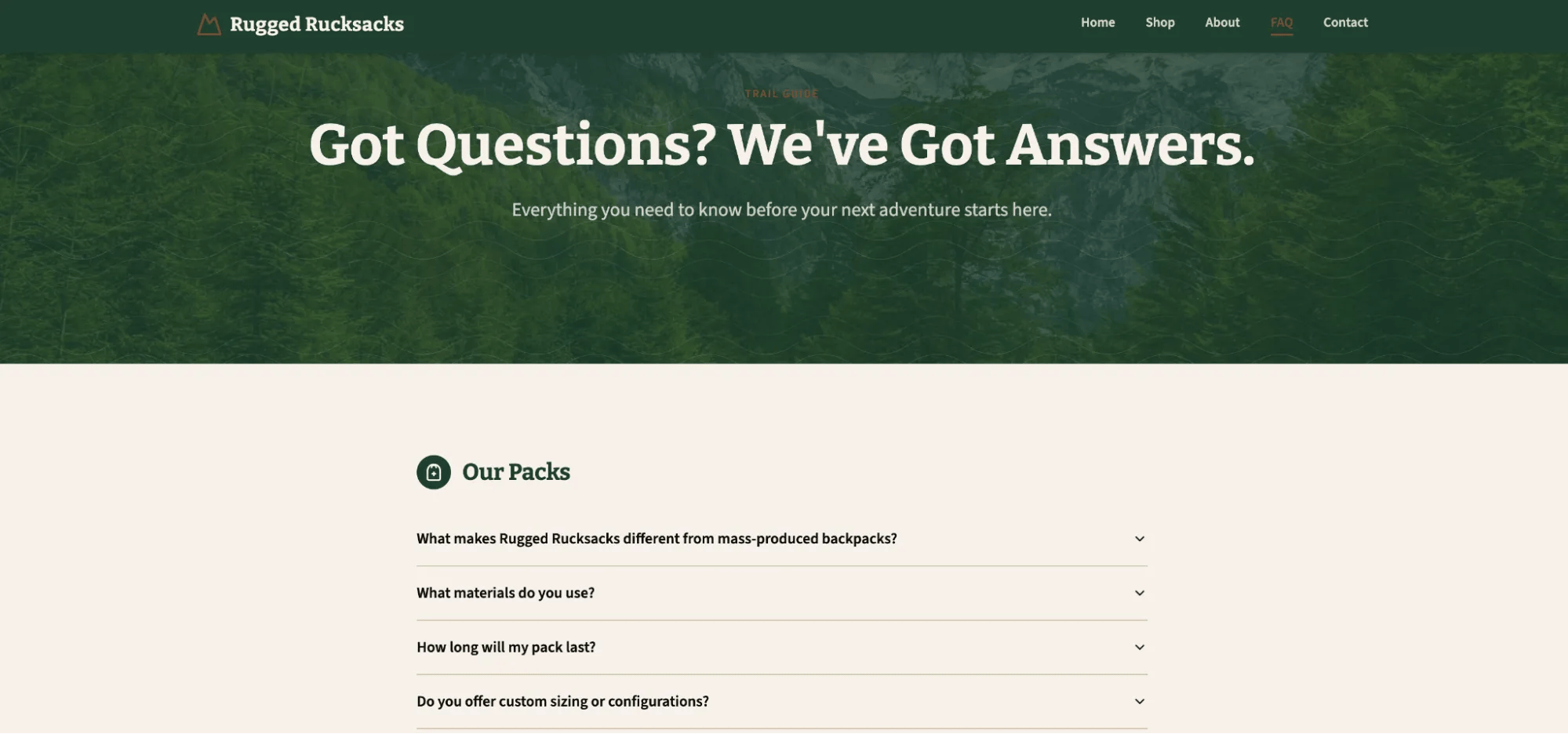
One-click deploy connects your FAQ page to your GoDaddy domain, with hosting, SSL, and analytics already built in.
Next steps
Whether you call it FAQ, help, or support, adding an FAQ page to your website or product pages can help accelerate the buyer’s journey from casual visitor to intentioned buyer.
A well-thought-out collection of questions and answers can save valuable customer support time, extend your brand, and even help your SEO.
It’s easy to get started by reviewing your most common existing customer service questions and answering them on your website.
Your FAQ page will evolve and change as your business grows, so there’s no time like the present to get started.