
Every website on the internet has an address. Not the kind with a street name and ZIP code, but a unique string of numbers called an IP address. Most website owners focus on domains, branding, and content, but there’s more happening behind the scenes that directly affects how your site is accessed.
If you’re building a site, moving hosting providers, setting up DNS, or troubleshooting performance issues, IP addresses will come into play. Let’s walk through how IP addresses work with domains, why they matter for your website, and what you should know as a site owner.
What is an IP address?
An Internet Protocol (IP) address is a unique numerical label assigned to a device or server connected to the internet.
Think of it like a street address or a phone number for your website. While your domain name is what people type into their browser, the IP address is the specific destination tied to the server where your website is stored.
For websites, that number is assigned to the hosting server that stores your files, images, and data. It gives your site a distinct location online so it can be identified separately from millions of others. Every live website is connected to at least one IP address, which makes it a foundational part of having a working domain and an accessible online presence.
How IP addresses work for websites
Every website lives on a server, and every server connected to the internet has an IP address. When you purchase web hosting, you’re essentially renting space on a server that has its own unique numerical address. That address makes your site publicly accessible.
Here’s a simple way to picture it:
- Someone types your domain name into their browser.
- The browser checks the Domain Name System (DNS), which acts like the internet’s phone book.
- DNS translates your domain name into the correct IP address.
- The browser connects to the server at that IP address.
- The server sends back your website’s files, and the page loads.
Without DNS, people would have to memorize strings of numbers instead of easy-to-remember domain names. DNS records store the information that links your domain to your server’s IP address. If you want a deeper dive, check out this complete guide to DNS records.
Related: What is a FQDN?
Get Web Hosting that's fast and reliable.
Types of IP addresses
Not all IP addresses are the same. They differ by version, how they’re used in hosting, and how they’re assigned.
IPv4 vs Ipv6
There are two main versions of IP addresses in use today: IPv4 and IPv6.
IPv4 is the older, yet still widely used, format. It uses a 32-bit structure and looks like this: 192.0.2.1. Because it relies on 32 bits, it supports about 4.3 billion unique addresses. That seemed like plenty in the early days of the internet, but with billions of devices and websites now online, IPv4 addresses have become limited.
IPv6 was introduced to solve that problem. It uses a 128-bit structure and looks something like this: 2001:0db8:85a3:0000:0000:8a2e:0370:7334. The expanded format allows for a virtually unlimited number of unique addresses, enough to support the internet's continued growth for the foreseeable future.
| Feature | IPv4 | IPv6 |
|---|---|---|
| Bit length | 32-bit | 128-bit |
| Example format | 192.0.2.1 | 2001:0db8:85a3::8a2e:0370:7334 |
| Address space | ~4.3 billion addresses | Vast, virtually unlimited |
| Adoption | Still widely used | Growing adoption, newer infrastructure |
Shared vs. dedicated IP addresses
When it comes to web hosting, IP addresses are also categorized by how they’re used.
A shared IP address means multiple websites are hosted on the same server and use the same IP address. This is common with shared hosting plans because it’s cost-effective and works well for most small to mid-sized websites. Thanks to modern server configurations and SSL support, sharing an IP address typically doesn’t impact basic website functionality.
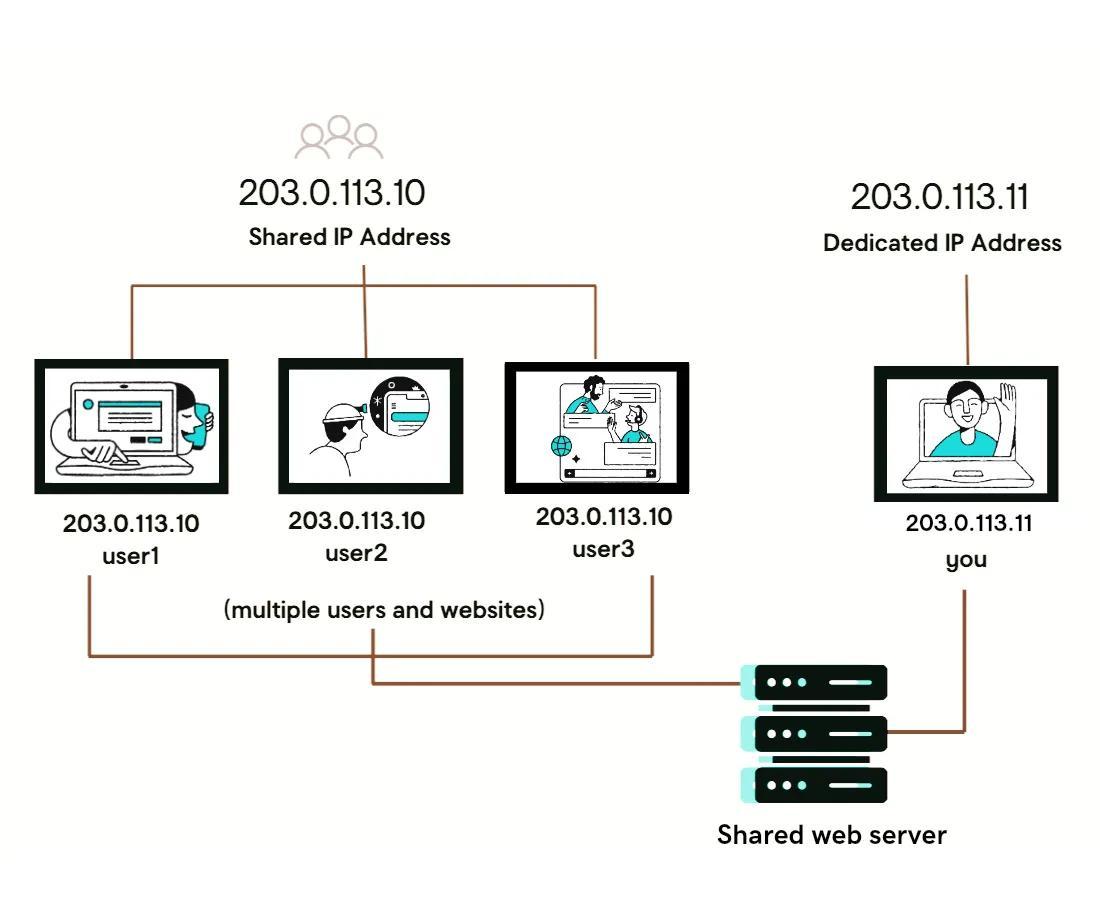
A dedicated IP address means your website has its own unique IP—no other sites share it. This setup offers more direct control over server configurations and can be useful for certain advanced hosting needs, custom server setups, or specific email and security configurations.
Read this “What is a dedicated IP” article for more information.
Static vs. dynamic IP addresses
IP addresses can also differ based on how they’re assigned.
A static IP address is permanent. It doesn’t change over time. This is common for servers and business websites because consistency matters. When your hosting server has a static IP, your DNS records can reliably point to the same address without interruption. Most hosting environments use static IP addresses at the server level to ensure your domain consistently points to the right destination.
A dynamic IP address changes periodically. Internet service providers often assign dynamic IP addresses to home users because it’s more efficient to manage large pools of addresses. While dynamic IPs work fine for personal internet use, they’re generally not ideal for hosting a public website, since stability and predictability are important for consistent access.
How to find your website’s IP address
Knowing your website’s IP address can be useful when updating DNS settings, troubleshooting connectivity issues, or verifying that your domain is pointing to the correct server. If you want to find the IP address connected to your website, you don’t need access to the server itself. You can look it up using a few simple tools that check the domain’s DNS records.
One of the quickest methods is using the command line on your computer:
- Ping: Open Command Prompt (Windows) or Terminal (Mac), type ping yourdomain.com, and press Enter. The IP address will appear in the output.
- Nslookup: In the same window, type nslookup yourdomain.com and press Enter. This command queries DNS directly and shows the IP address associated with the domain.
You can also use online DNS lookup tools. These tools let you enter a domain name into a search field and instantly see the IP address and related DNS records. This is helpful if you prefer a browser-based option or don’t want to use command-line tools.
If you’re using GoDaddy hosting, you can also check your account dashboard for server details. For step-by-step instructions, visit GoDaddy’s guide on how to find your IP address.
IP address vs. domain name: how they work together
An IP address and a domain name serve different roles, but they’re interconnected. The IP address is the technical location of your website’s server. The domain name is the human-friendly label people type into their browser. Both point to the same destination, but one is designed for computers and the other is designed for people.
Imagine trying to visit a website by entering 203.0.113.10 instead of yourbusiness.com; it’s just not practical. Domain names exist because they’re easier to remember, easier to brand, and easier to share.
DNS is the bridge between the two. When someone types your domain name into their browser, DNS translates it into the correct IP address behind the scenes. The browser then uses that IP address to connect to your server and load your website.
Why your website needs a dedicated IP address
For many smaller websites, a shared IP works just fine. But in certain situations, having a dedicated IP address can offer practical advantages. If your business depends on security, email reliability, or more advanced server control, a dedicated IP is likely your best option.
SSL/TLS certificate requirements
Secure websites rely on SSL/TLS certificates to encrypt data and protect visitors. While modern hosting environments often support SSL on shared IPs, a dedicated IP can simplify certain configurations and provide more direct control over certificate installation.
If you’re running advanced applications, custom server setups, or specific security configurations, a dedicated IP can make implementation more straightforward. It also reinforces your overall security strategy, which is essential for protecting customer data and maintaining trust.
Looking to upgrade your IP address’s security? Check out GoDaddy’s SSL certificate options.
Email deliverability
If your hosting server also handles emails, reputation is crucial. On a shared IP, multiple websites send emails from the same address. If one site engages in spammy behavior, it can affect the IP’s reputation and impact deliverability for others on that server.
With a dedicated IP, your email reputation is tied only to your sending practices. That level of isolation can help reduce the risk of deliverability issues and give you more control over how your business communications are received.
Direct server access
A dedicated IP gives you a direct path to your server. If you’re waiting for DNS changes to propagate after updating nameservers or switching hosting providers, you can sometimes access your site using the IP address itself.
This can be helpful during migrations, testing, or troubleshooting. It gives you an additional way to verify that your server is functioning correctly before DNS updates fully take effect.
Better site performance
In some hosting environments, a dedicated IP can contribute to more consistent performance. Since your website isn’t sharing the same IP address with multiple unrelated sites, there’s less potential for conflicts tied to traffic spikes or misconfigurations on neighboring accounts.
Performance improvements are not automatic and depend on your hosting plan, but businesses with higher traffic or more complex technical needs often choose dedicated IP addresses for added stability and control.
Protecting your website's IP address
Your website’s IP address is public by design—that’s how visitors can reach your server. But because it’s publicly accessible, it can also become a target. You must take steps to protect your IP address to help reduce downtime, strengthen security, and keep your site available when customers need it.
If you’re a new website owner, you may want to read these articles on why website security is important and on Wi-Fi security basics. You can also explore GoDaddy’s website security solutions.
DDoS attacks and how to protect your site
One of the most common threats tied to IP addresses is a Distributed Denial-of-Service (DDoS) attack. In a DDoS attack, a large volume of traffic is sent to your server at once to overwhelm it. When your server can’t handle the surge, your website may slow down or go offline.
Protection starts with the right hosting and security tools. Many hosting providers offer built-in DDoS mitigation that filters out malicious traffic before it reaches your server. Web application firewalls (WAFs), content delivery networks (CDNs), and managed security services can also help absorb and block suspicious activity.
For businesses that want an added layer of protection, services like Sucuri provide dedicated DDoS mitigation, firewall protection, and continuous monitoring. Sucuri acts as a protective layer between your website and incoming traffic, helping block malicious requests while allowing legitimate visitors through. That extra layer can make a meaningful difference in maintaining uptime and safeguarding your IP address.
DNS protection and monitoring
If someone gains access to your DNS settings, they could redirect traffic away from your site or disrupt access entirely. DNS protection features such as DNSSEC, two-factor authentication, and account-level security controls help prevent unauthorized changes. Ongoing DNS monitoring can alert you to unexpected record updates or outages so you can respond quickly.
Keeping your DNS records accurate and locked down ensures your domain consistently points to the correct IP address. Combined with strong hosting security, DNS protection helps create a more resilient and reliable online presence.
Future of IP addressing
IP addressing evolves alongside the Internet. As more websites, devices, and connected services come online every day, the infrastructure that supports them must scale. A combination of IPv6 adoption and emerging technologies makes this possible.
IPv6 adoption status worldwide
IPv6 was introduced to solve the address limitations of IPv4, and adoption has steadily increased over the past decade. Many major internet service providers, cloud platforms, and hosting companies now support IPv6 by default.
That said, IPv4 isn’t disappearing overnight. Most networks operate in dual-stack environments, meaning they support both IPv4 and IPv6 simultaneously. For website owners, this means your hosting provider likely handles compatibility behind the scenes so your site remains accessible regardless of which protocol a visitor’s network uses.
Emerging technologies and IP evolution
As technologies like IoT, edge computing, 5G, and AI-driven infrastructure expand, the demand for scalable IP addressing increases. Billions of connected devices require unique addresses, and IPv6 provides the capacity to support that long-term growth.
At the same time, improvements in network routing, security standards, and DNS management continue to shape how IP addresses are used and protected. Automation and smarter infrastructure tools make it easier for hosting providers to manage large address spaces efficiently while maintaining performance and security.
For website owners, the takeaway is simple: IP addressing is not static. The systems that connect domains to servers will continue to evolve to support a faster, more connected internet. Choosing a modern hosting provider that supports IPv6 and updated network standards helps ensure your site stays ready for what’s next.
Why understanding IP addresses matters in 2026
IP addresses might exist in the background, but they play a direct role in how your website is accessed, secured, and managed. From connecting your domain to the right server to supporting SSL, email deliverability, and DNS configuration, IP addresses are foundational to your online presence.
If your website supports your business, security and reliability can’t be an afterthought. Pairing strong hosting with proactive protection tools helps safeguard your IP, your data, and your reputation. Explore GoDaddy’s web security solutions to add monitoring, malware protection, and firewall coverage that keep your site accessible and protected in 2026 and beyond.
Frequently asked questions
What happens if we run out of IP addresses?
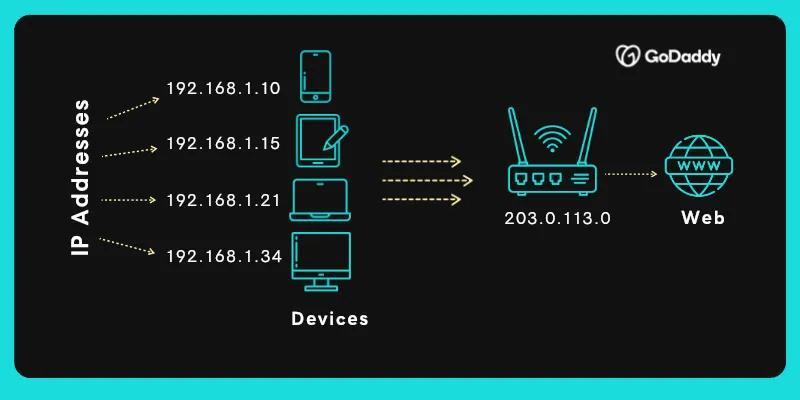
That’s largely what prompted the shift from IPv4 to IPv6. IPv4 has a limited pool of about 4.3 billion addresses, and most of them are already allocated. IPv6 solves this by offering a vastly larger address space that can support long-term internet growth. Today, most networks use a mix of both, so the internet continues to scale without disruption.
Can two devices have the same IP address?
On the public internet, no. Each public-facing IP address must be unique so traffic reaches the correct destination. Within a private local network, devices can share a private IP address range because a router translates traffic to a single public IP address using Network Address Translation (NAT).
Can I change my site’s IP address?
Yes, you can change your site’s IP address by switching hosting providers, upgrading to a dedicated IP, or moving to a different server. When that happens, you’ll need to update your DNS records so your domain points to the new IP. Once DNS propagation is complete, visitors will be directed to the updated server location.
Is hiding my IP address legal?
In general, yes. Businesses often use tools like firewalls, CDNs, or security services to mask or proxy their origin server IP for security reasons. As long as you’re not using these tools for unlawful activity, protecting or obscuring your server’s IP address is a standard and legitimate security practice.