
An online store gives you a way to build a business that works on your terms. It can start as a side project, grow into a full-time income stream, or support an existing brand that is ready to sell beyond a physical location.
In this guide, we’ll walk you through the entire process of how to start an online store for your website, from product ideation to planning, building, launching, and promoting your online store.
Let’s jump right in.
TL;DR: How to start an online store
This article walks through the real, practical steps to getting an online store up and running. It starts with understanding who you want to sell to and which products make sense for that audience, then moves on to sourcing those products and registering your business so you can start selling.
From there, it discusses how to use GoDaddy Airo AI Builder to design your store, add products, and set up payments without getting stuck in technical details. You will also learn how to test everything before launch, go live, and start promoting your store so customers can find you.
GoDaddy Airo AI Builder
Describe your idea. We'll build your live website in minutes.
With a few prompts, Airo AI Builder generates your website, web app, pages, databases and logic in minutes — no coding required. Start for free with 50 AI credits a month. No credit card required.
Build for FreeDefine your target customers
Even if you don’t have a product in mind yet, without a properly defined target market, your sales and promotional efforts will suffer. When starting an online shop, consider the following to classify your target audience and find the ideal product to sell online.
- Identify key demographics: Start by gathering statistical data related to your audience: age, gender, marital status, education level, household income, and geographic location.
- Spot customers’ professional interests: If you’re selling a business-related product, profile your customers’ professional details, such as the types of jobs they do and the markets they serve.
- Gather customer psychographics: Learn about your prospective customers’ lifestyles, goals, interests, and hobbies. Understanding these qualities helps you effectively target your products to their needs.
- Map out consumer buying behaviors and key influences: Do your customers research on mobile or desktop? Do their friends’ recommendations on social media sway their purchase decisions? Examine how your target consumers interact across all possible sales channels and touchpoints, including mobile apps, messaging platforms, and email.
An online survey tool can be helpful in gathering this data, along with free market research from organizations like eMarketer, Comscore, Pew Research, Nielsen IQ, and Think With Google Research Tools.
The more you learn about what makes your audience unique and ideal, the more targeted and effective your content will be.
Research and choose products to sell
Selling a unique product that stands out is important for building a successful online store. But how do you know if people actually need or want to buy it? Start by asking people you know, such as family and friends. Here’s what to ask when gathering insights from them:
- Do they love your idea? If so, find out what features would be most appealing to them.
- Is there anything about your product idea that they would change?
- Ask about their ideal customer experience. What services would make it shine?
- Would they be willing to pay full price for your product? What do they think it’s actually worth?
- Have they bought similar products elsewhere? What did they like or dislike about both the product and the buying experience?
Gathering this level of feedback is an excellent way to refine your product before selling it online.
You can conduct casual research by speaking with friends and family in person to gather qualitative insights or by setting up a quick online survey.
SurveyMonkey offers a monthly subscription service that you can use to survey friends, family, and visitors to your website to better understand who would or is buying your products.
Google Docs also enables you to set up survey forms.
Get the products for your online store
Once you’ve narrowed down the products you’ll be selling, you need to determine how you’re going to source and physically store them. There are many options when first starting an ecommerce website.
Sell existing inventory online
If you already own a retail brick-and-mortar shop, use it as a place to store inventory from the moment you create your online store until your ecommerce business grows.
An online store complements existing brick-and-mortar retail businesses by increasing brand reach, brand awareness, and customer trust.
Use dropshipping to start an online store without inventory
Many first-time ecommerce entrepreneurs start with no physical inventory. If you're wondering what is dropshipping, it involves acting as a wholesaler of products that you curate on your store website, then purchasing directly from the manufacturer to ship to your customers.
Create and ship your unique products on demand
If you currently sell crafts, custom t-shirts, or artwork on sites like Etsy, consider creating an online store and driving those customers to your own website after their first sale. Include a business card or coupon in their parcel that promotes your site’s URL and offers a discount on their next purchase.
This way, you keep 100% of the future profits from repeat buyers and build a stronger relationship with them.
The beauty of these businesses is that you only need to create and ship what you sell in advance. Be sure to indicate how long a customer can expect to wait for the product before they make their purchase decision.
Offer a monthly subscription service
Another way to manage your product inventory as a new ecommerce business is to sell a subscription-based service.
You only need to store and ship the units you’ve already sold in advance each month or quarter, depending on your business model.
If you’re still unsure about what kind of products you want to sell, check out our list of trending products to sell online.
Register your business
The first step is to make your business official. Registering your online store with the appropriate state authority helps establish credibility, protects you legally, and sets clear boundaries between your personal and business finances. It also makes it easier to handle taxes, apply for funding (check out GoDaddy Capital), and scale as your store grows. If you need help getting started, read this how to register a business guide.
Before launching your online store, select the type of legal entity for your company. Establishing your business from the outset as a legal entity will save you trouble in the long run, as it’ll help you with the following:
- Protect your personal assets.
- Lower your potential taxes.
- More easily secure business loans or funding.
- Keep your business and personal credit scores separate.
Not sure what type of business structure fits your needs? Here are some common options.
Sole proprietorship
A sole proprietorship is an unincorporated business with a single owner who pays personal income tax on profits earned from the business.
This is where most small businesses start, as the start-up costs are relatively low and it’s easy to change your legal structure later.
The owner can also keep all of the profits. Some disadvantages include being fully (personally) liable for your business debts, making it more difficult to get business credit or financing, and challenges in selling your business.
Partnership
There are several sub-categories to this legal entity type, including general partnership, limited partnership, and limited liability partnership. Partnerships are beneficial for new businesses as they help spread the costs and pool skills and resources.
However, partners are liable for both the profits and the debts of the business.
It’s also easy for business partnerships to fall apart, so ensure that you’ve prepared for this possibility before opting for this option.
Limited liability company (LLC)
A limited liability company (LLC) is a type of private limited company. It’s a business structure that combines the pass-through taxation of a partnership or sole proprietorship with the limited liability of a corporation.
The advantage of an LLC is that it limits your personal liability, protecting your personal assets from business-related debts. It also allows the business to be taxed as a pass-through entity, avoiding corporate-level taxes.
If you’re interested in forming an LLC, the process and requirements can differ depending on your location. When you’re ready to take the next step, you can register an LLC for free with GoDaddy. For specific, step-by-step instructions, explore these state-by-state examples:
- How to start an LLC in Arizona
- How to start an LLC in California
- How to start an LLC in Florida
- How to start an LLC in Georgia
- How to start an LLC in Illinois
- How to start an LLC in Maryland
- How to start an LLC in Missouri
- How to start an LLC in Nevada
- How to start an LLC in New York
- How to start an LLC in Pennsylvania
- How to start an LLC in South Dakota
- How to start an LLC in Texas
- How to start an LLC in Virginia
If you don’t see your state in the list above, you can always check out our guide on How to Start an LLC for a comprehensive overview.
Build your online store with Airo AI Builder
With all of the prep out of the way, it’s time to jump into building your online store. Let’s go over the steps you’ll need to take when building your online store in Airo AI Builder.
Step 1: Describe your ecommerce idea to Airo AI Builder
Your introduction with Airo AI Builder should ideally include your business type, business name, and what you’re trying to build or sell. But don’t sweat it if you forget something in your initial request; you can continue to refine your website as you go.
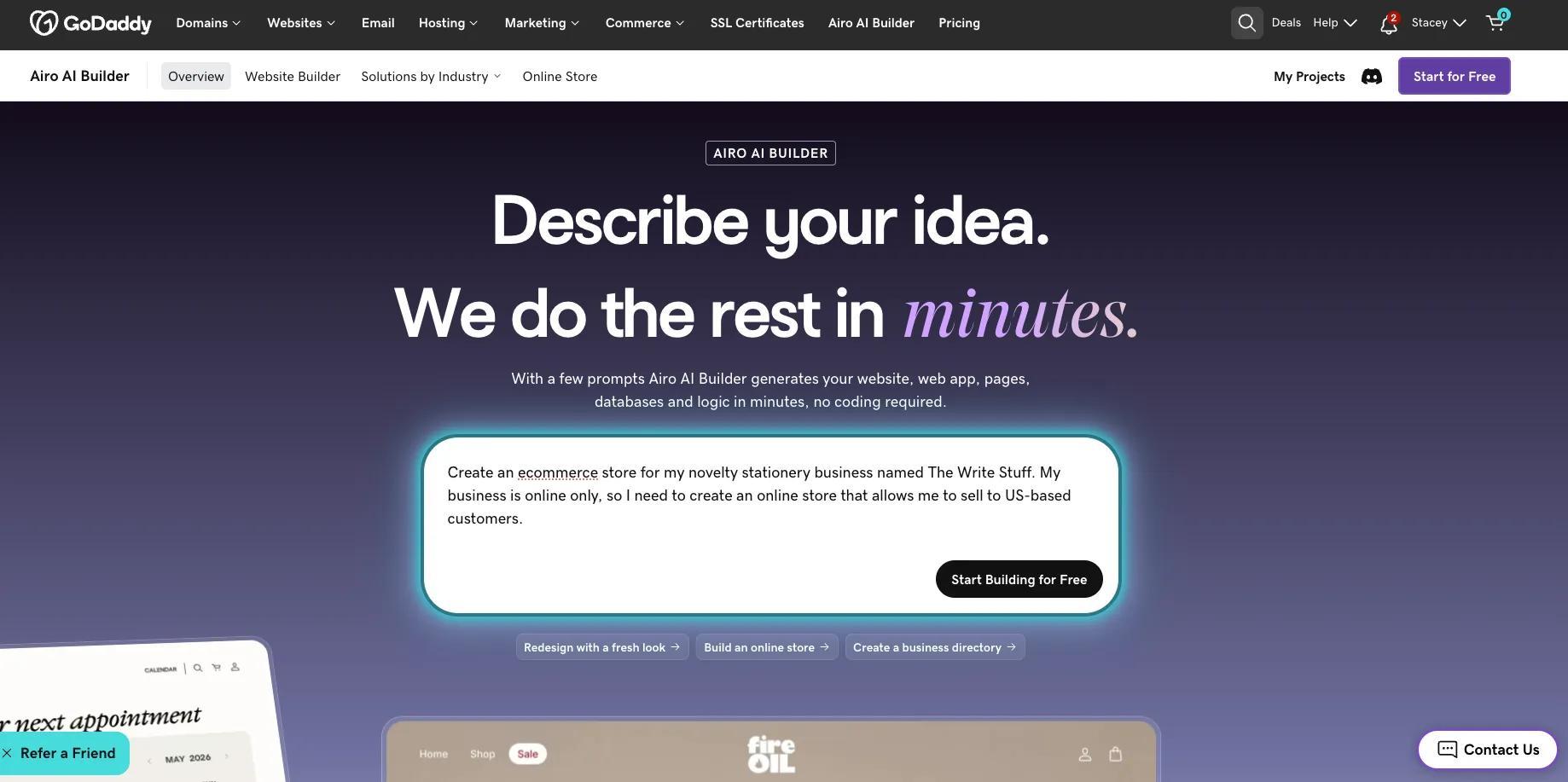
This description lets Airo AI Builder know my business name, the business type, what kind of website I’m building, and my target audience. Once I’ve sent that prompt, Airo AI Builder will start working on my site.
Step 2: Answer a few questions and refine through conversation
To make sure I’m getting something that works for my business, Airo AI Builder will ask a few questions before beginning the build. If the option you’re looking for isn’t there, you can specify what you’d like instead.
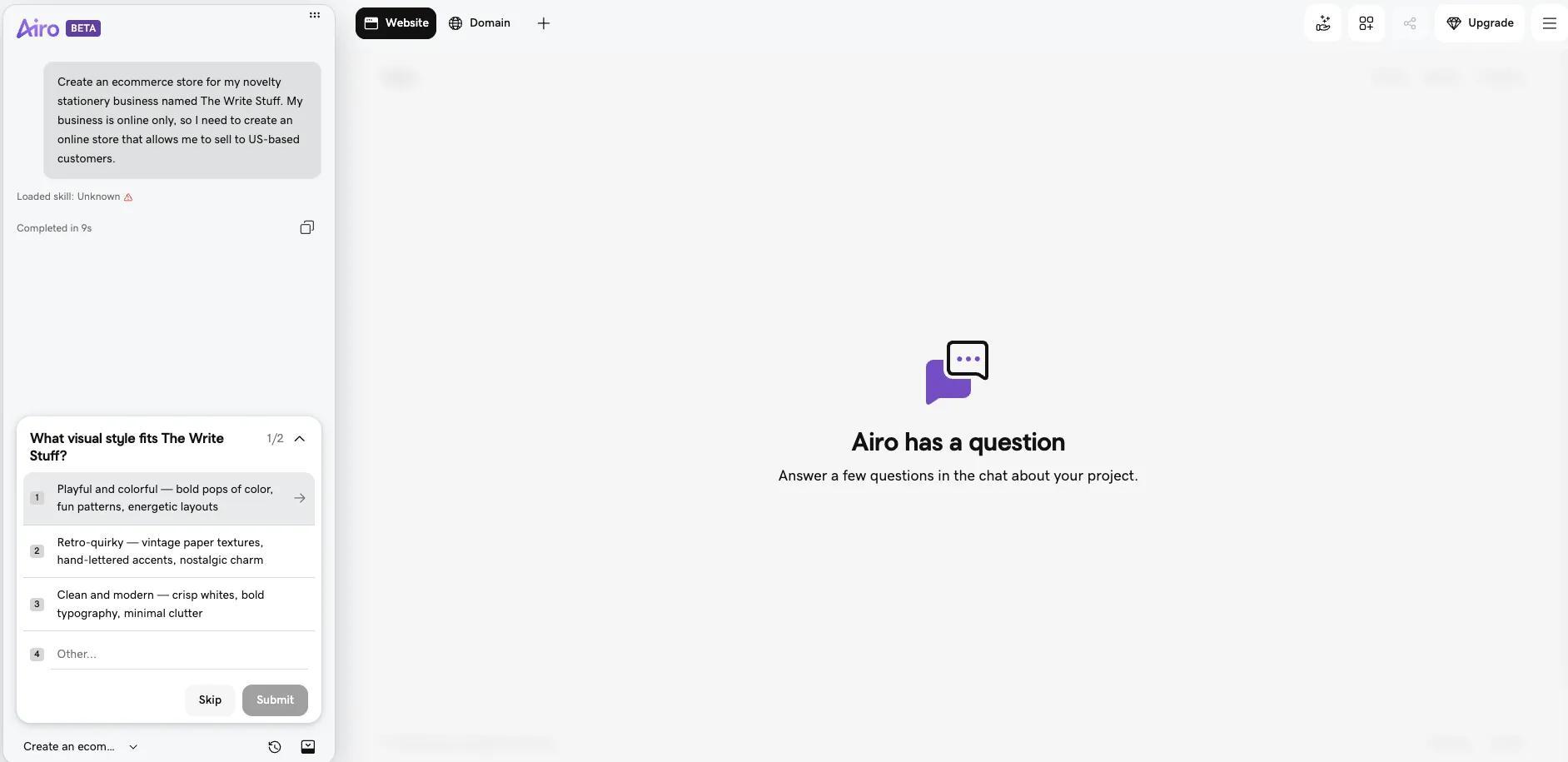
Based on my responses to the questions presented, this is what Airo AI Builder provides as a first draft:
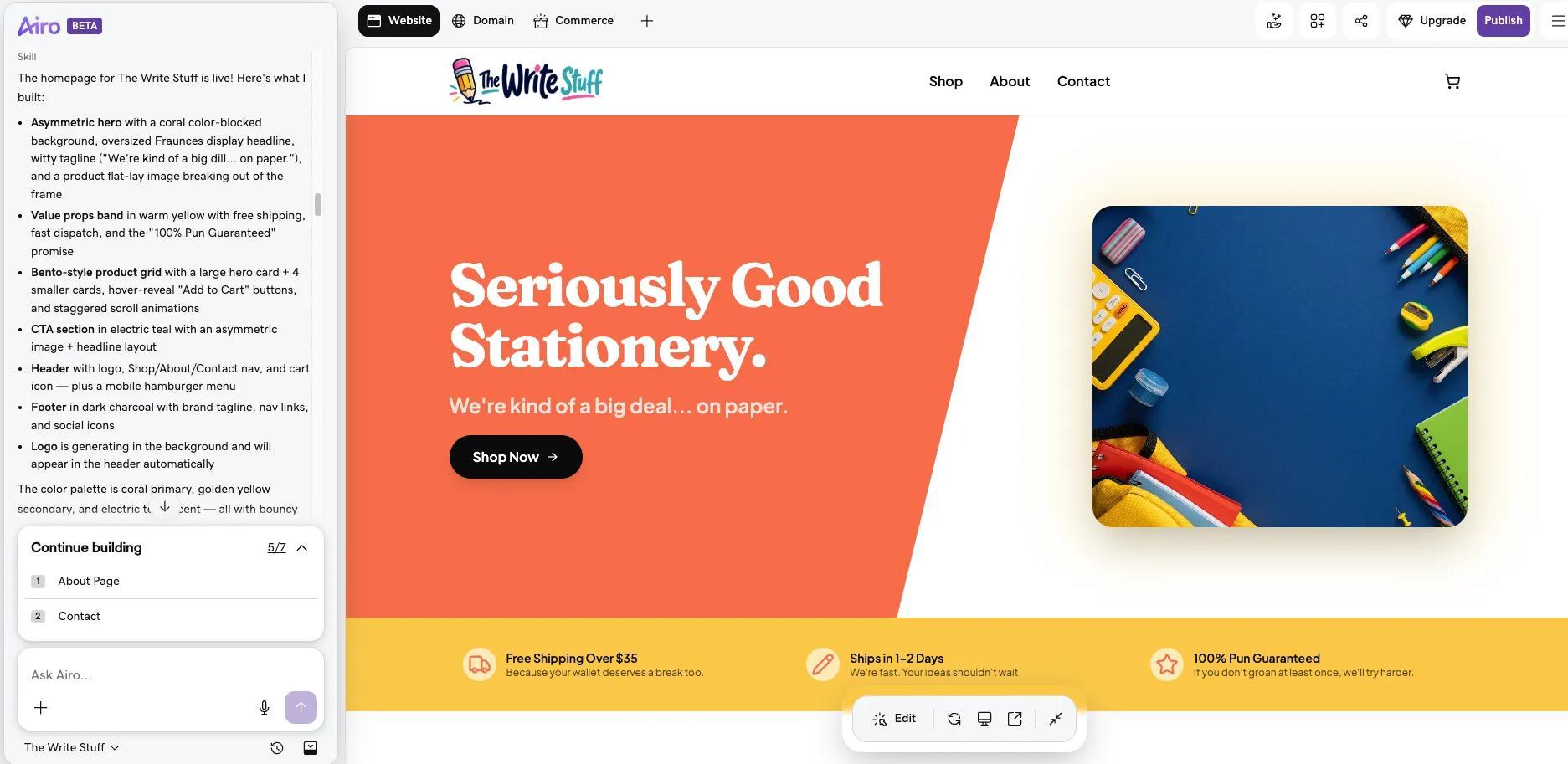
The colors are bright like I’d asked for, but the white feels a bit bright, so I ask Airo AI Builder to give me some other options.
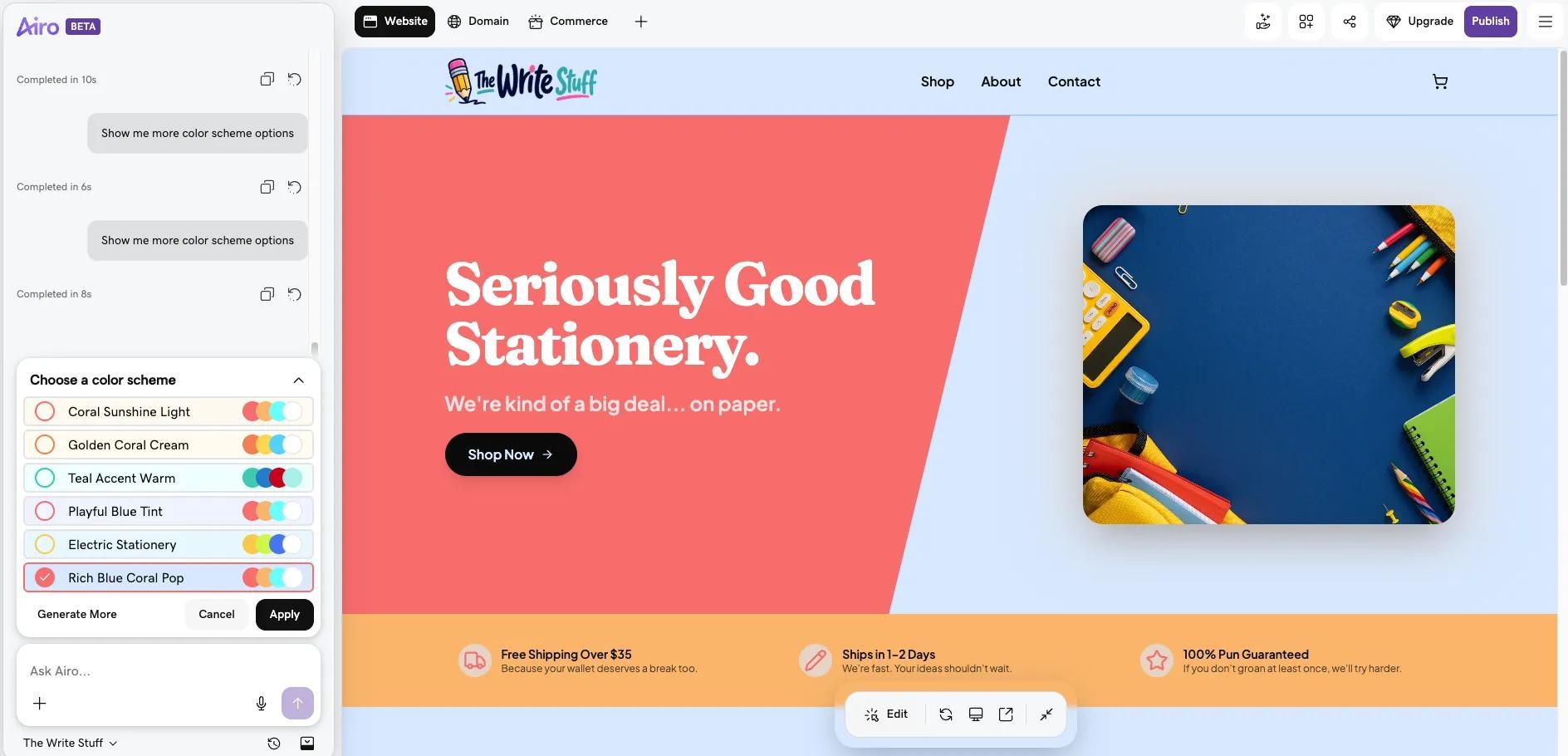
Once the new color palette is applied, Airo AI Builder will prompt you to continue to build out the other pages for your website.
It’s important to note here that you will need to edit the output that Airo AI Builder adds for your additional pages, since it will add placeholder information that likely won’t apply to your business. You can edit the content by clicking into the field that you need to edit, or by clicking the Edit button at the bottom to enter editing mode.
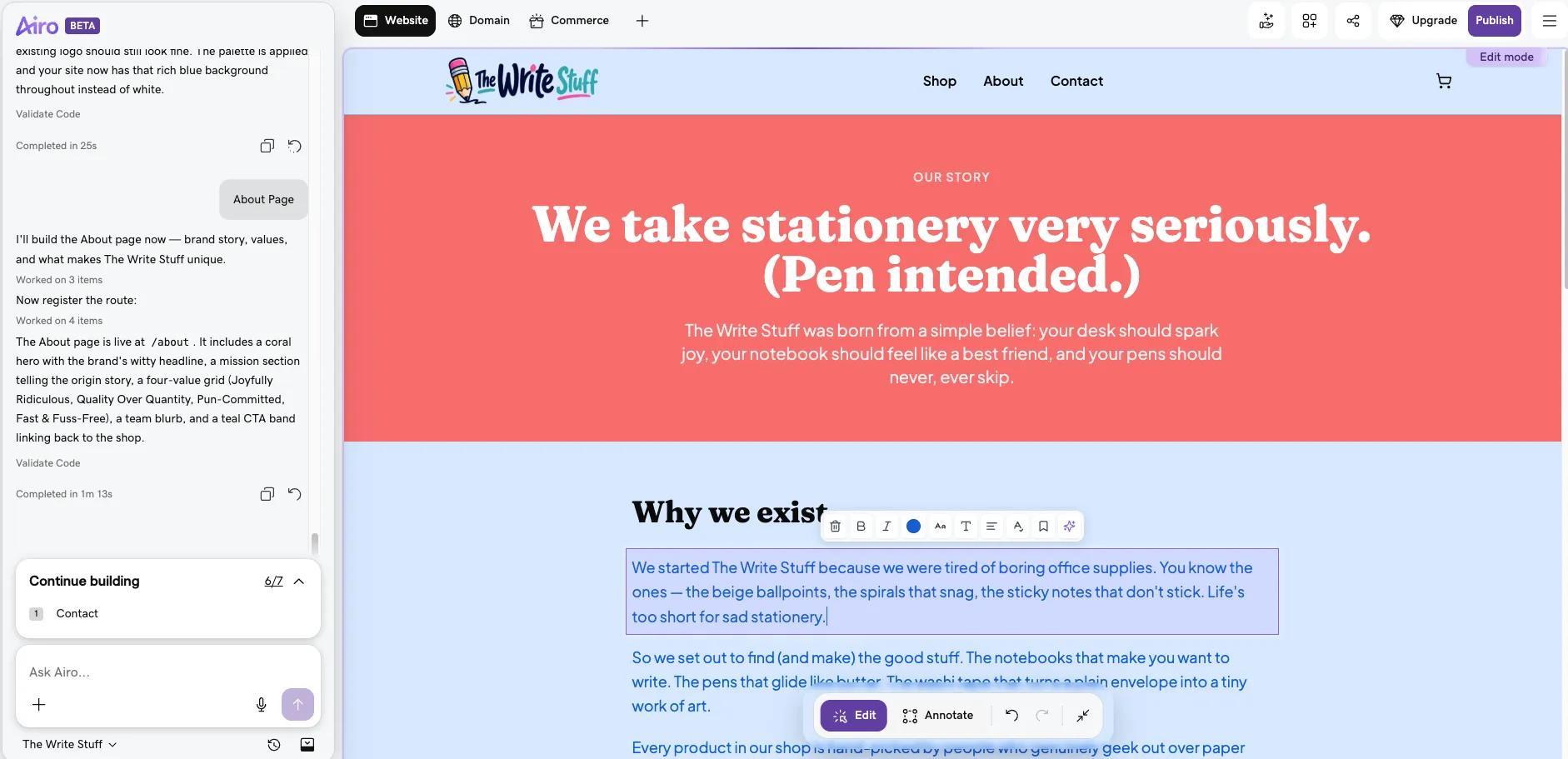
Once you’ve completed the overall wireframe for your website, it’s time to jump into the important bit: your online store.
Step 3: Add products, connect payment methods, taxes, and shipping
First up: adding your products. Airo AI Builder will add some placeholder products to your website to demonstrate how it’ll look, but you’ll need to add your own products, prices, and images instead. To make these updates, click on the Commerce tab at the top of Airo AI Builder, then click Manage Products.
Tip: If you haven’t accessed the Commerce settings for your website yet, you’ll need to click on the + icon at the top, then select Commerce from the dropdown options.
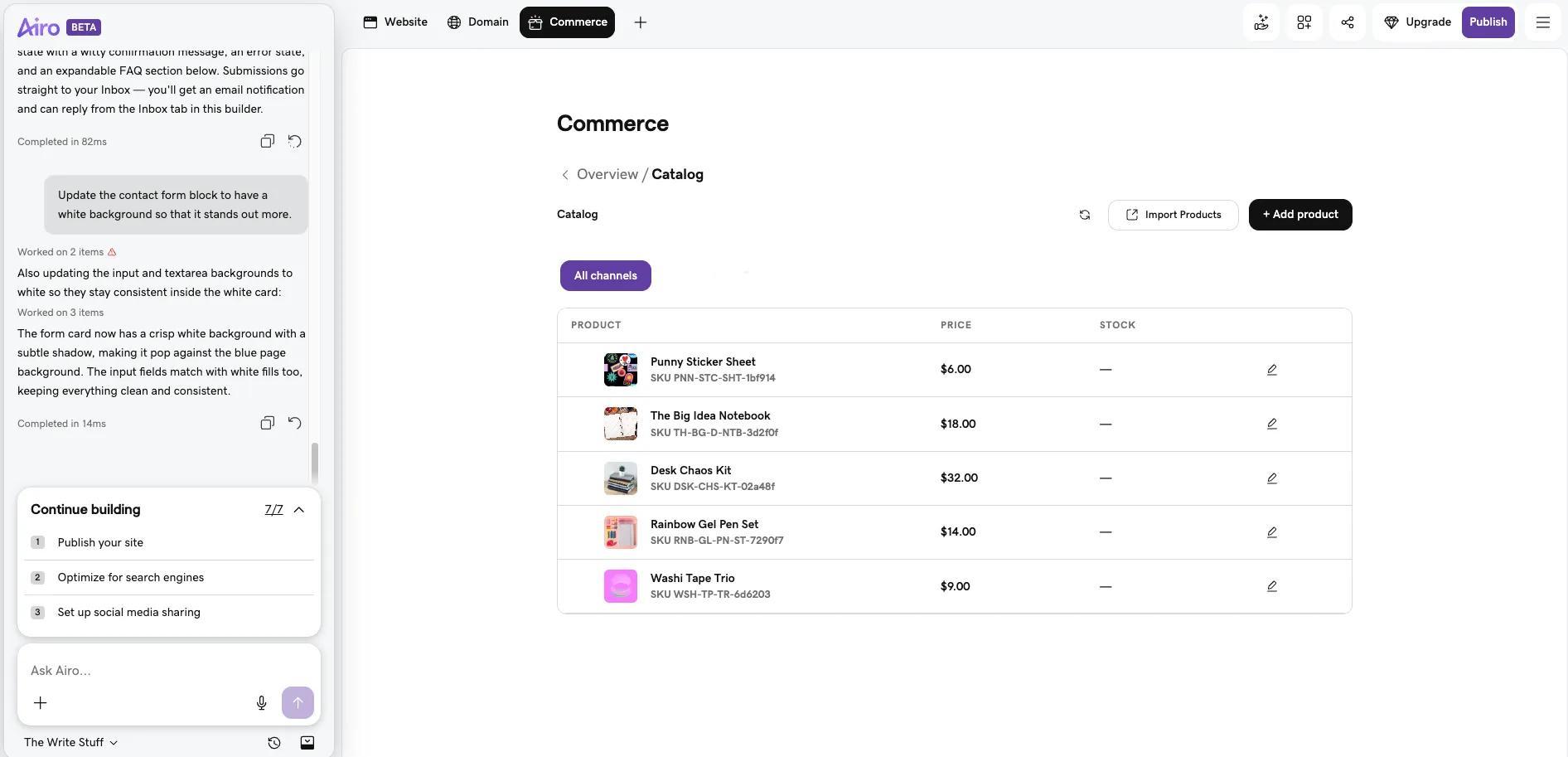
If you’ve got a list of products already, you can use the Import Products button to import that list directly. Or, to add products individually, click the Add product button and follow the prompts.
It’s a good idea to ensure that you’re keeping your products organized for optimal user experience. Effective product catalog management is key to streamlining this process. Additionally, you’re able to create and add SKU numbers to your products to help with the organization process.
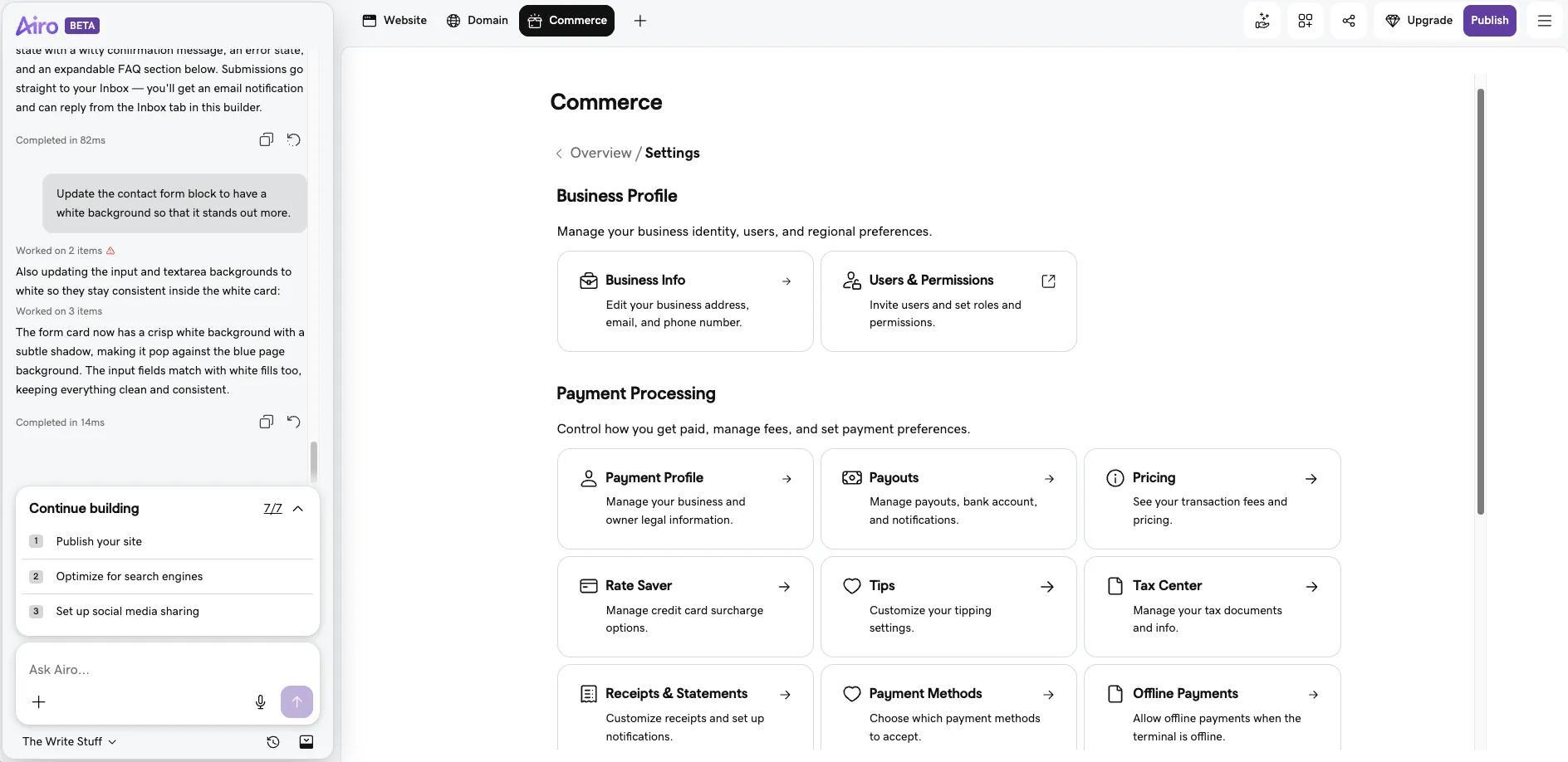
Once you’ve added your products, you’ll need to set up your business information, payment options, taxes, and shipping. To do that, click on the Commerce tab, then click View Settings under the Quick Links option at the bottom right.
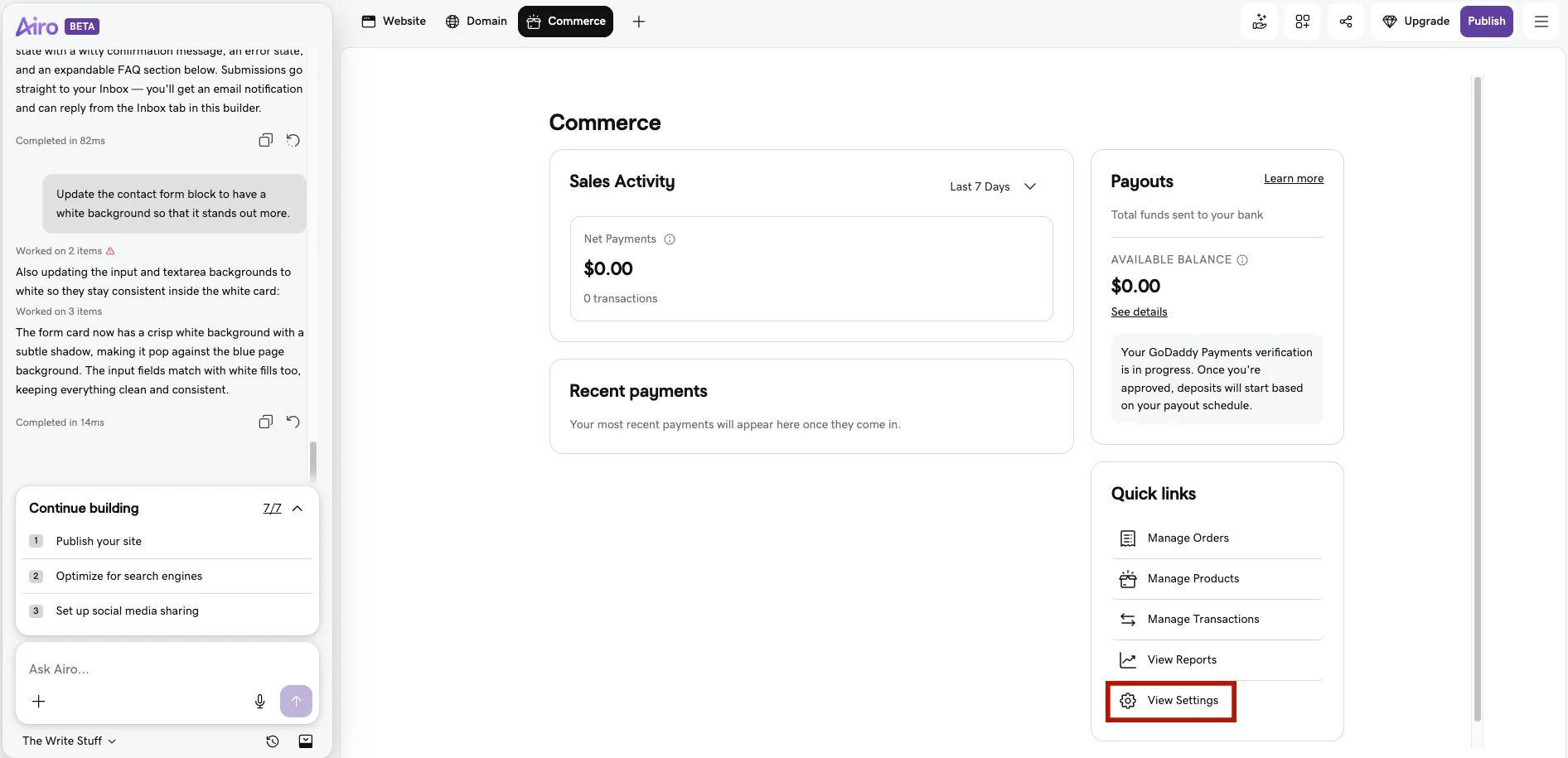
This settings page is where you’ll be configuring all of the technical details for your store, including:
- GoDaddy Payments settings: GoDaddy Payments enables you to accept payments online (available in the United States and Canada). If you’re outside of the US or Canada, Stripe can be used instead.
- Sales tax settings: You have the option to manually set your tax rates, or the online store can automatically calculate orders based on your customers’ zip code. Staying updated with the latest requirements for your online store is crucial to avoid unexpected fees. Learn more about businesses and states that require a seller’s permit here.
- Shipping settings: You’re able to offer free shipping, charge a flat rate, or set rates based on the weight of the order. You can also further configure shipping rates within each product individually.
While those settings are extremely important, they’re not the only settings available, so be sure to go through each of the options available to ensure that you’ve fully configured your online store.
Step 4: Test, connect your domain, and launch your online store
Now that everything has been configured, you’ll want to test your online store before you launch it. To do so, click the Preview button at the bottom of the site editor.
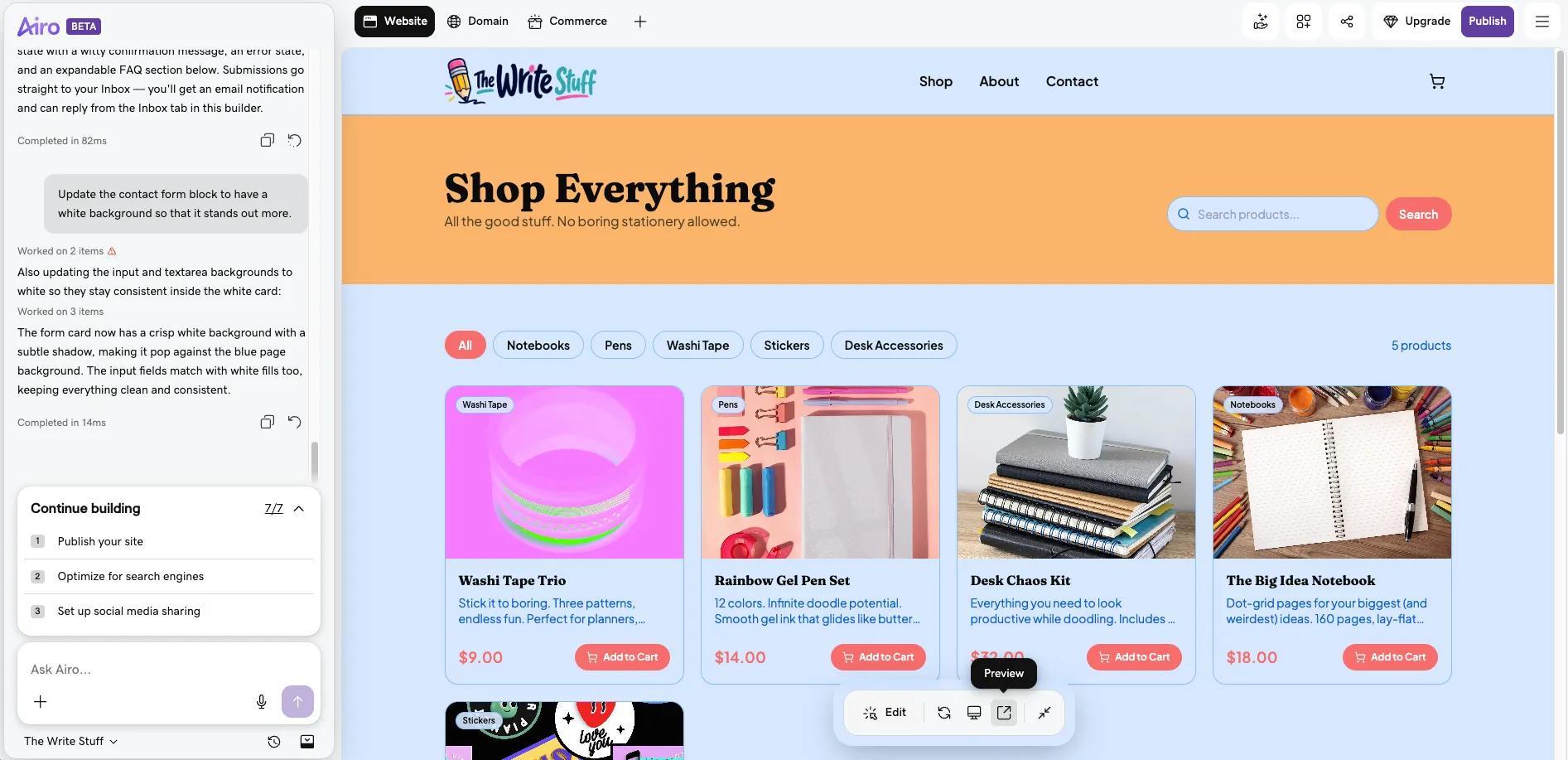
When you’re happy with your site’s functionality, you’re ready to make your online store live. Click the Publish button at the top right to add your domain name and push your site live.
Important note: If your domain is registered in the same GoDaddy account as Airo AI Builder, then your domain's DNS settings will be configured automatically when publishing. If your domain is registered in a different GoDaddy account, or at a different domain registrar, then additional steps will be required before your site can be live online. See our help guide on how to connect a domain to Airo AI Builder for the steps needed for each domain scenario.
If you don’t already have a domain and need help finding one, our domain name generator can also help you find the right name for your ecommerce store.
If you haven’t already, you’ll need to pay for your Airo AI Builder plan in order to publish your online store. To do so, click on the Upgrade button at the top right.
Ready to start? Start building your store with Airo AI Builder using 50 free AI credits.
Step 5: Continue to manage your store from the Commerce tab
After your store is live, you’ll be able to view your orders and manage your online store settings from the Commerce tab inside of Airo AI Builder. At a glance, you’ll be able to see:
- Sales Activity: This section shows your sales over a date range you choose, with a link through to your sales activity in Commerce Home.
- Recent payments: A list of your latest payments, with a link to view them.
- Payouts: A display of the total funds sent to your bank and your available balance.
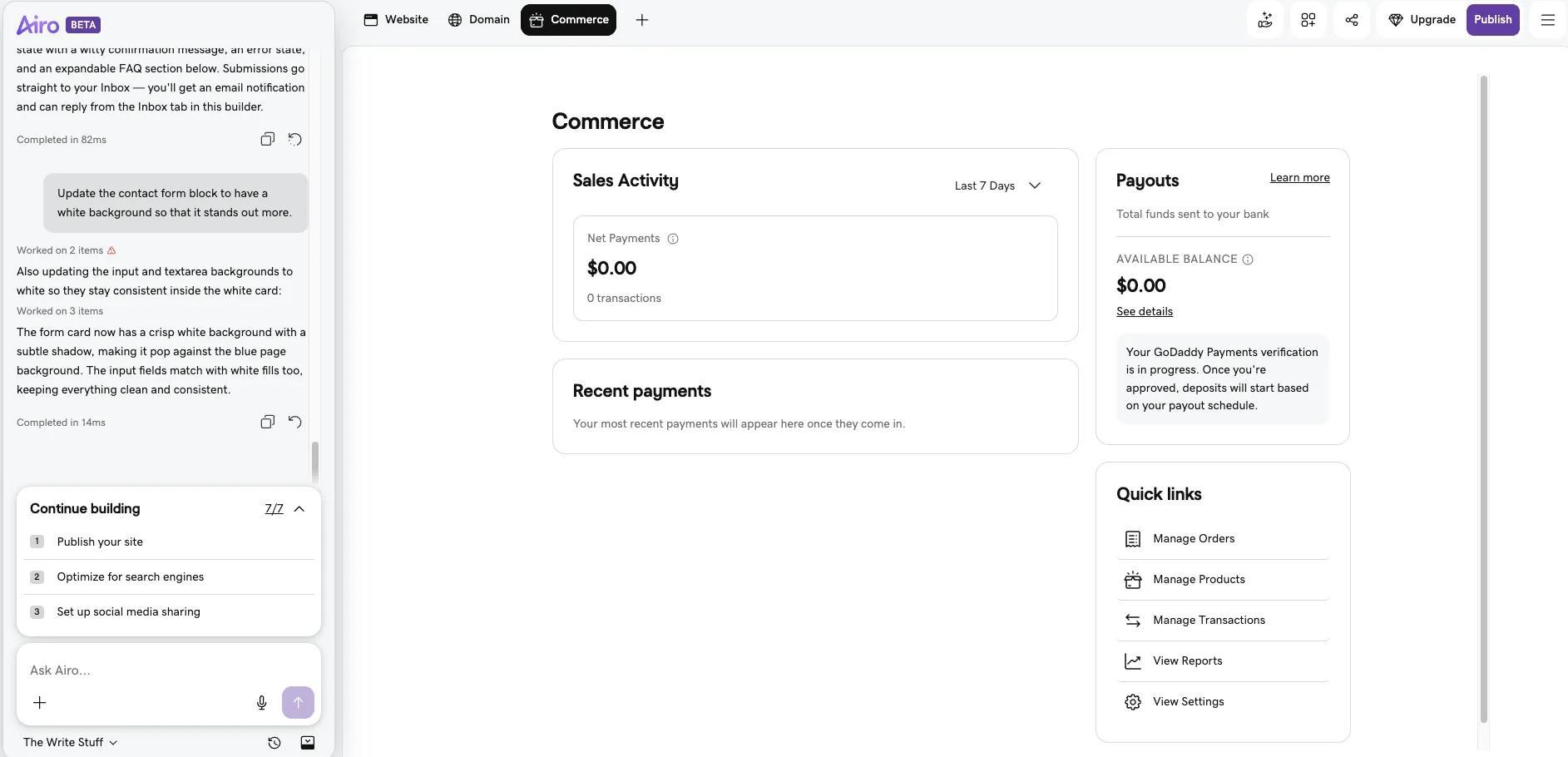
The Quick Links section is also available to take you to the following settings:
- Manage Orders to work through what customers have bought
- Manage Products to add, edit, or remove what you sell
- Manage Transactions to review individual payments
- View Reports to look at store performance over time
- View Settings to adjust how your store operates
Pro tip: When you need more than the Quick Links tools cover, the Commerce tab links out to Commerce Hub, where deeper store management lives.
What you get when you set up a store in Airo AI Builder
With Airo AI Builder, your online store includes all of the tools that you need to successfully manage your ecommerce space online.
| What you set up | What’s covered |
|---|---|
| Storefront and product pages | Product listings and checkout, built from your description |
| Payments | Card checkout through GoDaddy Payments or Stripe |
| Sales tax | Manual rates, or automatic calculation based on ZIP code |
| Shipping | Free shipping, flat-rate shipping, or weight-based rates |
| Orders and payouts | Orders, transactions, recent payments, and payouts |
| Advanced store management | Deeper settings and reporting beyond the in-editor tools |
Promote your online store
With your site live, it’s time to attract customers. Here are some tools that you can use to help drive traffic to your store.
Social media
If your brand targets Gen Z or Millennials, having a strong social media presence is critical to drive traffic to your website and boost sales.
Use social media content to personally connect with customers and build buzz about your latest products.
A strong social profile allows customers to engage and share feedback about your products, providing valuable insights into what you’re doing right and what needs improvement.
Advertise your website using paid marketing tools
Create seasonal or feature product promos, contests, and discounts, then drive traffic to them through online advertising.
Here are some of the biggest paid marketing channels small business owners use:
- Facebook and Instagram ads: These platforms offer various image-based and video-based ad placements that you can target based on your customers’ demographics, geo-location, and psychographic interests.
- Google Ads, Network, and YouTube:Google Ads is a pay-per-click platform that targets people searching on Google. Specify the search terms you want your ad to appear for and write ads for those search engine results pages (SERPs).
- Ads on Google’s ad network and YouTube can be targeted similarly. You can also place display (image) or video ads on these sites.
- Install an ad pixel on your ecommerce website: To track your ad campaigns in your website analytics tool and via advertising platforms like Google, Facebook, or Instagram, install an ad pixel on your ecommerce website.
An ad pixel is a small snippet of code added to your site to track customer sales conversions, optimize advertising efforts, and re-target customers after they’ve seen your ads on specific sites or social media platforms.
Here’s an overview from Facebook to guide you through the process.
Search Engine Optimization (SEO)
Search engines remain one of the leading sources of traffic for any ecommerce website. Optimizing your site for search is therefore critical. Ask Airo AI Builder to help you with configuring your website for SEO discoverability.
For a deep dive on good SEO practices, check out our comprehensive SEO beginner’s guide.
Email marketing
Email marketing is another powerful tool to connect with both potential and current customers.
A Forbes study found that customers are three times more likely to complete a purchase from an email marketing campaign than from social media.
Marketplaces
In addition to social media marketing, selling on social marketplaces shouldn’t be overlooked.
Related: How to sell on Facebook Marketplace
Implement customer loyalty programs
Encouraging repeat purchases and building brand loyalty is essential for the sustained success of your online store. Implementing customer loyalty programs can significantly enhance customer retention and increase lifetime value.
Offering digital gift cards is an effective way to attract new shoppers and increase the average order value.
Gift cards serve as both a purchase incentive and a means for customers to share your brand with others.
Incorporate a gift card system into your online store to provide customers with flexible gifting options, encouraging them to return and make future purchases.
Summing it all up
Once you’ve planned everything from customer targeting to finding the right hosting and online store-building platform, along with your marketing strategies and customer privacy and security policies, you can launch your online store with confidence.
Be sure to stay on top of sales tax collection laws wherever your products are sold and shipped.
Regularly update your homepage and product pages with seasonal or hot new products to keep your site fresh for returning shoppers.
Engage with customers on social media and product review pages by being helpful and respectful of their product complaints and needs.
GoDaddy Airo AI Builder
Describe your idea. We'll build your live website in minutes.
With a few prompts, Airo AI Builder generates your website, web app, pages, databases and logic in minutes — no coding required. Start for free with 50 AI credits a month. No credit card required.
Build for FreeFAQs about starting an online store
How much does it cost to start an online store?
The cost of starting an online store depends on how simple or advanced you want to go. Many stores can get started with a domain, a basic website, and a few products, keeping upfront costs relatively low. Tools like GoDaddy’s Airo AI Builder help reduce expenses by bundling hosting, AI design, and ecommerce features into one platform, starting at $9.99 per month.
Is creating an online store worth it?
Creating an online store can be worth it for businesses looking to reach customers beyond a physical location or traditional sales channels. An online store gives you flexibility, control over your brand, and the ability to sell around the clock. With the right setup and promotion, it can become a scalable, profitable part of your business.
Do you need a license to start an online store?
License requirements depend on what you sell and where your business is located. Some products require specific permits, and many states or local governments require a general business license. It’s important to research local regulations before launching so your online store is compliant from the start.
Can I set up an online store with Airo AI Builder without coding?
Yes. You describe your business and what you sell in plain language, and Airo AI Builder builds the storefront and product pages for you. You refine it by chatting, not by editing code. Setting up payments, tax, and shipping happens through the Commerce tab settings rather than through configuration files.
Does Airo AI Builder handle sales tax and shipping?
Yes, through Tax and Shipping. For tax, you can enter rates manually or have tax calculated automatically based on the customer's ZIP code. For shipping, you can offer free shipping, charge one flat rate, or set rates based on the weight of the order. You choose both in the Commerce tab settings.
Do I need a paid Airo AI Builder plan to publish my store?
Yes. The free plan gives you 50 free AI credits so you can build your store and preview how it looks. Publishing the store so customers can visit and buy requires a Professional plan. Publishing is also when you set up the domain people will use to find you.
Disclaimer: This content should not be construed as legal or financial advice. Always consult an attorney or financial advisor regarding your specific legal or financial situation. All trademark rights belong to their respective owners. Third-party trademarks are used here for demonstrative and educational purposes only, use does not represent affiliation or endorsement.