Key takeaways
- Set your foundation: Clearly define your website’s goals, target audience, and unique value to guide your decisions.
- Organize for your identity: Plan your site’s structure with a sitemap, create engaging content for each page, and select a memorable, relevant domain name that fits your brand.
- Choose the right tools and strategy: Research website builders or platforms - including AI website builders - that match your technical skills and needs, and incorporate SEO best practices and measurable objectives.
From an aspiring entrepreneur to a blogger or a small business owner, having a website is a must, but walking blindly into the world of site creation can be a bit daunting. Fortunately, we’ve got you covered with a detailed list of to-do items to plan a website before you build it yourself or hire a professional to do it for you.
Research shows that 55% of users are unlikely to return to a business after having a poor digital experience, so it’s important to carefully plan out your website from the very start. And, with visitors forming an impression of your website in 0.05 seconds, having a well-designed website is critical to retaining visitors.
What is website planning?
Website planning is the process of defining your site's goals, audience, structure, and content before you start building it. Instead of jumping straight into a builder or writing code, you map out what the site needs to accomplish and how it will be organized. Essentially, you’re creating a blueprint for the project.
A good website plan acts as both an anchor for every decision you make later and a roadmap you can use to set deadlines, budgets, and targets. The bigger the project, the more vital that planning becomes.
If you’re new to the whole process, start by learning more about what a website is and how to build a website.
Why website planning matters
Planning your website ahead of time is beneficial because it:
- Defines your objectives: You know exactly what the site is meant to achieve, so every page and feature has a purpose.
- Improves user experience: A planned structure helps visitors find what they need quickly and navigate without confusion.
- Saves time and money: Planning helps you estimate your overall website costs. Plus, catching structural or content gaps on paper is far cheaper than reworking a half-built site.
- Streamlines communication: Whether you're working with a designer, developer, or teammate, a clear plan keeps everyone aligned.
- Supports SEO from day one: Planning your structure, URLs, and content around search intent makes your site easier to find from day one.
How to plan a website in 10 steps
Website planning takes time and strategy. You’ll need to:
- Identify your website goals
- Identify your target audience
- Define your unique selling proposition
- Plan the website structure
- Wireframe your key pages
- Secure a domain name and hosting
- Pick a website builder
- Create and collect design elements
- Create content for your core website pages
- Develop a content strategy and optimize for SEO
Let’s take a look at each step in more detail.
Related: Guide on how to start a business
1. Identify your website goals
Before you start building a website, you need to know why you are building it.
- What is your primary objective?
- What do you want your website to accomplish for your business?
- Is it strictly informational, or are you selling products?
- Are you looking to increase engagement with customers via your site?
- Is your goal to leverage your website to bolster year-end profits?
Knowing the answers to these questions will help you create a plan that is strategically tied to your business goals.
Start thinking about the broad purpose of your website
The purpose of your website is the reason why you want to build it. It’s the somewhat obvious reason for what you think a website can do for you. You might think the purpose is to:
- Attract traffic and grow an audience
- Showcase your products
- Share what you know
- Advertise your business
- Entertain your readers
While those are good reasons to have a website, they won’t necessarily help you do anything specific, which is why you need to turn the purpose into a concrete goal.
Turn your purpose into a concrete goal
The goal is the real, concrete reason why you want (and need) a website. It’s what you want to happen as a result of having a website.
To find your concrete goal, start with the purpose that seems obvious and then keep asking yourself “why,” until you get to the real purpose. Examples of this might be:
| Broad purpose | Concrete goal |
|---|---|
| Attract traffic and grow an audience | Sell an ebook to your audience |
| Showcase your products | Sell more products |
| Share what you know | Build authority and get speaking engagements |
| Advertise your business | Get clients to register for a consultation |
| Entertain your readers | Build your newsletter subscriber base |
Decide what your website needs to help you reach your goal
Break down your goal and determine the elements you need on your site (such as opt-in forms, landing pages, etc.) to reach that goal. Then, design a funnel on your site that will drive audiences toward the action you want them to take.
For example, if your goal is to:
- Sell an ebook to your audience: You need to funnel users to your ebook product pages and have a way for them to make their purchase.
- Build authority and get speaking engagements: You need to highlight your expertise through blog posts and authoritative content, and create a page that tells audiences why and how to hire you as a speaker.
- Build your newsletter subscriber base: Learn how to create a newsletter, then add engaging lead magnets and opt-in forms to your site to grow your list.
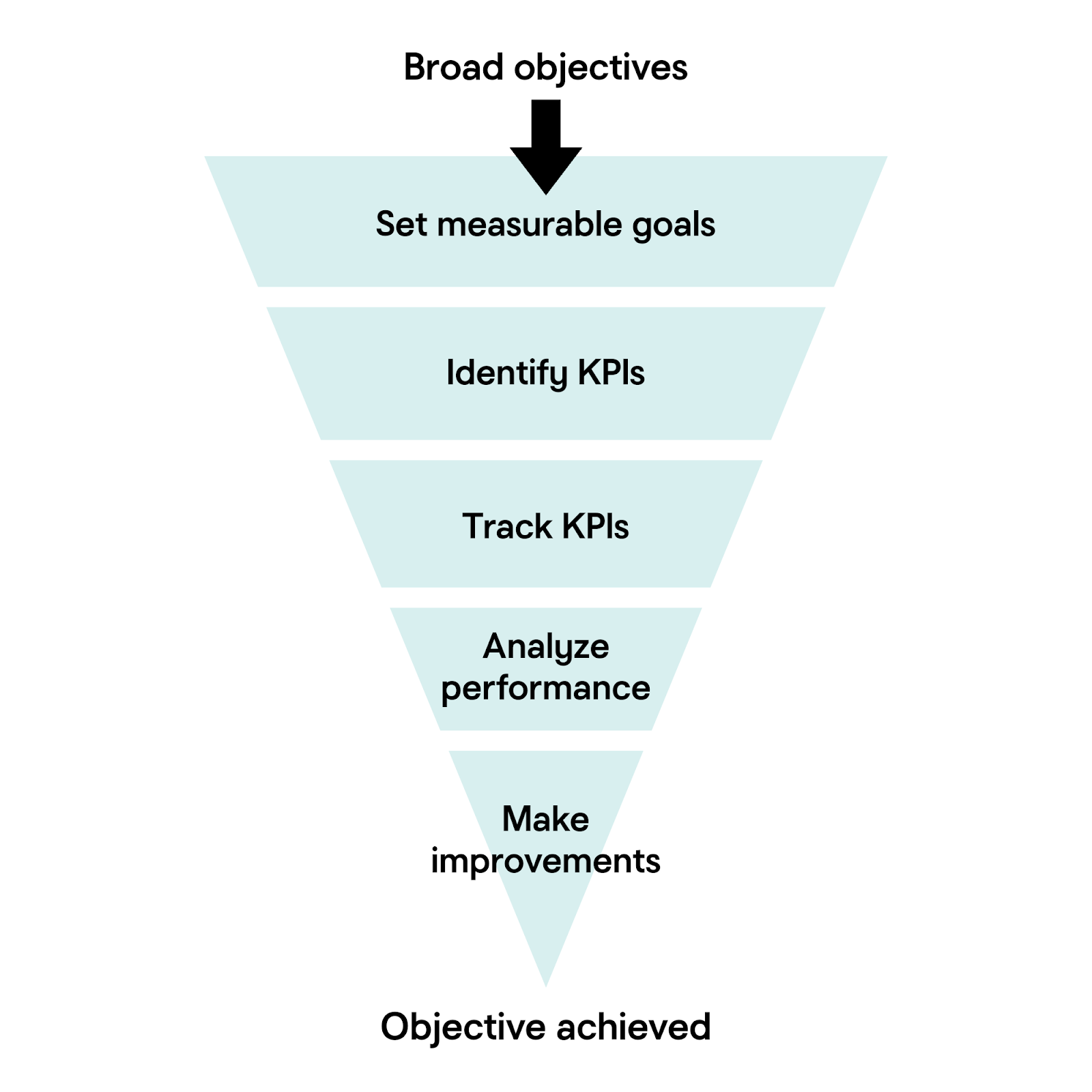
Set measurable goals and track KPIs (Key Performance Indicators)
Now that you’ve decided on your overall goals, the next step is to break those goals down further into achievable parts. A goal of “increase sales” is good, but a better way to manage that goal would be to set milestones like “generate 50 new product sales per month.”
Once those manageable goals are set, you’ll need to create KPIs to measure those goals in relation to your website. Some example KPIs could be:
- Number of website visitors
- Conversion rate
- Average time spent on site
- Number of leads generated
- Sales or revenue generated
With your KPIs selected, you can measure your website’s performance over time and make targeted improvements to achieve your goals.
2. Identify your target audience
When you’re planning your website, knowing your target audience is crucial. It will help shape the content, design, and features that will attract and engage the website visitors that you want, even before you’ve launched your business.
How to get to know your target audience
To pinpoint who you’re building your website for:
- Review your network and interests: Make a list of the people you want to target with your website. Who are the clients, readers, employers, or collaborators you’re looking to attract? What are the topics that those communities are most passionate about?
- Research key demographics: Consider the age, location, profession, industry, or niche your website should speak to.
- Identify pain points and motivations: What challenges are your audience facing that you’re able to help with? What are their goals? What information, services, or inspiration would enable your audience to be successful?
- Observe behaviors and preferences: What type of websites or other online content does your audience already engage with? How do they prefer to get their information, articles, videos, or social media? And what devices are they typically using to consume that information?
Create a simple audience profile
After you’ve compiled your target audience demographics, it’s time to combine your research into a basic description of your ideal website visitor. Here’s an example of what that description might look like:
“My ideal audience is young professionals looking for career advice and resources, who value practical tips and connect through LinkedIn and blogs.”
Use this description to guide your website design planning from the beginning, and you’ll have a solid foundation for scaling later.
3. Define your unique selling proposition
Now, you can start developing marketing strategies for reaching the audience and encouraging them to act. The first step in that process is creating a unique selling proposition.
A unique selling proposition (USP) is something special that makes your brand, products, or services different from and/or better than your competitors. It explains the selling points that get prospects to act and take a step closer to becoming your customer. It also grabs the attention of your ideal customers and is the reason why they choose you over all others.
You need to know your USP as you plan a website because your site will be positioned around it. All of your copy and content will be positioned to subtly (and sometimes not so subtly) promote your USP and tell website visitors why they should choose your brand.
Before nailing down your USP, make sure that your business name fits your brand and is easy for customers to remember. If you’re still brainstorming, try using a business name generator to spark new ideas and check for domain name availability.
How to develop your unique selling proposition
To develop your unique selling proposition, think about your brand, products and services and answer the following questions.
- How are you different from your competitors?
- Why does that difference matter to customers?
- What specific benefit do customers get by choosing you over the competition?
- Why does that benefit matter to customers?
Don’t rush through this exercise. The things that immediately come to mind might be too obvious. Spend time really digging into how your offerings truly help your customers and solve their problems.
Tips for finding your USP
If you’re having a difficult time finding your unique selling proposition:
- Think about what your customers value and how you help them get those things.
- Think about the problems your customers have and how you help solve them.
- Consider the unique strengths your brand brings to the table.
- Look at your competitors to see how you can differentiate your brand.
Remember, USPs aren’t specific to ecommerce sites and service-oriented businesses. If you’re a content creator or blogger, you’re “selling” information and want to establish yourself as a thought leader.
4. Plan your website structure
With your goals, audience, and USP in mind, it’s time to plan your site structure. A well-designed website helps your users navigate easily through your site and supports your search engine optimization (SEO) efforts.
Sketch out your site structure
Start by outlining the main pages that your website needs. This outline should be a simple diagram (or list). Web page outlines typically include:
- Home
- About
- Services/Products (with sub-pages for each category)
- Blog
- Contact
- Legal pages (Privacy Policy, Cookies, etc.)
Build your sitemap
Turn that rough outline into a sitemap, a visual map of every page on your site and how those pages connect. It shows your site’s hierarchy, including which pages are top-level and which sit beneath them, along with the paths visitors can follow as they move through the site. You don’t need special software to get started; a simple diagram or bulleted outline works well.
Design your page structure and layout
For each page, plan the main sections: headers, navigation menus, content areas, images, and calls-to-action. When mapping your layout, think about the content order and the actions you want visitors to take on each page. Once you've settled on a basic layout, apply that structure to other similar pages. Consistent layouts make your site feel cohesive and user-friendly.
Plan your navigation menus
Your primary navigation menu should include links to important top-level pages on your website. The goal is to make it easy for your visitors to find what they need in as few clicks as possible, so keep your menu clear and uncluttered.
If your site is complex, you can group related pages under top-level pages in your navigation via dropdown menus. You can also use internal links within your site content to help visitors discover related information without using the navigation menu at all.
Use SEO-friendly URLs
Structure your URLs in a clear, descriptive way to help search engines find and index your website. For example:
- Good: yourwebsite.com/services/web-design
- Not ideal: yourwebsite.com/page?id=27
Be sure to use keywords in your URLs where appropriate. You should also keep your URLs short and relevant, and avoid unnecessary numbers, symbols, or long text strings.
Optimize your site for user experience and SEO
Search engines prioritize websites that are helpful and well-organized, so creating an optimized user experience flows nicely into search engine optimization. A good site structure helps your visitors find information quickly and encourages them to stay longer. It also makes it easier for search engines to crawl and index your site. Win-win.
To optimize your site layout, keep important pages accessible from your navigation menu and try to minimize the number of clicks needed to navigate between pages.
5. Wireframe your key pages
The next step is to wireframe your most important pages. A wireframe is a simple, low-detail sketch of a single page's layout. The goal is to test the flow and user experience of each page before you invest time in design and content.
A basic wireframe maps out things like:
- Header and navigation: where your logo and menu sit
- Hero section: the headline, supporting text, and primary call-to-action a visitor sees first
- Content blocks: the order of sections down the page
- Images and media: placeholders for photos, video, or graphics
- Calls-to-action: where you'll prompt visitors to buy, sign up, or contact you
- Footer: secondary links, contact details, and legal info
You don't need design skills to wireframe. A pen and paper, a whiteboard, or a free wireframing tool all work.
Start with your highest-priority pages (usually the home, product/service, and contact pages) and reuse the same layout logic across similar pages for a consistent feel. If you need more guidance, take a look at these website wireframe examples.
6. Secure a domain name and hosting
You’ve mapped out your business goals and your website structure, so now it’s time to make your web presence official.
Your domain name and hosting work together to create the foundation for your new website, so it’s important to consider your options carefully. Here are some tips to help guide an informed decision:
Domain name selection tips:
- Choose a domain that’s short, memorable, and clearly represents your brand.
- Check to be sure that your desired domain isn’t too similar to another established company.
- Avoid using numbers or hyphens in the domain to keep it easy to type.
- Verify social media handle availability for your name.
- Include relevant keywords, if possible. Prioritize brevity, however.
Website hosting selection tips:
- Choose a hosting type that fits your needs.
- Shared hosting is a good option for smaller companies, while VPS or dedicated hosting is better for larger or more complex sites.
- Look for reliable uptime, good customer support, and scalable options to support you as your website grows.
- Verify that your hosting provider offers robust, up-to-date security for their hosting services.
In general, you can expect the cost of domain names to range anywhere between $2 and $20 per year. Hosting plans tend to start around a few dollars a month, then increase to support more features and traffic. Both your domain name and hosting plans will need to be renewed regularly to keep your website online.
Related: What is web hosting?
7. Pick a website builder
At this point in planning, you're ready to choose how you will build your website. You have a few options, such as:
- Describe your site to an AI builder like GoDaddy Airo AI Builder and have it generate a working site for you.
- Use a more advanced content management system like WordPress that requires a bit more technical know-how (although GoDaddy's WordPress Hosting makes starting a WordPress site much easier).
- Use custom code and start from scratch rather than using a pre-designed template (suitable for large sites – think thousands of products!)
- Hire a professional web designer to do it all for you.
Ask yourself these questions to find the right website builder:
- What should it do? Blog, collect leads, sell products/services, take payments, book appointments, or track inventory?
- How hands-on do you want to be? Total control over the code, or an easy drag-and-drop builder?
- Who's building it? You or a hired pro — and what's your budget?
Option 1: GoDaddy Airo AI Builder
The newest way to build a website is to describe what you want. GoDaddy Airo AI Builder is a conversational, AI-powered tool that lets you explain your site’s purpose, audience, and goals in plain language. It then generates a live, working website with pages, a layout, starter copy, and images.
It’s a strong option for getting from an idea to a published site quickly, without working through templates or code. Airo AI Builder also supports the planning work covered earlier in this guide by turning your goals, audience, and page list into a tangible first draft that you can refine.
Unlike a traditional drag-and-drop builder, Airo AI Builder is prompt-driven and can support advanced needs such as built-in hosting and SSL, forms, analytics, payments, and appointment booking. Technical users can also make code-level edits. You can start for free and add more as your site grows.
Option 2: Content management system (WordPress)
Another popular way to build a website is with a content management system (CMS) like WordPress. WordPress powers a large share of the web and offers a balance of flexibility, scalability, and a huge ecosystem of themes and plugins to extend what your site can do.
However, creating a website using a CMS usually requires some intermediate tech skills. If you choose to go with the free version of WordPress, you’ll need to purchase a hosting account and install the WordPress files. You’ll also be tasked with installing plugins and maintaining your site’s security through any necessary software updates, backups, etc.
If you want the customization and functionality that a WordPress site offers but don’t have the time or skills to handle the more technical aspects of creating and maintaining a WordPress website, GoDaddy’s WordPress Hosting could be the answer. It comes with WordPress, plugins, and design themes built in. It supports ecommerce and offers a variety of tools and specifications that keep your site secure and running speedily and smoothly. GoDaddy’s WordPress CMS also offers AI-powered site design tools that make creating your site easy without hindering customization or flexibility.
Option 3: Custom code
If you want the ultimate flexibility for your website, you can build it with custom code. But coding your own website requires specialized knowledge and is usually impractical for entrepreneurs who aren't in the coding business.
To go this route, you need to use a web programming or scripting language that provides instructions for either the client side (a user's web browser) or the server side (the server where your site's files are stored). Common languages include HTML, CSS, JavaScript, PHP, Python, and Ruby on Rails. The operating system of your hosting account determines which languages you can use, so if you choose this route, be mindful of which language you want when you purchase hosting.
Option 4: Hire a professional website designer
If you'd rather not build the site yourself, you can hire an expert web designer to do it for you using a website builder, CMS, or custom code. Custom projects cost more, while designers who use prebuilt themes and drag-and-drop tools are more affordable. Before you commit, review their portfolio, references, and communication style to make sure they're the right fit. This guide on how to choose a web designer can help.
The pros at GoDaddy's Website Design Service can build a mobile-friendly, modern WordPress website that reflects your industry while following your lead and input. Check out the design gallery here.
8. Create and collect design elements
By now, you have a strategy, domain name, and platform for where you will build your site. The next step in this website plan is putting together the content you need to fill your site. Start this process by creating and collecting design elements.
Brand design elements
Brand design elements are graphical representations of your business. A whopping 75% of people admit to making judgments about a business’s credibility based on its website design alone. These design elements define your brand personality and help customers feel what your brand represents through the use of:
- Colors
- Fonts and typography
- Logos
- Images and photos
If you aren’t sure what this means, look at competitor websites and sites you love for inspiration, in addition to website themes and templates available in website builders.
For a more structured resource, check out our guide on how to make a logo. We offer best practices and step-by-step instructions on how to choose a font, colors, and the type of logo that works best for your business.
Create and curate images
Images on your website are just as important as the copy that fills your pages. They visually display your offerings and help audiences get to know you.
Create and curate images that accurately and effectively represent your brand, products, and services.
If you have products, take professional, high-quality photos of each item. Get three to four shots of each product to show it from different angles. Customers want to see what they are going to buy, so product images will be vital for driving sales and interest on your website.
If the website is about you (for example, a personal or professional blog, consulting website, etc.), get a few high-quality photos of yourself. You will want a variety of shots and angles.
If you’re selling a service, take photos of your finished work. This could include screenshots if you are a designer or photos of a completed project if you are an artist.
If you can’t find existing images to capture your brand, hire a graphic designer to create custom designs for you, or explore AI-powered image generators that can produce graphics and illustrations based on your directions and descriptions.
Create a file with all of your brand design elements and photos so it will keep them organized until you are ready to start putting your site together.
Related: What is web design?
9. Create content for your core website pages
You can’t publish your website without copy or content; it would just be pages of images and graphics with no information to attract or guide visitors.
For most standard websites, you should prep content for the five key pages below. Focus on clear messaging that addresses your visitors' needs and highlights your USP.
- Home page: Your first impression. Quickly explain who you are, what you do, and how you help, then guide visitors toward your main goal with clear calls-to-action. Keep it simple and put the most important information at the top.
- About page: Explain who the site is for, why you started, and what makes you different. It's often one of the most visited pages, so don't rush it.
- Product/service page: Showcase what you offer with clear details, the benefits customers get, and a nudge toward the next step (buy, book, or contact).
- Testimonial/review page: Build trust with authentic customer feedback. Real reviews reassure new visitors in ways sales copy can't.
- Contact page: This is often a top-visited page and a key touchpoint for ready-to-buy customers, so make it easy to find and use.
10. Develop a content strategy and optimize for SEO
An effective content strategy keeps your momentum going after launch and signals to search engines that your site is active and relevant. To build one:
- Identify core themes: Group topics into 3–5 pillars that align with your brand and audience.
- Map key dates: Plan content around launches, promotions, and seasonal events.
- Build a keyword strategy: Choose primary and secondary keywords per topic and group related pieces into clusters.
- Plan promotion: Decide how you'll share each piece, like through social media, email, or paid ads.
Pair that with on-page SEO best practices so your site is easy to find:
- Research what your audience searches for, then use those keywords naturally throughout your site.
- Give every page a unique title, meta description, and clear header structure (H1, H2, etc.).
- Add descriptive alt text to all images for accessibility and SEO.
- Cover the technical basics: fast load times, mobile-friendliness, and working links.
If blogging is part of your plan, have a post or two ready at launch. Start by introducing yourself and your site, then show readers the kind of content they can expect. You can speed up drafting with AI content tools, but always have a human review the copy for accuracy and brand voice.
Website planning tools
You don't have to plan your website on paper alone. A range of tools can help you organize each stage of the process, from mapping structure to visualizing design.
- Sitemap tools: Apps like Slickplan help you build detailed sitemaps, diagrams, and information architecture so you can see your whole page hierarchy at a glance.
- Wireframing tools: Tools such as Figma, Balsamiq, or even a simple whiteboard let you sketch page layouts and test user flow before committing to design.
- Moodboard and creative tools: Visual canvases like Miro are useful for gathering colors, fonts, images, and inspiration in one place during early creative planning.
- AI planning and build tools: AI-powered tools can compress several planning steps at once. GoDaddy Airo AI Builder, for example, takes a plain-language description of your business and generates a site structure, starter copy, images, and a working draft you can refine. It’s a fast way to turn your plan into something tangible.
Choose the tools that match the size and complexity of your project. A simple brochure site may only need a basic outline, while a larger site benefits from dedicated sitemap and wireframing tools.
GoDaddy Airo AI Builder
Describe your idea. We'll build your live website in minutes.
With a few prompts, Airo AI Builder generates your website, web app, pages, databases and logic in minutes — no coding required. Start for free with 50 AI credits a month. No credit card required.
Build for FreeDon't forget ongoing website maintenance
Launching your website is only the beginning. To keep it running smoothly and attracting new visitors, you'll need to regularly maintain it. Here's what ongoing website maintenance typically involves:
- Content updates: Refresh your website with new blog posts, product updates, and seasonal information to keep visitors engaged and improve your SEO.
- Performance monitoring: Use analytics tools to track visitor behavior, page speed, and traffic sources. Look for ways to improve your site based on this data.
- Regular site backups: Set up automatic backups so you can easily restore your website if something goes wrong.
- Checking for broken links: Test your site's links periodically to make sure everything works and prevent a poor user experience.
- Security reviews: Use tools or services that monitor for malware and other threats, and ensure your SSL certificate is always current.
Regular maintenance protects your investment and delivers a better user experience, allowing you to achieve your website goals over time.