

The internet is an enormous place filled with millions and millions of websites. Competing in such a massive world can be daunting for small business owners trying to promote their local shops. But don’t fret; local SEO can help your business stand out and connect with nearby customers.
Local SEO helps brick-and-mortar and service-based businesses get found through online search, even when competing with large brands and national businesses that have a massive online presence. This guide explores what local SEO is, how it works, its benefits, and how you can use it for your business.
What is local SEO?
Local SEO, or local search engine optimization, is the process of improving your online presence so your business is more likely to appear when people nearby search for your products or services. It helps local customers find important details like your location, hours, phone number, and directions.
Standard SEO is not the same as local SEO. SEO is the broader practice of making your website easier for search engines to understand and recommend. It includes creating helpful content, using relevant keywords, maintaining a well-organized website, and building trust with search engines over time.
Local SEO applies those same principles to location-based searches. It focuses on signals that show where your business operates and who you serve, including your Google Business Profile, consistent business listings, local keywords, customer reviews, and location-specific website content. These efforts can help your business show up in local search results, Google Maps, and the map pack.
What’s the difference between SEO and local SEO?
Brands that serve customers across the country or around the world, such as a car insurance company or online software provider, use SEO to reach a broad audience through search.
Local brick-and-mortar and service-based businesses have a different goal. Their most valuable customers are typically nearby. Local SEO helps them appear when people in their service area search for relevant products or services.
| SEO | Local SEO |
|---|---|
| Helps businesses improve visibility in organic search results. | Helps businesses improve visibility in location-based search results. |
| Often targets a national or global audience. | Targets people in a specific city, region, or service area. |
| Uses website content, relevant keywords, site structure, and authority-building efforts. | Uses those SEO fundamentals along with local signals such as a Google Business Profile, business listings, reviews, and location-specific content. |
| Works well for businesses that sell online or serve customers in many locations. | Works well for local storefronts and service providers that rely on nearby customers. |
A hair salon in Tampa, for example, doesn’t need someone in San Francisco to see their business when searching for “hair salons” because that person is unlikely to become a customer. Local SEO helps people near the Tampa location, who are more likely to book an appointment, find the business in search results.
How does local SEO work?
Local SEO works by helping search engines understand what your business offers, where it is located, and how trustworthy it appears online. Search engines analyze signals across your website, Google Business Profile, online listings, and customer reviews to determine which local businesses are most relevant to a search.
When someone searches for a nearby product or service, search engines compare those signals with the searcher’s query and location. Businesses with accurate, consistent information and a strong local presence are more likely to appear in local results.
The three main aspects that drive local SEO are:
- Relevance: Search engines want to show results that best match what the user is looking for. Relevance helps them match results with search phrases and intent.
- Prominence: Search engines want to show results from leading brands and publications. Prominence helps them determine which sites are the most well-known and trustworthy. Sites with higher online authority receive higher search rankings. Both relevance and prominence are related to general SEO. Search engines want to present results from top websites that are closely related to search phrases. But in local SEO, search engines consider another factor.
- Proximity: Search engines want to show results that the searcher can use, so they prioritize results that are near the searcher when the search is related to a local need. Proximity refers to the distance between the searcher and the location of the business displayed in search results.
What do local search results look like?
Local search results usually come in four different forms: organic search results, sponsored search results, Google Map Packs, and Google Local Service Ads. Some look similar to each other, and some aren’t available to every business.
Organic search results
Organic search results display websites that search engines have deemed to be the most useful for searchers. The top placements are earned by websites that have strong SEO. You’ll often find results that are tailored to your location as well as general results.
Sponsored search results
Sponsored search results are paid ads that can appear alongside organic results on a search engine results page (SERP). Businesses use pay-per-click (PPC) marketing to bid on relevant keywords and reach people searching for related products or services. These results look like organic results, but search engines generally label them as sponsored.
Sponsored ads can appear in local search results. In Google Maps, these ads may appear in a business-focused results block that includes a map, business details, and directions, as shown below.
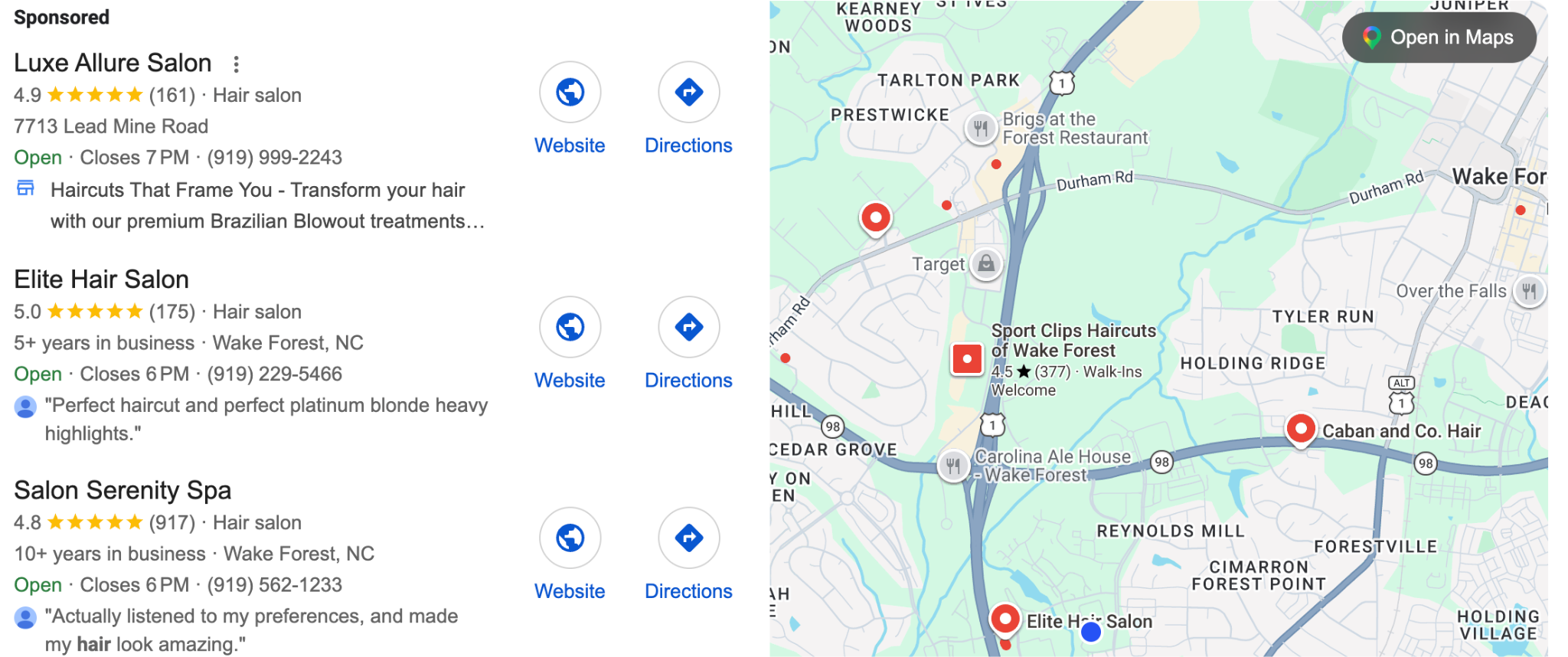
Sponsored ads can support a local SEO strategy when they target people in a specific area, but they are paid placements rather than results earned through organic local SEO.
Google Map Pack results
Google Map Pack results (also referred to as Snack Pack, Google 3-Pack, or Local Pack) are rich results that appear differently from general results. They might appear as listings and maps that show businesses relevant to the search phrase and located near the searcher.
For a business to appear in Google Map Pack search results, it must have a Google Business Profile (formerly called Google My Business) set up. Google pulls information from those profiles to create listings as well as rich search results for individual businesses.
The results in the listings can be organic and earned by following local SEO best practices, or they can be sponsored and paid for through PPC campaigns. The same “Sponsored” notation differentiates organic listings from paid listings.
Google Local Services ads
Other search results that are unique to local SEO are Google Local Service ads. Google Local Service ads feature service-based businesses by positioning them at the top of search results pages.
Google Local Services Ads is a paid advertising program available only to eligible service categories and locations. To participate, a business must complete Google’s screening and verification process, which may include business registration, license, insurance, background, and review checks.
Requirements vary based on the business category and location. Google may allow some businesses to appear with a pre-badge ad after they complete preliminary onboarding steps while they finish the remaining verification requirements.
Businesses that complete the full process may receive a Google Verified badge. The badge indicates that the business has passed Google’s screening and verification process, with the specific checks displayed on the provider’s profile when applicable.
The benefits of local SEO
Local SEO helps your business appear when nearby customers are actively looking for the products or services you offer. Greater local visibility can lead to more website visits, phone calls, direction requests, and in-person visits, all from people who are more likely to become customers.
- Local search reaches a large audience. Local intent plays a major role in how people use Google. One study found that 46% of Google searches were for local information. Google itself reported in 2022 that searches for “open now near me” grew more than 400% year over year globally.
- Local searchers often have clear intent. People searching locally usually know what they need and are looking for a nearby business that can provide it. Nectafy data cited by HubSpot found that 88% of mobile searches for local businesses led to a call or visit within 24 hours.
- Local visibility can drive store visits. Searchers often use local results to make immediate plans. Google found that 50% of consumers who conducted a local search on a smartphone visited a store within a day.
- Local searches can lead to purchases. Google reported that 18% of local mobile searches resulted in a sale within one day. Appearing in relevant local results gives your business an opportunity to connect with customers at an important point in their decision-making process.
Local SEO best practices
Now that you know what local search is and why it’s so important for small and local businesses, let’s look at how your brand can set up a successful local SEO plan. Here are some top local SEO tips to keep in mind as you build out your strategy.
Keep your business’s contact information up to date
Your business contact information, often referred to as your NAP (name, address, and phone number), is what tells search engines where your business is located and how customers can contact you.
Your business contact information needs to be consistent and up to date across your entire online presence.
Check to make sure your business NAP is consistent across the board and ensure that the information is correct. Inconsistent NAP information is a red flag to search engines that can eat away at trust, hamper rankings, and make it more difficult for customers to find you online.
To avoid issues, make sure you always:
- Use your official physical address.
- Carefully spell out your business’s name and address.
- Use the same variation of name, address, and phone number all across the web.
Even just a small change in your address (e.g., having one listing that includes your suite number and one that doesn’t) can throw off your NAP consistency. So make this a top priority for your local SEO.
Fully understand the local SEO landscape
While there are best practices to boost your local SEO, there is no exact plan to get your brand to the top of SERPs.
How much work it will take to improve your ranking depends on the competition in your space.
So before you start your local SEO plan, take some time to review your sector to see what you are up against. If the competition is high, know that it will take more work to get top placement. If the competition is low, expect to see results more quickly.
Research your industry and competitors
Perform a quick search to see which brands are already winning top placements in your industry and location. Also, look at how many other businesses are in your category and in your area.
Look closer at the brands in the top placements. Understand that you will need to outperform them in order to claim the top spots in search.
Make a list of top competitors and research their strategies to see what you will need to do to compete and overtake their rankings.
Pro tip: Search engines personalize your results depending on past actions and preferences. For example, if you have already visited the website for Fantastic Sams Cut and Color and you search for “hair salon,” it’s likely that Sams will show on the first page of results. So, if you want to get an objective, unaltered view of results, search from a private or incognito browser that doesn’t consider preferences or past searches.
Identify relevant keywords
Next, research the keywords that are top terms in your industry or category. Keep in mind that some keywords will be more difficult to rank for than others.
You might go into your local SEO strategy planning to rank on the first SERP for broad keywords like “hair salon” and “hair stylist,” but you may have to adjust your strategy depending on the competition for those terms. You might find that you need to focus on terms that are less popular but also less competitive (such as “best Tampa hair stylists” and “best hairstyles for the beach”).
Always put user experience first
While there are more than 200 ranking factors that help search engines decide which sites to put at the top of organic SERPs, search engines are really looking for one thing: the results that will provide the best user experience.
Search engines want users to find the best results. They want to offer the most useful and relevant information in the best packaging. So as you go through the local SEO checklist, always keep this in mind.
Follow local SEO best practices, but always think about how what you’re doing will affect users.
A useful, easy-to-navigate page can improve the customer experience and support business outcomes. Focus on satisfying the user’s search intent rather than trying to optimize individual engagement metrics for rankings.
Understand that backlinks can be both good and bad
Gaining links back to your brand’s website is a top-ranking factor for both general and local SEO. But it’s important to know that not all links are equally valuable.
- Backlinks from sites that have high online authority are more likely to boost your SEO than backlinks from lesser-known sites.
- Backlinks from spammy sites can actually negatively impact your SEO.
- Links from a few quality sites are better than a lot of links from low-quality sites.
As you develop link-building strategies and build citations for your website, always check the quality of the linking site before creating the connection.
Consider all search engines
While most of this post is about Google, most SEO advice refers directly to Google, and most searches are performed on Google, you can’t ignore other search engines.
Remember that searchers might be using other search engines like Bing or DuckDuckGo.
Many of the tips for optimizing for Google will be the same as optimizing for other search engines. But as you go through them, remember that you might need to repeat steps for other search engines, such as creating a local listing on Bing Places for Business and running sample searches on sites like DuckDuckGo.
Local SEO checklist: 11 steps to success
Now, let’s look at the specific steps you can take to improve and optimize your brand’s online presence to boost your local SEO.
- Make sure your site is mobile-friendly.
- Make sure your site is fast.
- Claim your Google Business Profile.
- Optimize your Google Business profile.
- Build other business citations.
- Create and optimize your social profiles.
- Get more backlinks for your site.
- Feature your online reviews and encourage more.
- Keywords: A quick recap.
- Content optimization for local SEO.
- Don’t forget about general SEO best practices.
1. Make sure your site is mobile-friendly
A mobile-friendly site is a responsive site that automatically repositions its layout so that the content looks good and is easy to read on every screen size. Mobile friendliness is crucial for local SEO for three reasons.
Mobile friendliness is a confirmed general ranking factor.
Search engines give higher rankings to sites that are responsive.
Mobile friendliness is a top-ranking factor for mobile searches. And Google can tell what type of device someone is searching on. If Google needs to decide how to rank two websites with similar relevancy, it will most likely rank the site that is mobile-friendly over the one that isn’t.
Many local searches are conducted on mobile devices. When people look for a nearby business, they are often on the go and searching from their mobile devices. Eighty-two percent of smartphone searchers conduct “near me” searches, and 90% are likely to click on the first set of results.
It’s imperative for your business website to be mobile-friendly so that search engines show your business to the customers that matter most.
A poor mobile experience will cripple your local SEO and drive away people who are actively trying to give you money. Get this one right from the get-go, and if you aren’t sure if your site is mobile-friendly or not, run a test.
Make sure your site works properly on mobile by using Google Lighthouse. Enter your site URL, and the tool will report back with any problems that might exist on the mobile version.
2. Make sure your site is fast
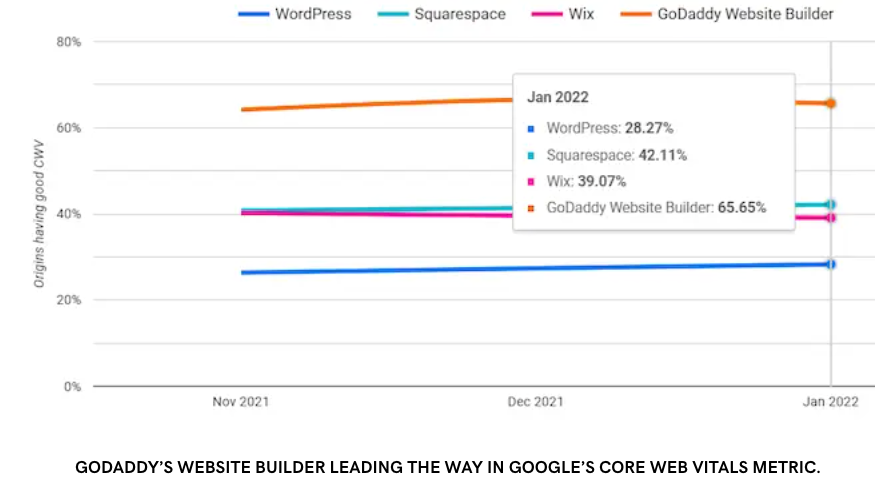
People want a good experience while using a website. They want it to look good on their screen size, and they also want it to load quickly. That is why search engines also use page load speed as a ranking factor.
Search engines give higher rankings to sites that load quickly, and they prioritize this even more for mobile searches (which is where many local searches take place). Quickly loading sites:
- Provide an overall better user experience, which search engines want to provide.
- Make your site easier to crawl, which helps search engines quickly understand and better rank your content.
- Reduce bounce rates and increase conversions to ensure that your site is engaging and useful to users.
How to check your site speed
Google helps you quickly identify if your load speed is up to par. Use its PageSpeed Insights tool to measure the load speed of your site.
Enter your site URL, and the tool will provide loading scores for both the mobile and desktop versions of your site. It will also provide tips for what you can do to improve your site speed.
How to improve your site speed
To improve your site speed, use the opportunities and diagnostics reports from Google PageSpeed Insights, and follow these other best practices for improving site loading speed:
- Enable browser caching.
- Use file compression to reduce the size of CSS, HTML, and JavaScript files.
- Reduce image sizes.
- Improve server response times.
- Reduce the number of redirects.
Many tactics to improve site speed require technical knowledge, website development tasks, or back-end coding. If you can’t implement these yourself, look for a service provider who specializes in site speed to give your site the boost it needs.
3. Claim your Google Business Profile page
Your Google Business Profile listing is the heart of your local SEO efforts and gives you an authoritative presence across Google search, not just Google Maps. It also gives you an integrated way of attracting reviews and ratings, which can help you improve your standing in Google’s revised local map results and add authority to your paid advertising.
To get started on your Google Business Profile page:
- If you haven’t already claimed your listing, create a listing for your location.
- If you have more than one location, create a listing for each location.
- Resolve duplicate profiles through Google’s duplicate-profile or ownership process. If another verified profile exists, request ownership or contact Google support as appropriate.
- Make sure the page is verified.
- Use an account email address that matches the domain of your website.
A quick note on page verification: You will need a genuine address for your business. Google automatically determines which verification methods are available for each business. Follow the options shown in your Business Profile, which may include video, phone or text, email, or postcard by mail.
Pay close attention to the official Google My Business guidelines as you set up your basic profile information, and remember to be particularly careful in establishing your official NAP information here.
This is a core set of information you want to be cited consistently online over time.
If you’re a new local business, take the time to study your competitors closely on Google Maps.
4. Optimize your Google Business Profile Page
To give your brand the best local SEO, it helps to regularly engage with, optimize, and update your Google Business Profile page. Pay attention to:
- Description: Add a short blurb about what your business does and why you do it.
- Categories: Add categories that closely describe your products or services, and be as specific as possible. If you’re not sure which main category to use, look at local competitors and big brands to see what they’re using. Primary categories are listed below any Google reviews. It’s important to add additional categories to help Google understand your business offering, even though these won’t be visible.
- Website link: Link each Business Profile to the most relevant page for that location. For a single-location business, this may be the homepage; for a multi-location business, it will often be the corresponding location page.
- Attributes: Private group dining or soft play areas for restaurants are examples of attributes that are increasing in online visibility for mobile search.
- Appointments: Add a button that leads users to the page where they can make an appointment, if applicable.
- Business hours: Make sure your hours are always up to date, as this information appears prominently on your profile.
- Telephone number: Google and Bing can pull numbers from profiles for a relevant search query. Some businesses add a secondary telephone number to their profile to use exclusively on other websites for their business citation listings. This can avoid unwanted sales calls on the main telephone line.
- Images: Start by adding cover photos and an album of photos that show the interior and exterior of your business. Then, continue to add fresh photos that show off the personality, products, and services of your business.
- Videos: Add a video that gives potential customers a closer look at your business and what you do or sell.
- FAQs: Keep an eye on this section and answer any questions that come in from customers. If customers don’t provide questions, enter your own. Add the frequently asked questions that your team hears most, and provide the answers to help build out your profile.
- Google Posts: Utilize Google Posts to share information about your business, promote events, and highlight new products and services. Also, use offer posts to set a time-sensitive special offer that can drive in new customers.
- Log in frequently: Before new features roll out, Google often picks certain business types for testing. If you’re lucky, you’ll get an early-bird advantage.
5. Build other business citations
Google uses prominence and authority as ranking factors. It wants to show the businesses that are the most well-known and trustworthy. Business listings and citations send those trust signals to Google, increasing your chances of ranking.
Having more citations makes search engines view your business more favorably, so build profiles on online business directories based on your location or industry.
Here are a few places to start:
- Yelp
- Angi
- Yellow Pages
- TripAdvisor
- MapQuest
- Apple Maps
- Citysearch
To find directory sites based on your location, use Moz’s Citations by City list. It includes the most popular sites in your area, so you can be sure to create profiles on the sites where your competitors already are.
Bear in mind that you’re after quality when it comes to these local links.
Citations on high-quality sites can boost your rankings, while citations on spammy, low-quality sites can decrease your rankings. Be mindful when reviewing directories and only create profiles on trustworthy, high-quality sites. Avoid sites with unusual names like websitelinksrus.net and look closely at the types of businesses it has listed on them.
6. Create and optimize your social profiles
Another way to show that your business is trustworthy and legitimate is by claiming your social media handles and building social profiles. Social profiles provide links back to your website and present another opportunity to share your brand’s NAP, which are both indirectly beneficial to your SEO. Plus, social media is a great way to get in front of your local customers.
If you have one location, create one social media profile on each of the top social sites: Facebook, Twitter, and Instagram
Consider what other social media sites might be right for your brand, depending on your industry and audience. This could include:
- LinkedIn (If your brand focuses on professional services like an accounting firm or a marketing agency.)
- Snapchat (If your brand targets customers 30 and under, like a clothing boutique or a nightclub.)
- Pinterest (If your brand is visually driven like a hair salon or interior decorating firm.)
- TikTok (If your brand is targeting a younger audience)
For the most part, you can use one social account for your brand as a whole. But if you have multiple locations, you might want to create a separate account for each location.
Facebook and Instagram rely heavily on location. Facebook has a section to add your full address and allows check-ins at individual locations. Instagram also uses geolocation tools to allow users to tag their specific location. It might be worthwhile to create those accounts for each of your business locations.
As you create your profiles, always include a link to your website and include as much relevant location information as possible.
7. Get more backlinks for your site
Backlinks are the lifeblood of the internet. They connect pages, show relationships between information, and help search engines decide what content is the most valuable and useful.
When you have a lot of high-quality links (links from authoritative websites) pointing to your site, it tells search engines that your site is valuable and should receive high rankings.
So, in addition to building citations and social profiles, put a plan in place to build links back to your brand website. To build links for your website:
- Approach relevant local bloggers about reviewing your business
- Send press releases to local news sites (it’s always best to have some actual news to share)
- Engage in guest posting
- Link share with other local businesses
- Produce great content and ask other websites to link to it as a resource
For more tips on how to create valuable backlinks for your website, check out the GoDaddy guide: How to get backlinks to a small business website. - Request, where possible, backlinks pointing to your pages to include your location in the anchor text.
- Reach out to online articles that focus on local businesses like yours. This signifies a trustworthy signal to search engines and can also enhance your chances of ranking in Google’s ‘top places’ results.
8. Feature your online reviews and encourage more
Multiple studies have found that the volume and quality of reviews can directly impact search visibility. In other words, the more positive reviews you have on Google, the more likely your brand will show up in Google search. Local businesses that appear on Google Map Pack with high reviews and average star ratings tend to rank better and get more traffic.
To get more reviews:
- Don’t be afraid to come out and ask your customers for reviews.
- Make it easy for customers to leave reviews by creating a page on your website that directs customers to where they can leave reviews on Google, Yelp, and Facebook.
- Put up signs in your business that feature review-site logos.
- Ask for reviews in your email newsletter.
- Feature and ask for reviews through your social media accounts.
- Engage with existing reviews to show that your brand cares about reviews.
Pro-tip: Don’t have any reviews yet? Try creating a review page on your site for customers to share their excitement. You can display things like customer quotes, photos of handwritten thank-you notes, or screenshots of text messages. Using a page URL such as yourwebsite.com/reviews will make you more visible in search query results.
For an extra boost in online visibility, add your review page to the main navigation or footer menu of your site. You can also network with other relevant websites to get a good-quality backlink.
9. Keywords: a quick recap
Before we dive into content optimization that'll enhance local SEO, here’s a quick keyword refresher:
Google matches search queries with the most relevant content to give searchers what they want. The search engine wants to provide the content that best matches what the searcher is looking for.
To help Google see your content as the most relevant information, you need to use keyword optimization.
Through keyword optimization, you:
- Perform keyword research to identify the top search terms that your target audience is searching for related to your business, products, or services.
- Use tools like Google’s Keyword Planner or Moz’s Keyword Explorer to get information about the term’s search volume.
- Create a page of content and assign one keyword to that page of content.
- Use on-page keyword optimization to help search engines see that the page is relevant to the assigned keyword.
When you find a keyword you want to use, optimize ONE page on your site for that keyword. Never assign a keyword to more than one page on your site. This leads to keyword cannibalization, which makes it difficult for search engines to determine which page is more important. Oftentimes, they won’t rank either page.
How to conduct keyword research
Keyword research is the process of looking up the terms and topics that will be most likely to attract your target audience and drive traffic to your site.
To find potential keywords, start with a list of terms that are relevant to your business. Research the terms using tools like Google’s Keyword Planner or Moz’s Keyword Explorer to get information about the term’s search volume and competition, then:
- Look for keywords with low competition. Highly competitive terms might be difficult to rank for if you’re just starting out with SEO.
- Look for popular terms. You want to target terms that people are actively searching for, so look for terms with a decent amount of search traffic.
- Identify terms that might be good for a pay-per-click (PPC) marketing campaign. Through a local AdWords PPC campaign, you can pay for placement on SERPs for terms that are too difficult to rank for organically.
- Consider targeting long-tail keywords (phrases with three or more words). As voice search continues to grow, more and more searches include long phrases and questions.
10. Optimize your content for local SEO
Location-based keywords are terms that reference your region or area. They might include your city, neighborhood, or district.
For local SEO, you also need to use location-based keywords to help nearby customers connect with your content.
Optimize the page for the keyword and your location by using both terms where practical in the:
- Headline
- Meta title: This is the blue stand-out title in the search engine results.
- Meta description: This is the description below a meta title, shown in the search results.
- Subheading
- Page URL
- Naturally in the content
- Image alt tag: This is the alternative description you’ve written when an image cannot load. It’s also used by search engines for image searches.
Remember, don’t go overboard and flood your pages with keywords and locations. Write compelling content with important lingo naturally spread throughout.
Also, as you create content, consider the search intent of the keyword. Ask yourself why someone would be searching for the keyword. Then, give the user what they would want to find in the content.
Optimize individual pages of content by targeting a general keyword, along with a location-based keyword. Some examples might look like:
- “Hair salon Tampa”
- “Plumber in San Francisco”
- “Carpet cleaner in San Diego”
You should also optimize your site for searches that include a general keyword plus a “near me” phrase. This could be something like “hair salon near me” or “who’s a good plumber near me.”
Optimize your website to highlight your address
Your website should make it easy for customers and search engines to understand where your business is located.
- Add your address to key pages. Include your full physical address on your contact page. Businesses with one location can also add the address to the website footer, so it’s visible across the site.
- Use an embedded map. Embed a Google Map on pages that feature a specific location to give visitors a quick way to view the business and get directions.
- Create a locations page. Businesses with multiple locations should create a central page that lists every location, including each address and links to individual location pages.
- Build a dedicated page for each location. Give every location its own page with its full address, phone number, hours, services, and an embedded map. Location-specific details can make each page more useful for nearby customers.
- Link to location pages from your sitewide footer. A footer link can make your locations page easier for visitors and search engines to find. Keep the footer focused and avoid adding an overwhelming number of location links, since visitor behavior varies from site to site.
- Add local business schema markup. Schema markup is structured data added to the backend of your website. Local business schema can provide search engines with details such as your business name, address, phone number, hours, and location, helping them better understand your business information.
11. Don’t forget about general SEO best practices
When it comes to local SEO, general SEO is still very important. You need to implement SEO best practices on your websites to ensure that your business can compete in search. You should:
- Create an ongoing content strategy that allows you to create fresh content that engages readers and attracts search engine bots.
- Submit your sitemap to search engines. Some website platforms and website builders do this automatically for Google, but you may need to check Bing and other search engines.)
- Use organized and natural site architecture.
- Add security to your site by installing an SSL certificate. This is included with GoDaddy’s Website Builder.
- Use redirects or delete repeat content to resolve duplicate content issues.
- Use both inbound and outbound links* to tie your website to the rest of the online world
A quick recap on links: Inbound links are links on other websites that point to pages on your site (aka backlinks). Outbound links are inserted on the pages of your website that link to other websites you don’t control. Internal links are links between pages within your website that you control.
Local SEO tools for small businesses
As you go through the tips outlined in this post, try using these local SEO tools to help you through the process.
Google Business Profile
Your local SEO presence is built around your Google Business Profile page, so it should be no surprise that this tool is at the top of the list of local SEO tools. Sign up for free and use it to manage the local search results that show up for your business.
Schema plugins
Adding Schema markup requires adding code to the backend of your website. But there are plugins that make it easy to add Schema markup through simple front-end forms. Top Schema plugins include:
GoDaddy SEO services
GoDaddy can help you improve your local SEO by helping you improve your overall SEO. GoDaddy’s SEO Services take over your site’s search engine optimization so experts can guide your SEO plan. Sign up for a monthly SEO plan and GoDaddy will:
- Examine your website to find optimization opportunities.
- Walk you step-by-step through keyword and phrase suggestions to improve your website’s search rankings.
- Track your search metrics to show you how your SEO improves over time.
- Create citations and directory listings for you.
Use these local SEO tips to grow your business
Local search visibility takes ongoing effort, but each improvement can make it easier for customers to find, contact, and choose your business.
Need help putting your local SEO strategy into action? GoDaddy SEO Services can help optimize your website and build a stronger online presence so you can focus on running your business.