Your domain name is more than a web address — it’s a piece of digital real estate your business can own. It’s what customers type, what they remember, and what shows up on your website, your email address, and (often) in search results.
If you’ve been putting off getting a domain because it feels technical or expensive, you’re not alone — and the good news is it’s much simpler than it sounds once you know what to look for.
This beginner-friendly guide is designed to be the only one you’ll need. We’ll walk through what a domain name is (and how it works behind the scenes), break down the parts of a domain and the difference between a domain and a URL, and explain why domains can have real, measurable value for your brand.
You’ll also learn how to choose a domain name, what it typically costs (including why some domains are “premium”), and how to buy, manage, and protect your domain so it stays in your control as your business grows.
By the end, you’ll be ready to confidently search for the right domain, register it, connect it to your website and email, and lock down the basics that keep your online presence consistent and trustworthy — without needing a tech background or another guide.
What is a domain name?
A domain name is the unique name and address assigned to any given website. For example, if you want to visit GoDaddy’s website, you need to type the domain name “godaddy.com” in the browser.
If you think of your website as a building, then the domain name is its street address. Your domain is the place people go to visit your website, and each domain is entirely unique.
Technically, a domain name simplifies browsing the internet and accessing a specific website. Instead of entering a long IP address, (a complex string of numbers and letters computers use to recognize a website – e.g. 192.153.2.46), a domain name is a simpler combination of letters, numbers and symbols typed into browser to access a specific web address directly.
| Human-friendly / Domain name | Computer-friendly / IP |
|---|---|
| google.com | 142.250.74.46 |
| godaddy.com | 184.168.131.241 |
Related: What is an IP address?
What are the parts of a domain name?
A domain name consists of two main parts: the second-level domain (SLD) and the top-level domain (TLD).
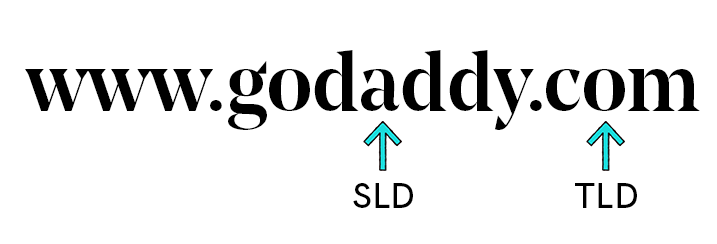
The Second-Level Domain (SLD) appears after “www.” in the above example. Although the maximum length of an SLD is 63 characters, it’s best to choose an SLD that is short, branded, and memorable.
The Top-Level Domain (TLD) is the last section, which in this case is the “.com” section. TLDs are also called “domain suffixes” or “domain extensions” and there are many options beyond “.com” that you can use for your domain names.
How do domains work?
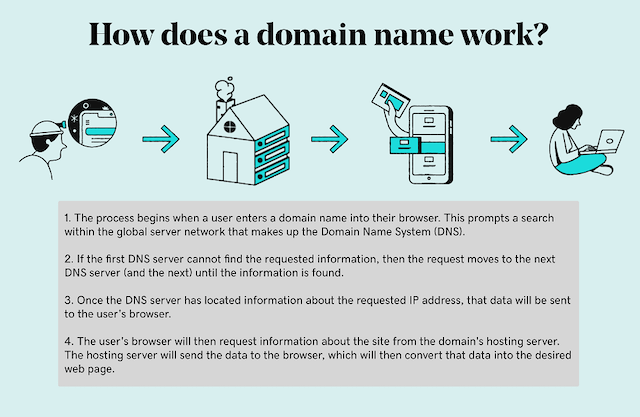
When you type the domain name or URL you wish to visit, your web browser searches for the website’s address in the domain name system (DNS).
If the domain name is not found in one DNS server, the request moves to the next DNS server, continuing until the request is found. Once the request is found, the DNS server with the website’s corresponding IP address returns that address to your web browser.
The browser receives data about the site from the hosting server, which converts and renders it as the expected web page.
Remembering IP addresses for websites would be impractical, much like memorizing phone numbers for all your contacts.
Thanks to DNS, users only need to remember the domain name with DNS resolution occurring in milliseconds, often unnoticed by the user.
Related: What is DNS?
Domain vs. URL: What’s the difference?
A domain is the unique name that identifies a website on the internet, while a URL (Uniform Resource Locator) is the specific address of a webpage within that domain.
The domain is the main part of a website's address, such as google.com or amazon.com, whereas the URL includes additional information like the protocol (http or https) and the specific webpage or resource being accessed.
While a URL and domain name share similarities, the URL is more descriptive. It encompasses the domain name and allows servers to pinpoint and render unique assets on a website.
In simpler terms, the domain is like the street address of a house, while the URL is like the specific room or location within that house.
| Domain | URL | |
|---|---|---|
| Purpose | Main website address | Full address to a specific page or resource |
| Components | Second-level domain, TLD, optional subdomains | Protocol, domain, path, optional query parameters |
| Memorability | Easy to remember, used for branding | Usually longer, not meant to be memorized |
| Use in marketing | Branding, business emails, promotion | Direct links to content, navigation, sharing specific pages |
| Impact on SEO | Builds credibility and recognition | Helps search engines understand site structure and content relevance |
| Example | godaddy.com | https://www.godaddy.com/help/set-up-my-domain-40634 |
As an example, let’s look at the URL below:
https://www.godaddy.com/help/set-up-my-domain-40634
This URL takes you directly to a GoDaddy Help article that guides you through setting up a new domain.
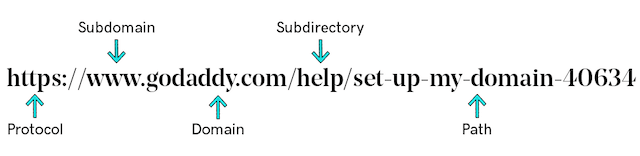
Within the Help URL is the domain name GoDaddy.com. So, we can see that the domain name is just one part of all the elements that make up a URL. The domain name serves as the primary address (or homepage) for a website, while the URL directs you to specific pages or resources on that website.
The first part is the protocol, such as "http://" or "https://", which specifies how the resource should be accessed. The difference between HTTP and HTTPS is the “S,” which refers to security. HTTPS websites have SSL security, an encryption that protects users’ sensitive data.
If your site lacks an SSL certificate, it’s highly recommended to add one because visitors are increasingly cautious about their personal data online, and 85% of online shoppers will avoid an unsecured website.
The different types of domains
The Internet Corporation for Assigned Names and Numbers (ICANN) recognizes two main types of domains, or TLDs:
Generic top-level domain (gTLD)
Generic top-level domains (gTLDs) are the most common type of domain extension, including .com, .net, .org, .gov, and .edu. These TLDs indicate the purpose of a website — such as commercial use (.com) or educational purposes (.edu).
Curious about which extension is right for your website? Here’s a full breakdown of .com vs .net vs .org and when to use each.
New Generic Top-Level Domains (New gTLDs)
In addition to traditional gTLDs, there is a wide range of new generic top-level domains (new gTLDs) that offer niche targeting and innovative branding opportunities. Extensions like .app, .blog, .guru, .shop, .xyz, .co, and .online allow businesses and individuals to create more tailored and memorable online identities.
For example, .store is ideal for ecommerce businesses, while the .tech and .dev extensions showcases your presence in the technology sector. Other popular extensions like .llc for limited liability companies, .io for tech startups, and .studio for creative professionals further allow you to tailor your domain to your business’s unique focus and audience.
These new gTLDs provide versatile options to enhance your brand’s visibility and appeal to specific audiences.
Country-code top-level domain (ccTLD)
Country-code top-level domains (ccTLDs) indicate the country where a website is registered or where a company or organization operates. For example, .us is the ccTLD for the United States, and .ie is the ccTLD for Ireland.
While a ccTLD is meant to signify the country of a domain name, some ccTLDs, like Anguilla’s .ai and Tuvalu’s .tv, are chosen because of their branding value (although certain ccTLDs have limitations on who can register them).
Additionally, gTLDs and ccTLDs can be combined to create common extensions like .co.uk or .com.au.
Internationalized Domain Names (IDNs)
Internationalized Domain Names allow for the use of non-ASCII characters in domain names, enabling website addresses in native languages and scripts.
This enhances accessibility and inclusivity for users who speak languages that use non-Latin fonts, such as Cyrillic, Arabic, Chinese, etc.
IDNs use Punycode encoding to translate non-ASCII characters into a standardized format that can be understood by the Domain Name System (DNS). This conversion ensures that domain names with special characters are accessible and functional across the global internet infrastructure.
The importance of domain names for businesses
A business domain name is a powerful opportunity to build a brand identity and enhance the customer experience.
Having an online presence is essential for any business’s survival and growth.
Without a domain name, you cannot establish a website. Consumers increasingly turn to the internet for information and purchasing decisions, making a professional online presence crucial.
You’ll also find it difficult to build a digital presence without a unique address where people can find you. Social media pages and marketplace profiles can help, but they’re rented space — the platform controls the rules, reach, and even your access.
A domain lets you create a consistent brand identity, host a website and email, and establish a central hub that you fully control.
Domain names can also affect search rankings and visibility indirectly. A clear, brandable domain that matches your business name improves trust and click‑through rates in search results, which can support better performance over time.
Keywords in a domain generally provide limited SEO advantage today, but a relevant, memorable name and the right domain extension can help users understand what you offer and where you operate, strengthening online recognition and discovery.
A dedicated website and a branded email using your own domain name (e.g., you@yourbrand.com ) signal legitimacy, and keep your name and messaging uniform across every channel instead of fragmented across social profiles.
As a practical next step, registering your domain and setting up your site and email through GoDaddy is a straightforward way to lock in that consistent brand identity and build confidence from the first click.
How to find and buy a domain name
With a solid understanding of domains and their functionality, you’re ready to search for and register your own domain name. Here are some recommendations for selecting your domain:
- Keep it simple: Choose something memorable and related to your business.
- Avoid numbers, hyphens, or uncommon words: These just make it harder for people to remember and type in your domain.
- Use keywords: Combine your business name with popular or relevant terms in your industry.
- Include your location: If your business serves a specific city or region, consider including it in your domain name.
- Register different extensions: While securing a .com is ideal, protecting your brand is easier when you register the same name with various extensions, such as .info, .net, or .org.
When you find the name and domain extension you want for your website, you just need to navigate to our Domain Name Search page, enter your preferred name in the search box to check its availability. If the domain name is available, just follow this guide to complete the domain registration process.
If your chosen domain is already owned, you have options like altering words, selecting a different extension, or using GoDaddy’s Domain Broker Service, we assign a dedicated broker to negotiate with the current domain owner on your behalf.
How to keep your domain name secure
It’s important to regard your domain name as a business asset: it’s your brand’s address, reputation, and a key pathway for customers to reach you.
Protecting it starts with domain privacy, which helps keep your personal or business contact details out of public WHOIS records, reducing spam, scams, and the risk of bad actors using that information for social engineering.
It also supports brand security by making it harder for someone to target your domain administration with convincing impersonation attempts.
Domain squatting is another real threat to that asset — someone registers your brand name (or close misspellings) to resell it at a premium, siphon traffic, or confuse customers.
The best defense is proactive: register your primary domain early, secure common variants (misspellings, hyphenated versions, and relevant extensions), and set up renewals so you don’t accidentally let it expire.
Monitoring brand mentions and domain availability can also help you spot problems before they impact customers.
Finally, domain transfers matter because control should live where you can manage and secure it confidently. Keeping your domains consolidated with a reputable registrar makes renewals, privacy, access controls, and DNS management easier to oversee—especially as your business grows.
If you’re moving a domain from another provider, GoDaddy is a trusted destination for incoming transfers, offering a straightforward process and tools to help keep this valuable asset protected.
Related: How to transfer my domain to GoDaddy
Next steps: What to do after picking your domain name
Understanding domain names and their components is just the beginning.
If you’re ready to proceed with choosing and registering your domain name, follow these steps:
- Register your domain through GoDaddy.
- Set up your new domain.
- Get a professional email address that matches your domain (e.g., theboss@mybusinessname.com). Consumers expect businesses to maintain a certain level of professionalism online. If you’re in a very competitive market, small differences like having a business email can be the deciding factor for customers.
- Attach a website to your domain. Registering a domain name is essential for creating a website, which provides consumers with the information you want to share about your business.
- Use domain forwarding and redirection. You can point your domain to another website or web page, helping you manage rebranding, redirect traffic, or consolidate multiple domains under one main site with ease.
- Consider domain parking. If you aren’t ready to launch a website yet, parking your domain reserves your online identity and can display a holding page or ads, ensuring your brand stays protected until you’re ready to move forward. (If you are not sure what domain parking is, check out our guide.)
- Explore domain investing. Some people buy and hold valuable domain names as digital assets, reselling them later for profit. This can be a strategic way to generate revenue or enhance your business portfolio.
Try our free Domain Name Generator tool and find your next domain name.
Related FAQ about domain names
What is the difference between a domain and a website?
A domain is the address where a website can be found on the internet, while a website is a collection of web pages and content that can be accessed through that domain.
Think of a domain like your home address, and the website as the physical home. The address is how someone finds your home, but the style, size, and layout of your home might vary drastically from one house to the next.
Your website is what a user sees when they visit your domain name or specific URLs on your domain. A website resides on a domain and consists of files and code that create the front-end experience for internet users.
If you are still confused, check out our guide What’s the difference between my domain and my website?
What is the difference between a domain and hosting?
Using the same real estate analogy, your domain name is the address people enter into their web browser to find your home (website) on the internet, and hosting is the land your website sits on.
You can’t have a website without a place to put it — web hosting.
Websites are stored — or “hosted” — on a publicly-accessible computer (a server). Some websites require an entire server to themselves. Others can share a server with hundreds of other websites. The storage space and the features that come with it make up your hosting plan.
Companies like GoDaddy offer different types of hosting, including shared web hosting or virtual private server (VPS) for more power.
How long does domain registration last?
When you register a domain name through a registrar like GoDaddy, it’s yours as long as you continue to pay the annual registration fee. Typically, you can register a domain for a period ranging from one and 10 years.
You need to renew the domain name registration before it expires to retain ownership.
How does domain pricing work?
Domain pricing usually falls into two buckets: standard domains, which typically cost about $10–$20 per year (depending on the extension, registrar, and any first-year promotions, with renewals often higher)
There are also premium domains, which are priced for their perceived market value—short, brandable, or high-demand names can cost hundreds to thousands of dollars (or more) as a one-time purchase plus ongoing annual renewals.
For a quick look at current entry-level offers, you can check GoDaddy’s page for cheap domain names.
How to choose the best domain registrar?
Choose a registrar that makes it easy to find and manage your domain long-term, not just register it once. Prioritize transparent pricing (including renewals), strong security (two-factor authentication, domain lock, and privacy options), reliable DNS and uptime, and responsive support you can reach when something goes wrong.
It also helps if the registrar offers convenient extras you may need soon — like email, SSL, and hosting — so everything stays centralized. If you want a quick confidence check before buying, see this comparison of the best domain registrars.
And if you’re deciding where to register, remember GoDaddy is the world’s largest domain registrar, which is a reassuring signal for many first-time buyers.